





Latest Version
Update
October 17, 2026
October 17, 2026
Developer
Videolabs
Videolabs
Categories
Media
Media
Platforms
Android
Android
Downloads
0
0
License
Free
Free
Package Name
org.videolan.vlc
org.videolan.vlc
Report
Report a Problem
Report a Problem
More About VLC for Android
VLC media player is a free and open source cross-platform multimedia player that plays most multimedia files as well as discs, devices, and network streaming protocols.
VLC for Android is a free, open-source media player that handles a wide range of video and audio formats, including files that may not work in a device’s default player. It can also play network streams and shared media, with useful playback controls, subtitle support, and a dedicated music library.
Trying to play a video only to find that your phone does not recognize its format can be frustrating. VLC for Android offers a versatile alternative, bringing the familiar VLC playback experience to phones, tablets, and Android TV devices.
Its broad format support, built-in codecs, subtitle controls, and ability to open network media make it useful for both everyday listening and watching files from different sources. It is also free and ad-free, with no in-app purchases.
VLC for Android is the mobile edition of the well-known VLC media player. It plays video and audio stored on your device, browses media folders, and supports network streams and shared drives. The app includes tools for adjusting playback, managing subtitles, and organizing audio and video in a media library.
An APK is the package file format used to install apps on Android. Installing VLC from an APK allows manual installation, but users should choose a trusted source and make sure the file is authentic and compatible with their device.
✅ Pros
❌ Cons
Users commonly value VLC for its dependable format support, ad-free experience, and ability to play media from both local storage and network locations. The subtitle options, audio library, and playback gestures are also frequently appreciated.
Some users report occasional playback or compatibility problems with particular files and devices, while others find the interface less straightforward than simpler players. Performance can also depend on hardware and the media being played. Because ratings and reviews change, check the latest Google Play feedback for current user experiences.
VLC for Android is a strong choice for people who want one player for a varied media collection. Its broad format support, subtitles, network playback, and music tools make it more capable than a basic default player, while its free, ad-free model is a major advantage.
The interface and extensive options may take a little getting used to, and results can vary with certain files or devices. Still, for most Android users who value flexibility and control, VLC is well worth considering.
Install VLC from Google Play or another source you trust. If you choose to install an APK manually, verify that it comes from a reputable provider and has not been modified. Unofficial or tampered APKs can contain malware or create privacy risks.
Android may ask you to allow installation from the browser or file manager you used to download the APK. This setting is commonly called Install unknown apps or Install from unknown sources. Enable it only for the trusted installation source, and turn it off again afterward if you do not need it. Review requested permissions and grant only those needed for the features you use.
Q1: Is VLC for Android free to use?
A1: Yes. VLC for Android is free and has no ads or in-app purchases.
Q2: Can VLC for Android play media without an internet connection?
A2: Yes. Local audio and video files can be played offline. An internet or network connection is needed for online streams and some network shares.
Q3: Does VLC for Android support subtitles?
A3: Yes. It supports subtitles, Teletext, and closed captions, along with multiple audio and subtitle tracks when available in the media.
Q4: Is it safe to install VLC from an APK?
A4: An APK can be safe when it is authentic and obtained from a trusted source. Modified or unofficial files may pose malware and privacy risks, so verify the download before installing it.
Q5: Why does VLC request storage or network permissions?
A5: Media access lets the app find and play files on your device or removable storage. Network access is used to open streams and shared media; other permissions may support specific features such as playback controls or Android TV functions.
VLC for Android APK
📱 VLC for Android APK Summary
VLC for Android is a free, open-source media player that handles a wide range of video and audio formats, including files that may not work in a device’s default player. It can also play network streams and shared media, with useful playback controls, subtitle support, and a dedicated music library.
- App Name: VLC for Android
- Current Version: Version varies by device and release; check Google Play for the latest listing
- Last Updated: The update date can vary by release and region; check the current store listing
- Category: Video Players & Editors / Music & Audio
- Developer: Videolabs
- Google Play Rating: Ratings and review counts change over time; consult the current Google Play listing for the latest figures
💡 Introduction
Trying to play a video only to find that your phone does not recognize its format can be frustrating. VLC for Android offers a versatile alternative, bringing the familiar VLC playback experience to phones, tablets, and Android TV devices.
Its broad format support, built-in codecs, subtitle controls, and ability to open network media make it useful for both everyday listening and watching files from different sources. It is also free and ad-free, with no in-app purchases.
❓ What is VLC for Android APK?
VLC for Android is the mobile edition of the well-known VLC media player. It plays video and audio stored on your device, browses media folders, and supports network streams and shared drives. The app includes tools for adjusting playback, managing subtitles, and organizing audio and video in a media library.
An APK is the package file format used to install apps on Android. Installing VLC from an APK allows manual installation, but users should choose a trusted source and make sure the file is authentic and compatible with their device.
🧑💻 How to Use
- Install and open the app: Download VLC from Google Play or install a verified APK that matches your device.
- Grant necessary access: Allow media or storage access if you want VLC to find local files. You can review permissions in Android settings.
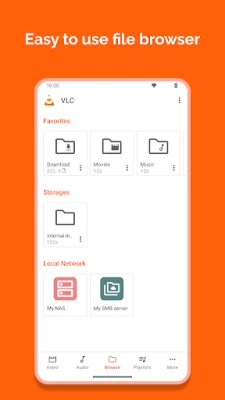
- Browse your library: Use the Video or Audio sections to explore detected media, or browse folders directly to find a particular file.
- Start playback: Tap a video or audio track. VLC automatically uses its included codecs for many common and less-common formats.
- Adjust playback: Use on-screen gestures and controls to change volume, brightness, playback position, screen orientation, or aspect ratio.
- Choose subtitles or audio tracks: During supported video playback, select an available subtitle or audio track from the playback controls.
- Open network media: Connect to an accessible network stream or shared location when you want to play content stored elsewhere on your network.
⚙️ Features
- Wide format compatibility: Plays many popular media types, including MKV, MP4, AVI, MOV, Ogg, FLAC, TS, M2TS, Wv, and AAC. Built-in codec support means separate codec downloads are generally unnecessary.
- Local video and audio playback: Opens media stored on your phone, tablet, or supported removable storage, making it a handy replacement for basic built-in players.
- Network streaming and shares: Plays supported network streams and media from shared drives, so compatible content does not always need to be copied onto your device first.
- Subtitle and multi-track support: Supports subtitles, Teletext, closed captions, and multiple audio tracks where available, giving viewers more control over how they watch.
- Flexible playback controls: Adjust brightness, volume, and seeking with gestures, and change screen rotation or aspect ratio to suit the video and display.
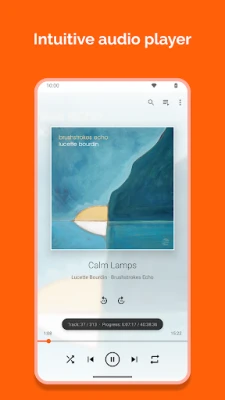
- Music library and audio tools: Organizes audio in a dedicated library and includes an equalizer and audio filters for a more configurable listening experience.
- Headset and widget controls: Offers audio headset controls and a playback widget, making it easier to manage music without reopening the full player.
- Free and ad-free: VLC is free to use, with no advertising or in-app purchases. It is developed as an open-source project by the VideoLAN community and contributors.
✅ Pros and ❌ Cons
✅ Pros
- Plays a broad range of video and audio formats.
- Includes codecs, so many files play without extra downloads.
- Supports subtitles, multiple audio tracks, and network media.
- Provides a media library as well as direct folder browsing.
- Free to use, without ads or in-app purchases.
- Offers useful audio features, playback gestures, and Android TV support.
❌ Cons
- The number of settings and playback options may feel overwhelming to first-time users.
- Some network sources or unusual files may require extra setup or may not work as expected.
- Playback performance can vary depending on the device, video format, and file quality.
- Media and network permissions may be needed for features that access local or shared content.
📋 App Details
- App Name: VLC for Android
- Current Version: Varies by release; check the current Google Play listing or the app’s official release information
- Last Updated: Varies; confirm the date on the current store listing
- File Size: Varies by version, Android device, and download package
- Requires Android: Minimum requirements may change between releases; check the current listing for device compatibility
- Developer: Videolabs
- Content Rating: Check the current Google Play listing for the rating applicable to your region
- Price: Free
- In-app purchases: None
💬 User Reviews
Users commonly value VLC for its dependable format support, ad-free experience, and ability to play media from both local storage and network locations. The subtitle options, audio library, and playback gestures are also frequently appreciated.
Some users report occasional playback or compatibility problems with particular files and devices, while others find the interface less straightforward than simpler players. Performance can also depend on hardware and the media being played. Because ratings and reviews change, check the latest Google Play feedback for current user experiences.
🔍 5 Best Alternative Apps
- MX Player: A popular video player with a broad range of playback controls and subtitle features. Some features or availability may vary by version and region.
- KMPlayer: A media player with support for many file types and playback customization, suited to users who want more control over viewing.
- Just (Video) Player: A lightweight Android video player focused on a clean interface and straightforward playback.
- Nova Video Player: A video library player designed to organize and browse personal video collections, including media from compatible network sources.
- MPV Android: An Android port of the flexible mpv media player, offering configurable playback for users comfortable with a more technical tool.
🧠 My Opinion
VLC for Android is a strong choice for people who want one player for a varied media collection. Its broad format support, subtitles, network playback, and music tools make it more capable than a basic default player, while its free, ad-free model is a major advantage.
The interface and extensive options may take a little getting used to, and results can vary with certain files or devices. Still, for most Android users who value flexibility and control, VLC is well worth considering.
🛡️ Privacy and Security
Install VLC from Google Play or another source you trust. If you choose to install an APK manually, verify that it comes from a reputable provider and has not been modified. Unofficial or tampered APKs can contain malware or create privacy risks.
Android may ask you to allow installation from the browser or file manager you used to download the APK. This setting is commonly called Install unknown apps or Install from unknown sources. Enable it only for the trusted installation source, and turn it off again afterward if you do not need it. Review requested permissions and grant only those needed for the features you use.
❓ Frequently Asked Questions (FAQs)
Q1: Is VLC for Android free to use?
A1: Yes. VLC for Android is free and has no ads or in-app purchases.
Q2: Can VLC for Android play media without an internet connection?
A2: Yes. Local audio and video files can be played offline. An internet or network connection is needed for online streams and some network shares.
Q3: Does VLC for Android support subtitles?
A3: Yes. It supports subtitles, Teletext, and closed captions, along with multiple audio and subtitle tracks when available in the media.
Q4: Is it safe to install VLC from an APK?
A4: An APK can be safe when it is authentic and obtained from a trusted source. Modified or unofficial files may pose malware and privacy risks, so verify the download before installing it.
Q5: Why does VLC request storage or network permissions?
A5: Media access lets the app find and play files on your device or removable storage. Network access is used to open streams and shared media; other permissions may support specific features such as playback controls or Android TV functions.
Rate the App
Add Comment & Review
User Reviews
Based on 0 reviews
No reviews added yet.
Comments will not be approved to be posted if they are SPAM, abusive, off-topic, use profanity, contain a personal attack, or promote hate of any kind.









More »

Popular Apps

TradingView: Track All MarketsTradingView Inc.

Bus Fever Party!Lumi Games

Claude by AnthropicAnthropic PBC

Block Craft 3D:Building GameWildlife Studios

Malwarebytes - Mobile SecurityMalwarebytes

Block Blast!HungryStudio

Canva: AI Photo & Video EditorCanva

Candy Crush SagaKing

Carrom Pool: Disc GameMiniclip.com

EA SPORTS FC Soccer Mobile 27ELECTRONIC ARTS
More »
Editor's Choice

Kahoot! Play & Create QuizzesKahoot!

United AirlinesUnited Airlines

Tripwoa: Travel Plan & Trailtripwoa

trivago: Compare hotel pricestrivago N.V.

Planner 5D: AI Home DesignPlanner 5D

ibis Paint Xibis inc.

Agoda: Cheap Flights & Hotelsagoda.com

Hopper: Hotels, Flights & CarsHopper Inc.

Brilliant: Learn Math & CodingBrilliant.org

Google ClassroomGoogle LLC