




Latest Version
Version
2.8.2
2.8.2
Update
October 17, 2026
October 17, 2026
Developer
InShot Inc.
InShot Inc.
Categories
Media
Media
Platforms
Android
Android
Downloads
0
0
License
Free
Free
Package Name
video.player.videoplayer
video.player.videoplayer
Report
Report a Problem
Report a Problem
More About Video Player All Format
Video Player All Format is a professional video playback tool.
XPlayer, also known as Video Player All Format, is an Android video player designed to handle everything from everyday clips to 4K videos. It combines playback tools with a password-protected private folder, flexible viewing modes, and Chromecast support.
Finding an Android player that can handle different video formats without extra conversion can make watching videos much easier. XPlayer aims to do that with broad format support, HD and 4K playback, playback-speed controls, and options for watching in a floating window or in the background.
It also includes a private folder for videos you want to keep away from casual browsing. Whether you watch downloaded films, personal recordings, or clips stored on an SD card, XPlayer brings playback and basic video management into one app.
XPlayer is a video playback and file-management app for Android phones and tablets. It can scan a device and SD card for video files, play many common formats, and provide controls for subtitles, screen orientation, aspect ratio, brightness, volume, and playback speed. Its private-folder feature is intended to protect selected videos from being viewed or deleted by other people using the device.
An APK is the package file format used to install apps on Android. Installing an XPlayer APK manually can be useful when an app is unavailable through an app store, but it requires extra care: the file should come from a source you trust and match your device.
Pros
Cons
Users commonly value XPlayer for its ability to open many video formats, straightforward playback controls, and convenient tools such as speed adjustment, floating playback, and subtitle support. The private folder and automatic video scanning can also make everyday video libraries easier to manage.
As with many media players, experiences may vary. Some users may dislike advertising or encounter playback issues with particular files, older devices, or unusual codecs. Casting and subtitle features can also depend on network conditions and compatibility, so they may not work identically for everyone.
XPlayer is a practical option for Android users who want one app for local video playback, format flexibility, and useful extras such as speed controls, a floating window, and Chromecast casting. Its private folder can be convenient for keeping selected clips out of the regular library, though it should not be treated as a replacement for stronger device security.
If you regularly watch videos in different formats or want more control over how they play, XPlayer is worth considering. Check the current listing for compatibility and release details, and choose a trusted installation source before downloading.
Download XPlayer from Google Play or another source you trust. Before installing, check the developer name, file details, permissions, and compatibility. APK files from unofficial or unknown websites may be modified and can expose your device or personal information to malware and privacy risks.
Manual installation may require enabling an option such as Install unknown apps for the browser or file manager you are using. Android settings vary by version; enable this permission only when necessary, install the file, and turn it off afterward if you do not need it. Review storage and other permissions carefully. A password-protected folder can help prevent casual access, but it should not be assumed to encrypt files or protect them against every threat.
Q1: Is XPlayer APK free to use?
A1: XPlayer is generally offered as a free app, although its features, advertising, or optional purchases may vary by version and region. Check the current store listing for the latest terms.
Q2: Can XPlayer play videos without an internet connection?
A2: Videos stored locally on your phone or SD card can generally be played offline. Features such as subtitle downloads or casting may need an internet connection or a local network.
Q3: Does XPlayer support 4K videos?
A3: The app supports 4K video playback, but smooth playback depends on the file’s encoding and your device’s display and processing capabilities.
Q4: Is it safe to download the XPlayer APK?
A4: Safety depends on the file and where it comes from. Prefer Google Play or a reputable APK provider, verify the app details, and avoid modified or unknown files that could contain malware.
Q5: Does XPlayer protect private videos with encryption?
A5: The app description says users can password-protect a private folder, but that alone does not confirm that files are encrypted. Use a secure device lock and avoid storing highly sensitive videos in any app unless its protection methods are clearly documented.
XPlayer APK
📱 XPlayer APK Summary
XPlayer, also known as Video Player All Format, is an Android video player designed to handle everything from everyday clips to 4K videos. It combines playback tools with a password-protected private folder, flexible viewing modes, and Chromecast support.
- App Name: XPlayer – Video Player All Format
- Current Version: Version varies by release; check the app listing or APK file details before downloading.
- Last Updated: The latest update date was not independently verifiable for this article.
- Category: Video Players & Editors
- Developer: InShot Inc.
- Google Play Rating: Rating and review count change over time; check Google Play for the current figures.
💡 Introduction
Finding an Android player that can handle different video formats without extra conversion can make watching videos much easier. XPlayer aims to do that with broad format support, HD and 4K playback, playback-speed controls, and options for watching in a floating window or in the background.
It also includes a private folder for videos you want to keep away from casual browsing. Whether you watch downloaded films, personal recordings, or clips stored on an SD card, XPlayer brings playback and basic video management into one app.
❓ What is XPlayer APK?
XPlayer is a video playback and file-management app for Android phones and tablets. It can scan a device and SD card for video files, play many common formats, and provide controls for subtitles, screen orientation, aspect ratio, brightness, volume, and playback speed. Its private-folder feature is intended to protect selected videos from being viewed or deleted by other people using the device.
An APK is the package file format used to install apps on Android. Installing an XPlayer APK manually can be useful when an app is unavailable through an app store, but it requires extra care: the file should come from a source you trust and match your device.
🧑💻 How to Use
- Install XPlayer from a trusted app store or, if installing manually, obtain the APK from a reputable source and review the requested permissions.
- Open the app and allow the access needed to find videos stored on your device or SD card. Permission names may differ depending on your Android version.
- Browse the detected video library, or use the file manager to locate a specific clip, then tap a video to play it.
- During playback, use the on-screen controls to pause, seek, change volume or brightness, and adjust the playback speed or aspect ratio.
- For private videos, open the private-folder feature, set a password, and add the videos you want to keep out of the regular library.
- Use the floating-window or background playback option when available to keep a video playing while using other apps.
- To watch on a compatible television, connect to the same network as your Chromecast-enabled device and choose the casting control in the player.
⚙️ Features
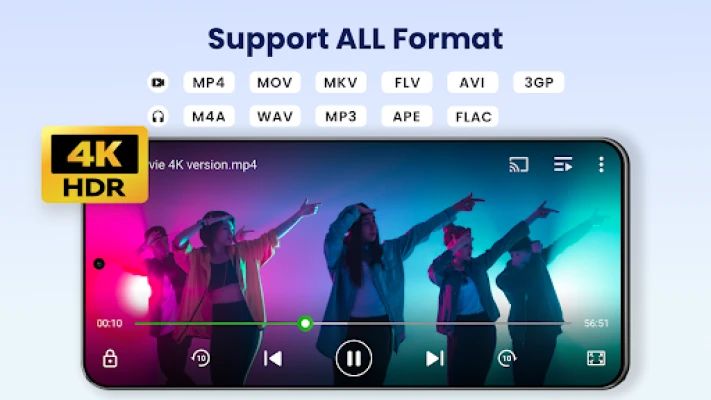
- Wide video-format support: Plays popular formats such as MP4, MKV, AVI, MOV, 3GP, FLV, WMV, RMVB, and TS, reducing the need to convert files before watching.
- HD and 4K playback: Supports high-resolution videos, including 4K files, when the device and video are compatible.
- Password-protected private folder: Lets you move selected videos into a protected area to help keep them away from casual viewing and accidental removal.
- Hardware acceleration: Uses compatible device hardware to support smoother playback and efficient video decoding.
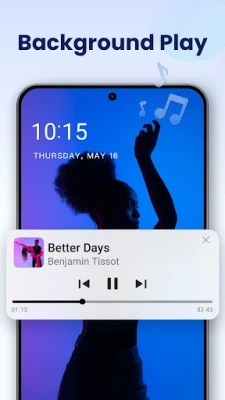
- Floating and background playback: A movable, resizable pop-up window supports multitasking, while background playback can keep audio playing when you switch apps.
- Playback-speed controls: Adjust playback from slow motion to faster speeds, with the available range described as 0.25× to 8×.
- Chromecast casting: Cast compatible videos to a Chromecast-enabled TV or display, subject to network, device, and format compatibility.
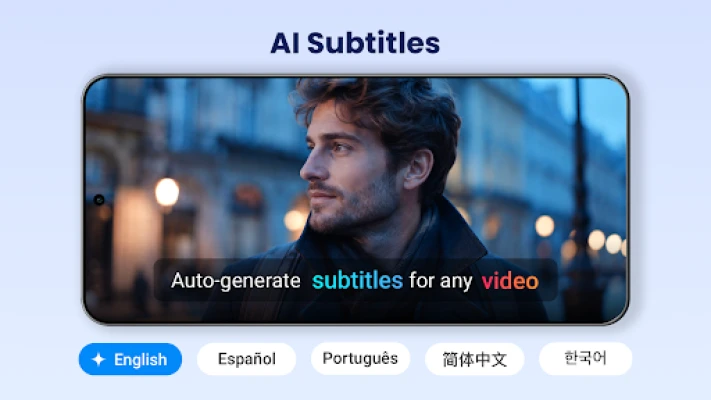
- Subtitle support: Offers subtitle options, including subtitle downloading features where supported.
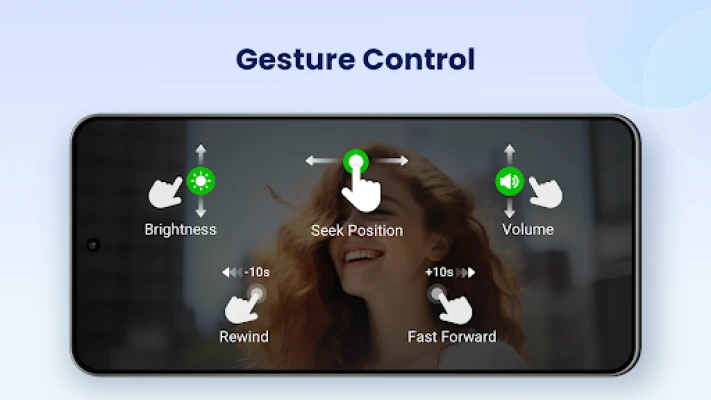
- Gesture controls and viewing options: Adjust brightness, volume, and playback position from the playback screen, and use options such as rotation, screen lock, and aspect-ratio selection.
- Automatic video library: Scans supported device storage and SD-card locations for video files, with tools to manage or share them.
- Night Mode and quick mute: Provides convenient viewing controls for dim environments and quick audio changes.
✅ Pros and ❌ Cons
Pros
- Supports a broad range of common video formats.
- Offers HD and 4K playback on compatible devices.
- Includes useful controls for speed, subtitles, screen orientation, and aspect ratio.
- Floating-window and background playback options make multitasking easier.
- Provides a private folder and basic video-library management tools.
- Can cast compatible videos to Chromecast-enabled devices.
Cons
- Playback quality and 4K performance depend on the device’s hardware and the video file.
- Some features may require permissions or may behave differently across Android versions.
- Private-folder protection is not a substitute for encrypted storage or a secure device lock.
- Subtitle downloads and casting depend on external services, network access, and device compatibility.
- The app’s current rating, version, update date, and file size can vary by store listing and release.
📋 App Details
- App Name: XPlayer – Video Player All Format
- Current Version: Varies by release; verify the version shown for the specific download.
- Last Updated: Not independently verified; check the current app-store listing.
- File Size: Varies by version and device architecture; check the download page or installer details.
- Requires Android: Minimum requirement varies by release. Confirm compatibility on the store listing or APK details before installation.
- Developer: InShot Inc.
- Category: Video Players & Editors
- Content Rating: Typically listed as suitable for general audiences; confirm the current rating in your region.
💬 User Reviews
Users commonly value XPlayer for its ability to open many video formats, straightforward playback controls, and convenient tools such as speed adjustment, floating playback, and subtitle support. The private folder and automatic video scanning can also make everyday video libraries easier to manage.
As with many media players, experiences may vary. Some users may dislike advertising or encounter playback issues with particular files, older devices, or unusual codecs. Casting and subtitle features can also depend on network conditions and compatibility, so they may not work identically for everyone.
🔍 5 Best Alternative Apps
- VLC for Android: A well-known open-source media player with broad format support, subtitle options, and network-streaming features. It is a strong choice for users who prefer a feature-rich player without a typical ad-supported experience.
- MX Player: A popular Android video player with playback gestures, subtitle tools, and hardware-accelerated decoding on compatible devices. Some features and availability may vary by region or version.
- KMPlayer: A multimedia player offering support for numerous video formats, playback controls, and online or local media options. It may suit viewers looking for additional playback customisation.
- Just (Video) Player: A lightweight player focused on straightforward local video playback and subtitle support. It is worth considering if you want a simpler interface with fewer extra library features.
- BSPlayer: A video player with subtitle support, playback controls, and options for playing media on Android devices. Its feature set and compatibility can differ depending on the device and app version.
🧠 My Opinion
XPlayer is a practical option for Android users who want one app for local video playback, format flexibility, and useful extras such as speed controls, a floating window, and Chromecast casting. Its private folder can be convenient for keeping selected clips out of the regular library, though it should not be treated as a replacement for stronger device security.
If you regularly watch videos in different formats or want more control over how they play, XPlayer is worth considering. Check the current listing for compatibility and release details, and choose a trusted installation source before downloading.
🛡️ Privacy and Security
Download XPlayer from Google Play or another source you trust. Before installing, check the developer name, file details, permissions, and compatibility. APK files from unofficial or unknown websites may be modified and can expose your device or personal information to malware and privacy risks.
Manual installation may require enabling an option such as Install unknown apps for the browser or file manager you are using. Android settings vary by version; enable this permission only when necessary, install the file, and turn it off afterward if you do not need it. Review storage and other permissions carefully. A password-protected folder can help prevent casual access, but it should not be assumed to encrypt files or protect them against every threat.
❓ Frequently Asked Questions (FAQs)
Q1: Is XPlayer APK free to use?
A1: XPlayer is generally offered as a free app, although its features, advertising, or optional purchases may vary by version and region. Check the current store listing for the latest terms.
Q2: Can XPlayer play videos without an internet connection?
A2: Videos stored locally on your phone or SD card can generally be played offline. Features such as subtitle downloads or casting may need an internet connection or a local network.
Q3: Does XPlayer support 4K videos?
A3: The app supports 4K video playback, but smooth playback depends on the file’s encoding and your device’s display and processing capabilities.
Q4: Is it safe to download the XPlayer APK?
A4: Safety depends on the file and where it comes from. Prefer Google Play or a reputable APK provider, verify the app details, and avoid modified or unknown files that could contain malware.
Q5: Does XPlayer protect private videos with encryption?
A5: The app description says users can password-protect a private folder, but that alone does not confirm that files are encrypted. Use a secure device lock and avoid storing highly sensitive videos in any app unless its protection methods are clearly documented.
Rate the App
Add Comment & Review
User Reviews
Based on 0 reviews
No reviews added yet.
Comments will not be approved to be posted if they are SPAM, abusive, off-topic, use profanity, contain a personal attack, or promote hate of any kind.









More »

Popular Apps

TradingView: Track All MarketsTradingView Inc.

Bus Fever Party!Lumi Games

Claude by AnthropicAnthropic PBC

Block Craft 3D:Building GameWildlife Studios

Malwarebytes - Mobile SecurityMalwarebytes

Block Blast!HungryStudio

Canva: AI Photo & Video EditorCanva

Candy Crush SagaKing

Carrom Pool: Disc GameMiniclip.com

EA SPORTS FC Soccer Mobile 27ELECTRONIC ARTS
More »
Editor's Choice

Kahoot! Play & Create QuizzesKahoot!

United AirlinesUnited Airlines

Tripwoa: Travel Plan & Trailtripwoa

trivago: Compare hotel pricestrivago N.V.

Planner 5D: AI Home DesignPlanner 5D

ibis Paint Xibis inc.

Agoda: Cheap Flights & Hotelsagoda.com

Hopper: Hotels, Flights & CarsHopper Inc.

Brilliant: Learn Math & CodingBrilliant.org

Google ClassroomGoogle LLC