

Latest Version
Version
3.68.991701869
3.68.991701869
Update
October 18, 2026
October 18, 2026
Developer
Google LLC
Google LLC
Categories
Education
Education
Platforms
Android
Android
Downloads
0
0
License
Free
Free
Package Name
com.google.android.apps.classroom
com.google.android.apps.classroom
Report
Report a Problem
Report a Problem
More About Google Classroom
Classroom makes it easy for learners and instructors to connect—inside and outside of schools. Classroom saves time and paper, and makes it easy to create classes, distribute assignments, communicate, and stay organized.
Google Classroom helps teachers manage classes, assignments, and communication while giving students one organized place to follow their coursework. Its paperless workflow connects with Google Drive and other Google Workspace tools, making it easier to share materials, submit work, and keep track of class activity.
Keeping lessons, assignments, and class conversations in order can be challenging when they are spread across paper handouts, email, and multiple apps. Google Classroom brings many of those everyday school tasks together in one digital space, helping teachers share work and students find what they need.
Designed for education, Classroom is popular with schools and learning groups that use Google Workspace. Teachers can post announcements, distribute assignments, and give feedback, while students can check classwork and submit files from a compatible device.
Google Classroom is an education and class-management app from Google. Teachers can create or join classes, share announcements and learning materials, assign work, and review student submissions. Students can use it to see coursework, turn in assignments, and participate in class discussions. It is intended for teachers and learners, with access and available features depending on the school or organization’s setup.
An APK is the package format Android uses to install apps. An APK file can be used for manual installation, but downloading one from an unofficial source may carry security or privacy risks. When available, installing or updating Classroom through Google Play is the safer and simpler option.
Pros
Cons
Feedback about Google Classroom commonly reflects how useful it is for keeping schoolwork and class updates together. Users often appreciate its straightforward assignment flow, convenient file sharing, and connection with Google services. Teachers may value being able to distribute and review work without relying on paper.
Common frustrations can include notification or synchronization issues, confusing class organization when many courses are active, and problems submitting files on particular devices or networks. Experiences can vary by Android version, account type, school configuration, and app release, so checking recent reviews for your device can help set expectations.
Google Classroom is a practical choice for teachers and students who want a straightforward way to manage digital coursework. Its strongest points are its organized assignment workflow, class announcements, and integration with Google tools. It works best when the whole class uses it consistently and the school has configured accounts and permissions appropriately.
It is worth considering if your school or learning group already uses Google Workspace. For independent learners, the app may be less useful without an active class to join. Overall, Classroom is a helpful education companion that can make everyday class tasks easier to follow.
For the safest installation, use Google Play or another reputable source and check that the app is published by Google LLC. Be cautious with APK files from unknown websites: modified or counterfeit packages may contain malware, request excessive permissions, or put personal information at risk.
Manual APK installation may require enabling permission to install unknown apps for the specific browser or file manager you use. Android settings and wording differ by version. Enable this only when necessary, avoid granting unrelated permissions, and turn the setting off again afterward. Classroom may request camera, file or storage, and account access for the functions described above; review each permission prompt and your school’s privacy policies.
Q1: Is Google Classroom free to use?
A1: The app is available without a separate app purchase, but access to classes and features can depend on a school, organization, or Google account setup.
Q2: Do I need an internet connection to use Google Classroom?
A2: An internet connection is needed for many tasks, including syncing updates and submitting work. Some previously available content may be accessible offline, but offline access is limited.
Q3: Is it safe to download the Google Classroom APK?
A3: The safest option is to install the official app through Google Play. If you use an APK, choose a reputable source, confirm the publisher, and understand that unofficial or modified files can pose malware and privacy risks.
Q4: Can students join a class without an invitation?
A4: A student may be able to join with a class code, but the teacher or school must provide access, and account or administrator settings may apply.
Q5: Why does Classroom ask for camera or file access?
A5: Camera access can support taking photos or videos to post, while file or storage access can allow users to attach local materials and use selected offline features. You can review or change app permissions in Android settings.
Google Classroom APK
📱 Google Classroom APK Summary
Google Classroom helps teachers manage classes, assignments, and communication while giving students one organized place to follow their coursework. Its paperless workflow connects with Google Drive and other Google Workspace tools, making it easier to share materials, submit work, and keep track of class activity.
- App Name: Google Classroom
- Current Version: Varies by device and rollout; check Google Play for the latest version
- Last Updated: October 2026 listing details not independently verifiable here
- Category: Education
- Developer: Google LLC
- Google Play Rating: Ratings and review counts change over time; see the current Google Play listing for the latest figures
💡 Introduction
Keeping lessons, assignments, and class conversations in order can be challenging when they are spread across paper handouts, email, and multiple apps. Google Classroom brings many of those everyday school tasks together in one digital space, helping teachers share work and students find what they need.
Designed for education, Classroom is popular with schools and learning groups that use Google Workspace. Teachers can post announcements, distribute assignments, and give feedback, while students can check classwork and submit files from a compatible device.
❓ What Is Google Classroom APK?
Google Classroom is an education and class-management app from Google. Teachers can create or join classes, share announcements and learning materials, assign work, and review student submissions. Students can use it to see coursework, turn in assignments, and participate in class discussions. It is intended for teachers and learners, with access and available features depending on the school or organization’s setup.
An APK is the package format Android uses to install apps. An APK file can be used for manual installation, but downloading one from an unofficial source may carry security or privacy risks. When available, installing or updating Classroom through Google Play is the safer and simpler option.
🧑💻 How to Use
- Install and open the app: Download Google Classroom from Google Play or another source you trust, then launch it.
- Choose an account: Select the Google account you want to use. Your school may require an account provided by its administrator.
- Join or create a class: Students can join with a class code or invitation. Teachers can create a class if their account and organization settings allow it.
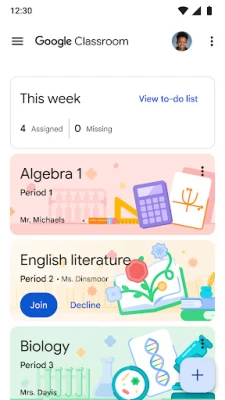
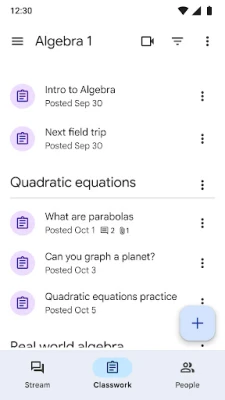
- Explore the class: Open a class to find its stream, announcements, assignments, and shared learning materials.
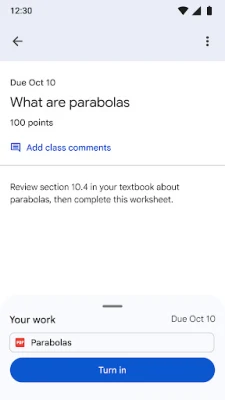
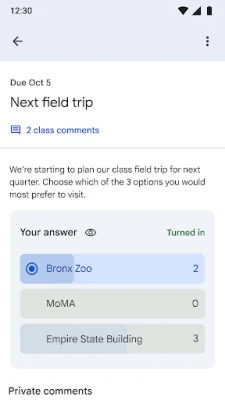
- Complete and submit work: Open an assignment, review its instructions, attach or create the requested work, and submit it before the deadline.
- Check feedback and updates: Return to the class to review teacher feedback, grades where available, and new posts.
- Share materials when needed: Attach suitable files or use your device camera to add photos or videos, granting permissions only when you use those features.
⚙️ Features
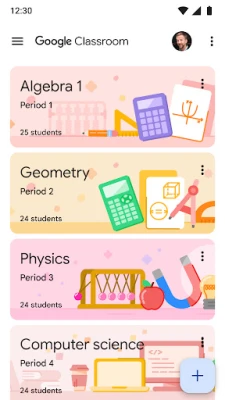
- Simple class setup: Teachers can invite students directly or share a class code, making it straightforward to get a class started.
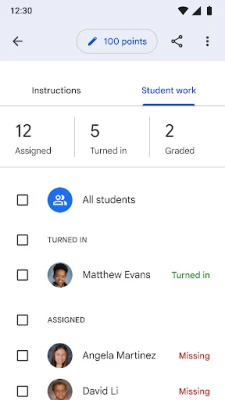
- Digital assignment workflow: Teachers can distribute, review, and mark assignments in one place, reducing the need to manage paper handouts.
- Organized coursework: Students can view assignments in the app, while class files shared through Google services can be organized in Google Drive.
- Announcements and discussions: Teachers can post class updates, and students can respond or share relevant resources when discussion features are enabled.
- File attachments: Users can add documents and, with permission, photos or videos to classwork and posts.
- Google Workspace integration: Classroom works with Google services used by many schools, helping keep learning materials and workflows connected.
- Offline support for selected tasks: Some previously available or downloaded content may remain accessible offline, though connectivity is needed for many actions and updates.
- Education-focused privacy: Google states that Classroom contains no ads and that student content and data are not used for advertising purposes. Users should still review their school’s policies and Google’s privacy information.
✅ Pros and ❌ Cons
Pros
- Brings assignments, announcements, and class materials into a familiar digital workspace.
- Can save time by simplifying the distribution and collection of coursework.
- Supports class access through invitations or codes.
- Integrates with Google Drive and other Google tools commonly used in education.
- Offers useful communication features for teachers and students.
- Google says the education service is ad-free.
Cons
- Some features depend on a school or organization’s account settings and administrator policies.
- Users may need a reliable internet connection for joining classes, syncing work, or submitting assignments.
- Managing several classes and notifications can feel busy for some users.
- Classroom’s usefulness depends on teachers and students using it consistently.
- Camera, storage, and account permissions may be needed for particular tasks, which may concern users who prefer to limit app access.
📋 App Details
- App Name: Google Classroom
- Current Version: Varies by device and rollout; check Google Play for the latest version
- Last Updated: October 2026 listing details not independently verifiable here
- File Size: Varies by version and Android device; check the download listing for the exact size
- Requires Android: Minimum requirement may change between releases; check the current Google Play listing for your device
- Developer: Google LLC
- Category: Education
- Content Rating: Check the current store listing for the rating in your region
- Permissions: Camera access can be used to take photos or videos for Classroom; storage or file access can support attachments and selected offline features; account access lets users choose which Google account to use.
💬 User Reviews
Feedback about Google Classroom commonly reflects how useful it is for keeping schoolwork and class updates together. Users often appreciate its straightforward assignment flow, convenient file sharing, and connection with Google services. Teachers may value being able to distribute and review work without relying on paper.
Common frustrations can include notification or synchronization issues, confusing class organization when many courses are active, and problems submitting files on particular devices or networks. Experiences can vary by Android version, account type, school configuration, and app release, so checking recent reviews for your device can help set expectations.
🔍 5 Best Alternative Apps
- Microsoft Teams for Education: Combines class communication, meetings, shared files, and assignments for schools using Microsoft 365.
- Moodle: A flexible learning-management platform used by schools and institutions to deliver courses, activities, and assessments.
- Canvas Student: Gives learners access to course materials, announcements, assignments, and grades from institutions that use Canvas.
- Schoology: Provides a learning platform for course content, classroom communication, and assignment management, depending on the school’s setup.
- Blackboard Learn: Supports online courses, learning materials, assessments, and academic communication at participating institutions.
🧠 My Opinion
Google Classroom is a practical choice for teachers and students who want a straightforward way to manage digital coursework. Its strongest points are its organized assignment workflow, class announcements, and integration with Google tools. It works best when the whole class uses it consistently and the school has configured accounts and permissions appropriately.
It is worth considering if your school or learning group already uses Google Workspace. For independent learners, the app may be less useful without an active class to join. Overall, Classroom is a helpful education companion that can make everyday class tasks easier to follow.
🛡️ Privacy and Security
For the safest installation, use Google Play or another reputable source and check that the app is published by Google LLC. Be cautious with APK files from unknown websites: modified or counterfeit packages may contain malware, request excessive permissions, or put personal information at risk.
Manual APK installation may require enabling permission to install unknown apps for the specific browser or file manager you use. Android settings and wording differ by version. Enable this only when necessary, avoid granting unrelated permissions, and turn the setting off again afterward. Classroom may request camera, file or storage, and account access for the functions described above; review each permission prompt and your school’s privacy policies.
❓ Frequently Asked Questions (FAQs)
Q1: Is Google Classroom free to use?
A1: The app is available without a separate app purchase, but access to classes and features can depend on a school, organization, or Google account setup.
Q2: Do I need an internet connection to use Google Classroom?
A2: An internet connection is needed for many tasks, including syncing updates and submitting work. Some previously available content may be accessible offline, but offline access is limited.
Q3: Is it safe to download the Google Classroom APK?
A3: The safest option is to install the official app through Google Play. If you use an APK, choose a reputable source, confirm the publisher, and understand that unofficial or modified files can pose malware and privacy risks.
Q4: Can students join a class without an invitation?
A4: A student may be able to join with a class code, but the teacher or school must provide access, and account or administrator settings may apply.
Q5: Why does Classroom ask for camera or file access?
A5: Camera access can support taking photos or videos to post, while file or storage access can allow users to attach local materials and use selected offline features. You can review or change app permissions in Android settings.
Rate the App
Add Comment & Review
User Reviews
Based on 0 reviews
No reviews added yet.
Comments will not be approved to be posted if they are SPAM, abusive, off-topic, use profanity, contain a personal attack, or promote hate of any kind.





More »

Popular Apps

TradingView: Track All MarketsTradingView Inc.

Bus Fever Party!Lumi Games

Claude by AnthropicAnthropic PBC

Block Craft 3D:Building GameWildlife Studios

Malwarebytes - Mobile SecurityMalwarebytes

Block Blast!HungryStudio

Canva: AI Photo & Video EditorCanva

Candy Crush SagaKing

Carrom Pool: Disc GameMiniclip.com

EA SPORTS FC Soccer Mobile 27ELECTRONIC ARTS
More »
Editor's Choice

Kahoot! Play & Create QuizzesKahoot!

United AirlinesUnited Airlines

Tripwoa: Travel Plan & Trailtripwoa

trivago: Compare hotel pricestrivago N.V.

Planner 5D: AI Home DesignPlanner 5D

ibis Paint Xibis inc.

Agoda: Cheap Flights & Hotelsagoda.com

Hopper: Hotels, Flights & CarsHopper Inc.

Brilliant: Learn Math & CodingBrilliant.org

Google ClassroomGoogle LLC