




Latest Version
Version
1.16.9
1.16.9
Update
November 05, 2026
November 05, 2026
Developer
Noctua Software
Noctua Software
Categories
Education
Education
Platforms
Android
Android
Downloads
0
0
License
Free
Free
Package Name
com.noctuasoftware.stellarium_free
com.noctuasoftware.stellarium_free
Report
Report a Problem
Report a Problem
More About Stellarium - Star Map
Stellarium - Star Map is a planetarium app that shows exactly what you see when you look up at the stars.
Stellarium - Star Map turns your Android phone into a pocket planetarium. Point it toward the sky to identify stars, constellations, planets, satellites, and other celestial objects, or explore a simulated sky for different dates and locations.
Looking up at the night sky can leave you wondering what that bright point of light is—or where a familiar constellation has gone. Stellarium - Star Map helps answer those questions with an interactive sky map that matches the view above your location.
Created by the original developer of the Stellarium desktop planetarium, the app combines an accessible interface with detailed astronomy data. It is useful for curious beginners, families, students, and experienced skywatchers who want to explore the cosmos from a phone.
Stellarium - Star Map is an astronomy and sky-observation app. Its core feature uses your device’s location and orientation to show a representation of the sky, helping you identify stars, constellations, planets, comets, artificial satellites such as the International Space Station, and deep-sky objects. You can also change the date, time, and location to see how the sky looks at another moment or from somewhere else on Earth.
The app is designed for both first-time stargazers and people planning observations. Its free features cover many common sky-exploration needs, while an optional in-app purchase unlocks Stellarium Plus, which adds extensive catalogs and advanced observing tools.
An APK is the package file format used to distribute and install Android apps. Installing an APK manually can be useful when an app is not available through your usual store, but it is important to use a trusted source and verify that the file is genuine.
Pros
Cons
User feedback commonly highlights Stellarium’s intuitive sky map, clear object identification, and value as a learning tool. Many users appreciate being able to point a phone at the sky and quickly find out what they are seeing, while astronomy hobbyists often value the simulation and observation-planning options.
Some users report that the compass or device orientation can be inaccurate, particularly if sensors need calibration or the phone is affected by nearby magnetic interference. Others would prefer more advanced catalog and offline features to be included without an upgrade. As with any sensor-based astronomy app, results can depend on the phone model, setup, and viewing conditions.
Stellarium - Star Map is a strong choice for anyone who wants to make the night sky easier to understand. Its live sky map, time-and-location simulation, satellite tracking, and approachable design make it useful for casual curiosity as well as more deliberate observing.
The free version offers plenty to explore, while Stellarium Plus is aimed at users who need larger catalogs, offline observing data, telescope control, or advanced planning. If you enjoy astronomy—or simply want to identify what is above you—Stellarium is well worth trying. Just remember that phone sensor accuracy and local sky conditions can affect what you see.
For the safest installation, download Stellarium from Google Play or another trusted source. If you install an APK manually, check that it comes from a reputable provider and that the app package has not been modified. Unofficial or tampered APKs may contain malware, request unnecessary permissions, or put personal information at risk.
Android may require you to allow Install unknown apps for the browser or file manager you use. Enable this permission only when needed, install the file you trust, and turn the permission off afterward. Review app permissions and avoid granting access that is unrelated to the app’s functions.
Q1: Is Stellarium - Star Map free to use?
A1: The app offers a free experience, with an optional in-app purchase for Stellarium Plus. Plus unlocks additional catalogs and advanced observing features.
Q2: Do I need an internet connection to use Stellarium?
A2: Some features may work without a connection, but available offline content depends on the version and data already stored on your device. Stellarium Plus provides a reduced offline dataset for field use.
Q3: Can Stellarium track the International Space Station?
A3: Yes. The app includes artificial satellite tracking, including the ISS. Visibility depends on the satellite’s path, timing, location, and observing conditions.
Q4: Why does the sky map point in the wrong direction?
A4: The app relies on your phone’s compass and motion sensors. Calibrate the device, check location and sensor permissions, and move away from magnetic interference if the view seems inaccurate.
Q5: Is it safe to download the Stellarium APK?
A5: An APK can be safe when it is obtained from an official or reputable source, but unofficial or modified files may contain malware. Verify the source and scan the file before installing.
Stellarium - Star Map APK
📱 Stellarium - Star Map APK Summary
Stellarium - Star Map turns your Android phone into a pocket planetarium. Point it toward the sky to identify stars, constellations, planets, satellites, and other celestial objects, or explore a simulated sky for different dates and locations.
- App Name: Stellarium - Star Map
- Current Version: Version details vary by release; check the Google Play listing for the latest version.
- Last Updated: The current update date can vary by region and store listing.
- Category: Education
- Developer: Stellarium Labs
- Google Play Rating: Ratings and review counts change over time; check Google Play for the current figures.
💡 Introduction
Looking up at the night sky can leave you wondering what that bright point of light is—or where a familiar constellation has gone. Stellarium - Star Map helps answer those questions with an interactive sky map that matches the view above your location.
Created by the original developer of the Stellarium desktop planetarium, the app combines an accessible interface with detailed astronomy data. It is useful for curious beginners, families, students, and experienced skywatchers who want to explore the cosmos from a phone.
❓ What is Stellarium - Star Map APK?
Stellarium - Star Map is an astronomy and sky-observation app. Its core feature uses your device’s location and orientation to show a representation of the sky, helping you identify stars, constellations, planets, comets, artificial satellites such as the International Space Station, and deep-sky objects. You can also change the date, time, and location to see how the sky looks at another moment or from somewhere else on Earth.
The app is designed for both first-time stargazers and people planning observations. Its free features cover many common sky-exploration needs, while an optional in-app purchase unlocks Stellarium Plus, which adds extensive catalogs and advanced observing tools.
An APK is the package file format used to distribute and install Android apps. Installing an APK manually can be useful when an app is not available through your usual store, but it is important to use a trusted source and verify that the file is genuine.
🧑💻 How to Use
- Install and open the app: Get Stellarium from a trusted Android app store or a reputable APK provider.
- Set permissions: Allow location access if you want the map to show the sky above your current position. Compass and motion-sensor access may help the view follow your phone’s direction.
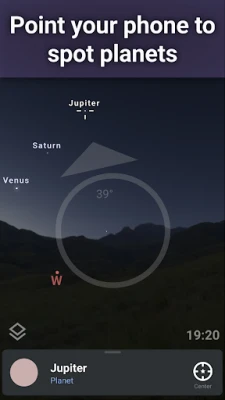
- Point your phone at the sky: Hold the device toward a visible area of the sky. The map will show objects in that direction, though accuracy depends on your device sensors and calibration.
- Explore an object: Tap a star, planet, or other labeled object to view its name and available information. Use the search function to find a particular target.
- Adjust the view: Swipe to move around the sky and pinch to zoom. Use the time controls to view the sky at another date or hour.
- Customize your observation: Explore constellation illustrations, sky-culture options, landscape settings, atmosphere effects, and red night mode.
- Consider Stellarium Plus: Upgrade in-app if you need its expanded catalogs, offline observing data, telescope control, or advanced planning tools.
⚙️ Features
- Live sky identification: Aim your phone at the sky to explore the celestial objects shown in that direction. It makes unfamiliar stars and planets easier to investigate.
- Sky simulation for any time and place: Change the date, time, or location to see how the sky appears elsewhere or at a future or past moment—helpful for learning and planning.
- Stars, constellations, and deep-sky objects: Browse stars, nebulae, galaxies, star clusters, and other objects. Stellarium Plus expands the available catalogs substantially.
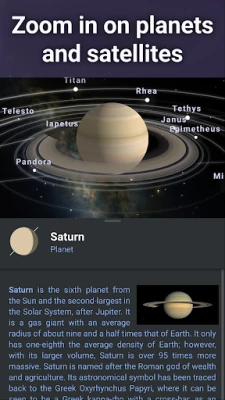
- Realistic Milky Way and object imagery: Zoom in on detailed sky images to get a closer look at selected celestial features.
- Satellite tracking: Follow artificial satellites, including the International Space Station, and see where they appear in the sky.
- Constellation cultures: View constellation patterns and illustrations from different cultural traditions, offering more context than standard constellation lines alone.
- Natural sky effects: Simulate landscapes, the atmosphere, sunrise, sunset, and atmospheric refraction for a more lifelike view.
- Solar system exploration: Explore 3D representations of major planets and their natural satellites.
- Red night mode: Switch to a red display to help preserve dark adaptation while observing outdoors.
- Stellarium Plus observing tools: The optional upgrade adds expanded catalogs, offline data, high-resolution views, telescope control over Bluetooth or Wi-Fi, and tools for checking visibility and transit times.
✅ Pros and ❌ Cons
Pros
- Easy-to-use sky map suited to beginners as well as astronomy enthusiasts.
- Identifies a broad range of celestial objects and satellites.
- Lets users simulate the sky for different dates, times, and locations.
- Offers useful educational features, including constellation illustrations and realistic sky effects.
- Red night mode is helpful for outdoor observation.
- Stellarium Plus offers powerful catalog, planning, offline, and telescope-control options.
Cons
- Accurate live positioning depends on the phone’s compass, motion sensors, and location settings.
- Some advanced catalogs and observing features require a paid in-app upgrade.
- The full Stellarium Plus catalog can be demanding in terms of storage and device performance.
- New users may need time to understand the many sky objects and observing controls.
- Offline use with expanded data is a Plus feature, and the available offline dataset is reduced compared with the full catalog.
📋 App Details
- App Name: Stellarium - Star Map
- Current Version: Check the current Google Play listing or trusted distributor; version numbers change with updates.
- Last Updated: Check the current store listing for the latest date.
- File Size: Varies by version, device, and distribution package. Check the download page before installing.
- Requires Android: Minimum requirements vary by release and device; confirm compatibility on the current store listing.
- Developer: Stellarium Labs
- Content Rating: Generally suitable for a broad audience; confirm the rating shown in your region’s app store.
- In-App Purchases: Available for the Stellarium Plus upgrade.
💬 User Reviews
User feedback commonly highlights Stellarium’s intuitive sky map, clear object identification, and value as a learning tool. Many users appreciate being able to point a phone at the sky and quickly find out what they are seeing, while astronomy hobbyists often value the simulation and observation-planning options.
Some users report that the compass or device orientation can be inaccurate, particularly if sensors need calibration or the phone is affected by nearby magnetic interference. Others would prefer more advanced catalog and offline features to be included without an upgrade. As with any sensor-based astronomy app, results can depend on the phone model, setup, and viewing conditions.
🔍 5 Best Alternative Games/Apps
- Sky Map: A straightforward sky-viewing app for identifying stars and planets. It is a good choice for users who want a simple, focused stargazing experience.
- SkyView Lite: Helps users find stars, constellations, and planets by aiming a device at the sky. Its accessible interface makes it suitable for casual sky exploration.
- Star Walk 2: An interactive astronomy guide with sky identification and educational content. It is a strong alternative for users who enjoy a more visual presentation.
- Night Sky: A sky-exploration app with celestial object discovery and astronomy information. Availability and feature support may vary by device and region.
- Mobile Observatory: Provides astronomy information and tools for observing and planning. It may appeal to users looking for a more technical companion for skywatching.
🧠 My Opinion
Stellarium - Star Map is a strong choice for anyone who wants to make the night sky easier to understand. Its live sky map, time-and-location simulation, satellite tracking, and approachable design make it useful for casual curiosity as well as more deliberate observing.
The free version offers plenty to explore, while Stellarium Plus is aimed at users who need larger catalogs, offline observing data, telescope control, or advanced planning. If you enjoy astronomy—or simply want to identify what is above you—Stellarium is well worth trying. Just remember that phone sensor accuracy and local sky conditions can affect what you see.
🛡️ Privacy and Security
For the safest installation, download Stellarium from Google Play or another trusted source. If you install an APK manually, check that it comes from a reputable provider and that the app package has not been modified. Unofficial or tampered APKs may contain malware, request unnecessary permissions, or put personal information at risk.
Android may require you to allow Install unknown apps for the browser or file manager you use. Enable this permission only when needed, install the file you trust, and turn the permission off afterward. Review app permissions and avoid granting access that is unrelated to the app’s functions.
❓ Frequently Asked Questions (FAQs)
Q1: Is Stellarium - Star Map free to use?
A1: The app offers a free experience, with an optional in-app purchase for Stellarium Plus. Plus unlocks additional catalogs and advanced observing features.
Q2: Do I need an internet connection to use Stellarium?
A2: Some features may work without a connection, but available offline content depends on the version and data already stored on your device. Stellarium Plus provides a reduced offline dataset for field use.
Q3: Can Stellarium track the International Space Station?
A3: Yes. The app includes artificial satellite tracking, including the ISS. Visibility depends on the satellite’s path, timing, location, and observing conditions.
Q4: Why does the sky map point in the wrong direction?
A4: The app relies on your phone’s compass and motion sensors. Calibrate the device, check location and sensor permissions, and move away from magnetic interference if the view seems inaccurate.
Q5: Is it safe to download the Stellarium APK?
A5: An APK can be safe when it is obtained from an official or reputable source, but unofficial or modified files may contain malware. Verify the source and scan the file before installing.
Rate the App
Add Comment & Review
User Reviews
Based on 0 reviews
No reviews added yet.
Comments will not be approved to be posted if they are SPAM, abusive, off-topic, use profanity, contain a personal attack, or promote hate of any kind.





More »

Popular Apps

TradingView: Track All MarketsTradingView Inc.

Bus Fever Party!Lumi Games

Claude by AnthropicAnthropic PBC

Block Craft 3D:Building GameWildlife Studios

Malwarebytes - Mobile SecurityMalwarebytes

Block Blast!HungryStudio

Canva: AI Photo & Video EditorCanva

Candy Crush SagaKing

Carrom Pool: Disc GameMiniclip.com

EA SPORTS FC Soccer Mobile 27ELECTRONIC ARTS
More »
Editor's Choice

Kahoot! Play & Create QuizzesKahoot!

United AirlinesUnited Airlines

Tripwoa: Travel Plan & Trailtripwoa

trivago: Compare hotel pricestrivago N.V.

Planner 5D: AI Home DesignPlanner 5D

ibis Paint Xibis inc.

Agoda: Cheap Flights & Hotelsagoda.com

Hopper: Hotels, Flights & CarsHopper Inc.

Brilliant: Learn Math & CodingBrilliant.org

Google ClassroomGoogle LLC