



Latest Version
Update
October 17, 2026
October 17, 2026
Developer
TradingView Inc.
TradingView Inc.
Categories
Finance
Finance
Platforms
Android
Android
Downloads
0
0
License
Free
Free
Package Name
com.tradingview.tradingviewapp
com.tradingview.tradingviewapp
Report
Report a Problem
Report a Problem
More About TradingView: Track All Markets
TradingView is the charting and trading app used by 100 million traders and investors to follow the stock market, invest in stocks and bonds, and trade forex and crypto. Analyze stocks, currency pairs and Bitcoin on professional charts, and make your next investment or trade with confidence, wherever you are.
TradingView brings financial charts, market research, watchlists, alerts, news, and supported-broker trading tools together in one app. It covers markets ranging from stocks and ETFs to forex, futures, commodities, and cryptocurrencies, with paper trading available for practicing strategies using virtual funds.
Markets can move quickly, and keeping track of prices, news, and potential trade setups across separate apps can be inconvenient. TradingView combines charting, market data, watchlists, alerts, and community analysis in a single mobile workspace.
Its appeal lies in the range of tools available to both newer investors and experienced traders. You can research an asset, study its chart, follow important price levels, and—where a supported broker connection is available—place or manage trades from the app.
TradingView is a financial-market research and charting app for people who follow or trade assets such as shares, ETFs, currencies, cryptocurrencies, futures, and commodities. It offers technical-analysis tools, economic and news features, customizable watchlists, price alerts, and ideas shared by other users. Supported brokerage integrations and paper trading add ways to place trades or practice without using real funds.
An APK is the package format Android uses to install apps. Installing the TradingView APK manually can be useful when an app is not being installed through Google Play, but users should verify the file and its source before proceeding.
Pros
Cons
Users commonly value TradingView for its detailed charts, broad selection of markets, flexible watchlists, and useful alert system. Traders also appreciate being able to access familiar research tools on mobile and continue work across devices.
Some users find the interface dense, particularly when first exploring chart settings and indicators. Reviews may also raise concerns about subscription limits, data availability, or occasional performance issues on particular devices. As with any financial app, experiences can vary by region, broker, subscription, and device.
TradingView is a strong choice for people who want more than a basic price-checking app. Its combination of advanced charts, cross-market watchlists, alerts, research features, and paper trading makes it useful for both learning and ongoing market analysis.
Beginners should take time to learn the tools and remember that charts and community ideas cannot guarantee investment results. If you want a flexible research platform and understand the risks involved in trading, TradingView is well worth considering. Always verify orders and make financial decisions based on your own circumstances.
For the safest installation, get TradingView from Google Play or another source you have carefully verified. APK files from unofficial websites may be modified and could expose your device or personal information to malware, unwanted permissions, or other privacy risks.
Manual APK installation may require enabling Install unknown apps for the browser or file manager you use. Android’s setting name and location vary by version. Enable it only when necessary, install a file you trust, and turn the permission off afterward. Never share account passwords or verification codes, and review app permissions and connected-broker details carefully.
Q1: Is TradingView APK free to use?
A1: TradingView is free to download and offers free features. Optional subscriptions can unlock additional capabilities, and some market data or exchange services may involve separate fees.
Q2: Can I place trades through TradingView?
A2: Yes, where a supported broker connection and trading service are available. Broker availability, instruments, and order features depend on your location and provider. Paper trading is also available for practice with virtual funds.
Q3: Does TradingView work without an internet connection?
A3: Most live market data, news, syncing, and account features require an internet connection. Offline access to current market information is limited.
Q4: Is it safe to install the TradingView APK?
A4: An APK’s safety depends on where it comes from and whether it has been altered. Prefer Google Play or a verified source, and avoid unfamiliar files that request unusual permissions.
Q5: Does TradingView guarantee successful trades?
A5: No. Charting tools and market commentary can support research, but they cannot predict outcomes or remove the risk of losing money. Trading decisions remain your responsibility.
TradingView APK
📱 TradingView APK Summary
TradingView brings financial charts, market research, watchlists, alerts, news, and supported-broker trading tools together in one app. It covers markets ranging from stocks and ETFs to forex, futures, commodities, and cryptocurrencies, with paper trading available for practicing strategies using virtual funds.
- App Name: TradingView: Track All Markets
- Current Version: Check Google Play for the latest version; version numbers can vary by release and device.
- Last Updated: Check the Google Play listing for the current update date.
- Category: Finance
- Developer: TradingView
- Google Play Rating: The rating and review count change over time; see Google Play for the live figures.
💡 Introduction
Markets can move quickly, and keeping track of prices, news, and potential trade setups across separate apps can be inconvenient. TradingView combines charting, market data, watchlists, alerts, and community analysis in a single mobile workspace.
Its appeal lies in the range of tools available to both newer investors and experienced traders. You can research an asset, study its chart, follow important price levels, and—where a supported broker connection is available—place or manage trades from the app.
❓ What Is TradingView APK?
TradingView is a financial-market research and charting app for people who follow or trade assets such as shares, ETFs, currencies, cryptocurrencies, futures, and commodities. It offers technical-analysis tools, economic and news features, customizable watchlists, price alerts, and ideas shared by other users. Supported brokerage integrations and paper trading add ways to place trades or practice without using real funds.
An APK is the package format Android uses to install apps. Installing the TradingView APK manually can be useful when an app is not being installed through Google Play, but users should verify the file and its source before proceeding.
🧑💻 How to Use
- Install and open the app: Download TradingView from Google Play or use a verified APK source, then launch it and sign in or create an account.
- Find a market: Search for a company, currency pair, cryptocurrency, index, or commodity to open its market page and chart.
- Study the chart: Choose a chart style and timeframe. Add indicators, draw trend lines, or compare symbols to explore price movements.
- Create a watchlist: Save instruments you want to follow and arrange them into lists that suit your research.
- Set alerts: Choose a price level or supported chart condition and configure a notification so you can keep track of important changes.
- Practice or connect a broker: Use paper trading to try strategies with virtual funds, or connect a supported broker if you intend to trade with real money. Check all order details before submitting.
- Follow market context: Review news, economic-calendar events, and community ideas to add context to your own research.
⚙️ Features
- Multi-market coverage: Follow stocks, ETFs, bonds, indices, forex, cryptocurrencies, futures, and commodities from one app.
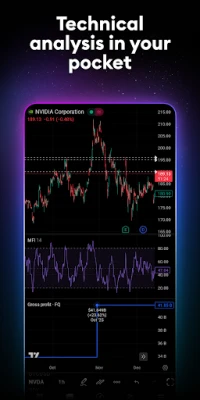
- Advanced mobile charts: Explore multiple chart styles, including candlesticks and other formats, and adjust timeframes to suit your analysis.
- Technical indicators and scripts: Apply built-in tools such as moving averages, RSI, MACD, and Bollinger Bands, alongside community-created scripts.
- Drawing and comparison tools: Mark charts with trend lines, Fibonacci levels, and other drawing tools, or compare instruments on the same chart.
- Watchlists and alerts: Organize assets you follow and receive notifications when selected price levels or chart conditions are reached.
- Broker connections and paper trading: Trade through participating brokers where available, or practice strategies with virtual money before risking capital.
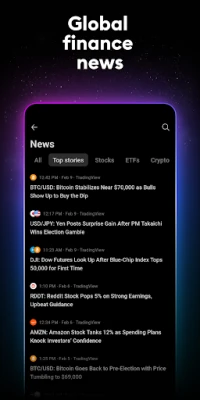
- Market news and events: Use news and economic-calendar information to follow events such as inflation releases, rate decisions, and earnings.
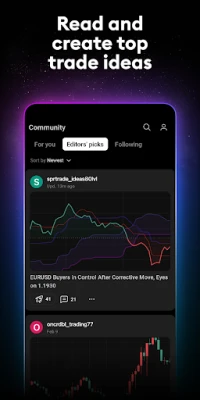
- Community ideas: Read market views from other users, follow contributors, and share your own analysis.
- Cross-device syncing: Keep supported charts, watchlists, and alerts synchronized across mobile, web, and desktop when signed in.
✅ Pros and ❌ Cons
Pros
- Combines research, charting, watchlists, and alerts in one place.
- Supports a broad range of global markets and instruments.
- Offers substantial technical-analysis and chart-customization tools.
- Paper trading provides a way to practice without placing real-money trades.
- Charts and saved market lists can sync across devices.
Cons
- The number of tools and settings can feel overwhelming to beginners.
- Some features, usage limits, or data access may depend on the subscription plan or exchange.
- Market data can be delayed or subject to separate exchange fees, depending on the instrument and data provider.
- Broker integrations and available trading products vary by location and provider.
- Community analysis is user-generated and should not be treated as guaranteed or personalized financial advice.
📋 App Details
- App Name: TradingView: Track All Markets
- Current Version: Check Google Play or the app’s official listing for the latest release.
- Last Updated: The update date varies; confirm it on the current Google Play listing.
- File Size: Varies by version, Android device, and installation method.
- Requires Android: Requirements may change between releases; check the app listing or installer for the minimum supported Android version.
- Developer: TradingView
- Content Rating: Check Google Play for the current rating in your region.
- Category: Finance
- Price: Free to download, with optional paid subscription plans and potentially separate market-data fees.
💬 User Reviews
Users commonly value TradingView for its detailed charts, broad selection of markets, flexible watchlists, and useful alert system. Traders also appreciate being able to access familiar research tools on mobile and continue work across devices.
Some users find the interface dense, particularly when first exploring chart settings and indicators. Reviews may also raise concerns about subscription limits, data availability, or occasional performance issues on particular devices. As with any financial app, experiences can vary by region, broker, subscription, and device.
🔍 5 Best Alternative Apps
- MetaTrader 4: A widely used trading platform focused on forex and CFDs, with charting, indicators, and broker-dependent trading features.
- MetaTrader 5: A multi-asset trading platform that offers chart analysis and trading tools through participating brokers; available instruments depend on the provider.
- Investing.com: Provides financial news, market quotes, economic-calendar information, and watchlists for users who want broad market coverage.
- Yahoo Finance: Offers market news, company information, portfolio tracking, and price data, making it a convenient option for general investment research.
- Stocktwits: Combines market-related social discussions with symbol pages and watchlists for people interested in following investor sentiment.
🧠 My Opinion
TradingView is a strong choice for people who want more than a basic price-checking app. Its combination of advanced charts, cross-market watchlists, alerts, research features, and paper trading makes it useful for both learning and ongoing market analysis.
Beginners should take time to learn the tools and remember that charts and community ideas cannot guarantee investment results. If you want a flexible research platform and understand the risks involved in trading, TradingView is well worth considering. Always verify orders and make financial decisions based on your own circumstances.
🛡️ Privacy and Security
For the safest installation, get TradingView from Google Play or another source you have carefully verified. APK files from unofficial websites may be modified and could expose your device or personal information to malware, unwanted permissions, or other privacy risks.
Manual APK installation may require enabling Install unknown apps for the browser or file manager you use. Android’s setting name and location vary by version. Enable it only when necessary, install a file you trust, and turn the permission off afterward. Never share account passwords or verification codes, and review app permissions and connected-broker details carefully.
❓ Frequently Asked Questions (FAQs)
Q1: Is TradingView APK free to use?
A1: TradingView is free to download and offers free features. Optional subscriptions can unlock additional capabilities, and some market data or exchange services may involve separate fees.
Q2: Can I place trades through TradingView?
A2: Yes, where a supported broker connection and trading service are available. Broker availability, instruments, and order features depend on your location and provider. Paper trading is also available for practice with virtual funds.
Q3: Does TradingView work without an internet connection?
A3: Most live market data, news, syncing, and account features require an internet connection. Offline access to current market information is limited.
Q4: Is it safe to install the TradingView APK?
A4: An APK’s safety depends on where it comes from and whether it has been altered. Prefer Google Play or a verified source, and avoid unfamiliar files that request unusual permissions.
Q5: Does TradingView guarantee successful trades?
A5: No. Charting tools and market commentary can support research, but they cannot predict outcomes or remove the risk of losing money. Trading decisions remain your responsibility.
Rate the App
Add Comment & Review
User Reviews
Based on 0 reviews
No reviews added yet.
Comments will not be approved to be posted if they are SPAM, abusive, off-topic, use profanity, contain a personal attack, or promote hate of any kind.
More »
Other Apps in This Category





More »

Popular Apps

TradingView: Track All MarketsTradingView Inc.

Bus Fever Party!Lumi Games

Claude by AnthropicAnthropic PBC

Block Craft 3D:Building GameWildlife Studios

Malwarebytes - Mobile SecurityMalwarebytes

Block Blast!HungryStudio

Canva: AI Photo & Video EditorCanva

Candy Crush SagaKing

Carrom Pool: Disc GameMiniclip.com

EA SPORTS FC Soccer Mobile 27ELECTRONIC ARTS
More »
Editor's Choice

Kahoot! Play & Create QuizzesKahoot!

United AirlinesUnited Airlines

Tripwoa: Travel Plan & Trailtripwoa

trivago: Compare hotel pricestrivago N.V.

Planner 5D: AI Home DesignPlanner 5D

ibis Paint Xibis inc.

Agoda: Cheap Flights & Hotelsagoda.com

Hopper: Hotels, Flights & CarsHopper Inc.

Brilliant: Learn Math & CodingBrilliant.org

Google ClassroomGoogle LLC