




Latest Version
Update
October 17, 2026
October 17, 2026
Developer
SeaBank Indonesia
SeaBank Indonesia
Categories
Finance
Finance
Platforms
Android
Android
Downloads
0
0
License
Free
Free
Package Name
id.co.bankbkemobile.digitalbank
id.co.bankbkemobile.digitalbank
Report
Report a Problem
Report a Problem
More About SeaBank
Simpel, Untung, untuk Semua!
SeaBank is a mobile banking app from PT Bank SeaBank Indonesia for managing everyday transactions and savings from an Android phone. It offers features such as QRIS payments, bank transfers, e-wallet top-ups, savings, and— for eligible customers—instant loans.
SeaBank puts common banking tasks in one mobile app, making it easier to pay, transfer money, top up an e-wallet, and manage savings without visiting a branch. Its appeal lies in convenient digital access and advertised benefits such as free transfers within stated limits and competitive deposit interest, subject to the bank’s current terms.
Whether you need a straightforward way to handle daily payments or want to explore digital savings, SeaBank brings several financial tools together. As with any banking app, review the fees, rates, eligibility rules, and account protections before using its products.
SeaBank is a digital banking application for customers of PT Bank SeaBank Indonesia. It supports services including QRIS payments, transfers, ShopeePay top-ups, Shopee purchases through a virtual account, cash deposits and withdrawals at participating minimarkets, and savings products. Some features, such as SeaBank Pinjam, may only be available to selected customers.
An APK is the package format Android uses to install applications. Installing SeaBank from an APK file is a manual alternative to downloading it through an app store, but banking apps should be obtained only from a source you trust. Unofficial or modified copies can put your account credentials and financial data at risk.
Menu names and availability can change as the app is updated. Never share your password, PIN, or one-time verification code with anyone, including callers claiming to represent the bank.
Pros
Cons
SeaBank states that PT Bank SeaBank Indonesia is licensed and supervised by the Financial Services Authority (OJK) and Bank Indonesia (BI), and participates in the Indonesia Deposit Insurance Corporation (LPS). The bank also cautions that deposits with interest exceeding the applicable LPS guarantee rate may not be covered by LPS protection. Verify the current guarantee terms and rate directly before making a deposit.
User feedback for banking apps commonly reflects both convenience and the importance of reliable access. Customers may value having transfers, payments, and savings available in one place, while concerns can arise around account verification, transaction processing, app performance, or getting help with an issue. Ratings and review themes change over time, and a current, verified SeaBank review breakdown was not available for this article. Check recent Play Store reviews for feedback about the latest version and your device.
SeaBank is a useful option for people who want to handle everyday payments, transfers, and savings through a phone. Its range of services and advertised fee benefits may be attractive, but offers and interest rates can change, and some products are restricted to eligible customers. Review the latest terms rather than relying on promotional figures alone.
It may suit customers comfortable with digital banking who want several routine services in one place. Download the official app, protect your login details, and compare its terms with other banks before deciding where to keep or borrow money.
For a financial app, use Google Play or another source you can verify as official. Avoid modified APKs and unfamiliar download sites: a tampered installer could contain malware or expose personal information, passwords, and banking data.
If you install an APK manually, Android may ask you to enable permission to install apps from that source—sometimes labelled “Install unknown apps” or “Install from unknown sources.” Enable it only for a trusted source, then turn it off again when appropriate. Check the app’s requested permissions, keep Android and the app updated, use a unique PIN or password, and never disclose verification codes. Contact SeaBank through its official channels if you suspect unauthorised activity.
Q1: Is SeaBank APK free to use?
A1: The app can generally be downloaded without a purchase, but banking services may have specific fees, limits, eligibility requirements, or terms. Check the latest information in the app before making a transaction.
Q2: Do I need an internet connection to use SeaBank?
A2: Yes. Account access, payments, transfers, and most other app services require an internet connection.
Q3: Is it safe to download SeaBank as an APK?
A3: Safety depends on where the file comes from and whether it has been altered. Prefer the official app store or a source you can verify, and avoid unofficial or modified APKs that could compromise your device or banking information.
Q4: Can everyone use SeaBank Pinjam?
A4: No. The service is described as limited to selected customers. Check the app for availability and review the full loan terms, including the final interest and repayment amount, before accepting an offer.
Q5: Are SeaBank savings deposits guaranteed by LPS?
A5: SeaBank says it is an LPS participant, but guarantee coverage is subject to LPS rules and conditions. Deposits with interest above the applicable guarantee rate may not be covered, so verify the current terms with LPS or SeaBank.
SeaBank APK
📱 SeaBank APK Summary
SeaBank is a mobile banking app from PT Bank SeaBank Indonesia for managing everyday transactions and savings from an Android phone. It offers features such as QRIS payments, bank transfers, e-wallet top-ups, savings, and— for eligible customers—instant loans.
- App Name: SeaBank
- Current Version: Version number not verified; check Google Play for the latest release
- Last Updated: Not verified; see the app listing for the current date
- Category: Finance
- Developer: PT Bank SeaBank Indonesia
- Google Play Rating: Rating and review count change over time and could not be verified for this article
💡 Introduction
SeaBank puts common banking tasks in one mobile app, making it easier to pay, transfer money, top up an e-wallet, and manage savings without visiting a branch. Its appeal lies in convenient digital access and advertised benefits such as free transfers within stated limits and competitive deposit interest, subject to the bank’s current terms.
Whether you need a straightforward way to handle daily payments or want to explore digital savings, SeaBank brings several financial tools together. As with any banking app, review the fees, rates, eligibility rules, and account protections before using its products.
❓ What is SeaBank APK?
SeaBank is a digital banking application for customers of PT Bank SeaBank Indonesia. It supports services including QRIS payments, transfers, ShopeePay top-ups, Shopee purchases through a virtual account, cash deposits and withdrawals at participating minimarkets, and savings products. Some features, such as SeaBank Pinjam, may only be available to selected customers.
An APK is the package format Android uses to install applications. Installing SeaBank from an APK file is a manual alternative to downloading it through an app store, but banking apps should be obtained only from a source you trust. Unofficial or modified copies can put your account credentials and financial data at risk.
🧑💻 How to Use
- Install SeaBank from Google Play or another source you have independently verified.
- Open the app and follow the registration instructions. Keep your identity details and phone number accurate.
- Complete any identity checks requested by the bank and create secure login credentials.
- Add funds using an available deposit or transfer method shown in the app.
- To pay with QRIS, select the scan or payment option, scan the merchant’s code, check the amount and recipient, then confirm.
- For transfers, choose the recipient and transfer method, enter the amount, review any applicable limits or fees, and confirm the transaction.
- Use the app’s savings and other eligible services only after reviewing their rates, terms, and conditions.
Menu names and availability can change as the app is updated. Never share your password, PIN, or one-time verification code with anyone, including callers claiming to represent the bank.
⚙️ Features
- QRIS payments: Scan supported QR codes to pay participating merchants, after checking the recipient and amount before confirming.
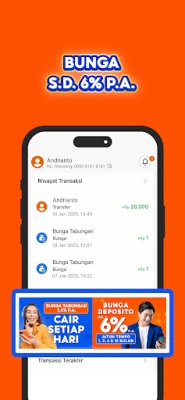
- Digital savings: Manage savings through your phone. Interest rates can change, so check the current rate and applicable terms in the app.
- Promotional transfer benefits: SeaBank advertises up to 100 free transfers per month to other banks. Eligibility, transfer methods, and current terms may apply.
- ShopeePay top-ups: Top up ShopeePay through the app; the supplied description advertises fee-free top-ups without a limit, subject to current conditions.
- Shopee payments: Pay for Shopee purchases using a SeaBank virtual account, with the app description advertising no administration fee for this method.
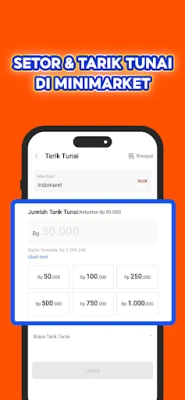
- Cash services at minimarkets: Deposit or withdraw cash at participating minimarkets using the available SeaBank service. Check the app for locations and any transaction conditions.
- SeaBank Pinjam for selected customers: Eligible users may see loan offers with stated limits, repayment periods, and interest. Availability and final terms depend on the customer’s offer and the bank’s assessment.
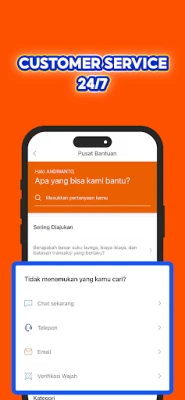
- Round-the-clock customer service: SeaBank lists 24/7 customer support through its official contact channels.
✅ Pros and ❌ Cons
Pros
- Combines common banking and payment tasks in one mobile app.
- Supports QRIS payments, transfers, e-wallet top-ups, and Shopee payments.
- Advertises free-transfer and top-up benefits, subject to current terms.
- Provides access to savings and cash services without relying solely on branch visits.
- Offers customer support around the clock through its listed channels.
Cons
- Requires an internet connection for most banking functions.
- Some benefits, rates, limits, and fees can change or depend on eligibility.
- SeaBank Pinjam is not available to every customer.
- Users who install an unofficial APK face additional security and privacy risks.
- Digital banking may not suit customers who prefer in-person assistance for routine transactions.
📋 App Details
- App Name: SeaBank
- Current Version: Not independently verified; check the official app listing for the latest version
- Last Updated: Not independently verified
- File Size: Varies by release and device; check the installer listing before downloading
- Requires Android: Minimum Android version not verified; consult the current Google Play listing for device compatibility
- Developer: PT Bank SeaBank Indonesia
- Category: Finance
- Content Rating: Check the current Google Play listing; the app is a financial service and may be subject to age and account eligibility requirements
SeaBank states that PT Bank SeaBank Indonesia is licensed and supervised by the Financial Services Authority (OJK) and Bank Indonesia (BI), and participates in the Indonesia Deposit Insurance Corporation (LPS). The bank also cautions that deposits with interest exceeding the applicable LPS guarantee rate may not be covered by LPS protection. Verify the current guarantee terms and rate directly before making a deposit.
💬 User Reviews
User feedback for banking apps commonly reflects both convenience and the importance of reliable access. Customers may value having transfers, payments, and savings available in one place, while concerns can arise around account verification, transaction processing, app performance, or getting help with an issue. Ratings and review themes change over time, and a current, verified SeaBank review breakdown was not available for this article. Check recent Play Store reviews for feedback about the latest version and your device.
🔍 5 Best Alternative Apps
- Jago: A digital banking app offering account management and tools for organising money. Compare its current fees, features, and eligibility with your needs.
- blu by BCA Digital: A mobile-first banking service with digital account features and everyday financial tools. Availability and product conditions may differ from SeaBank.
- Livin’ by Mandiri: Bank Mandiri’s app for customers looking to manage banking and payments digitally. Some services require a Mandiri account.
- BRImo: A mobile banking app from Bank Rakyat Indonesia that provides access to banking and payment services for its customers.
- myBCA: BCA’s mobile banking app for managing supported BCA accounts and transactions. Check account requirements and current features before choosing it.
🧠 My Opinion
SeaBank is a useful option for people who want to handle everyday payments, transfers, and savings through a phone. Its range of services and advertised fee benefits may be attractive, but offers and interest rates can change, and some products are restricted to eligible customers. Review the latest terms rather than relying on promotional figures alone.
It may suit customers comfortable with digital banking who want several routine services in one place. Download the official app, protect your login details, and compare its terms with other banks before deciding where to keep or borrow money.
🛡️ Privacy and Security
For a financial app, use Google Play or another source you can verify as official. Avoid modified APKs and unfamiliar download sites: a tampered installer could contain malware or expose personal information, passwords, and banking data.
If you install an APK manually, Android may ask you to enable permission to install apps from that source—sometimes labelled “Install unknown apps” or “Install from unknown sources.” Enable it only for a trusted source, then turn it off again when appropriate. Check the app’s requested permissions, keep Android and the app updated, use a unique PIN or password, and never disclose verification codes. Contact SeaBank through its official channels if you suspect unauthorised activity.
❓ Frequently Asked Questions (FAQs)
Q1: Is SeaBank APK free to use?
A1: The app can generally be downloaded without a purchase, but banking services may have specific fees, limits, eligibility requirements, or terms. Check the latest information in the app before making a transaction.
Q2: Do I need an internet connection to use SeaBank?
A2: Yes. Account access, payments, transfers, and most other app services require an internet connection.
Q3: Is it safe to download SeaBank as an APK?
A3: Safety depends on where the file comes from and whether it has been altered. Prefer the official app store or a source you can verify, and avoid unofficial or modified APKs that could compromise your device or banking information.
Q4: Can everyone use SeaBank Pinjam?
A4: No. The service is described as limited to selected customers. Check the app for availability and review the full loan terms, including the final interest and repayment amount, before accepting an offer.
Q5: Are SeaBank savings deposits guaranteed by LPS?
A5: SeaBank says it is an LPS participant, but guarantee coverage is subject to LPS rules and conditions. Deposits with interest above the applicable guarantee rate may not be covered, so verify the current terms with LPS or SeaBank.
Rate the App
Add Comment & Review
User Reviews
Based on 0 reviews
No reviews added yet.
Comments will not be approved to be posted if they are SPAM, abusive, off-topic, use profanity, contain a personal attack, or promote hate of any kind.






More »

Popular Apps

TradingView: Track All MarketsTradingView Inc.

Bus Fever Party!Lumi Games

Claude by AnthropicAnthropic PBC

Block Craft 3D:Building GameWildlife Studios

Malwarebytes - Mobile SecurityMalwarebytes

Block Blast!HungryStudio

Canva: AI Photo & Video EditorCanva

Candy Crush SagaKing

Carrom Pool: Disc GameMiniclip.com

EA SPORTS FC Soccer Mobile 27ELECTRONIC ARTS
More »
Editor's Choice

Kahoot! Play & Create QuizzesKahoot!

United AirlinesUnited Airlines

Tripwoa: Travel Plan & Trailtripwoa

trivago: Compare hotel pricestrivago N.V.

Planner 5D: AI Home DesignPlanner 5D

ibis Paint Xibis inc.

Agoda: Cheap Flights & Hotelsagoda.com

Hopper: Hotels, Flights & CarsHopper Inc.

Brilliant: Learn Math & CodingBrilliant.org

Google ClassroomGoogle LLC