




Latest Version
Update
November 03, 2026
November 03, 2026
Developer
tripwoa
tripwoa
Categories
Travel & Local
Travel & Local
Platforms
Android
Android
Downloads
0
0
License
Free
Free
Package Name
com.usnoow.tripwoa
com.usnoow.tripwoa
Report
Report a Problem
Report a Problem
More About Tripwoa: Travel Plan & Trail
✦ Plan together. Explore with confidence. Keep the memories.
Tripwoa is a travel-planning app that brings itineraries, maps, bookings, events and trip memories together in one place. Plan a journey yourself or use AI to create a day-by-day outline, then invite fellow travelers to help organize it.
Planning a trip can mean juggling map pins, booking confirmations, group chats and scattered notes. Tripwoa aims to bring those details into one organized travel companion, making it easier to shape an itinerary, coordinate with friends and keep track of the places you visit.
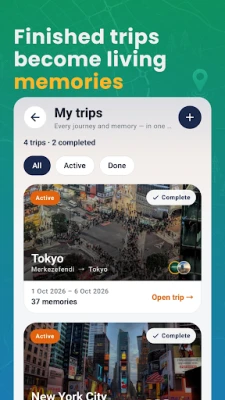
Its standout idea is that a journey does not end when you get home. Tripwoa’s Trail feature can collect liked places, pins, visits, photos and notes into a timeline, helping travelers revisit the memories and details behind each trip.
Tripwoa is a travel-planning and discovery app for people who want to organize a trip from the initial idea through the journey itself. Users can enter a destination, dates and travel preferences, build an itinerary manually or ask AI to suggest a day-by-day plan, and adjust the schedule to suit their pace. The app also supports shared planning, local event discovery, map-based navigation and travel records.
An APK is the package file format used to distribute and install Android apps. Installing a Tripwoa APK manually can be an alternative to downloading the app through an app store, but users should verify the file’s source, compatibility and authenticity before installing it.
Pros
Cons
Current Google Play review data could not be verified, so it would be misleading to claim specific praise or complaints from Tripwoa users. Based on the described features, travelers may appreciate having plans, shared edits, maps and trip memories together. Potential areas to assess in recent reviews include AI itinerary accuracy, map and listing freshness, syncing reliability, ease of collaboration and the limits of the free plan.
Tripwoa’s appeal lies in bringing several stages of travel planning together: shaping an itinerary, coordinating with companions, exploring a destination and saving memories afterward. Its editable AI plans and map-based daily routes could be especially helpful for travelers who like having a clear structure without locking themselves into a rigid schedule.
The app is worth considering if you want one shared place for trip plans and travel records. Before relying on it, check recent app-store details, confirm important bookings and opening times independently, and review how your location, photos and shared memories are handled. It looks most suited to organized travelers and groups who want their trip details—and the story behind them—kept together.
Tripwoa’s described features may involve personal information such as location, travel dates, photos, notes, booking documents and details shared with other travelers. Review the app’s privacy settings and permissions, and use its sharing controls carefully. The supplied description mentions options for private memories and limiting media backup with Privacy Mode.
If you install an APK manually, download it only from a trusted source and confirm that it is the correct, unmodified package. Android may ask you to allow installation from that source under a setting commonly called Install unknown apps or Install from unknown sources; turn that permission off again when you no longer need it. Unofficial or altered APK files can contain malware, compromise data or fail to receive safe updates, so the official app store is generally the safer choice when available.
Q1: Is Tripwoa free to use?
A1: The app description says core trip planning is free to start. Tripwoa Premium is described as adding features such as more plan generation, longer trips, smart route optimization and higher AI and cloud limits.
Q2: Can I plan a trip with friends?
A2: Yes. The description says you can invite co-travelers by email to edit a shared trip. You can also create a view-only link or QR code for people who only need to see the itinerary.
Q3: Does Tripwoa work offline?
A3: Offline availability is not confirmed in the supplied information. Features such as live location, event discovery, syncing and online map data may require an internet connection, so check what is available before traveling.
Q4: Is it safe to download the Tripwoa APK?
A4: Safety depends on the file and where it comes from. Prefer an official app store or a trusted distributor, avoid modified APKs, and scan files when possible. An unofficial APK can expose your device or personal information to security risks.
Q5: What is Trail in Tripwoa?
A5: Trail is a travel-history feature described as a timeline of liked places, pins and confirmed visits. It can also hold photos and notes, with controls for keeping personal memories private or sharing selected ones.
Tripwoa APK
📱 Tripwoa APK Summary
Tripwoa is a travel-planning app that brings itineraries, maps, bookings, events and trip memories together in one place. Plan a journey yourself or use AI to create a day-by-day outline, then invite fellow travelers to help organize it.
- App Name: Tripwoa
- Current Version: Not verified
- Last Updated: Not verified
- Category: Travel & Local
- Developer: Not verified
- Google Play Rating: Not verified
💡 Introduction
Planning a trip can mean juggling map pins, booking confirmations, group chats and scattered notes. Tripwoa aims to bring those details into one organized travel companion, making it easier to shape an itinerary, coordinate with friends and keep track of the places you visit.
Its standout idea is that a journey does not end when you get home. Tripwoa’s Trail feature can collect liked places, pins, visits, photos and notes into a timeline, helping travelers revisit the memories and details behind each trip.
❓ What is Tripwoa APK?
Tripwoa is a travel-planning and discovery app for people who want to organize a trip from the initial idea through the journey itself. Users can enter a destination, dates and travel preferences, build an itinerary manually or ask AI to suggest a day-by-day plan, and adjust the schedule to suit their pace. The app also supports shared planning, local event discovery, map-based navigation and travel records.
An APK is the package file format used to distribute and install Android apps. Installing a Tripwoa APK manually can be an alternative to downloading the app through an app store, but users should verify the file’s source, compatibility and authenticity before installing it.
🧑💻 How to Use
- Install and open the app: Get Tripwoa through an official app store or a trusted APK provider, then launch it on your Android device.
- Create an account: Sign up or log in if you want to save and sync journeys across devices. The supplied app description says core trip planning is free to start.
- Set up a trip: Choose a destination, travel dates, companions and interests. Add your own places or request an AI-generated itinerary.
- Personalize the schedule: Review the suggested stops, then add, remove, rearrange or replace activities. Check the route and estimated visit durations before settling on a plan.
- Invite your group: Add co-travelers by email so they can edit the shared itinerary. You can also create a view-only link or QR code for people who only need to see the plan.
- Explore and navigate: Browse places and local events, open the map or route view, mark stops as visited and launch directions when you are ready to move on.
- Save trip details and memories: Attach travel documents and booking information, then add notes or photos to your Trail as you go. Review privacy and backup settings to control what is stored or shared.
⚙️ Features
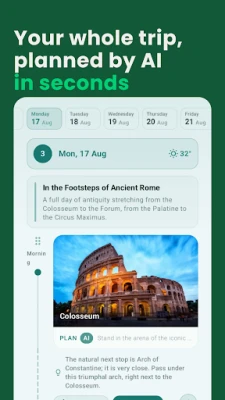
- AI-assisted itinerary planning: Generate a personalized day-by-day outline using details such as travel dates, interests, pace and companions. Suggested plans are editable, so you remain in control.
- Flexible trip editing: Add, remove, rearrange, swap or rebuild stops as plans change. Save favorite places for future journeys.
- Collaborative planning: Invite friends as co-travelers who can edit the trip, manage group members and keep everyone working from the same itinerary instead of scattered messages.
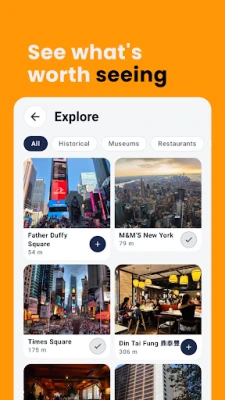
- Destination and event discovery: Explore landmarks, restaurants, museums, nature spots, concerts, festivals and other local events. Where available, listings include practical details such as opening hours and ticket information.
- Interactive maps and routes: Switch between map and route views, see numbered stops and travel distances, use live location to find nearby places, and open directions to a stop.
- Trail travel history: Keep liked places, map pins and confirmed visits in a chronological timeline. Add photos, notes, emojis and companions to capture the context of a moment.
- Travel details in one place: Store flight information, lodging details, tickets, receipts, documents and private pins alongside the relevant trip. The description also mentions flight status and daily weather features.
- Sharing and export options: Share a current view-only itinerary link or QR code, export a PDF or text summary with map links, and add trip dates to your calendar.
- Language choices: The app description lists English, Turkish, German, French, Russian, Arabic, Spanish, Brazilian Portuguese and Japanese, with place names shown according to the chosen language.
✅ Pros and ❌ Cons
Pros
- Combines itinerary planning, maps, trip documents and memories in one travel-focused app.
- AI suggestions can provide a useful starting point for organizing a destination visit.
- Shared editing helps groups coordinate around one itinerary.
- Map and route views make it easier to follow a day’s planned stops.
- The Trail feature offers a structured way to save places and remember past journeys.
- Core planning is described as free to start.
Cons
- AI-generated plans and local listings may need checking for accuracy, availability and current opening times.
- Useful features such as syncing, maps and event discovery may depend on an internet connection or location access.
- Premium limits apply to features such as monthly plan generation, trip length, route optimization and AI or cloud usage.
- Some listing details, including ticket information and local guidance, may not be available for every destination.
- Version, compatibility and store-rating details could not be independently verified for this review.
📋 App Details
- App Name: Tripwoa
- Current Version: Not verified
- Last Updated: Not verified
- File Size: Varies by release; check the installer listing before downloading
- Requires Android: Minimum Android version not verified
- Developer: Not verified
- Content Rating: Not verified
- Category: Travel & Local
- Pricing: Free to start, with a Premium option described by the app
💬 User Reviews
Current Google Play review data could not be verified, so it would be misleading to claim specific praise or complaints from Tripwoa users. Based on the described features, travelers may appreciate having plans, shared edits, maps and trip memories together. Potential areas to assess in recent reviews include AI itinerary accuracy, map and listing freshness, syncing reliability, ease of collaboration and the limits of the free plan.
🔍 5 Best Alternative Apps
- Wanderlog: A trip planner for organizing places, routes and travel details in an itinerary. It is a strong option for travelers who want to build a detailed plan and coordinate with others.
- Roadtrippers: Focuses on road-trip planning and finding interesting stops along a route. It may suit travelers who want to make the journey between destinations part of the adventure.
- Polarsteps: Helps travelers record and share journeys, including visited locations and travel memories. It is worth considering if documenting a trip is more important than building a detailed schedule.
- Google Maps: Offers navigation, saved places, local business discovery and directions. It is a practical choice for travelers who mainly need reliable mapping and location tools.
- Visit A City: Provides destination guides and suggested sightseeing itineraries. It can be useful for visitors looking for a structured starting point for exploring popular attractions.
🧠 My Opinion
Tripwoa’s appeal lies in bringing several stages of travel planning together: shaping an itinerary, coordinating with companions, exploring a destination and saving memories afterward. Its editable AI plans and map-based daily routes could be especially helpful for travelers who like having a clear structure without locking themselves into a rigid schedule.
The app is worth considering if you want one shared place for trip plans and travel records. Before relying on it, check recent app-store details, confirm important bookings and opening times independently, and review how your location, photos and shared memories are handled. It looks most suited to organized travelers and groups who want their trip details—and the story behind them—kept together.
🛡️ Privacy and Security
Tripwoa’s described features may involve personal information such as location, travel dates, photos, notes, booking documents and details shared with other travelers. Review the app’s privacy settings and permissions, and use its sharing controls carefully. The supplied description mentions options for private memories and limiting media backup with Privacy Mode.
If you install an APK manually, download it only from a trusted source and confirm that it is the correct, unmodified package. Android may ask you to allow installation from that source under a setting commonly called Install unknown apps or Install from unknown sources; turn that permission off again when you no longer need it. Unofficial or altered APK files can contain malware, compromise data or fail to receive safe updates, so the official app store is generally the safer choice when available.
❓ Frequently Asked Questions (FAQs)
Q1: Is Tripwoa free to use?
A1: The app description says core trip planning is free to start. Tripwoa Premium is described as adding features such as more plan generation, longer trips, smart route optimization and higher AI and cloud limits.
Q2: Can I plan a trip with friends?
A2: Yes. The description says you can invite co-travelers by email to edit a shared trip. You can also create a view-only link or QR code for people who only need to see the itinerary.
Q3: Does Tripwoa work offline?
A3: Offline availability is not confirmed in the supplied information. Features such as live location, event discovery, syncing and online map data may require an internet connection, so check what is available before traveling.
Q4: Is it safe to download the Tripwoa APK?
A4: Safety depends on the file and where it comes from. Prefer an official app store or a trusted distributor, avoid modified APKs, and scan files when possible. An unofficial APK can expose your device or personal information to security risks.
Q5: What is Trail in Tripwoa?
A5: Trail is a travel-history feature described as a timeline of liked places, pins and confirmed visits. It can also hold photos and notes, with controls for keeping personal memories private or sharing selected ones.
Rate the App
Add Comment & Review
User Reviews
Based on 0 reviews
No reviews added yet.
Comments will not be approved to be posted if they are SPAM, abusive, off-topic, use profanity, contain a personal attack, or promote hate of any kind.










More »

Popular Apps

TradingView: Track All MarketsTradingView Inc.

Bus Fever Party!Lumi Games

Claude by AnthropicAnthropic PBC

Block Craft 3D:Building GameWildlife Studios

Malwarebytes - Mobile SecurityMalwarebytes

Block Blast!HungryStudio

Canva: AI Photo & Video EditorCanva

Candy Crush SagaKing

Carrom Pool: Disc GameMiniclip.com

EA SPORTS FC Soccer Mobile 27ELECTRONIC ARTS
More »
Editor's Choice

Kahoot! Play & Create QuizzesKahoot!

United AirlinesUnited Airlines

Tripwoa: Travel Plan & Trailtripwoa

trivago: Compare hotel pricestrivago N.V.

Planner 5D: AI Home DesignPlanner 5D

ibis Paint Xibis inc.

Agoda: Cheap Flights & Hotelsagoda.com

Hopper: Hotels, Flights & CarsHopper Inc.

Brilliant: Learn Math & CodingBrilliant.org

Google ClassroomGoogle LLC