




Latest Version
Version
5.114.0
5.114.0
Update
October 18, 2026
October 18, 2026
Developer
Hopper Inc.
Hopper Inc.
Categories
Travel & Local
Travel & Local
Platforms
Android
Android
Downloads
0
0
License
Free
Free
Package Name
com.hopper.mountainview.play
com.hopper.mountainview.play
Report
Report a Problem
Report a Problem
More About Hopper: Hotels, Flights & Cars
The Hopper app has helped over 100 million travelers find and secure the best price on flights, hotels, homes and car rentals - each and every time they book their trips.
Hopper is a travel-booking app for comparing and reserving flights, hotels, homes, and rental cars. Its price-tracking tools and color-coded calendar help travelers spot promising dates and decide when to book.
Planning a trip can mean checking multiple websites, comparing dates, and wondering whether a fare will drop after you book. Hopper brings flight, accommodation, and car-rental searches together, with tools designed to make price comparisons and trip planning more straightforward.
Its signature feature is the price-watch system: track a trip and receive an alert when Hopper thinks it may be a good time to book. Add a calendar that highlights cheaper travel dates, and Hopper can be a useful companion for flexible travelers looking to plan with more confidence.
Hopper is a travel app that lets users search and book flights, hotels, homes, and rental cars. It also offers fare tracking, price predictions, flexible booking options, and customer support. Availability and terms for features such as cancellation or disruption protection can depend on the booking, route, and applicable conditions, so review the details shown before purchasing.
An APK is the package file format Android uses to install apps. Downloading and installing an APK manually is an alternative to installing through an app store, but it requires care: use a trustworthy source and check that the file is genuine and compatible with your device.
Pros
Cons
User feedback commonly values Hopper’s easy-to-use search tools, price notifications, and ability to compare trip dates in one place. Travelers also appreciate having different booking categories and itinerary details accessible through a single app.
Some users report concerns about changing prices, booking changes, refunds, or getting help when travel plans go wrong. These experiences can depend on the booking provider, fare rules, and protection plan. Before confirming a purchase, check who is responsible for the booking, read the cancellation and change terms, and save your confirmation details.
Hopper is a handy option for travelers who want to compare trip dates, monitor prices, and search across several travel categories from one app. Its alerts and calendar tools can make planning less repetitive, particularly if you have flexibility about when or where you travel.
It is not a guarantee of the lowest price, and optional protections should never be selected without reviewing their cost and conditions. Overall, Hopper is worth considering as a travel-search and booking tool—especially for deal-conscious planners who are comfortable comparing the final terms before they pay.
For the safest installation, download Hopper through Google Play or another source you trust. If you install an APK manually, Android may ask you to allow installation from that particular source in the device settings. Enable this permission only when needed, and turn it off again afterward.
Unofficial or modified APK files can contain malware, request unnecessary permissions, or put personal and payment information at risk. Avoid files from unknown websites, keep Android and the app updated, and review permissions before granting access. When booking, use secure payment methods and verify that the trip details and provider are correct.
Q1: Is Hopper free to use?
A1: The app can generally be downloaded and used to search for travel options. Bookings, optional protection plans, and other services may have costs, so review the price breakdown before confirming.
Q2: Do I need an internet connection to use Hopper?
A2: Yes. Searching, checking prices, receiving updates, and managing bookings require an internet connection. Keep your confirmation details accessible for your trip.
Q3: Is the Hopper APK safe to download?
A3: The safest choice is the official Google Play listing. If you install an APK, use a reputable source and avoid modified files, which may contain malware or compromise your data.
Q4: Can Hopper guarantee that a price prediction will be correct?
A4: No. Price guidance is an estimate based on available information, and fares can change quickly. Compare the current options and book when the price and terms work for you.
Q5: Can I change or cancel a booking through Hopper?
A5: It depends on the booking’s rules and any optional plan you purchased. Check the cancellation, change, and eligibility terms shown for your specific itinerary before booking.
Hopper APK
📱 Hopper APK Summary
Hopper is a travel-booking app for comparing and reserving flights, hotels, homes, and rental cars. Its price-tracking tools and color-coded calendar help travelers spot promising dates and decide when to book.
- App Name: Hopper: Flights, Hotels & Cars
- Current Version: Version varies by device and release; check the latest listing before downloading
- Last Updated: The date varies by release and region; check the current app listing
- Category: Travel & Local
- Developer: Hopper
- Google Play Rating: Ratings and review counts change over time and by region; see Google Play for the current figures
💡 Introduction
Planning a trip can mean checking multiple websites, comparing dates, and wondering whether a fare will drop after you book. Hopper brings flight, accommodation, and car-rental searches together, with tools designed to make price comparisons and trip planning more straightforward.
Its signature feature is the price-watch system: track a trip and receive an alert when Hopper thinks it may be a good time to book. Add a calendar that highlights cheaper travel dates, and Hopper can be a useful companion for flexible travelers looking to plan with more confidence.
❓ What Is Hopper APK?
Hopper is a travel app that lets users search and book flights, hotels, homes, and rental cars. It also offers fare tracking, price predictions, flexible booking options, and customer support. Availability and terms for features such as cancellation or disruption protection can depend on the booking, route, and applicable conditions, so review the details shown before purchasing.
An APK is the package file format Android uses to install apps. Downloading and installing an APK manually is an alternative to installing through an app store, but it requires care: use a trustworthy source and check that the file is genuine and compatible with your device.
🧑💻 How to Use Hopper
- Install and open the app: Get Hopper from Google Play or another trusted source, then launch it and follow the setup prompts.
- Choose what you want to book: Select flights, hotels, homes, or rental cars.
- Enter your trip details: Add your destination, travel dates, passenger or guest information, and any other search preferences.
- Compare dates and options: Check the available results and use the color-coded calendar, where offered, to explore potentially cheaper dates.
- Track a trip: Turn on price watching for a journey to receive alerts when Hopper updates its recommendation or fare information.
- Review the booking carefully: Before paying, confirm the total cost, baggage or property details, cancellation terms, and any optional protection plans.
- Manage your trip: Use the app to view booking information and contact support if you need help.
⚙️ Features
- Flight search and booking: Compare flight options in one place and book through the app, subject to availability and the displayed fare conditions.
- Hotels, homes, and rental cars: Search for accommodation and transportation alongside flights, making it easier to organize several parts of a trip.
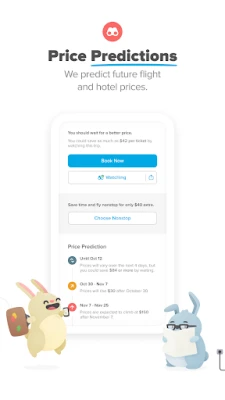
- Price tracking: Watch selected trips and receive notifications about price changes and Hopper’s booking guidance.
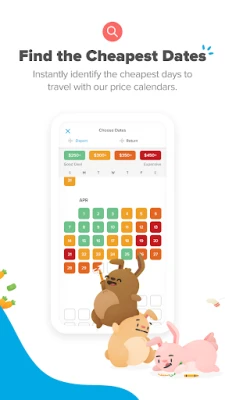
- Color-coded date calendar: Explore travel dates visually to find days that may offer lower prices, especially when your schedule is flexible.
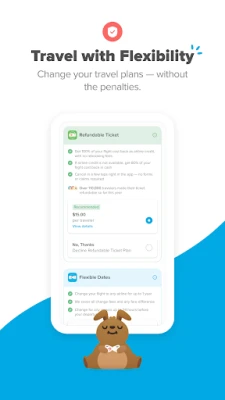
- Flexible booking options: Hopper may offer add-on plans for changing or cancelling certain bookings. Read the specific terms and eligibility requirements before choosing one.
- Flight disruption assistance: Eligible bookings may include options designed to help when disruptions occur. Coverage, rebooking conditions, and costs depend on the plan and itinerary.
- Customer support: The app provides access to help for booking questions and travel issues; response options and availability may vary.
- Tree-planting pledge: Hopper says it pledges to plant two trees for each booking made through its platform. This is part of the company’s stated environmental initiative.
✅ Pros and ❌ Cons
Pros
- Brings flight, hotel, home, and rental-car searches into one app.
- Price alerts can help users keep track of fares without repeatedly searching.
- The date calendar makes it easier to compare travel dates at a glance.
- Offers optional flexibility and disruption-related services on eligible bookings.
- Provides a convenient way to keep trip details and booking information together.
Cons
- Price predictions are estimates, not guarantees that a fare will rise or fall.
- Some protections and flexible-booking options may cost extra and have restrictions.
- Prices, availability, and booking conditions can change, so users should verify the final details before paying.
- Support experiences and resolution times may vary, particularly during busy travel periods.
- Like many booking platforms, the app may not show every option available from airlines or accommodation providers directly.
📋 App Details
- App Name: Hopper: Flights, Hotels & Cars
- Current Version: Varies by device and release; check the current store listing
- Last Updated: Varies by release and region; check the current store listing
- File Size: Varies by version and device; check the download page before installing
- Requires Android: Minimum requirement varies by release; confirm compatibility on the app listing
- Developer: Hopper
- Content Rating: Check the current Google Play listing for the rating in your region
💬 User Reviews
User feedback commonly values Hopper’s easy-to-use search tools, price notifications, and ability to compare trip dates in one place. Travelers also appreciate having different booking categories and itinerary details accessible through a single app.
Some users report concerns about changing prices, booking changes, refunds, or getting help when travel plans go wrong. These experiences can depend on the booking provider, fare rules, and protection plan. Before confirming a purchase, check who is responsible for the booking, read the cancellation and change terms, and save your confirmation details.
🔍 5 Best Alternative Apps
- Google Flights: A flight-search tool with date comparisons and price tracking. It is a useful alternative for researching fares, though bookings are often completed with an airline or travel provider.
- Skyscanner: Compares flights, hotels, and car rentals from a range of providers. Its flexible-date and destination searches can help travelers explore options.
- Kayak: A travel search platform for flights, stays, and rental cars, with filters and fare-tracking tools for comparing trips.
- Expedia: Offers a broad selection of flights, hotels, and rental cars, with package-booking options for travelers who want to arrange several trip components together.
- Booking.com: Best known for accommodation searches, it also offers flight and car-rental options in many markets, making it a practical alternative for trip planning.
🧠 My Opinion
Hopper is a handy option for travelers who want to compare trip dates, monitor prices, and search across several travel categories from one app. Its alerts and calendar tools can make planning less repetitive, particularly if you have flexibility about when or where you travel.
It is not a guarantee of the lowest price, and optional protections should never be selected without reviewing their cost and conditions. Overall, Hopper is worth considering as a travel-search and booking tool—especially for deal-conscious planners who are comfortable comparing the final terms before they pay.
🛡️ Privacy and Security
For the safest installation, download Hopper through Google Play or another source you trust. If you install an APK manually, Android may ask you to allow installation from that particular source in the device settings. Enable this permission only when needed, and turn it off again afterward.
Unofficial or modified APK files can contain malware, request unnecessary permissions, or put personal and payment information at risk. Avoid files from unknown websites, keep Android and the app updated, and review permissions before granting access. When booking, use secure payment methods and verify that the trip details and provider are correct.
❓ Frequently Asked Questions (FAQs)
Q1: Is Hopper free to use?
A1: The app can generally be downloaded and used to search for travel options. Bookings, optional protection plans, and other services may have costs, so review the price breakdown before confirming.
Q2: Do I need an internet connection to use Hopper?
A2: Yes. Searching, checking prices, receiving updates, and managing bookings require an internet connection. Keep your confirmation details accessible for your trip.
Q3: Is the Hopper APK safe to download?
A3: The safest choice is the official Google Play listing. If you install an APK, use a reputable source and avoid modified files, which may contain malware or compromise your data.
Q4: Can Hopper guarantee that a price prediction will be correct?
A4: No. Price guidance is an estimate based on available information, and fares can change quickly. Compare the current options and book when the price and terms work for you.
Q5: Can I change or cancel a booking through Hopper?
A5: It depends on the booking’s rules and any optional plan you purchased. Check the cancellation, change, and eligibility terms shown for your specific itinerary before booking.
Rate the App
Add Comment & Review
User Reviews
Based on 0 reviews
No reviews added yet.
Comments will not be approved to be posted if they are SPAM, abusive, off-topic, use profanity, contain a personal attack, or promote hate of any kind.










More »

Popular Apps

TradingView: Track All MarketsTradingView Inc.

Bus Fever Party!Lumi Games

Claude by AnthropicAnthropic PBC

Block Craft 3D:Building GameWildlife Studios

Malwarebytes - Mobile SecurityMalwarebytes

Block Blast!HungryStudio

Canva: AI Photo & Video EditorCanva

Candy Crush SagaKing

Carrom Pool: Disc GameMiniclip.com

EA SPORTS FC Soccer Mobile 27ELECTRONIC ARTS
More »
Editor's Choice

Kahoot! Play & Create QuizzesKahoot!

United AirlinesUnited Airlines

Tripwoa: Travel Plan & Trailtripwoa

trivago: Compare hotel pricestrivago N.V.

Planner 5D: AI Home DesignPlanner 5D

ibis Paint Xibis inc.

Agoda: Cheap Flights & Hotelsagoda.com

Hopper: Hotels, Flights & CarsHopper Inc.

Brilliant: Learn Math & CodingBrilliant.org

Google ClassroomGoogle LLC