




Latest Version
Version
7.213
7.213
Update
October 18, 2026
October 18, 2026
Developer
Skyscanner Ltd
Skyscanner Ltd
Categories
Travel & Local
Travel & Local
Platforms
Android
Android
Downloads
0
0
License
Free
Free
Package Name
net.skyscanner.android.main
net.skyscanner.android.main
Report
Report a Problem
Report a Problem
More About Skyscanner Flights Hotels Cars
Skyscanner makes planning your next trip easy. Find the best prices on flights, hotels & rental cars – all in one place.
Skyscanner is a travel-search app that helps you compare flights, accommodation, and rental cars in one place. Explore destinations, check flexible dates, track fare changes, and compare offers from airlines and travel providers before choosing where to book.
Planning a trip can mean checking dozens of airline, hotel, and car-rental websites. Skyscanner brings many of those options together, making it easier to compare prices and narrow down choices from your phone.
Whether you already know your destination or are open to ideas, the app offers tools for exploring routes, comparing travel dates, and keeping an eye on fare changes. It’s designed for travelers who want a convenient overview before deciding where and how to book.
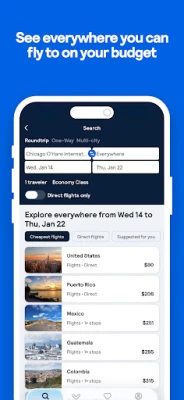
Skyscanner is a travel comparison app for searching flights, hotels, and rental cars. Flight searches can be filtered by factors such as airline, number of stops, travel class, and departure or arrival time. If you’re flexible about your destination, the “Everywhere” search can show flight options to places around the world. Calendar and price-alert tools can also help you compare dates and monitor changes.
The app compares offers from airlines, online travel agencies, accommodation providers, and car-rental companies. Skyscanner helps you find options, but bookings are generally completed with the airline or travel provider shown in the search results. Prices and availability may change, so check the provider’s final terms before booking.
An APK is the Android application package format used to distribute and install apps. An APK may be used for manual installation, but downloading from an unofficial source can carry security and privacy risks. When available, installing Skyscanner through Google Play is the safer option.
Pros
Cons
Feedback commonly highlights the convenience of comparing travel options in one app, the flexible-date tools, and the ability to discover destinations without choosing one first. Users also value being able to track prices and revisit saved searches.
Some frustrations relate to differences between the prices shown in search results and the final amount displayed by a booking provider. Since many bookings are handled by third parties, experiences with changes, refunds, or customer support can depend on the provider. It’s wise to check the final terms and total cost before confirming a booking.
Skyscanner is a practical choice for travelers who want to compare flights, stays, and car rentals without starting their search on several separate websites. Its “Everywhere” search, flexible-date views, filters, saved trips, and Price Alerts are especially helpful when your plans are still taking shape.
It is best treated as a comparison and discovery tool rather than a guarantee of the final booking price. Check the provider’s total cost, rules, and reputation before paying. For travelers who value choice and convenience, Skyscanner is well worth considering as part of a trip-planning toolkit.
For the safest installation, download Skyscanner from Google Play or another trusted, official distribution channel. If you choose to install an APK manually, use a reputable source and check that the file is genuine and has not been modified. Unofficial APKs can contain malware or expose personal information.
Android may require you to allow installation from the source you’re using, sometimes described as “Install unknown apps” or “Install from unknown sources.” Enable this permission only when necessary, limit it to a trusted app, and turn it off again afterward. Review the app’s requested permissions and privacy information, and avoid entering payment details on unfamiliar booking pages.
Q1: Is Skyscanner APK free to use?
A1: Skyscanner is generally free to download and use for searching and comparing travel options. Airlines, hotels, or booking providers may charge for the services you purchase, and their terms determine the final cost.
Q2: Can I book a flight directly in Skyscanner?
A2: Skyscanner helps you compare available fares. Many bookings are completed on the airline’s or travel provider’s website or app, where you should verify the final price and conditions.
Q3: Do I need an internet connection to use Skyscanner?
A3: Yes. Searching for current flights, accommodation, and rental-car availability requires an internet connection. Previously saved information may be accessible in the app, but live prices need to be refreshed online.
Q4: Does Skyscanner charge booking fees?
A4: Skyscanner says it does not add booking fees. The provider you book with may apply its own charges, so review the complete price before confirming.
Q5: Is it safe to download the Skyscanner APK?
A5: The safest option is to install the app from Google Play or an official source. Unofficial APK files may be modified or infected, so only use a trusted distributor and check the file before installation.
Skyscanner APK
📱 Skyscanner APK Summary
Skyscanner is a travel-search app that helps you compare flights, accommodation, and rental cars in one place. Explore destinations, check flexible dates, track fare changes, and compare offers from airlines and travel providers before choosing where to book.
- App Name: Skyscanner
- Current Version: Version information varies by release and device; check Google Play for the latest available version.
- Last Updated: The latest update date can vary by region; check the app listing for the current date.
- Category: Travel & Local
- Developer: Skyscanner Ltd
- Google Play Rating: Ratings and review totals change over time and by region; see Google Play for the current figures.
💡 Introduction
Planning a trip can mean checking dozens of airline, hotel, and car-rental websites. Skyscanner brings many of those options together, making it easier to compare prices and narrow down choices from your phone.
Whether you already know your destination or are open to ideas, the app offers tools for exploring routes, comparing travel dates, and keeping an eye on fare changes. It’s designed for travelers who want a convenient overview before deciding where and how to book.
❓ What is Skyscanner APK?
Skyscanner is a travel comparison app for searching flights, hotels, and rental cars. Flight searches can be filtered by factors such as airline, number of stops, travel class, and departure or arrival time. If you’re flexible about your destination, the “Everywhere” search can show flight options to places around the world. Calendar and price-alert tools can also help you compare dates and monitor changes.
The app compares offers from airlines, online travel agencies, accommodation providers, and car-rental companies. Skyscanner helps you find options, but bookings are generally completed with the airline or travel provider shown in the search results. Prices and availability may change, so check the provider’s final terms before booking.
An APK is the Android application package format used to distribute and install apps. An APK may be used for manual installation, but downloading from an unofficial source can carry security and privacy risks. When available, installing Skyscanner through Google Play is the safer option.
🧑💻 How to Use
- Install and open the app. Choose your region and preferred settings if prompted.
- Select a search type. Choose flights, hotels, or car rentals from the available travel-search options.
- Enter your trip details. Add your departure point, destination, dates, and traveler information. For flights, try “Everywhere” if you’re open to destination ideas.
- Search and compare. Review the available options, then use filters such as price, airline, stops, travel time, hotel type, or vehicle features.
- Check dates and prices. Use flexible-date or calendar views where available to compare costs across different days.
- Save or track options. Save appealing flights or stays, or set a Price Alert for a route to receive updates when fares change.
- Choose a provider and book. Review the final price, baggage or cancellation rules, and other terms before continuing to the airline or travel provider to complete your booking.
⚙️ Features
- Flight comparison: Search and compare available fares from airlines and travel agencies in one place, helping you review options without checking every provider separately.
- “Everywhere” destination search: Explore flight prices to destinations around the world when you haven’t settled on where to go.
- Flexible-date calendar: Compare fares across dates to spot potentially cheaper travel days. Prices are subject to availability and may change.
- Custom search filters: Refine flight results by airline, number of stops, flight duration, travel class, and departure or arrival times.
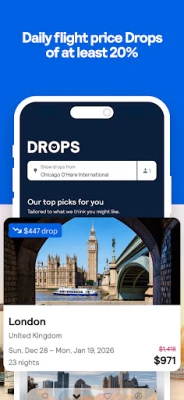
- Price Alerts: Track selected routes and receive notifications when fares change, which can help you decide when to revisit a search.
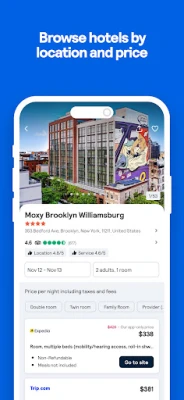
- Hotel search: Compare accommodation options such as hotels, resorts, hostels, and vacation rentals, including stays near your location where available.
- Car-rental comparison: Search rental vehicles from participating providers and filter results by vehicle type, fuel type, and other features.
- Saved trips: Keep selected flights or accommodation options in one place so you can return to them later.
- Provider reviews: Review traveler feedback about listed travel partners where ratings and reviews are available.
- Transparent comparison: Skyscanner says it does not add booking fees. The final price and any service charges are set by the provider, so verify the total before you pay.
✅ Pros and ❌ Cons
Pros
- Search flights, accommodation, and rental cars from a single app.
- Useful tools for flexible travelers, including destination discovery and date comparisons.
- Filters make it easier to narrow a large set of search results.
- Price Alerts and saved options help you keep track of trips you’re considering.
- Lets users compare offers from multiple airlines and travel providers.
Cons
- Skyscanner is primarily a comparison and search service; many bookings must be completed with a third-party provider.
- Prices and availability can change between the search and the final booking page.
- Different providers may have different baggage, refund, cancellation, or customer-support policies.
- Some users may prefer booking directly with an airline or hotel rather than through an agency.
- Search results depend on participating providers and may not show every available offer.
📋 App Details
- App Name: Skyscanner
- Current Version: Varies by release; check Google Play or the app’s official listing for the current version.
- Last Updated: Varies by region and release; check the current Google Play listing.
- File Size: Varies by version and device. Check the installation listing for the download size shown for your device.
- Requires Android: Minimum Android requirement may change between releases; confirm compatibility on Google Play before installing.
- Developer: Skyscanner Ltd
- Category: Travel & Local
- Content Rating: Check the current store listing for the rating applicable to your region.
💬 User Reviews
Feedback commonly highlights the convenience of comparing travel options in one app, the flexible-date tools, and the ability to discover destinations without choosing one first. Users also value being able to track prices and revisit saved searches.
Some frustrations relate to differences between the prices shown in search results and the final amount displayed by a booking provider. Since many bookings are handled by third parties, experiences with changes, refunds, or customer support can depend on the provider. It’s wise to check the final terms and total cost before confirming a booking.
🔍 5 Best Alternative Apps
- Google Flights: A flight-search service with date and route exploration tools. It’s a useful alternative for comparing fares and monitoring flight-price trends.
- Kayak: A travel-search app for comparing flights, hotels, and car rentals. Its filters and trip-planning features suit travelers who want several travel categories in one place.
- Momondo: A travel comparison service focused on finding and comparing flight and hotel options from different providers.
- Hopper: A travel-booking app known for fare tracking and price predictions. Its availability and booking features may vary by destination.
- Expedia: A travel platform for searching and booking flights, hotels, car rentals, and trip packages, with booking managed through its own service.
🧠 My Opinion
Skyscanner is a practical choice for travelers who want to compare flights, stays, and car rentals without starting their search on several separate websites. Its “Everywhere” search, flexible-date views, filters, saved trips, and Price Alerts are especially helpful when your plans are still taking shape.
It is best treated as a comparison and discovery tool rather than a guarantee of the final booking price. Check the provider’s total cost, rules, and reputation before paying. For travelers who value choice and convenience, Skyscanner is well worth considering as part of a trip-planning toolkit.
🛡️ Privacy and Security
For the safest installation, download Skyscanner from Google Play or another trusted, official distribution channel. If you choose to install an APK manually, use a reputable source and check that the file is genuine and has not been modified. Unofficial APKs can contain malware or expose personal information.
Android may require you to allow installation from the source you’re using, sometimes described as “Install unknown apps” or “Install from unknown sources.” Enable this permission only when necessary, limit it to a trusted app, and turn it off again afterward. Review the app’s requested permissions and privacy information, and avoid entering payment details on unfamiliar booking pages.
❓ Frequently Asked Questions (FAQs)
Q1: Is Skyscanner APK free to use?
A1: Skyscanner is generally free to download and use for searching and comparing travel options. Airlines, hotels, or booking providers may charge for the services you purchase, and their terms determine the final cost.
Q2: Can I book a flight directly in Skyscanner?
A2: Skyscanner helps you compare available fares. Many bookings are completed on the airline’s or travel provider’s website or app, where you should verify the final price and conditions.
Q3: Do I need an internet connection to use Skyscanner?
A3: Yes. Searching for current flights, accommodation, and rental-car availability requires an internet connection. Previously saved information may be accessible in the app, but live prices need to be refreshed online.
Q4: Does Skyscanner charge booking fees?
A4: Skyscanner says it does not add booking fees. The provider you book with may apply its own charges, so review the complete price before confirming.
Q5: Is it safe to download the Skyscanner APK?
A5: The safest option is to install the app from Google Play or an official source. Unofficial APK files may be modified or infected, so only use a trusted distributor and check the file before installation.
Rate the App
Add Comment & Review
User Reviews
Based on 0 reviews
No reviews added yet.
Comments will not be approved to be posted if they are SPAM, abusive, off-topic, use profanity, contain a personal attack, or promote hate of any kind.









More »

Popular Apps

TradingView: Track All MarketsTradingView Inc.

Bus Fever Party!Lumi Games

Claude by AnthropicAnthropic PBC

Block Craft 3D:Building GameWildlife Studios

Malwarebytes - Mobile SecurityMalwarebytes

Block Blast!HungryStudio

Canva: AI Photo & Video EditorCanva

Candy Crush SagaKing

Carrom Pool: Disc GameMiniclip.com

EA SPORTS FC Soccer Mobile 27ELECTRONIC ARTS
More »
Editor's Choice

Kahoot! Play & Create QuizzesKahoot!

United AirlinesUnited Airlines

Tripwoa: Travel Plan & Trailtripwoa

trivago: Compare hotel pricestrivago N.V.

Planner 5D: AI Home DesignPlanner 5D

ibis Paint Xibis inc.

Agoda: Cheap Flights & Hotelsagoda.com

Hopper: Hotels, Flights & CarsHopper Inc.

Brilliant: Learn Math & CodingBrilliant.org

Google ClassroomGoogle LLC