





Latest Version
Version
2.227
2.227
Update
November 03, 2026
November 03, 2026
Developer
Wanderlog
Wanderlog
Categories
Travel & Local
Travel & Local
Platforms
Android
Android
Downloads
0
0
License
Free
Free
Package Name
com.wanderlog.android
com.wanderlog.android
Report
Report a Problem
Report a Problem
More About Wanderlog - Trip Planner App
The best app to plan a trip, Wanderlog is the easiest-to-use, completely free travel app for planning every kind of trip, including road trips and group travel! Create a trip itinerary, organize flight, hotel, and car reservations, view places to visit on a map, and collaborate with friends. After your trip, share a travel guide to inspire other travelers.
Wanderlog is a trip-planning app for organizing itineraries, reservations, places to visit, road-trip routes, and travel expenses in one place. Its shared planning tools make it useful for solo travelers and groups, while map-based itineraries help turn a list of ideas into a practical travel plan.
Planning a trip often means juggling maps, booking confirmations, saved restaurants, spreadsheets, and group messages. Wanderlog brings these details together, helping travelers build an itinerary, see destinations on a map, and coordinate plans with other people.
Whether you are arranging a weekend city break or a multi-stop road trip, Wanderlog offers tools for keeping your plans organized. You can add places, organize activities by day, import reservations, and keep track of shared trip expenses without scattering everything across separate apps.
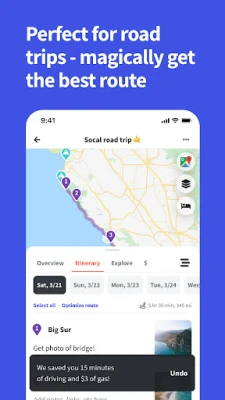
Wanderlog is a travel-planning application for creating and managing trips. It combines itinerary building with a map view, giving you a way to arrange flights, hotels, attractions, restaurants, and other stops. Road-trippers can add multiple destinations, review estimated distances and travel times, and use route-optimization tools to help organize their journey.
The app is designed for travelers who want a clear overview of their plans, including friends coordinating a shared vacation. Depending on the feature, you can add notes and links, invite collaborators, import reservation details, explore travel recommendations, and manage trip budgets or shared costs. Some options, such as offline itinerary access, may require a Pro subscription.
An APK is the package file format used to install apps on Android. Downloading an APK can allow manual installation, but it is important to use a trustworthy source and verify that the file is authentic and compatible with your device.
Pros
Cons
Travelers commonly appreciate having trip ideas, bookings, and destinations gathered in one itinerary, particularly when planning a road trip or coordinating with a group. The map view, shared editing, and ability to rearrange stops are also useful for people whose plans change frequently.
Some users may find that building a detailed itinerary takes effort, while others may want more features without a subscription. As with many travel apps, the experience can also depend on the quality of place information, internet access, and compatibility with a particular device. Ratings and review themes change over time, so check recent reviews for feedback on the latest version.
Wanderlog is a capable choice for travelers who want more than a basic checklist. Its strongest advantages are the combination of map-based itineraries, flexible road-trip planning, shared editing, reservation organization, and expense tracking. It can be particularly helpful when several people are planning together or when a journey includes many stops.
The main considerations are that some features may require Pro, and users should think carefully before connecting an email account. If you want one place to organize a trip and do not mind spending time building your itinerary, Wanderlog is well worth considering. For people who only need navigation or a simple booking list, a more focused app may be enough.
For the safest installation, download Wanderlog through Google Play or another trusted source. If you install an APK manually, check that it comes from a reputable provider and matches the correct app and version. Unofficial or modified APKs can contain malware, request excessive permissions, or put personal information at risk.
Android may ask you to allow installation from an unknown source for the browser or file manager you are using. Enable this permission only when necessary, install the file you trust, and disable it again afterward. Before connecting Gmail or sharing trip details, review the requested permissions and the app’s privacy settings.
Q1: Is Wanderlog free to use?
A1: Wanderlog can be downloaded and used for trip planning, and some road-trip features are available for free. Certain options, such as offline itinerary access, may require Wanderlog Pro. Check the app for current subscription details.
Q2: Does Wanderlog work offline?
A2: Offline access to trip plans is listed as a Pro feature. Some information may be available on your device after it has loaded, but you should check the app’s current plan details and download what you need before traveling.
Q3: Can I plan a trip with friends?
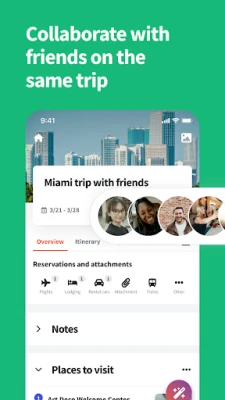
A3: Yes. You can invite collaborators to view or edit a trip, allowing everyone to contribute to the itinerary in real time.
Q4: Can Wanderlog import flight and hotel reservations?
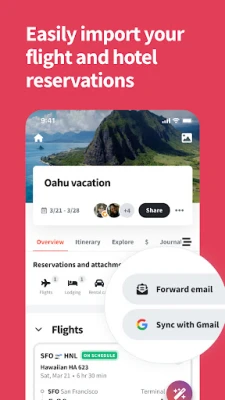
A4: The app supports importing reservation details by forwarding confirmation emails or connecting Gmail. Review the requested email permissions before linking an account.
Q5: Is it safe to download the Wanderlog APK?
A5: APK installation is safest when the file comes from a trusted source and has not been modified. Unofficial APKs may contain malware or create privacy risks, so check the source and permissions before installing.
Wanderlog APK
📱 Wanderlog APK Summary
Wanderlog is a trip-planning app for organizing itineraries, reservations, places to visit, road-trip routes, and travel expenses in one place. Its shared planning tools make it useful for solo travelers and groups, while map-based itineraries help turn a list of ideas into a practical travel plan.
- App Name: Wanderlog: Trip Planner App
- Current Version: Version varies by release and device; check the latest listing before downloading.
- Last Updated: The current update date may vary by store and region.
- Category: Travel & Local
- Developer: Wanderlog
- Google Play Rating: Ratings and review counts change over time; check Google Play for the current figures.
💡 Introduction
Planning a trip often means juggling maps, booking confirmations, saved restaurants, spreadsheets, and group messages. Wanderlog brings these details together, helping travelers build an itinerary, see destinations on a map, and coordinate plans with other people.
Whether you are arranging a weekend city break or a multi-stop road trip, Wanderlog offers tools for keeping your plans organized. You can add places, organize activities by day, import reservations, and keep track of shared trip expenses without scattering everything across separate apps.
❓ What is Wanderlog APK?
Wanderlog is a travel-planning application for creating and managing trips. It combines itinerary building with a map view, giving you a way to arrange flights, hotels, attractions, restaurants, and other stops. Road-trippers can add multiple destinations, review estimated distances and travel times, and use route-optimization tools to help organize their journey.
The app is designed for travelers who want a clear overview of their plans, including friends coordinating a shared vacation. Depending on the feature, you can add notes and links, invite collaborators, import reservation details, explore travel recommendations, and manage trip budgets or shared costs. Some options, such as offline itinerary access, may require a Pro subscription.
An APK is the package file format used to install apps on Android. Downloading an APK can allow manual installation, but it is important to use a trustworthy source and verify that the file is authentic and compatible with your device.
🧑💻 How to Use
- Install and open the app: Get Wanderlog from Google Play or a trusted APK provider, then launch it and follow the setup prompts.
- Create a trip: Start a new itinerary and enter your destination and travel dates if prompted.
- Add places: Search for attractions, restaurants, hotels, or other stops and add them to your plan. You can also create general lists for ideas you have not scheduled yet.
- Organize your itinerary: Arrange activities by day and reorder stops with drag-and-drop. Add times, notes, and useful links to keep details close at hand.
- Check the map and route: View your destinations on the map, review route distances and estimated travel times, and use route optimization where available.
- Import bookings or collaborate: Add reservation details by forwarding confirmation emails or connecting Gmail if you choose. Invite travel companions to view or edit the itinerary.
- Track spending: Set a budget and record expenses. For group trips, use the expense tools to calculate who paid and how costs should be split.
⚙️ Features
- Map-based trip planning: See itinerary destinations pinned on a Google Maps-based map. Connected stops make it easier to understand the order and shape of a route.
- Road-trip tools: Add unlimited stops for free, review estimated distances and travel times, and use route optimization to help arrange destinations efficiently.
- Flexible itinerary building: Schedule activities by day, reorder them with drag-and-drop, and add notes or links for important details.
- Reservation organization: Keep flight, hotel, and attraction information alongside your itinerary. You can import booking details by forwarding emails or connecting Gmail.
- Group collaboration: Invite friends to a trip and work on plans together in real time. Sharing permissions can let collaborators edit or simply view the itinerary.
- Travel inspiration: Browse information and recommendations for places, such as descriptions, opening hours, addresses, ratings, and links to further details. Add ideas to your trip plan where supported.
- Budgeting and expense splitting: Set a trip budget, record spending, and calculate shared costs so group members can see who paid and what is owed.
- Offline access and device syncing: Trip information can sync across devices. Offline itinerary access is a Pro feature, so check the app’s current plan details for availability.
- Google Maps export: Export places from your itinerary to Google Maps for navigation and additional route planning.
✅ Pros and ❌ Cons
Pros
- Combines itinerary planning, maps, reservations, and expenses in one app.
- Useful collaboration features for friends and family planning a trip together.
- Road-trip planning supports many stops and shows estimated travel distances and times.
- Drag-and-drop organization makes it easy to adjust plans as they change.
- Reservation imports and place information can reduce manual organizing.
- Some planning and road-trip tools are available without a paid subscription.
Cons
- Some features, including offline access, may be limited to the Pro subscription.
- Connecting Gmail involves granting account access, so users should review permissions and privacy settings carefully.
- Maps, place information, and reservation imports may depend on internet access or third-party services.
- Large, detailed itineraries can take time to set up and maintain.
- App features, compatibility, and subscription terms can change between releases.
📋 App Details
- App Name: Wanderlog: Trip Planner App
- Current Version: Version varies by release; confirm the latest version in the app store or the APK listing.
- Last Updated: Check the current store listing, as update dates can change.
- File Size: Varies by version and device; check the download listing for the exact APK size.
- Requires Android: Minimum Android version varies by release. Check the compatibility details for the version you plan to install.
- Developer: Wanderlog
- Category: Travel & Local
- Content Rating: Check the current Google Play listing for the official rating in your region.
- Pricing: Free to download, with optional Pro features and in-app purchases that may vary.
💬 User Reviews
Travelers commonly appreciate having trip ideas, bookings, and destinations gathered in one itinerary, particularly when planning a road trip or coordinating with a group. The map view, shared editing, and ability to rearrange stops are also useful for people whose plans change frequently.
Some users may find that building a detailed itinerary takes effort, while others may want more features without a subscription. As with many travel apps, the experience can also depend on the quality of place information, internet access, and compatibility with a particular device. Ratings and review themes change over time, so check recent reviews for feedback on the latest version.
🔍 5 Best Alternative Apps
- TripIt: Organizes travel confirmation details into a consolidated itinerary. It is a strong option for travelers who want their bookings grouped together.
- Roadtrippers: Focuses on road-trip routes, stops, and points of interest. It may suit travelers who want to explore destinations along a driving route.
- TripCase: Helps organize trip details and travel plans in one place. It is worth considering if your priority is keeping itinerary information easy to review.
- Google Maps: Offers navigation, saved places, and route planning. It works well for travelers who mainly need maps and directions rather than a full shared itinerary.
- Google Travel: Provides travel planning and destination discovery tools through Google services. Its available features may differ by region and product updates.
🧠 My Opinion
Wanderlog is a capable choice for travelers who want more than a basic checklist. Its strongest advantages are the combination of map-based itineraries, flexible road-trip planning, shared editing, reservation organization, and expense tracking. It can be particularly helpful when several people are planning together or when a journey includes many stops.
The main considerations are that some features may require Pro, and users should think carefully before connecting an email account. If you want one place to organize a trip and do not mind spending time building your itinerary, Wanderlog is well worth considering. For people who only need navigation or a simple booking list, a more focused app may be enough.
🛡️ Privacy and Security
For the safest installation, download Wanderlog through Google Play or another trusted source. If you install an APK manually, check that it comes from a reputable provider and matches the correct app and version. Unofficial or modified APKs can contain malware, request excessive permissions, or put personal information at risk.
Android may ask you to allow installation from an unknown source for the browser or file manager you are using. Enable this permission only when necessary, install the file you trust, and disable it again afterward. Before connecting Gmail or sharing trip details, review the requested permissions and the app’s privacy settings.
❓ Frequently Asked Questions (FAQs)
Q1: Is Wanderlog free to use?
A1: Wanderlog can be downloaded and used for trip planning, and some road-trip features are available for free. Certain options, such as offline itinerary access, may require Wanderlog Pro. Check the app for current subscription details.
Q2: Does Wanderlog work offline?
A2: Offline access to trip plans is listed as a Pro feature. Some information may be available on your device after it has loaded, but you should check the app’s current plan details and download what you need before traveling.
Q3: Can I plan a trip with friends?
A3: Yes. You can invite collaborators to view or edit a trip, allowing everyone to contribute to the itinerary in real time.
Q4: Can Wanderlog import flight and hotel reservations?
A4: The app supports importing reservation details by forwarding confirmation emails or connecting Gmail. Review the requested email permissions before linking an account.
Q5: Is it safe to download the Wanderlog APK?
A5: APK installation is safest when the file comes from a trusted source and has not been modified. Unofficial APKs may contain malware or create privacy risks, so check the source and permissions before installing.
Rate the App
Add Comment & Review
User Reviews
Based on 0 reviews
No reviews added yet.
Comments will not be approved to be posted if they are SPAM, abusive, off-topic, use profanity, contain a personal attack, or promote hate of any kind.








More »

Popular Apps

TradingView: Track All MarketsTradingView Inc.

Bus Fever Party!Lumi Games

Claude by AnthropicAnthropic PBC

Block Craft 3D:Building GameWildlife Studios

Malwarebytes - Mobile SecurityMalwarebytes

Block Blast!HungryStudio

Canva: AI Photo & Video EditorCanva

Candy Crush SagaKing

Carrom Pool: Disc GameMiniclip.com

EA SPORTS FC Soccer Mobile 27ELECTRONIC ARTS
More »
Editor's Choice

Kahoot! Play & Create QuizzesKahoot!

United AirlinesUnited Airlines

Tripwoa: Travel Plan & Trailtripwoa

trivago: Compare hotel pricestrivago N.V.

Planner 5D: AI Home DesignPlanner 5D

ibis Paint Xibis inc.

Agoda: Cheap Flights & Hotelsagoda.com

Hopper: Hotels, Flights & CarsHopper Inc.

Brilliant: Learn Math & CodingBrilliant.org

Google ClassroomGoogle LLC