





Latest Version
Version
2026.41.0
2026.41.0
Update
October 18, 2026
October 18, 2026
Developer
Expedia
Expedia
Categories
Travel & Local
Travel & Local
Platforms
Android
Android
Downloads
0
0
License
Free
Free
Package Name
com.expedia.bookings
com.expedia.bookings
Report
Report a Problem
Report a Problem
More About Expedia: Hotels, Flights, Cars
Expedia is a one-stop travel shop for booking flights, hotels, car rentals, activities, and vacation packages—and managing your whole trip in one place. Search, compare, book, and track it all from a single app, and save more when you book more.
Expedia is a travel-booking app for arranging flights, hotels, vacation rentals, rental cars, activities, and trip packages from one place. It also offers member deals, flight-price tracking, itinerary management, and eligible OneKeyCash rewards.
Planning a trip often means switching between several websites and apps to compare flights, find a place to stay, book transport, and keep track of reservations. Expedia brings many of those tasks together, helping travelers search, book, and manage trip details in one mobile app.
Whether you are organizing a weekend away or a longer vacation, Expedia offers tools for comparing travel options, discovering app-exclusive offers, and keeping reservations in a single itinerary. Availability, prices, rewards, and cancellation terms can vary, so review the details before booking.
Expedia is a travel service that lets users search for and book flights, hotels, vacation rentals, rental cars, activities, and selected travel packages. It is designed for people who want to plan a trip in one place, compare available options, and access booking information while on the move. Features such as price alerts, trip notifications, member prices, and itinerary sharing can make travel planning and coordination easier.
An APK is the package file format Android uses to distribute and install apps. Installing the Expedia APK manually can be an alternative to downloading through an app store, but users should make sure the file comes from a trusted source and is compatible with their device.
Pros
Cons
Travelers commonly value Expedia for bringing booking options and itinerary information together, as well as for its search filters, accommodation variety, and member offers. Users who book several parts of a trip through the app may also appreciate having reservations easier to find in one place.
Common concerns include changing prices or availability, confusion about cancellation conditions, and difficulties resolving certain booking changes. Experiences can differ depending on the airline, hotel, or other provider involved. Before paying, carefully review the full price, terms, and provider details, and keep your confirmation information available.
Expedia is a practical choice for travelers who want to search for several trip essentials and keep many booking details accessible in one app. Its package options, member deals, price tools, and itinerary features can make planning more convenient, particularly for people who travel regularly.
It is still important to compare the final price and read the terms for every part of a booking. Discounts and rewards have conditions, and cancellation policies differ between providers. If you are comfortable checking those details before purchase, Expedia is a well-rounded travel-planning app worth considering.
Download Expedia from Google Play or another source you trust. If you install an APK manually, verify that the file is authentic and has not been modified. Unofficial APKs can contain malware, request excessive permissions, or put personal and payment information at risk.
Manual installation may require enabling permission to install unknown apps for the specific browser or file manager you use. Android settings and wording vary by device. Enable this permission only when necessary, avoid installing files from unfamiliar websites, and turn it off again afterward. Expedia states that the app uses information for analytics, personalization, and advertising, so review its privacy settings and policies if you have concerns.
Q1: Is the Expedia APK free to use?
A1: The app is generally free to download, but travel bookings cost money. Prices, taxes, fees, and any applicable service charges are shown during the booking process.
Q2: Can I book flights and hotels in the Expedia app?
A2: Yes. Expedia lets users search for and book supported flights, stays, rental cars, activities, and eligible packages. Availability depends on the destination and travel dates.
Q3: Do I need an internet connection to use Expedia?
A3: An internet connection is needed for searching, booking, and receiving live updates. Some previously loaded itinerary information may remain accessible, but do not rely on offline access for current travel changes.
Q4: Can I cancel an Expedia booking for free?
A4: Sometimes. Cancellation rules depend on the specific reservation. Some hotels offer free cancellation if you cancel before the stated deadline, while other bookings may be non-refundable or have fees.
Q5: Is it safe to install the Expedia APK?
A5: The safest option is to install the app from Google Play. If installing an APK manually, use a reputable source and verify the file. Unofficial or modified APKs may expose your device and personal data to security risks.
Expedia APK
📱 Expedia APK Summary
Expedia is a travel-booking app for arranging flights, hotels, vacation rentals, rental cars, activities, and trip packages from one place. It also offers member deals, flight-price tracking, itinerary management, and eligible OneKeyCash rewards.
- App Name: Expedia
- Current Version: Varies by device and rollout; check Google Play for the latest version
- Last Updated: The date varies by release; check the current Google Play listing
- Category: Travel & Local
- Developer: Expedia Group, Inc.
- Google Play Rating: Rating and review count change over time and by region; check Google Play for the current figures
💡 Introduction
Planning a trip often means switching between several websites and apps to compare flights, find a place to stay, book transport, and keep track of reservations. Expedia brings many of those tasks together, helping travelers search, book, and manage trip details in one mobile app.
Whether you are organizing a weekend away or a longer vacation, Expedia offers tools for comparing travel options, discovering app-exclusive offers, and keeping reservations in a single itinerary. Availability, prices, rewards, and cancellation terms can vary, so review the details before booking.
❓ What Is Expedia APK?
Expedia is a travel service that lets users search for and book flights, hotels, vacation rentals, rental cars, activities, and selected travel packages. It is designed for people who want to plan a trip in one place, compare available options, and access booking information while on the move. Features such as price alerts, trip notifications, member prices, and itinerary sharing can make travel planning and coordination easier.
An APK is the package file format Android uses to distribute and install apps. Installing the Expedia APK manually can be an alternative to downloading through an app store, but users should make sure the file comes from a trusted source and is compatible with their device.
🧑💻 How to Use
- Install and open the app: Get Expedia from Google Play or another reputable source, then launch it on your Android device.
- Sign in or continue browsing: Sign in or create an account to access member offers and rewards. You can also explore available travel options before deciding to book.
- Choose what you need: Select flights, stays, cars, activities, or a travel package, then enter your destination and dates.
- Compare results: Use filters to narrow options by price, location, amenities, times, and other available details. Check reviews and booking conditions before choosing.
- Review the booking: Confirm traveler information, dates, total cost, fees, and cancellation terms before completing payment.
- Manage your itinerary: Find reservations and trip details in the app. Depending on the booking, you may also receive alerts about flight updates or other important travel information.
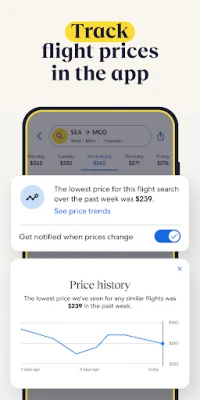
- Track prices and offers: Use available price-tracking tools and check member or app offers. Prices and discounts can change and may apply only to selected bookings.
⚙️ Features
- Travel booking in one app: Search for flights, hotels, homes, cars, activities, and eligible vacation packages without moving between multiple travel apps.
- Flight comparison and price tracking: Compare available flights and, where supported, track prices to receive alerts when fares change.
- Hotels and vacation rentals: Browse a range of accommodation types, from budget stays and airport hotels to resorts, boutique properties, and vacation homes.
- Bundle & Save: Combine eligible travel components in a package. Expedia advertises savings of up to 30% on some bundles compared with booking the same components separately; actual savings vary.
- One Key member benefits: Members may see discounts on eligible bookings and earn OneKeyCash on qualifying purchases. Rewards are subject to program terms and are not cash.
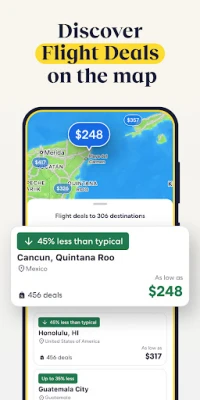
- Last-minute offers: Search for available stays close to your travel date. Discounts and inventory depend on destination, dates, and participating properties.
- Filters and verified reviews: Narrow searches using preferences such as Wi-Fi, parking, pools, kitchens, or airport shuttles, and review traveler feedback before booking.
- Trip itinerary and alerts: Keep booking information together, view trip details, and receive supported notifications such as flight or gate updates.
- Flexible trip management: View or manage reservations in the app. Cancellation options depend on the specific booking, and free cancellation is not available for every property or fare.
✅ Pros and ❌ Cons
Pros
- Combines several common travel-planning services in one app.
- Offers filters and comparison tools for browsing travel options.
- Member prices and eligible OneKeyCash can add value for frequent travelers.
- Price tracking and trip notifications can help users stay informed.
- Useful itinerary tools make it easier to find reservation details while traveling.
Cons
- Prices, discounts, and availability can change, and advertised savings are not guaranteed for every booking.
- Cancellation and change rules vary by airline, property, activity, and fare.
- Some deals and rewards require an account and may have restrictions.
- Booking a trip through one platform does not mean every travel provider follows the same support or refund process.
- The app uses information for analytics, personalization, and advertising, so privacy-conscious users should review its policies and device permissions.
📋 App Details
- App Name: Expedia
- Current Version: Varies by device and rollout; check Google Play for the latest version
- Last Updated: Check the current Google Play listing for the latest release date
- File Size: Varies by version and Android device; check the download listing before installing
- Requires Android: Minimum Android requirement may vary by release and device; confirm compatibility on the app listing
- Developer: Expedia Group, Inc.
- Content Rating: Check Google Play for the current regional rating
- Category: Travel & Local
💬 User Reviews
Travelers commonly value Expedia for bringing booking options and itinerary information together, as well as for its search filters, accommodation variety, and member offers. Users who book several parts of a trip through the app may also appreciate having reservations easier to find in one place.
Common concerns include changing prices or availability, confusion about cancellation conditions, and difficulties resolving certain booking changes. Experiences can differ depending on the airline, hotel, or other provider involved. Before paying, carefully review the full price, terms, and provider details, and keep your confirmation information available.
🔍 5 Best Alternative Travel Apps
- Booking.com: A travel app for finding accommodation, flights, rental cars, and other trip services. It is a useful alternative for travelers comparing stays and booking options.
- Hotels.com: Focuses on accommodation searches and hotel reservations, with options across different budgets and destinations.
- Google Flights: A flight-search and comparison tool that helps travelers explore routes, dates, and fare trends. Booking is generally completed with an airline or travel provider.
- Skyscanner: Compares flight options and also helps users search for hotels and rental cars. Its flexible search tools can be helpful when dates or destinations are open.
- Trip.com: Offers bookings for flights, hotels, trains, rental cars, and activities in supported locations, making it another broad travel-planning option.
🧠 My Opinion
Expedia is a practical choice for travelers who want to search for several trip essentials and keep many booking details accessible in one app. Its package options, member deals, price tools, and itinerary features can make planning more convenient, particularly for people who travel regularly.
It is still important to compare the final price and read the terms for every part of a booking. Discounts and rewards have conditions, and cancellation policies differ between providers. If you are comfortable checking those details before purchase, Expedia is a well-rounded travel-planning app worth considering.
🛡️ Privacy and Security
Download Expedia from Google Play or another source you trust. If you install an APK manually, verify that the file is authentic and has not been modified. Unofficial APKs can contain malware, request excessive permissions, or put personal and payment information at risk.
Manual installation may require enabling permission to install unknown apps for the specific browser or file manager you use. Android settings and wording vary by device. Enable this permission only when necessary, avoid installing files from unfamiliar websites, and turn it off again afterward. Expedia states that the app uses information for analytics, personalization, and advertising, so review its privacy settings and policies if you have concerns.
❓ Frequently Asked Questions (FAQs)
Q1: Is the Expedia APK free to use?
A1: The app is generally free to download, but travel bookings cost money. Prices, taxes, fees, and any applicable service charges are shown during the booking process.
Q2: Can I book flights and hotels in the Expedia app?
A2: Yes. Expedia lets users search for and book supported flights, stays, rental cars, activities, and eligible packages. Availability depends on the destination and travel dates.
Q3: Do I need an internet connection to use Expedia?
A3: An internet connection is needed for searching, booking, and receiving live updates. Some previously loaded itinerary information may remain accessible, but do not rely on offline access for current travel changes.
Q4: Can I cancel an Expedia booking for free?
A4: Sometimes. Cancellation rules depend on the specific reservation. Some hotels offer free cancellation if you cancel before the stated deadline, while other bookings may be non-refundable or have fees.
Q5: Is it safe to install the Expedia APK?
A5: The safest option is to install the app from Google Play. If installing an APK manually, use a reputable source and verify the file. Unofficial or modified APKs may expose your device and personal data to security risks.
Rate the App
Add Comment & Review
User Reviews
Based on 0 reviews
No reviews added yet.
Comments will not be approved to be posted if they are SPAM, abusive, off-topic, use profanity, contain a personal attack, or promote hate of any kind.









More »

Popular Apps

TradingView: Track All MarketsTradingView Inc.

Bus Fever Party!Lumi Games

Claude by AnthropicAnthropic PBC

Block Craft 3D:Building GameWildlife Studios

Malwarebytes - Mobile SecurityMalwarebytes

Block Blast!HungryStudio

Canva: AI Photo & Video EditorCanva

Candy Crush SagaKing

Carrom Pool: Disc GameMiniclip.com

EA SPORTS FC Soccer Mobile 27ELECTRONIC ARTS
More »
Editor's Choice

Kahoot! Play & Create QuizzesKahoot!

United AirlinesUnited Airlines

Tripwoa: Travel Plan & Trailtripwoa

trivago: Compare hotel pricestrivago N.V.

Planner 5D: AI Home DesignPlanner 5D

ibis Paint Xibis inc.

Agoda: Cheap Flights & Hotelsagoda.com

Hopper: Hotels, Flights & CarsHopper Inc.

Brilliant: Learn Math & CodingBrilliant.org

Google ClassroomGoogle LLC