



Latest Version
Version
26.43
26.43
Update
November 03, 2026
November 03, 2026
Developer
Airbnb
Airbnb
Categories
Travel & Local
Travel & Local
Platforms
Android
Android
Downloads
0
0
License
Free
Free
Package Name
com.airbnb.android
com.airbnb.android
Report
Report a Problem
Report a Problem
More About Airbnb
AIRBNB MORE THAN AN AIRBNB
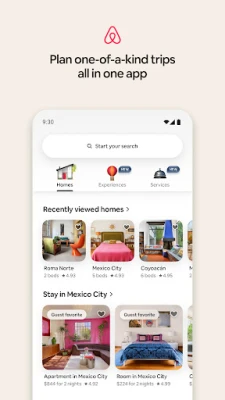
Airbnb brings vacation rentals, local experiences, and bookable services together in one travel app. Browse places to stay, plan activities, manage trip details, and connect with hosts from your Android device.
Planning a trip often means searching across several apps for a place to stay, things to do, and essential booking information. Airbnb aims to make that process easier by bringing accommodation, experiences, select local services, and trip communication into one place.
Whether you’re arranging a weekend away, a group holiday, or a local activity, the app helps you discover options and keep important details close at hand. Its wide range of listings and flexible search tools make it a popular choice for travelers looking for stays beyond traditional hotels.
Airbnb is a travel and accommodation platform for finding and booking short-term homes, rooms, and other stays. Depending on availability and location, users can also discover hosted activities and services such as food experiences, wellness treatments, or photography. Search filters, listing details, guest reviews, and host messaging help users compare options and coordinate a reservation.
An APK is the package file format used to install applications on Android. Installing an Airbnb APK manually can be useful in some circumstances, but it’s important to use a legitimate, current file. For the safest and simplest installation, use Google Play where it is available.
Pros
Cons
User feedback commonly reflects the convenience of browsing stays, comparing property details, and keeping reservation information in one place. Travelers also value being able to contact hosts through the app and use reviews to help assess a listing.
Common concerns include differences between expectations and the experience at a particular property, booking costs or cancellation conditions, and occasional app or account issues. As with any marketplace, it’s wise to read recent reviews, check the complete price breakdown, and confirm the listing’s rules before booking.
Airbnb is a convenient option for travelers who want to explore accommodation beyond standard hotels and manage key trip details from one app. Its search tools, guest reviews, messaging, and additional experiences can make planning more flexible, although listings and available extras vary by destination.
It’s worth considering if you’re comfortable comparing properties and carefully checking fees, rules, reviews, and cancellation terms before booking. For travelers who value choice and a more home-like stay, Airbnb can be a useful travel companion—provided each reservation is reviewed with care.
Download Airbnb from Google Play or another trusted source, and avoid APK files from unfamiliar websites. Unofficial or modified APKs may contain malware, expose personal information, or fail to receive important security updates. If you install an APK manually, Android may ask you to allow installation from that specific source; enable this permission only when necessary, verify the file’s legitimacy, and turn the permission off again afterward. Never share passwords, payment details, or verification codes with someone claiming to be a host or support agent outside the app’s official processes.
Q1: Is the Airbnb app free to download?
A1: The app is generally free to download, but accommodation, experiences, and services may cost money. Review the total price and any applicable fees before confirming a booking.
Q2: Can I use Airbnb without an internet connection?
A2: Most searches, bookings, and messaging features require an internet connection. Some previously loaded trip details may remain accessible offline, but don’t rely on offline access for all information.
Q3: Is it safe to download the Airbnb APK?
A3: The safest option is to install Airbnb through Google Play. If you use an APK, choose a trusted source and avoid modified files, which may pose malware and privacy risks.
Q4: Can I book experiences or services through Airbnb?
A4: Experiences and services may be available in selected locations. What you can book depends on the destination and current listings in the app.
Q5: Can I contact my host through the app?
A5: Yes. Airbnb includes in-app messaging for communicating with hosts about booking questions, arrival details, and updates.
Airbnb APK
📱 Airbnb APK Summary
Airbnb brings vacation rentals, local experiences, and bookable services together in one travel app. Browse places to stay, plan activities, manage trip details, and connect with hosts from your Android device.
- App Name: Airbnb
- Current Version: Version varies by device and release; check Google Play for the latest version.
- Last Updated: The update date varies by listing and rollout; check Google Play for the current date.
- Category: Travel & Local
- Developer: Airbnb
- Google Play Rating: Rating and review count change over time; see Google Play for the latest figures.
💡 Introduction
Planning a trip often means searching across several apps for a place to stay, things to do, and essential booking information. Airbnb aims to make that process easier by bringing accommodation, experiences, select local services, and trip communication into one place.
Whether you’re arranging a weekend away, a group holiday, or a local activity, the app helps you discover options and keep important details close at hand. Its wide range of listings and flexible search tools make it a popular choice for travelers looking for stays beyond traditional hotels.
❓ What Is Airbnb APK?
Airbnb is a travel and accommodation platform for finding and booking short-term homes, rooms, and other stays. Depending on availability and location, users can also discover hosted activities and services such as food experiences, wellness treatments, or photography. Search filters, listing details, guest reviews, and host messaging help users compare options and coordinate a reservation.
An APK is the package file format used to install applications on Android. Installing an Airbnb APK manually can be useful in some circumstances, but it’s important to use a legitimate, current file. For the safest and simplest installation, use Google Play where it is available.
🧑💻 How to Use
- Install and open the app: Download Airbnb from Google Play or another source you trust, then launch it on your Android device.
- Sign in or create an account: Follow the on-screen steps to access booking and messaging features.
- Choose what you’re looking for: Search for a place to stay, an experience, or an available service.
- Enter your trip details: Add a destination, dates, and guest count where relevant.
- Refine your search: Apply filters for price, amenities, accessibility, property type, or other preferences.
- Compare listings: Review photos, descriptions, house rules, location information, availability, and guest feedback.
- Book and coordinate: Complete the reservation through the app and use Airbnb messaging to contact the host or share trip details.
- Check the Trips tab: Review booking information, check-in instructions, and other plans in one place.
⚙️ Features
- A broad selection of stays: Browse homes and other accommodation options for solo travel, family holidays, and group trips.
- Detailed search filters: Narrow results by factors such as amenities, price, property type, and accessibility features to find a stay that better fits your needs.
- Listing information and guest feedback: Check property details, photos, ratings, and reviews to make a more informed booking decision.
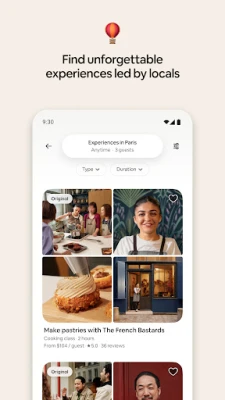
- Local experiences: Discover activities hosted by people with local knowledge, including food, culture, outdoor activities, and creative workshops where available.
- Bookable services: In supported locations, explore services such as personal care, wellness, photography, or food-related offerings.
- Trip planning in one place: Use the Trips area to find reservation details and relevant instructions, helping keep plans organized.
- In-app host communication: Message hosts about questions, arrival plans, and booking updates without switching between separate platforms.
- Tools for prospective hosts: People interested in hosting can explore options for listing a home or applying to offer an experience or service.
✅ Pros and ❌ Cons
Pros
- Combines accommodation search, trip information, and host messaging in one app.
- Offers filters and listing details to help users compare properties.
- Guest reviews can provide useful context before booking.
- Experiences and services may add more options to a trip, depending on the destination.
- Useful for travelers with different budgets, group sizes, and accommodation preferences.
Cons
- Availability and the range of stays, experiences, and services differ by location.
- Prices, service fees, house rules, and cancellation terms can vary between listings, so users should review the full booking details.
- Listing quality and guest experiences may not be consistent across all hosts.
- Some app features and booking tasks require an internet connection.
- Users may find the number of choices overwhelming when searching without clear preferences.
📋 App Details
- App Name: Airbnb
- Current Version: Varies by device and release; check Google Play for the latest version.
- Last Updated: Check Google Play for the current update date.
- File Size: Varies by version and Android device.
- Requires Android: Minimum requirements can change; check the app’s Google Play listing or installation prompt for compatibility with your device.
- Developer: Airbnb
- Content Rating: Check Google Play for the current rating in your region.
💬 User Reviews
User feedback commonly reflects the convenience of browsing stays, comparing property details, and keeping reservation information in one place. Travelers also value being able to contact hosts through the app and use reviews to help assess a listing.
Common concerns include differences between expectations and the experience at a particular property, booking costs or cancellation conditions, and occasional app or account issues. As with any marketplace, it’s wise to read recent reviews, check the complete price breakdown, and confirm the listing’s rules before booking.
🔍 5 Best Alternative Apps
- Booking.com: A travel booking platform with hotels, apartments, and other accommodation options. It’s a useful alternative for travelers who want to compare traditional lodging and vacation stays.
- Vrbo: Focuses on vacation rentals, particularly whole-home accommodation that can suit families and larger groups.
- Expedia: Offers travel planning and booking tools for accommodation and other trip components, making it a practical option for organizing a broader itinerary.
- Agoda: Provides accommodation search and booking across many destinations, with a strong selection in numerous international markets.
- Tripadvisor: Combines travel research, traveler reviews, and destination information to help users compare places to stay and plan activities.
🧠 My Opinion
Airbnb is a convenient option for travelers who want to explore accommodation beyond standard hotels and manage key trip details from one app. Its search tools, guest reviews, messaging, and additional experiences can make planning more flexible, although listings and available extras vary by destination.
It’s worth considering if you’re comfortable comparing properties and carefully checking fees, rules, reviews, and cancellation terms before booking. For travelers who value choice and a more home-like stay, Airbnb can be a useful travel companion—provided each reservation is reviewed with care.
🛡️ Privacy and Security
Download Airbnb from Google Play or another trusted source, and avoid APK files from unfamiliar websites. Unofficial or modified APKs may contain malware, expose personal information, or fail to receive important security updates. If you install an APK manually, Android may ask you to allow installation from that specific source; enable this permission only when necessary, verify the file’s legitimacy, and turn the permission off again afterward. Never share passwords, payment details, or verification codes with someone claiming to be a host or support agent outside the app’s official processes.
❓ Frequently Asked Questions (FAQs)
Q1: Is the Airbnb app free to download?
A1: The app is generally free to download, but accommodation, experiences, and services may cost money. Review the total price and any applicable fees before confirming a booking.
Q2: Can I use Airbnb without an internet connection?
A2: Most searches, bookings, and messaging features require an internet connection. Some previously loaded trip details may remain accessible offline, but don’t rely on offline access for all information.
Q3: Is it safe to download the Airbnb APK?
A3: The safest option is to install Airbnb through Google Play. If you use an APK, choose a trusted source and avoid modified files, which may pose malware and privacy risks.
Q4: Can I book experiences or services through Airbnb?
A4: Experiences and services may be available in selected locations. What you can book depends on the destination and current listings in the app.
Q5: Can I contact my host through the app?
A5: Yes. Airbnb includes in-app messaging for communicating with hosts about booking questions, arrival details, and updates.
Rate the App
Add Comment & Review
User Reviews
Based on 0 reviews
No reviews added yet.
Comments will not be approved to be posted if they are SPAM, abusive, off-topic, use profanity, contain a personal attack, or promote hate of any kind.









More »

Popular Apps

TradingView: Track All MarketsTradingView Inc.

Bus Fever Party!Lumi Games

Claude by AnthropicAnthropic PBC

Block Craft 3D:Building GameWildlife Studios

Malwarebytes - Mobile SecurityMalwarebytes

Block Blast!HungryStudio

Canva: AI Photo & Video EditorCanva

Candy Crush SagaKing

Carrom Pool: Disc GameMiniclip.com

EA SPORTS FC Soccer Mobile 27ELECTRONIC ARTS
More »
Editor's Choice

Kahoot! Play & Create QuizzesKahoot!

United AirlinesUnited Airlines

Tripwoa: Travel Plan & Trailtripwoa

trivago: Compare hotel pricestrivago N.V.

Planner 5D: AI Home DesignPlanner 5D

ibis Paint Xibis inc.

Agoda: Cheap Flights & Hotelsagoda.com

Hopper: Hotels, Flights & CarsHopper Inc.

Brilliant: Learn Math & CodingBrilliant.org

Google ClassroomGoogle LLC