




Latest Version
Version
5.32.0+582
5.32.0+582
Update
October 17, 2026
October 17, 2026
Developer
Malwarebytes
Malwarebytes
Categories
Security
Security
Platforms
Android
Android
Downloads
0
0
License
Free
Free
Package Name
org.malwarebytes.antimalware
org.malwarebytes.antimalware
Report
Report a Problem
Report a Problem
More About Malwarebytes - Mobile Security
Malwarebytes delivers all-in-one mobile security and powerful digital protection against malware, online scams, identity theft, ransomware and more. Combining proactive device security, privacy protection, and powerful antivirus defense, Malwarebytes keeps your Android device fast, safe and optimized.
Malwarebytes is an Android security and privacy app that helps detect malicious apps, block scams, and clean unnecessary files. It also offers features such as call protection, dark web monitoring, and a secure VPN, with availability depending on your plan and region.
Your phone may hold banking details, private photos, passwords, and work files, so protecting it is about more than removing viruses. Malwarebytes brings several security and privacy tools together in a straightforward mobile app, aiming to make everyday protection manageable for both experienced users and newcomers.
Its core offering includes malware scanning, scam and call protection, and device cleanup. Depending on the subscription and availability in your location, additional options may include VPN access and identity monitoring. The app requires Android 10 or later, according to the supplied product information.
Malwarebytes is a mobile security app for Android devices. Its purpose is to help users identify harmful apps and files, guard against suspicious links and scams, and keep their devices tidier. It is designed for individual users and families who want accessible security tools without needing specialist technical knowledge.
An APK is the package file format Android uses to distribute and install applications. Installing an APK manually can be useful when an app is unavailable through your usual store, but it requires extra care: the file should come from a trustworthy source and match your device.
Pros
Cons
User opinions can differ across app versions, devices, and subscription plans. Common reasons people choose Malwarebytes include its familiar security focus, easy-to-follow interface, and combination of scanning with additional privacy tools. Some users may find the range of features useful when they want a single app for several protection tasks.
Potential concerns include subscription costs, differences in feature availability, and permissions needed for tools such as call or scam protection. As with other security apps, results can vary, and users should check recent reviews for reports relevant to their Android version and device.
Malwarebytes is a practical choice for Android users who want an approachable security app with more than basic malware scanning. Its combination of threat checks, scam-related tools, and cleanup features makes it worth considering, while optional services may appeal to users seeking broader privacy coverage.
Before subscribing, compare the exact features, permissions, renewal terms, and coverage available to you. Malwarebytes can add a useful layer of protection, but it should complement safe browsing habits, strong unique passwords, software updates, and reliable backups—not replace them.
For the safest installation, use Google Play or the developer’s official distribution channel. If you choose to install an APK manually, use a reputable source, verify that the package is genuine, and avoid modified or “unlocked” versions. Unofficial APKs may contain malware, altered code, or data-collection behavior that is not present in the legitimate app.
Manual installation may require allowing your browser or file manager to install unknown apps in Android settings. Enable this permission only for the installation source you trust, then turn it off afterward if you do not need it. Review the app’s permissions and privacy terms, and remember that features such as call filtering, accessibility-based protection, or VPN access may require sensitive permissions to function.
Q1: Is Malwarebytes APK free to use?
A1: Some features may be available for free, while advanced services require a subscription. The supplied description mentions a 7-day trial, but eligibility and terms can change, so check the offer shown in the app.
Q2: Which Android version does Malwarebytes require?
A2: The supplied app description states that Android 10 or later is required. Check the current store listing because requirements can change with updates.
Q3: Does Malwarebytes include a VPN?
A3: The app description lists a VPN, but access may depend on your plan and region. Confirm the current subscription details before relying on it.
Q4: Can Malwarebytes guarantee that my phone will stay safe?
A4: No security app can guarantee complete protection. Use it alongside Android updates, cautious link handling, strong passwords, and backups.
Q5: Is it safe to download the Malwarebytes APK?
A5: The official app from a trusted source is the safer choice. Unofficial APK files may be modified or bundled with malware, so verify the source and avoid files that promise paid features for free.
Malwarebytes APK
📱 Malwarebytes APK Summary
Malwarebytes is an Android security and privacy app that helps detect malicious apps, block scams, and clean unnecessary files. It also offers features such as call protection, dark web monitoring, and a secure VPN, with availability depending on your plan and region.
- App Name: Malwarebytes Mobile Security
- Current Version: Version varies by release and device; check the Google Play listing for the latest build
- Last Updated: Check Google Play for the current update date
- Category: Tools / Security
- Developer: Malwarebytes
- Google Play Rating: Rating and review count change over time; consult the current Google Play listing
💡 Introduction
Your phone may hold banking details, private photos, passwords, and work files, so protecting it is about more than removing viruses. Malwarebytes brings several security and privacy tools together in a straightforward mobile app, aiming to make everyday protection manageable for both experienced users and newcomers.
Its core offering includes malware scanning, scam and call protection, and device cleanup. Depending on the subscription and availability in your location, additional options may include VPN access and identity monitoring. The app requires Android 10 or later, according to the supplied product information.
❓ What is Malwarebytes APK?
Malwarebytes is a mobile security app for Android devices. Its purpose is to help users identify harmful apps and files, guard against suspicious links and scams, and keep their devices tidier. It is designed for individual users and families who want accessible security tools without needing specialist technical knowledge.
An APK is the package file format Android uses to distribute and install applications. Installing an APK manually can be useful when an app is unavailable through your usual store, but it requires extra care: the file should come from a trustworthy source and match your device.
🧑💻 How to Use
- Install the app: Get Malwarebytes from Google Play or another source you trust, then open it and review the requested permissions.
- Set up your protection: Follow the in-app prompts to configure scanning and any features available for your account or region.
- Run a scan: Start a security scan to check installed apps and relevant files for potential threats. Follow the app’s guidance if it flags something.
- Review alerts: Check warnings about suspicious apps, links, calls, or possible data exposure, where those tools are available.
- Clean up storage: Use the cleanup or storage-analysis tools to review unnecessary files before removing them.
- Explore optional services: If included in your plan, configure VPN or identity-monitoring features and read their terms and coverage details.
- Keep it updated: Install app updates and Android security updates to help maintain protection.
⚙️ Features
- Malware scanning and removal: Scan for potentially harmful apps and files, then review recommended actions. Background and automatic scanning capabilities may depend on Android settings and app permissions.
- Protection against emerging threats: Malwarebytes describes protection intended to identify newer malware and suspicious activity. No security app can guarantee that every threat will be detected.
- Ransomware defense: The app advertises safeguards against attacks that attempt to lock or encrypt files. Keep independent backups as an additional precaution.
- Call protection: Available call tools can help identify or block known spam callers and let users manage trusted contacts and alerts.
- Scam and malicious-link checks: Scam Guard is designed to flag suspicious messages and URLs, including common phishing attempts. Its operation may require relevant permissions.
- Dark web and identity monitoring: Eligible plans may check for exposed personal information and provide breach notifications. Monitoring and insurance terms vary, so review the plan details carefully.
- Secure VPN: A VPN option is promoted for encrypted browsing and added privacy on public Wi-Fi. Availability, supported locations, and service terms depend on the subscription.
- Junk cleanup and storage analysis: Cleanup tools help identify unnecessary files and show what is using device storage, giving you more control over space.
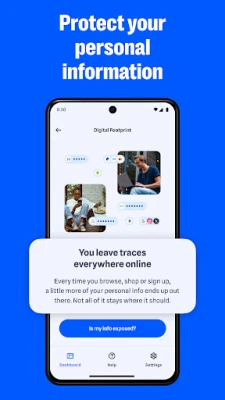
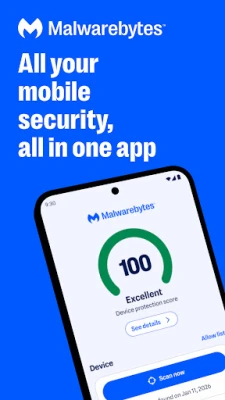
- Simple dashboard: A central dashboard makes it easier to review security status and access the app’s main tools.
✅ Pros and ❌ Cons
Pros
- Combines several security and privacy tools in one app.
- Designed to be approachable for users without technical experience.
- Offers malware scanning and scam-related protection features.
- Includes cleanup tools that can help users review storage usage.
- A free 7-day trial of advanced features is advertised in the supplied app description; trial availability and terms may change.
Cons
- Some advertised features require a paid plan and may not be available in every country.
- Advanced protections depend on permissions, Android capabilities, and correct configuration.
- VPN and identity-protection services have separate terms, eligibility rules, or coverage limits.
- Security software cannot guarantee complete protection against malware, fraud, or identity theft.
- Installing an unofficial APK carries additional security and privacy risks.
📋 App Details
- App Name: Malwarebytes Mobile Security
- Current Version: Varies by release; verify the current version in Google Play
- Last Updated: Check the current store listing
- File Size: Varies by version and device; check the download page before installing
- Requires Android: Android 10 or later, according to the supplied description
- Developer: Malwarebytes
- Content Rating: Check the current Google Play listing for the rating in your region
- Category: Tools / Security
- Pricing: Some features may be available at no cost, while advanced services require a subscription or trial
💬 User Reviews
User opinions can differ across app versions, devices, and subscription plans. Common reasons people choose Malwarebytes include its familiar security focus, easy-to-follow interface, and combination of scanning with additional privacy tools. Some users may find the range of features useful when they want a single app for several protection tasks.
Potential concerns include subscription costs, differences in feature availability, and permissions needed for tools such as call or scam protection. As with other security apps, results can vary, and users should check recent reviews for reports relevant to their Android version and device.
🔍 5 Best Alternative Apps
- Bitdefender Mobile Security: A mobile security option with malware scanning and web protection features. It may suit users looking for a security-focused app from another established provider.
- Avast Antivirus & Security: Offers Android security tools and optional privacy features. Review its current plan details and permissions to see whether it matches your needs.
- ESET Mobile Security: Provides security and anti-phishing features for Android. It is a possible alternative for users who prefer a focused protection suite.
- Norton 360: Combines mobile security with additional privacy services in eligible plans. Feature availability and pricing depend on the selected subscription.
- Google Play Protect: Built into Google Play services on many Android devices, it checks apps for potentially harmful behavior. It is a convenient baseline, though its features differ from a full third-party security suite.
🧠 My Opinion
Malwarebytes is a practical choice for Android users who want an approachable security app with more than basic malware scanning. Its combination of threat checks, scam-related tools, and cleanup features makes it worth considering, while optional services may appeal to users seeking broader privacy coverage.
Before subscribing, compare the exact features, permissions, renewal terms, and coverage available to you. Malwarebytes can add a useful layer of protection, but it should complement safe browsing habits, strong unique passwords, software updates, and reliable backups—not replace them.
🛡️ Privacy and Security
For the safest installation, use Google Play or the developer’s official distribution channel. If you choose to install an APK manually, use a reputable source, verify that the package is genuine, and avoid modified or “unlocked” versions. Unofficial APKs may contain malware, altered code, or data-collection behavior that is not present in the legitimate app.
Manual installation may require allowing your browser or file manager to install unknown apps in Android settings. Enable this permission only for the installation source you trust, then turn it off afterward if you do not need it. Review the app’s permissions and privacy terms, and remember that features such as call filtering, accessibility-based protection, or VPN access may require sensitive permissions to function.
❓ Frequently Asked Questions (FAQs)
Q1: Is Malwarebytes APK free to use?
A1: Some features may be available for free, while advanced services require a subscription. The supplied description mentions a 7-day trial, but eligibility and terms can change, so check the offer shown in the app.
Q2: Which Android version does Malwarebytes require?
A2: The supplied app description states that Android 10 or later is required. Check the current store listing because requirements can change with updates.
Q3: Does Malwarebytes include a VPN?
A3: The app description lists a VPN, but access may depend on your plan and region. Confirm the current subscription details before relying on it.
Q4: Can Malwarebytes guarantee that my phone will stay safe?
A4: No security app can guarantee complete protection. Use it alongside Android updates, cautious link handling, strong passwords, and backups.
Q5: Is it safe to download the Malwarebytes APK?
A5: The official app from a trusted source is the safer choice. Unofficial APK files may be modified or bundled with malware, so verify the source and avoid files that promise paid features for free.
Rate the App
Add Comment & Review
User Reviews
Based on 0 reviews
No reviews added yet.
Comments will not be approved to be posted if they are SPAM, abusive, off-topic, use profanity, contain a personal attack, or promote hate of any kind.


More »

Popular Apps

TradingView: Track All MarketsTradingView Inc.

Bus Fever Party!Lumi Games

Claude by AnthropicAnthropic PBC

Block Craft 3D:Building GameWildlife Studios

Malwarebytes - Mobile SecurityMalwarebytes

Block Blast!HungryStudio

Canva: AI Photo & Video EditorCanva

Candy Crush SagaKing

Carrom Pool: Disc GameMiniclip.com

EA SPORTS FC Soccer Mobile 27ELECTRONIC ARTS
More »
Editor's Choice

Kahoot! Play & Create QuizzesKahoot!

United AirlinesUnited Airlines

Tripwoa: Travel Plan & Trailtripwoa

trivago: Compare hotel pricestrivago N.V.

Planner 5D: AI Home DesignPlanner 5D

ibis Paint Xibis inc.

Agoda: Cheap Flights & Hotelsagoda.com

Hopper: Hotels, Flights & CarsHopper Inc.

Brilliant: Learn Math & CodingBrilliant.org

Google ClassroomGoogle LLC