




Latest Version
Version
3.3.323.2579
3.3.323.2579
Update
October 17, 2026
October 17, 2026
Developer
Bitdefender
Bitdefender
Categories
Security
Security
Platforms
Android
Android
Downloads
0
0
License
Free
Free
Package Name
com.bitdefender.security
com.bitdefender.security
Report
Report a Problem
Report a Problem
More About Bitdefender Mobile Security
Bitdefender Mobile Security & Antivirus delivers industry-leading protection for your Android phone or tablet. It safeguards against viruses, malware, and online threats, all while keeping your personal data safe—and with minimal battery impact.
Bitdefender Mobile Security & Antivirus helps protect Android devices from malware, phishing, scam links, unwanted calls, and other digital threats. It combines real-time security tools with privacy features such as identity monitoring, app locking, anti-theft protection, and a limited daily VPN allowance.
Android phones hold personal messages, payment details, photos, and account information, making them valuable targets for scammers and malicious software. Bitdefender Mobile Security & Antivirus brings several layers of protection together in one app, helping users spot threats and respond to suspicious activity from their device.
Its appeal comes from combining antivirus scanning with web and scam protection, call filtering, identity alerts, and anti-theft tools. New users can try the premium features with a 14-day free trial, while the exact subscription options and included services may vary by location and plan.
Bitdefender Mobile Security & Antivirus is an Android security app designed to help protect a device and its user from malicious apps, unsafe websites, scam messages, and unwanted calls. It can scan apps and files, check links in supported contexts, alert users to potential data breaches, and provide tools such as app locking and remote device location or locking. Some features require an active subscription, an internet connection, or specific Android permissions.
An APK is the package file format used to distribute and install Android apps. Installing an APK manually can be useful in some situations, but it is important to obtain the file from a trustworthy source and verify that it is authentic and current.
Pros
Cons
User feedback commonly values the app’s broad set of security tools, clear alerts, and convenient combination of scanning, web protection, and anti-theft features. Some users also appreciate being notified about suspicious links or potential account exposure.
Common concerns include subscription costs, occasional device or Android-version compatibility issues, and the permissions required for features such as call filtering and anti-theft protection. As with any security app, individual results can differ depending on device settings, network access, and which protections are enabled.
Bitdefender Mobile Security & Antivirus is a strong option for Android users who want more than a basic malware scanner. Its combination of app scanning, scam and web protection, call blocking, identity alerts, and anti-theft tools makes it especially useful for people who regularly browse, shop, bank, and communicate on their phones.
The main considerations are the subscription cost, limited VPN allowance, and permissions needed for certain protections. If you are comfortable reviewing those trade-offs and want several security tools in one place, it is worth considering. Use the trial to test compatibility and features on your device before committing to a plan.
Download the app from Google Play or another source you trust. If you install an APK manually, Android may ask you to allow installation from that source, sometimes described as “Install unknown apps” or “Install from unknown sources.” Enable this only for the installer you are using, and turn it off again when you are finished.
Unofficial or modified APKs can contain malware, steal information, or expose your device to privacy risks. Prefer the official, unmodified app, check that the developer is Bitdefender, and keep the app and Android system updated. Before granting permissions, read what they enable; access to call screening, accessibility features, or device administration can provide powerful capabilities.
Q1: Is Bitdefender Mobile Security & Antivirus free to use?
A1: The app may offer a 14-day trial of premium features, but ongoing access to many protections requires a subscription. Check the current in-app terms and pricing for your region.
Q2: Does Bitdefender Mobile Security need an internet connection?
A2: Some scanning can work on the device, but updates, online threat checks, identity monitoring, account features, and VPN use generally require an internet connection.
Q3: Is the Bitdefender Mobile Security APK safe to install?
A3: An authentic APK from Bitdefender or a reputable app store is the safer choice. Unofficial or altered APK files may contain malware or compromise your privacy, so avoid unknown download sources.
Q4: Why does the app request permissions?
A4: Permissions support specific functions. For example, call screening enables call filtering, accessibility access can support link protection in compatible apps, and device administration can enable remote anti-theft actions. Review each request and enable only the features you want.
Q5: Does the app include an unlimited VPN?
A5: The described offer includes up to 200 MB of encrypted VPN traffic per day. It is a limited allowance, not an unlimited VPN plan.
Bitdefender Mobile Security & Antivirus APK
📱 Bitdefender Mobile Security & Antivirus APK Summary
Bitdefender Mobile Security & Antivirus helps protect Android devices from malware, phishing, scam links, unwanted calls, and other digital threats. It combines real-time security tools with privacy features such as identity monitoring, app locking, anti-theft protection, and a limited daily VPN allowance.
- App Name: Bitdefender Mobile Security & Antivirus
- Current Version: Version varies by release; check Google Play for the latest version
- Last Updated: Check Google Play for the current update date
- Category: Tools / Security
- Developer: Bitdefender
- Google Play Rating: Rating and review count vary by region and change over time; see Google Play for the latest figures
💡 Introduction
Android phones hold personal messages, payment details, photos, and account information, making them valuable targets for scammers and malicious software. Bitdefender Mobile Security & Antivirus brings several layers of protection together in one app, helping users spot threats and respond to suspicious activity from their device.
Its appeal comes from combining antivirus scanning with web and scam protection, call filtering, identity alerts, and anti-theft tools. New users can try the premium features with a 14-day free trial, while the exact subscription options and included services may vary by location and plan.
❓ What is Bitdefender Mobile Security & Antivirus APK?
Bitdefender Mobile Security & Antivirus is an Android security app designed to help protect a device and its user from malicious apps, unsafe websites, scam messages, and unwanted calls. It can scan apps and files, check links in supported contexts, alert users to potential data breaches, and provide tools such as app locking and remote device location or locking. Some features require an active subscription, an internet connection, or specific Android permissions.
An APK is the package file format used to distribute and install Android apps. Installing an APK manually can be useful in some situations, but it is important to obtain the file from a trustworthy source and verify that it is authentic and current.
🧑💻 How to Use
- Install Bitdefender Mobile Security from Google Play or another reputable source, then open the app.
- Sign in to your Bitdefender account or create one if prompted. Review the available trial and subscription details before starting a paid plan.
- Follow the setup instructions and grant only the permissions needed for the features you want to use. For example, call screening is needed for call blocking, while anti-theft actions may require device administrator access.
- Run an initial security scan. The app can check installed apps and, depending on the available tools and permissions, other files for potential threats.
- Turn on features such as Web Protection, Scam Protection, Call Blocking, App Lock, and Identity Protection individually, and review what each feature monitors.
- Check security reports and alerts regularly. If the app identifies a suspicious link, call, app, or exposed account detail, follow its guidance and take appropriate steps.
- Use the included VPN allowance when needed, keeping in mind that the supplied plan is limited to up to 200 MB of encrypted traffic per day.
⚙️ Features
- Antivirus and malware scanning: Scans apps and files for potential threats, with checks available on demand and during app installation or updates. Scanning helps identify risks, but no security product can guarantee detection of every threat.
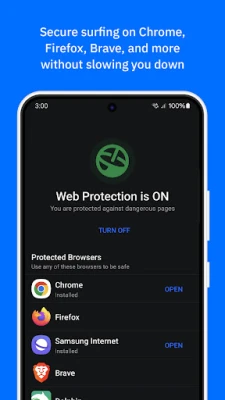
- Web Protection: Helps warn users about dangerous or deceptive websites, including links associated with phishing and online fraud.
- Scam and chat protection: Checks suspicious links received through supported texts, messaging apps, and notifications. Scam Radar can also alert users to reported scam activity in their area.
- Call Blocking: Identifies or filters known spam and scam calls, flags potentially suspicious numbers, and supports personal block lists. Availability and operation can depend on Android version and permissions.
- App Anomaly Detection: Monitors app behavior for suspicious activity that may indicate a threat, including behavior that has not yet been classified as known malware.
- Identity Protection: Checks for signs that account details, such as an email address or password, may have appeared in known data breaches and provides alerts when a match is found.
- App Lock: Adds an extra access barrier to selected apps, with biometric unlocking available on supported devices.
- Anti-Theft tools: Helps users locate or remotely lock a missing device, subject to the required setup, permissions, connectivity, and account access.
- Autopilot and security reports: Offers security suggestions and weekly activity summaries, helping users review scans and blocked threats.
- Limited VPN: Includes up to 200 MB of encrypted traffic per day, useful for occasional protected browsing. This allowance is limited and may differ by plan.
✅ Pros and ❌ Cons
Pros
- Combines antivirus scanning, web protection, scam alerts, and privacy tools in one app.
- Includes call filtering, app locking, identity monitoring, and anti-theft features.
- Can provide real-time alerts and security recommendations.
- Offers a 14-day trial of premium features, subject to the current offer and terms.
- Includes a small daily VPN allowance for occasional use.
Cons
- Many advanced features require a subscription after any trial period.
- The included VPN allowance is limited and may not suit frequent streaming or browsing.
- Some protections depend on granting sensitive permissions, which users should review carefully.
- Feature availability and behavior can vary by Android version, device, region, and subscription.
- Security scanning may use battery, data, or device resources, particularly during scans and updates.
📋 App Details
- App Name: Bitdefender Mobile Security & Antivirus
- Current Version: Version varies by release; check Google Play for the latest listing
- Last Updated: Check Google Play for the latest date
- File Size: Varies by version and device; check the installer or store listing before downloading
- Requires Android: Minimum requirement can change; confirm compatibility on the current Google Play listing
- Developer: Bitdefender
- Content Rating: Check the current Google Play listing for the rating in your region
💬 User Reviews
User feedback commonly values the app’s broad set of security tools, clear alerts, and convenient combination of scanning, web protection, and anti-theft features. Some users also appreciate being notified about suspicious links or potential account exposure.
Common concerns include subscription costs, occasional device or Android-version compatibility issues, and the permissions required for features such as call filtering and anti-theft protection. As with any security app, individual results can differ depending on device settings, network access, and which protections are enabled.
🔍 5 Best Alternative Games/Apps
- Google Play Protect: Google’s built-in Android app security service scans apps and can warn about potentially harmful software. It is a useful basic option, though its tools differ from a dedicated paid security suite.
- Malwarebytes Mobile Security: Offers Android security features focused on detecting threats and helping users avoid risky websites. Check the current plan for which features are free or subscription-based.
- Norton 360: Mobile Security: Provides a range of mobile security and privacy tools, with features and plan limits depending on the selected subscription.
- ESET Mobile Security Antivirus: Combines malware protection with additional security features for Android devices. Its available tools and pricing depend on the current product plan.
- Avast Antivirus & Security: Offers Android scanning and other device-protection tools, with some features or capabilities available through paid plans.
🧠 My Opinion
Bitdefender Mobile Security & Antivirus is a strong option for Android users who want more than a basic malware scanner. Its combination of app scanning, scam and web protection, call blocking, identity alerts, and anti-theft tools makes it especially useful for people who regularly browse, shop, bank, and communicate on their phones.
The main considerations are the subscription cost, limited VPN allowance, and permissions needed for certain protections. If you are comfortable reviewing those trade-offs and want several security tools in one place, it is worth considering. Use the trial to test compatibility and features on your device before committing to a plan.
🛡️ Privacy and Security
Download the app from Google Play or another source you trust. If you install an APK manually, Android may ask you to allow installation from that source, sometimes described as “Install unknown apps” or “Install from unknown sources.” Enable this only for the installer you are using, and turn it off again when you are finished.
Unofficial or modified APKs can contain malware, steal information, or expose your device to privacy risks. Prefer the official, unmodified app, check that the developer is Bitdefender, and keep the app and Android system updated. Before granting permissions, read what they enable; access to call screening, accessibility features, or device administration can provide powerful capabilities.
❓ Frequently Asked Questions (FAQs)
Q1: Is Bitdefender Mobile Security & Antivirus free to use?
A1: The app may offer a 14-day trial of premium features, but ongoing access to many protections requires a subscription. Check the current in-app terms and pricing for your region.
Q2: Does Bitdefender Mobile Security need an internet connection?
A2: Some scanning can work on the device, but updates, online threat checks, identity monitoring, account features, and VPN use generally require an internet connection.
Q3: Is the Bitdefender Mobile Security APK safe to install?
A3: An authentic APK from Bitdefender or a reputable app store is the safer choice. Unofficial or altered APK files may contain malware or compromise your privacy, so avoid unknown download sources.
Q4: Why does the app request permissions?
A4: Permissions support specific functions. For example, call screening enables call filtering, accessibility access can support link protection in compatible apps, and device administration can enable remote anti-theft actions. Review each request and enable only the features you want.
Q5: Does the app include an unlimited VPN?
A5: The described offer includes up to 200 MB of encrypted VPN traffic per day. It is a limited allowance, not an unlimited VPN plan.
Rate the App
Add Comment & Review
User Reviews
Based on 0 reviews
No reviews added yet.
Comments will not be approved to be posted if they are SPAM, abusive, off-topic, use profanity, contain a personal attack, or promote hate of any kind.


More »

Popular Apps

TradingView: Track All MarketsTradingView Inc.

Bus Fever Party!Lumi Games

Claude by AnthropicAnthropic PBC

Block Craft 3D:Building GameWildlife Studios

Malwarebytes - Mobile SecurityMalwarebytes

Block Blast!HungryStudio

Canva: AI Photo & Video EditorCanva

Candy Crush SagaKing

Carrom Pool: Disc GameMiniclip.com

EA SPORTS FC Soccer Mobile 27ELECTRONIC ARTS
More »
Editor's Choice

Kahoot! Play & Create QuizzesKahoot!

United AirlinesUnited Airlines

Tripwoa: Travel Plan & Trailtripwoa

trivago: Compare hotel pricestrivago N.V.

Planner 5D: AI Home DesignPlanner 5D

ibis Paint Xibis inc.

Agoda: Cheap Flights & Hotelsagoda.com

Hopper: Hotels, Flights & CarsHopper Inc.

Brilliant: Learn Math & CodingBrilliant.org

Google ClassroomGoogle LLC