

Latest Version
Version
26.18.0.261002870
26.18.0.261002870
Update
October 17, 2026
October 17, 2026
Developer
AVG Mobile
AVG Mobile
Categories
Security
Security
Platforms
Android
Android
Downloads
0
0
License
Free
Free
Package Name
com.antivirus
com.antivirus
Report
Report a Problem
Report a Problem
More About AVG AntiVirus & Security
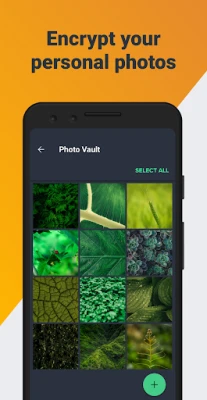
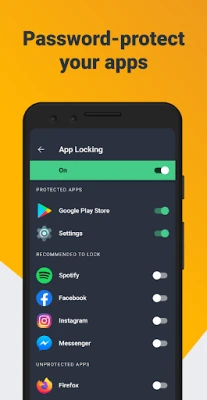
Get AVG AntiVirus FREE - Mobile Security for Android to help protect you from harmful viruses and malware. Keep your personal data safe with App Lock, Photo Vault, Wi-Fi Security Scan, Hack Alerts, Malware security, and App Permissions advisor.
AVG AntiVirus FREE for Android combines malware scanning with privacy and device-cleanup tools. It can scan apps and files, check Wi-Fi security, help protect private photos, and flag potential online scams. Some features may require a paid plan, and availability can vary by region or app version.
AVG AntiVirus FREE is a mobile security and maintenance app designed to help Android users check for threats and manage some common privacy and storage concerns from one place. Its toolkit includes security scans, Wi-Fi checks, junk-file cleanup, and privacy features, making it a familiar option for people who want an extra layer of visibility over their device.
The app’s free offering provides useful basic tools, while features such as enhanced scam protection or VPN access may be limited to particular plans, regions, or subscription tiers. Reviewing the in-app plan details before relying on a specific feature helps set clear expectations.
AVG AntiVirus FREE is an Android security application from AVG Mobile. Its main purpose is to help users identify potentially harmful apps and files, review network safety, and access tools intended to support privacy and device maintenance. It may suit people who want straightforward security checks without navigating several separate apps.
An APK is the package file format used to distribute and install Android applications. Installing an APK manually can be useful when an app is not available through an app store, but it also places more responsibility on the user to verify the file’s source, authenticity, and compatibility.
Pros
Cons
Feedback for AVG AntiVirus FREE commonly reflects appreciation for having scans, Wi-Fi checks, and cleanup tools in a single interface. Some users also value the app’s privacy features and the reassurance of receiving security notifications.
Common concerns for apps in this category include upgrade prompts, feature limits in the free tier, and differences in performance across devices. As with any security app, results and user experience can vary; check recent reviews for comments about your Android version and device model.
AVG AntiVirus FREE is a practical choice for Android users who want security scans alongside tools for Wi-Fi checks, permissions, and basic storage cleanup. Its broad feature set is convenient, but the free version may not include every advertised protection, and some features can depend on a subscription or location.
It is worth considering if you want an approachable security dashboard and are comfortable reviewing permissions and plan limits. Download it from a trusted source, keep Android and the app updated, and treat any security tool as one part of a broader approach to safer browsing and account protection.
For the safest installation, get AVG AntiVirus FREE from Google Play or another source you can verify. If you install an APK manually, confirm that it comes from a reputable distributor and that the file has not been altered. Unofficial or modified APKs can contain malware, expose personal information, or fail to receive legitimate security updates.
Android may ask you to allow installation from an unknown source for the specific browser or file manager you use. Enable this permission only when necessary, install the file you have verified, and turn the permission off afterward. Review AVG’s permissions and privacy terms as well, especially before enabling features that need accessibility access, VPN operation, call handling, or access to photos and files.
Q1: Is AVG AntiVirus FREE APK free to use?
A1: The app offers free features, but some tools or expanded protections may require a paid plan. Check the current in-app details for availability and pricing.
Q2: Does AVG AntiVirus FREE need an internet connection?
A2: Some basic functions may work offline, but features such as web protection, updates, online threat checks, and account alerts generally need an internet connection.
Q3: Is it safe to download AVG AntiVirus FREE APK?
A3: It is safest to install the app through Google Play or a source you can independently verify. APK files from unknown or unofficial sources may be modified or contain malware.
Q4: Are all features available in the free version?
A4: No. Availability can depend on the subscription tier, country, device, and app version. Check the current feature and pricing information inside the app.
Q5: Can AVG AntiVirus FREE protect against every threat?
A5: No security app can guarantee complete protection. Keep Android and your apps updated, avoid suspicious links and downloads, and use unique passwords with multifactor authentication where possible.
AVG AntiVirus FREE 2026 APK
📱 AVG AntiVirus FREE 2026 APK Summary
AVG AntiVirus FREE for Android combines malware scanning with privacy and device-cleanup tools. It can scan apps and files, check Wi-Fi security, help protect private photos, and flag potential online scams. Some features may require a paid plan, and availability can vary by region or app version.
- App Name: AVG AntiVirus FREE
- Current Version: Version varies by release; check the Google Play listing for the latest build
- Last Updated: The current update date varies; check the official listing for the latest date
- Category: Tools / Security
- Developer: AVG Mobile
- Google Play Rating: Rating and review count change over time; consult Google Play for current figures
💡 Introduction
AVG AntiVirus FREE is a mobile security and maintenance app designed to help Android users check for threats and manage some common privacy and storage concerns from one place. Its toolkit includes security scans, Wi-Fi checks, junk-file cleanup, and privacy features, making it a familiar option for people who want an extra layer of visibility over their device.
The app’s free offering provides useful basic tools, while features such as enhanced scam protection or VPN access may be limited to particular plans, regions, or subscription tiers. Reviewing the in-app plan details before relying on a specific feature helps set clear expectations.
❓ What is AVG AntiVirus FREE APK?
AVG AntiVirus FREE is an Android security application from AVG Mobile. Its main purpose is to help users identify potentially harmful apps and files, review network safety, and access tools intended to support privacy and device maintenance. It may suit people who want straightforward security checks without navigating several separate apps.
An APK is the package file format used to distribute and install Android applications. Installing an APK manually can be useful when an app is not available through an app store, but it also places more responsibility on the user to verify the file’s source, authenticity, and compatibility.
🧑💻 How to Use
- Install AVG AntiVirus FREE from Google Play or another source you trust, then open the app.
- Review the requested permissions and privacy information. Grant only the access needed for the features you intend to use.
- Run the initial security scan and follow any recommendations the app provides.
- Use the Wi-Fi scanner when connected to a network to review its security information.
- Explore cleanup, App Lock, Photo Vault, or other available tools. Their availability can depend on your device, location, and plan.
- Check the app’s subscription screen before activating paid features, and keep the app updated through a trusted channel.
⚙️ Features
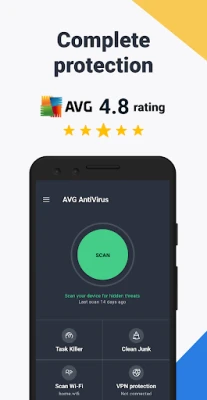
- Security scans: Scan apps, games, and files for potential threats, then review the results before taking action.
- Smart Scan: Run a broader check intended to surface security or privacy concerns that may be less obvious during a basic scan.
- Wi-Fi security checks: Review information about your connected network and check its download and upload speed with the available tools.
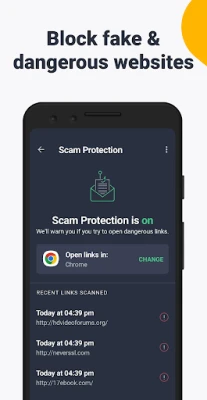
- Web and scam protection: Depending on your plan and region, browsing safeguards may help identify suspicious links or unsafe sites.
- App Lock and Photo Vault: Protect selected apps or private photos with additional access controls where these features are available.
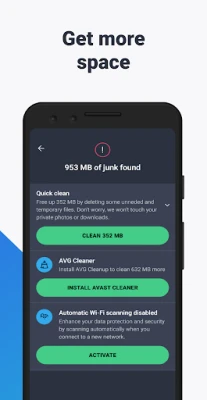
- Junk cleanup: Find certain unnecessary files that may be taking up device storage. Review suggested items before deleting them.
- Password leak alerts: Some versions or plans can notify you about accounts associated with known data breaches and provide guidance on changing affected passwords.
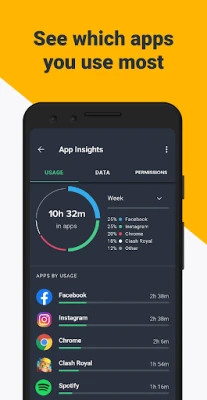
- App permission insights: Review permissions requested by installed apps to better understand the access they may have to device data.
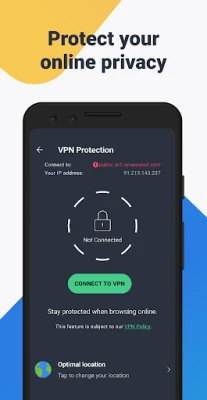
- VPN and call or text protection: These options may be tied to paid plans, supported devices, or regional availability; check the current in-app description for specifics.
✅ Pros and ❌ Cons
Pros
- Brings several security and maintenance tools together in one app.
- Offers on-demand scans for apps, files, and other potential risks.
- Includes practical extras such as Wi-Fi checks and storage cleanup.
- Provides privacy-focused tools such as permission insights and, where available, App Lock or Photo Vault.
- Has a free version for users who want to try basic functions.
Cons
- Some advertised tools may require a paid plan or may not be available in every region.
- Prompts to upgrade can be noticeable in a free security app.
- Security apps may request sensitive permissions, so users should review access carefully.
- Cleanup tools cannot replace Android’s built-in storage controls and may not make a substantial difference on every device.
- Ratings, compatibility, and feature availability can change with app updates.
📋 App Details
- App Name: AVG AntiVirus FREE
- Current Version: Varies by release; confirm the installed build in the app or latest official listing
- Last Updated: Check the official app listing for the current date
- File Size: Varies by version and device; check the download details before installing
- Requires Android: Minimum requirement varies by release; verify compatibility on the official listing
- Developer: AVG Mobile
- Content Rating: Check the current store listing for the applicable rating
- Category: Tools / Security
💬 User Reviews
Feedback for AVG AntiVirus FREE commonly reflects appreciation for having scans, Wi-Fi checks, and cleanup tools in a single interface. Some users also value the app’s privacy features and the reassurance of receiving security notifications.
Common concerns for apps in this category include upgrade prompts, feature limits in the free tier, and differences in performance across devices. As with any security app, results and user experience can vary; check recent reviews for comments about your Android version and device model.
🔍 5 Best Alternative Apps
- Google Play Protect: Android’s built-in app-safety service checks apps for harmful behavior. It is a convenient starting point for users who prefer tools integrated with Google Play.
- Bitdefender Mobile Security: A mobile security option with threat-scanning and web-protection features. Its functions and pricing depend on the current version and subscription.
- Avast Mobile Security: Offers Android security and privacy tools from another established security brand. Compare its free and paid features before choosing.
- Malwarebytes Mobile Security: Focuses on identifying malicious apps and web threats. It may suit users looking for a security-focused alternative.
- ESET Mobile Security: Provides Android protection features, with some tools available through a subscription. Check its current compatibility and plan details.
🧠 My Opinion
AVG AntiVirus FREE is a practical choice for Android users who want security scans alongside tools for Wi-Fi checks, permissions, and basic storage cleanup. Its broad feature set is convenient, but the free version may not include every advertised protection, and some features can depend on a subscription or location.
It is worth considering if you want an approachable security dashboard and are comfortable reviewing permissions and plan limits. Download it from a trusted source, keep Android and the app updated, and treat any security tool as one part of a broader approach to safer browsing and account protection.
🛡️ Privacy and Security
For the safest installation, get AVG AntiVirus FREE from Google Play or another source you can verify. If you install an APK manually, confirm that it comes from a reputable distributor and that the file has not been altered. Unofficial or modified APKs can contain malware, expose personal information, or fail to receive legitimate security updates.
Android may ask you to allow installation from an unknown source for the specific browser or file manager you use. Enable this permission only when necessary, install the file you have verified, and turn the permission off afterward. Review AVG’s permissions and privacy terms as well, especially before enabling features that need accessibility access, VPN operation, call handling, or access to photos and files.
❓ Frequently Asked Questions (FAQs)
Q1: Is AVG AntiVirus FREE APK free to use?
A1: The app offers free features, but some tools or expanded protections may require a paid plan. Check the current in-app details for availability and pricing.
Q2: Does AVG AntiVirus FREE need an internet connection?
A2: Some basic functions may work offline, but features such as web protection, updates, online threat checks, and account alerts generally need an internet connection.
Q3: Is it safe to download AVG AntiVirus FREE APK?
A3: It is safest to install the app through Google Play or a source you can independently verify. APK files from unknown or unofficial sources may be modified or contain malware.
Q4: Are all features available in the free version?
A4: No. Availability can depend on the subscription tier, country, device, and app version. Check the current feature and pricing information inside the app.
Q5: Can AVG AntiVirus FREE protect against every threat?
A5: No security app can guarantee complete protection. Keep Android and your apps updated, avoid suspicious links and downloads, and use unique passwords with multifactor authentication where possible.
Rate the App
Add Comment & Review
User Reviews
Based on 0 reviews
No reviews added yet.
Comments will not be approved to be posted if they are SPAM, abusive, off-topic, use profanity, contain a personal attack, or promote hate of any kind.


More »

Popular Apps

TradingView: Track All MarketsTradingView Inc.

Bus Fever Party!Lumi Games

Claude by AnthropicAnthropic PBC

Block Craft 3D:Building GameWildlife Studios

Malwarebytes - Mobile SecurityMalwarebytes

Block Blast!HungryStudio

Canva: AI Photo & Video EditorCanva

Candy Crush SagaKing

Carrom Pool: Disc GameMiniclip.com

EA SPORTS FC Soccer Mobile 27ELECTRONIC ARTS
More »
Editor's Choice

Kahoot! Play & Create QuizzesKahoot!

United AirlinesUnited Airlines

Tripwoa: Travel Plan & Trailtripwoa

trivago: Compare hotel pricestrivago N.V.

Planner 5D: AI Home DesignPlanner 5D

ibis Paint Xibis inc.

Agoda: Cheap Flights & Hotelsagoda.com

Hopper: Hotels, Flights & CarsHopper Inc.

Brilliant: Learn Math & CodingBrilliant.org

Google ClassroomGoogle LLC