






Latest Version
Version
17.1.0
17.1.0
Update
October 17, 2026
October 17, 2026
Developer
Trend Micro
Trend Micro
Categories
Security
Security
Platforms
Android
Android
Downloads
0
0
License
Free
Free
Package Name
com.trendmicro.tmmspersonal
com.trendmicro.tmmspersonal
Report
Report a Problem
Report a Problem
More About Mobile Security & Antivirus
Mobile Security for Android provides powerful, comprehensive protection against online threats.
Trend Micro Mobile Security is an Android security app that helps detect malicious apps, risky websites, scam messages, and unsafe Wi-Fi networks. It combines antivirus scanning and web protection with tools such as parental controls and app locking; some features require a subscription or trial.
Mobile devices hold personal conversations, payment details, photos, and access to important accounts, making them attractive targets for scams and malicious software. Trend Micro Mobile Security is designed to add an extra layer of protection by checking apps, websites, messages, and Wi-Fi connections for potential threats.
Alongside security scanning, it offers practical tools for safer browsing and family device management. Its combination of web protection, scam detection, and privacy-focused utilities makes it a useful option for Android users who want more visibility into mobile risks.
Trend Micro Mobile Security is a mobile protection app from Trend Micro. Its features include antivirus scanning, checks for newly installed apps, phishing and harmful-site warnings, suspicious-message detection, Wi-Fi risk alerts, and protections for banking and shopping activities. It also includes tools such as app locking, website filtering, and a security report covering recent activity. Availability may vary by device, Android version, region, and subscription plan.
An APK is the package file format Android uses to distribute and install applications. Installing an APK manually can be useful when an app is not available through a particular app store, but users should verify the file and its source before installation.
Pros
Cons
User feedback for mobile security apps commonly focuses on how useful the alerts and scanning tools are in everyday use, along with ease of setup and the value of paid features. Users may appreciate having web, message, and app protection together, while common concerns for subscription-based security apps can include renewal costs, permission requests, and occasional false alarms or compatibility differences. Ratings and review themes change over time, so check the latest Google Play feedback for current impressions of this specific release.
Trend Micro Mobile Security is a feature-rich option for Android users who want more than a basic malware scan. Its combination of web warnings, message screening, Wi-Fi checks, and family tools can be useful, particularly for people who frequently browse, shop, or handle financial tasks on their phones.
Before installing, consider whether you need its full range of features, review the permissions carefully, and check the current subscription terms. It is best viewed as an additional layer of protection—not a substitute for cautious browsing, strong account security, and regular software updates.
Security tools may need access to sensitive areas of a device to provide features such as website checking, notification scanning, or anti-theft protection. Trend Micro describes using permissions and services such as Accessibility, VPN, location, SMS or notifications, background activity, and device administration for particular functions. These permissions can have significant privacy or device-control implications, so read the in-app explanations and enable only the protections you are comfortable using.
Download the app from Google Play or another trusted source. If installing an APK manually, Android may ask you to allow installation from that specific source. Grant this permission only when necessary, and turn it off again afterward if you do not need it. Unofficial or modified APKs can contain malware, be altered to steal data, or fail to receive legitimate security updates.
Q1: Is Trend Micro Mobile Security APK free to use?
A1: The app may offer a free trial, but some protections require a paid subscription. Check the current listing and in-app plan details for pricing and trial conditions.
Q2: Does Trend Micro Mobile Security need an internet connection?
A2: Some functions, such as checking online threats and updating security information, need internet access. The availability of individual tools may differ when you are offline.
Q3: Is it safe to download the Trend Micro Mobile Security APK?
A3: The safest option is to install the official app through Google Play or a trusted source. APK files from unofficial websites may be modified or bundled with malware, so verify the source before installing.
Q4: Why does the app request VPN or Accessibility access?
A4: The app description says these services support selected web-protection features, such as checking websites in supported apps and warning about dangerous pages. Review the permission prompts and enable them only if you want those features.
Q5: Can Trend Micro Mobile Security guarantee that my phone is protected?
A5: No security app can guarantee detection of every threat. Keep Android and your apps updated, use strong authentication, and avoid suspicious links and downloads alongside any security software.
Trend Micro Mobile Security APK
📱 Trend Micro Mobile Security APK Summary
Trend Micro Mobile Security is an Android security app that helps detect malicious apps, risky websites, scam messages, and unsafe Wi-Fi networks. It combines antivirus scanning and web protection with tools such as parental controls and app locking; some features require a subscription or trial.
- App Name: Trend Micro Mobile Security
- Current Version: Varies by release and region; check Google Play for the current version
- Last Updated: Check the Google Play listing for the latest update date
- Category: Tools / Security
- Developer: Trend Micro Incorporated
- Google Play Rating: Ratings and review counts change over time; check Google Play for the current figures
💡 Introduction
Mobile devices hold personal conversations, payment details, photos, and access to important accounts, making them attractive targets for scams and malicious software. Trend Micro Mobile Security is designed to add an extra layer of protection by checking apps, websites, messages, and Wi-Fi connections for potential threats.
Alongside security scanning, it offers practical tools for safer browsing and family device management. Its combination of web protection, scam detection, and privacy-focused utilities makes it a useful option for Android users who want more visibility into mobile risks.
❓ What is Trend Micro Mobile Security APK?
Trend Micro Mobile Security is a mobile protection app from Trend Micro. Its features include antivirus scanning, checks for newly installed apps, phishing and harmful-site warnings, suspicious-message detection, Wi-Fi risk alerts, and protections for banking and shopping activities. It also includes tools such as app locking, website filtering, and a security report covering recent activity. Availability may vary by device, Android version, region, and subscription plan.
An APK is the package file format Android uses to distribute and install applications. Installing an APK manually can be useful when an app is not available through a particular app store, but users should verify the file and its source before installation.
🧑💻 How to Use
- Install the app: Download it from Google Play or another source you trust, then open it and follow the setup instructions.
- Review the permissions: The app may request access needed for selected protections, such as scanning notifications or checking websites. Read each request and enable only the features you want to use.
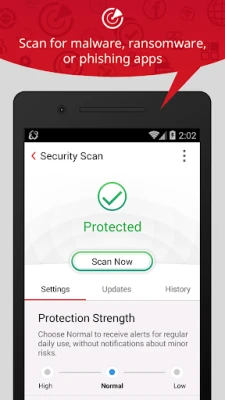
- Run an initial scan: Start an antivirus scan to check installed apps and your device for potential security concerns.
- Enable web protection: Set up Web Guard and choose the supported browsers or apps you want it to monitor. Its local VPN service may be used for this protection; review the in-app explanation before enabling it.
- Check messages and notifications: If available on your device and plan, enable Fraud Buster to screen suspicious texts and notifications.
- Use extra tools as needed: Set up Wi-Fi checks, Pay Guard, parental controls, or app locks based on your needs.
- Review security activity: Check the security report and alerts regularly, and keep the app updated.
⚙️ Features
- Antivirus scanning: Checks for malicious apps and other potential threats, including malware, spyware, and ransomware.
- Pre-installation checks: Helps identify suspicious apps before or during installation, giving you an opportunity to review a potential risk.
- Web Guard: Warns about phishing pages and dangerous links while you browse or use supported apps. Protection depends on the selected apps and granted permissions.
- Fraud Buster: Screens supported text messages and notifications for scam indicators, helping you think twice before responding or opening a link.
- Pay Guard Mobile: Adds checks around supported banking and shopping activities to help you avoid imitation apps and risky websites.
- Wi-Fi Checker: Alerts you to potential issues with Wi-Fi networks, which can help you make more informed choices on public or unfamiliar connections.
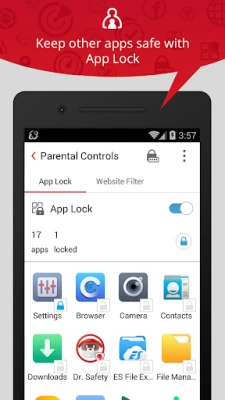
- Parental controls and app locking: Lets families restrict access to selected apps or websites, subject to device compatibility and configuration.
- Security report: Summarizes recent protection activity so you can review alerts and the status of covered features.
- Memory Booster and Secret Snap: The app description also lists a memory utility and a feature that can photograph unauthorized device-access attempts. Availability may vary by version and permissions.
✅ Pros and ❌ Cons
Pros
- Combines app scanning, web protection, and scam-related tools in one app.
- Can help flag suspicious links and messages before you interact with them.
- Includes additional options for Wi-Fi checks, family controls, and financial-app protection.
- Comes from an established cybersecurity company with long-running security software experience.
- Provides alerts and a report to make recent security activity easier to review.
Cons
- Some features may require a paid plan after the advertised trial period.
- Protection features can request sensitive permissions, which users should review carefully.
- Web monitoring may rely on a local VPN service and may not cover every app or browsing situation.
- Feature availability and performance can vary across Android devices and versions.
- Security software cannot guarantee that every scam, malicious app, or unsafe website will be detected.
📋 App Details
- App Name: Trend Micro Mobile Security
- Current Version: Varies by release and region; confirm in Google Play or the app’s official listing
- Last Updated: Check the current Google Play listing
- File Size: Varies by version and device; check the download listing before installation
- Requires Android: Minimum requirement can change between releases; confirm compatibility on the current app listing
- Developer: Trend Micro Incorporated
- Content Rating: Check Google Play for the current rating in your region
- Pricing: May offer a free trial; continued access to certain protections may require a subscription
💬 User Reviews
User feedback for mobile security apps commonly focuses on how useful the alerts and scanning tools are in everyday use, along with ease of setup and the value of paid features. Users may appreciate having web, message, and app protection together, while common concerns for subscription-based security apps can include renewal costs, permission requests, and occasional false alarms or compatibility differences. Ratings and review themes change over time, so check the latest Google Play feedback for current impressions of this specific release.
🔍 5 Best Alternative Apps
- Bitdefender Mobile Security: Offers Android malware scanning and web protection, with additional security tools depending on the plan. It is worth considering if you want a focused mobile security suite.
- Malwarebytes Mobile Security: Provides tools for identifying malicious apps and protecting against risky websites. Its feature set and subscription terms differ by region and version.
- Avast Mobile Security: Includes mobile security and privacy utilities, with some features available through paid plans. Review its permissions and pricing before choosing it.
- ESET Mobile Security: Provides Android threat detection and web-related protections. It may suit users looking for another established security vendor’s mobile offering.
- Norton 360 for Mobile: Combines mobile security features with broader privacy and online protection tools in some plans. Available functions depend on the subscription and region.
🧠 My Opinion
Trend Micro Mobile Security is a feature-rich option for Android users who want more than a basic malware scan. Its combination of web warnings, message screening, Wi-Fi checks, and family tools can be useful, particularly for people who frequently browse, shop, or handle financial tasks on their phones.
Before installing, consider whether you need its full range of features, review the permissions carefully, and check the current subscription terms. It is best viewed as an additional layer of protection—not a substitute for cautious browsing, strong account security, and regular software updates.
🛡️ Privacy and Security
Security tools may need access to sensitive areas of a device to provide features such as website checking, notification scanning, or anti-theft protection. Trend Micro describes using permissions and services such as Accessibility, VPN, location, SMS or notifications, background activity, and device administration for particular functions. These permissions can have significant privacy or device-control implications, so read the in-app explanations and enable only the protections you are comfortable using.
Download the app from Google Play or another trusted source. If installing an APK manually, Android may ask you to allow installation from that specific source. Grant this permission only when necessary, and turn it off again afterward if you do not need it. Unofficial or modified APKs can contain malware, be altered to steal data, or fail to receive legitimate security updates.
❓ Frequently Asked Questions (FAQs)
Q1: Is Trend Micro Mobile Security APK free to use?
A1: The app may offer a free trial, but some protections require a paid subscription. Check the current listing and in-app plan details for pricing and trial conditions.
Q2: Does Trend Micro Mobile Security need an internet connection?
A2: Some functions, such as checking online threats and updating security information, need internet access. The availability of individual tools may differ when you are offline.
Q3: Is it safe to download the Trend Micro Mobile Security APK?
A3: The safest option is to install the official app through Google Play or a trusted source. APK files from unofficial websites may be modified or bundled with malware, so verify the source before installing.
Q4: Why does the app request VPN or Accessibility access?
A4: The app description says these services support selected web-protection features, such as checking websites in supported apps and warning about dangerous pages. Review the permission prompts and enable them only if you want those features.
Q5: Can Trend Micro Mobile Security guarantee that my phone is protected?
A5: No security app can guarantee detection of every threat. Keep Android and your apps updated, use strong authentication, and avoid suspicious links and downloads alongside any security software.
Rate the App
Add Comment & Review
User Reviews
Based on 0 reviews
No reviews added yet.
Comments will not be approved to be posted if they are SPAM, abusive, off-topic, use profanity, contain a personal attack, or promote hate of any kind.


More »

Popular Apps

TradingView: Track All MarketsTradingView Inc.

Bus Fever Party!Lumi Games

Claude by AnthropicAnthropic PBC

Block Craft 3D:Building GameWildlife Studios

Malwarebytes - Mobile SecurityMalwarebytes

Block Blast!HungryStudio

Canva: AI Photo & Video EditorCanva

Candy Crush SagaKing

Carrom Pool: Disc GameMiniclip.com

EA SPORTS FC Soccer Mobile 27ELECTRONIC ARTS
More »
Editor's Choice

Kahoot! Play & Create QuizzesKahoot!

United AirlinesUnited Airlines

Tripwoa: Travel Plan & Trailtripwoa

trivago: Compare hotel pricestrivago N.V.

Planner 5D: AI Home DesignPlanner 5D

ibis Paint Xibis inc.

Agoda: Cheap Flights & Hotelsagoda.com

Hopper: Hotels, Flights & CarsHopper Inc.

Brilliant: Learn Math & CodingBrilliant.org

Google ClassroomGoogle LLC