


Latest Version
Version
.996656812.1-release
.996656812.1-release
Update
October 17, 2026
October 17, 2026
Developer
Google LLC
Google LLC
Categories
Finance
Finance
Platforms
Android
Android
Downloads
0
0
License
Free
Free
Package Name
com.google.android.apps.finance
com.google.android.apps.finance
Report
Report a Problem
Report a Problem
More About Google Finance
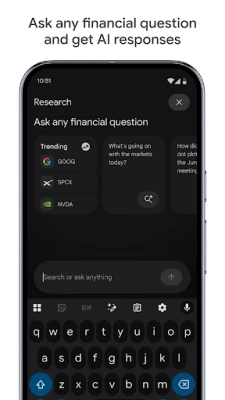
The Google Finance app offers a new way to get instant market intel and AI-powered insights. Stay on top of the latest market events, track the stocks you care about, dive deeper with charting tools, and ask any financial question to get AI responses.
Google Finance helps you follow markets, track investments, and keep up with business and financial news in one place. Its features and availability may vary by country, device, and Google account.
Keeping an eye on stocks, market movements, and financial headlines can quickly become overwhelming when information is scattered across different sites. Google Finance brings market data, watchlists, and related news together in a familiar Google experience, making it a convenient starting point for everyday research.
Whether you are curious about a company’s share price or want to follow a group of investments, its straightforward tools help you see relevant information at a glance. It is designed for market awareness and research—not as a substitute for professional financial advice.
Google Finance is Google’s financial information service. It lets users explore market indices, company and security details, price movements, and finance-related news. Users can follow selected securities and review market information, although available data and features can differ by region.
An APK is the package file format Android uses to distribute and install apps. In this case, be careful when searching for a “Google Finance APK”: Google Finance may be accessed through a web browser, and an APK advertised under that name may not be an official standalone Google app. Check the developer and listing details before installing anything.
Pros
Cons
There is no verified standalone Google Finance Android app listing from which to summarize an app-specific star rating or review count. Feedback about the service generally focuses on the convenience of checking market information and news in one place, along with its familiar interface. Common drawbacks for online finance tools include regional differences, data that may not be real-time, and a feature set that is less extensive than dedicated investment research or trading platforms.
Google Finance is a convenient option for people who want a simple way to explore markets, follow selected securities, and find related financial news. Its main strengths are accessibility and ease of use; it is less suitable for users who need advanced portfolio analytics, comprehensive research tools, or trading features.
It is worth trying as a market-information resource, especially for casual investors and anyone who wants a quick overview. Use it as one source of information, verify important figures, and make investment decisions only after considering your own research and financial needs.
For the safest experience, access Google Finance through Google’s official service or install apps only from trusted stores and verified developers. Avoid unofficial APKs claiming to be Google Finance: modified or misleading packages can contain malware, collect personal information, or request unnecessary permissions.
Installing an APK manually may require enabling permission to install unknown apps for the browser or file manager you use. Only enable this setting when necessary, confirm the file’s origin, and turn the permission off afterward. Sideloading carries risks, and an APK cannot be considered safe simply because it uses Google’s name.
Q1: Is Google Finance free to use?
A1: Google Finance is generally available as a free web service. Access to third-party content or other financial services may have separate terms or charges.
Q2: Is Google Finance a standalone Android app?
A2: A standalone Google Finance Android app listing is not verified here. You can access the service through a compatible browser, and availability may vary by location.
Q3: Does Google Finance provide real-time prices?
A3: Not necessarily. Market data may be delayed, and timing depends on the exchange, instrument, and data provider. Check the displayed data details before relying on a quote.
Q4: Can I trade stocks through Google Finance?
A4: Google Finance is primarily an information and research service, not a brokerage. You will need a suitable broker to place trades.
Q5: Is it safe to download a Google Finance APK?
A5: Only install an APK if you can verify that it comes from an official, trusted source and is genuinely published by Google LLC. Unofficial APKs may contain malware or expose your data, so using the Google Finance web service is the safer option when no official app is available.
Google Finance APK
📱 Google Finance APK Summary
Google Finance helps you follow markets, track investments, and keep up with business and financial news in one place. Its features and availability may vary by country, device, and Google account.
- App Name: Google Finance
- Current Version: No separate version is publicly listed for a standalone Google Finance Android app; Google Finance is also available as a web service.
- Last Updated: Not applicable to the web service; updates to Google’s services and interfaces may roll out over time.
- Category: Finance
- Developer: Google LLC
- Google Play Rating: No verified rating or review count is available for a standalone Google Finance app listing.
💡 Introduction
Keeping an eye on stocks, market movements, and financial headlines can quickly become overwhelming when information is scattered across different sites. Google Finance brings market data, watchlists, and related news together in a familiar Google experience, making it a convenient starting point for everyday research.
Whether you are curious about a company’s share price or want to follow a group of investments, its straightforward tools help you see relevant information at a glance. It is designed for market awareness and research—not as a substitute for professional financial advice.
❓ What Is Google Finance APK?
Google Finance is Google’s financial information service. It lets users explore market indices, company and security details, price movements, and finance-related news. Users can follow selected securities and review market information, although available data and features can differ by region.
An APK is the package file format Android uses to distribute and install apps. In this case, be careful when searching for a “Google Finance APK”: Google Finance may be accessed through a web browser, and an APK advertised under that name may not be an official standalone Google app. Check the developer and listing details before installing anything.
🧑💻 How to Use
- Open Google Finance: Visit the Google Finance service in a supported browser, or open the official app or Google feature available on your device if offered in your region.
- Explore the market: Browse featured market information or use search to look up a company, ticker, index, or other available security.
- Review an asset: Open its information page to check price movements and related market details. Data may be delayed or subject to regional availability.
- Follow securities: Sign in to your Google account if prompted, then use available watchlist or follow options to keep selected items together.
- Read related news: Check linked finance coverage for additional context, and compare information across reliable sources before making decisions.
- Check back regularly: Markets change throughout the day, so revisit the service for updated information where available.
⚙️ Features
- Market overviews: See broad market information and commonly followed indices without having to visit several finance websites.
- Company and security search: Look up available stocks and other market instruments by name or symbol to find relevant information quickly.
- Price and performance information: Review price changes and historical movement where data is available, helping you understand an asset’s recent trend.
- Watchlist tools: Follow selected securities in one place, making it easier to monitor items that matter to you.
- Finance news: Discover financial and business stories related to markets and companies you are exploring.
- Google account integration: Signing in can make supported personalization and saved items more convenient across compatible Google experiences.
- Simple, familiar interface: Google’s search-led design makes it approachable for casual users who want a quick market check rather than a complex trading terminal.
✅ Pros and ❌ Cons
Pros
- Combines market information and related news in a convenient experience.
- Search makes it easy to find companies and market instruments.
- Useful for building a personal list of securities to follow where watchlist features are available.
- Familiar Google interface with a relatively gentle learning curve.
- Can be used for research without treating it as a brokerage or trading platform.
Cons
- It is not a full-service investment or trading app.
- Features, financial instruments, and data availability can vary by country.
- Some market data may be delayed and should not be assumed to be real-time.
- A standalone Google Finance APK and its Play Store details may not be available in every region.
- News and market information alone cannot account for an individual’s financial circumstances or risk tolerance.
📋 App Details
- App Name: Google Finance
- Current Version: No standalone Android app version verified
- Last Updated: Not applicable to the web service
- File Size: Not applicable to the web service; browser storage and data use vary
- Requires Android: No specific Android version for the web service; a compatible browser and internet connection are needed
- Developer: Google LLC
- Content Rating: Not applicable to the web service; any official app listing may have its own rating
💬 User Reviews
There is no verified standalone Google Finance Android app listing from which to summarize an app-specific star rating or review count. Feedback about the service generally focuses on the convenience of checking market information and news in one place, along with its familiar interface. Common drawbacks for online finance tools include regional differences, data that may not be real-time, and a feature set that is less extensive than dedicated investment research or trading platforms.
🔍 5 Best Alternative Apps
- Yahoo Finance: Offers market quotes, company information, financial news, and watchlists. It is a strong choice for users who want a broad finance portal.
- Investing.com: Provides market coverage, economic calendars, news, and data across a range of financial instruments. Its wide selection may suit users who follow global markets.
- TradingView: Known for detailed charts, technical analysis tools, and community ideas. It is useful for people who want more charting features than a basic market overview provides.
- MarketWatch: Combines business and investing news with market information. It can be a good option for readers who prioritize financial reporting and commentary.
- Bloomberg: Provides business and market news alongside financial coverage and analysis. Some content or features may require a subscription, depending on the service and region.
🧠 My Opinion
Google Finance is a convenient option for people who want a simple way to explore markets, follow selected securities, and find related financial news. Its main strengths are accessibility and ease of use; it is less suitable for users who need advanced portfolio analytics, comprehensive research tools, or trading features.
It is worth trying as a market-information resource, especially for casual investors and anyone who wants a quick overview. Use it as one source of information, verify important figures, and make investment decisions only after considering your own research and financial needs.
🛡️ Privacy and Security
For the safest experience, access Google Finance through Google’s official service or install apps only from trusted stores and verified developers. Avoid unofficial APKs claiming to be Google Finance: modified or misleading packages can contain malware, collect personal information, or request unnecessary permissions.
Installing an APK manually may require enabling permission to install unknown apps for the browser or file manager you use. Only enable this setting when necessary, confirm the file’s origin, and turn the permission off afterward. Sideloading carries risks, and an APK cannot be considered safe simply because it uses Google’s name.
❓ Frequently Asked Questions (FAQs)
Q1: Is Google Finance free to use?
A1: Google Finance is generally available as a free web service. Access to third-party content or other financial services may have separate terms or charges.
Q2: Is Google Finance a standalone Android app?
A2: A standalone Google Finance Android app listing is not verified here. You can access the service through a compatible browser, and availability may vary by location.
Q3: Does Google Finance provide real-time prices?
A3: Not necessarily. Market data may be delayed, and timing depends on the exchange, instrument, and data provider. Check the displayed data details before relying on a quote.
Q4: Can I trade stocks through Google Finance?
A4: Google Finance is primarily an information and research service, not a brokerage. You will need a suitable broker to place trades.
Q5: Is it safe to download a Google Finance APK?
A5: Only install an APK if you can verify that it comes from an official, trusted source and is genuinely published by Google LLC. Unofficial APKs may contain malware or expose your data, so using the Google Finance web service is the safer option when no official app is available.
Rate the App
Add Comment & Review
User Reviews
Based on 0 reviews
No reviews added yet.
Comments will not be approved to be posted if they are SPAM, abusive, off-topic, use profanity, contain a personal attack, or promote hate of any kind.






More »

Popular Apps

TradingView: Track All MarketsTradingView Inc.

Bus Fever Party!Lumi Games

Claude by AnthropicAnthropic PBC

Block Craft 3D:Building GameWildlife Studios

Malwarebytes - Mobile SecurityMalwarebytes

Block Blast!HungryStudio

Canva: AI Photo & Video EditorCanva

Candy Crush SagaKing

Carrom Pool: Disc GameMiniclip.com

EA SPORTS FC Soccer Mobile 27ELECTRONIC ARTS
More »
Editor's Choice

Kahoot! Play & Create QuizzesKahoot!

United AirlinesUnited Airlines

Tripwoa: Travel Plan & Trailtripwoa

trivago: Compare hotel pricestrivago N.V.

Planner 5D: AI Home DesignPlanner 5D

ibis Paint Xibis inc.

Agoda: Cheap Flights & Hotelsagoda.com

Hopper: Hotels, Flights & CarsHopper Inc.

Brilliant: Learn Math & CodingBrilliant.org

Google ClassroomGoogle LLC