





Latest Version
Version
8.9.97
8.9.97
Update
October 17, 2026
October 17, 2026
Developer
BTCC.COM
BTCC.COM
Categories
Finance
Finance
Platforms
Android
Android
Downloads
0
0
License
Free
Free
Package Name
com.btcc.hy
com.btcc.hy
Report
Report a Problem
Report a Problem
More About BTCC - Trade Bitcoin & Crypto
Welcome to BTCC! We're the trusted crypto exchange that's been providing secure trading services for millions of users since 2011.
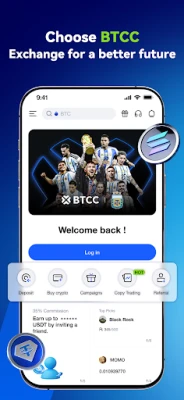
BTCC is a cryptocurrency trading app for buying and selling digital assets, trading spot pairs and futures, and following other traders through copy trading. It also offers demo trading, crypto deposits, and tokenized stock products, though availability and features can vary by region.
Managing crypto trades from a phone can be difficult when charts, order types, and account tools are spread across different platforms. BTCC brings several trading functions together, including spot markets, futures, copy trading, and demo mode, in one mobile app.
The app is aimed at both newcomers who want to explore crypto trading and experienced users who need advanced market tools on the go. Its broad selection of trading products may appeal to active traders, but leverage and cryptocurrency prices can involve substantial risk.
BTCC is a mobile cryptocurrency exchange application. Users can browse supported digital assets, buy or sell crypto where available, trade spot pairs, and access USDT perpetual or coin-margined futures. The app also promotes copy trading, demo trading, and tokenized stock products. Supported services, payment methods, and assets may depend on the user's location and account eligibility.
An APK is the Android application package format used to distribute and install apps. Installing an APK manually can be useful when an app is not installed through an app store, but users should obtain it only from a trusted, verified source and make sure the file is the authentic, current release.
Pros
Cons
User feedback for cryptocurrency exchange apps commonly focuses on the trading experience, ease of use, available markets, and account or deposit support. BTCC users may value having multiple trading tools in one place, while newcomers can find derivatives and leverage settings complex. Experiences with verification, payment processing, fees, and customer support can differ by location and account circumstances. Review recent feedback in your app store before signing up, and do not rely on ratings alone when deciding where to trade.
BTCC offers a broad set of crypto trading tools, including spot markets, futures, copy trading, and a demo mode. That variety can be convenient for users who want to manage different trading activities in one app, while the practice environment may help newcomers understand the interface.
However, the app is not a shortcut to reliable returns. Futures leverage, copy trading, and volatile crypto markets can lead to rapid losses. BTCC may be worth exploring for users who understand these risks and can access the relevant products in their region. Beginners should start with education and demo trading, verify all fees and terms, and never trade money they cannot afford to lose.
Download BTCC only through a trusted app store or a verified official distribution channel. Before installing an APK manually, confirm that the source and file are authentic. Android may ask you to enable Install unknown apps for the app handling the download; grant this permission only when necessary, and turn it off again afterward.
Unofficial or modified APKs can contain malware, steal login details, or expose personal and financial information. An app's security claims do not remove trading risks or guarantee that funds are risk-free. Use strong account security, protect recovery details, and carefully check transfer addresses and networks before sending crypto.
Q1: Is the BTCC APK free to use?
A1: The app may be free to download, but trading can involve fees, spreads, funding costs, or other charges. Check the current fee schedule and product terms before making a transaction.
Q2: Do I need an internet connection to use BTCC?
A2: Yes. Account access, market prices, deposits, and trading features require an internet connection. Some functions may also be limited during outages or maintenance.
Q3: Is it safe to download BTCC APK?
A3: Safety depends on getting the authentic app from a trusted source. Unofficial APKs can be modified or malicious, so avoid unknown download sites and review Android permissions before installing.
Q4: Can beginners use BTCC?
A4: Beginners can explore the app and use demo trading if it is available, but futures and leverage are complex and risky. Learn the basics before using real funds.
Q5: Does BTCC guarantee profits through copy trading?
A5: No. Copying another trader does not guarantee returns. Their trades can lose money, and past performance does not reliably predict future results.
BTCC APK
📱 BTCC APK Summary
BTCC is a cryptocurrency trading app for buying and selling digital assets, trading spot pairs and futures, and following other traders through copy trading. It also offers demo trading, crypto deposits, and tokenized stock products, though availability and features can vary by region.
- App Name: BTCC
- Current Version: Varies by release and Android device; check the app listing for the latest version
- Last Updated: Changes with each release; the current date should be confirmed in the official app listing
- Category: Finance
- Developer: BTCC
- Google Play Rating: Rating and review count vary by region and can change over time; check Google Play for the current figures
💡 Introduction
Managing crypto trades from a phone can be difficult when charts, order types, and account tools are spread across different platforms. BTCC brings several trading functions together, including spot markets, futures, copy trading, and demo mode, in one mobile app.
The app is aimed at both newcomers who want to explore crypto trading and experienced users who need advanced market tools on the go. Its broad selection of trading products may appeal to active traders, but leverage and cryptocurrency prices can involve substantial risk.
❓ What is BTCC APK?
BTCC is a mobile cryptocurrency exchange application. Users can browse supported digital assets, buy or sell crypto where available, trade spot pairs, and access USDT perpetual or coin-margined futures. The app also promotes copy trading, demo trading, and tokenized stock products. Supported services, payment methods, and assets may depend on the user's location and account eligibility.
An APK is the Android application package format used to distribute and install apps. Installing an APK manually can be useful when an app is not installed through an app store, but users should obtain it only from a trusted, verified source and make sure the file is the authentic, current release.
🧑💻 How to Use
- Install the app: Get BTCC through a trusted app store or an official distribution channel available in your region.
- Create or access an account: Register or sign in, then complete any identity or security checks required for the features you intend to use.
- Secure your account: Review the available security settings and use a strong, unique password. Enable additional account protections where offered.
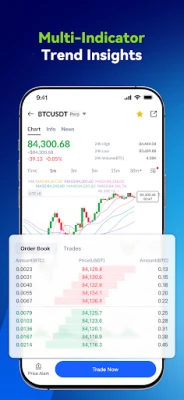
- Explore the markets: Browse spot pairs or futures contracts and review the asset, price, fees, and order details before trading.
- Fund your account: Use a supported crypto deposit or payment method. Confirm the network and deposit details carefully before transferring funds.
- Practise if needed: Use demo trading, if available in your region, to learn the interface and test strategies without putting real funds at risk.
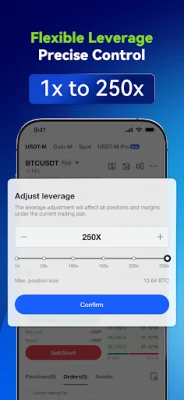
- Place and monitor trades: Choose an order type and size you understand, check any leverage settings, and keep track of open positions and account activity.
⚙️ Features
- Spot crypto trading: Trade supported pairs featuring assets such as Bitcoin, Ethereum, Solana, and XRP. Market availability can vary by region.
- Crypto futures: Access USDT perpetual and coin-margined futures with professional trading tools. Futures can magnify losses as well as gains.
- Copy trading: Follow eligible traders and automatically mirror selected trades. Copy trading does not guarantee profits, and copied positions can lose value.
- Demo trading: Practise with a simulated trading environment, where available, before risking real funds.
- Crypto purchases and conversion: The app advertises ways to buy supported cryptocurrencies and convert between digital assets. Payment options and availability depend on location.
- Tokenized stock products: BTCC promotes tokenized assets linked to certain US stocks. These products are not the same as owning shares through a traditional brokerage, and regional restrictions may apply.
- Trading fees and VIP benefits: The exchange advertises fee rates and VIP or SVIP programs for eligible users. Actual rates depend on account tier, product, and current terms.
- Account funding and support: Users can access supported deposit options and contact customer support. Deposit processing times and support availability may vary.
✅ Pros and ❌ Cons
Pros
- Combines spot trading, futures, and copy trading in one app.
- Demo trading can help users learn the interface before placing live trades.
- Supports a range of cryptocurrencies and trading products, subject to regional availability.
- Offers tools and markets that may suit experienced traders as well as beginners exploring crypto.
- The app advertises proof-of-reserves reporting and account security measures; users should review the current details and limitations.
Cons
- Crypto and leveraged futures trading carry a high risk of financial loss.
- Advanced screens and trading terminology may be difficult for first-time users.
- Products, payment options, and account features may not be available in every country.
- Copy trading can still result in losses and should not be treated as guaranteed income.
- Fees, promotions, and VIP terms can change, so users need to check current conditions before trading.
- Tokenized stock products do not necessarily provide the same rights or protections as directly holding traditional shares.
📋 App Details
- App Name: BTCC
- Current Version: Varies by release; verify the latest version in the official listing
- Last Updated: Check the official app listing for the latest update date
- File Size: Varies by version and device; check the installer details before downloading
- Requires Android: Minimum Android requirement can vary by release; confirm compatibility in the app listing
- Developer: BTCC
- Category: Finance
- Content Rating: Check the store listing for the rating applicable to your region
💬 User Reviews
User feedback for cryptocurrency exchange apps commonly focuses on the trading experience, ease of use, available markets, and account or deposit support. BTCC users may value having multiple trading tools in one place, while newcomers can find derivatives and leverage settings complex. Experiences with verification, payment processing, fees, and customer support can differ by location and account circumstances. Review recent feedback in your app store before signing up, and do not rely on ratings alone when deciding where to trade.
🔍 5 Best Alternative Apps
- Binance: A large crypto platform offering spot markets, derivatives, and other digital-asset services where permitted. Its broad selection may suit users comparing market coverage and trading tools.
- Coinbase: A widely known crypto app with a beginner-friendly approach to buying, selling, and managing supported cryptocurrencies. Features and availability depend on the user's country.
- Kraken: A cryptocurrency platform with spot trading and other products in supported regions. It may appeal to users looking for a mix of accessible account tools and more advanced markets.
- OKX: An exchange app offering spot markets, derivatives, and additional crypto services in eligible locations. Its range of tools may be useful to active traders who are comfortable with market risk.
- Bybit: A crypto trading platform known for spot and derivatives products where available. As with any exchange, users should check local access, fees, and product risks before trading.
🧠 My Opinion
BTCC offers a broad set of crypto trading tools, including spot markets, futures, copy trading, and a demo mode. That variety can be convenient for users who want to manage different trading activities in one app, while the practice environment may help newcomers understand the interface.
However, the app is not a shortcut to reliable returns. Futures leverage, copy trading, and volatile crypto markets can lead to rapid losses. BTCC may be worth exploring for users who understand these risks and can access the relevant products in their region. Beginners should start with education and demo trading, verify all fees and terms, and never trade money they cannot afford to lose.
🛡️ Privacy and Security
Download BTCC only through a trusted app store or a verified official distribution channel. Before installing an APK manually, confirm that the source and file are authentic. Android may ask you to enable Install unknown apps for the app handling the download; grant this permission only when necessary, and turn it off again afterward.
Unofficial or modified APKs can contain malware, steal login details, or expose personal and financial information. An app's security claims do not remove trading risks or guarantee that funds are risk-free. Use strong account security, protect recovery details, and carefully check transfer addresses and networks before sending crypto.
❓ Frequently Asked Questions (FAQs)
Q1: Is the BTCC APK free to use?
A1: The app may be free to download, but trading can involve fees, spreads, funding costs, or other charges. Check the current fee schedule and product terms before making a transaction.
Q2: Do I need an internet connection to use BTCC?
A2: Yes. Account access, market prices, deposits, and trading features require an internet connection. Some functions may also be limited during outages or maintenance.
Q3: Is it safe to download BTCC APK?
A3: Safety depends on getting the authentic app from a trusted source. Unofficial APKs can be modified or malicious, so avoid unknown download sites and review Android permissions before installing.
Q4: Can beginners use BTCC?
A4: Beginners can explore the app and use demo trading if it is available, but futures and leverage are complex and risky. Learn the basics before using real funds.
Q5: Does BTCC guarantee profits through copy trading?
A5: No. Copying another trader does not guarantee returns. Their trades can lose money, and past performance does not reliably predict future results.
Rate the App
Add Comment & Review
User Reviews
Based on 0 reviews
No reviews added yet.
Comments will not be approved to be posted if they are SPAM, abusive, off-topic, use profanity, contain a personal attack, or promote hate of any kind.
More »
Other Apps in This Category






More »

Popular Apps

TradingView: Track All MarketsTradingView Inc.

Bus Fever Party!Lumi Games

Claude by AnthropicAnthropic PBC

Block Craft 3D:Building GameWildlife Studios

Malwarebytes - Mobile SecurityMalwarebytes

Block Blast!HungryStudio

Canva: AI Photo & Video EditorCanva

Candy Crush SagaKing

Carrom Pool: Disc GameMiniclip.com

EA SPORTS FC Soccer Mobile 27ELECTRONIC ARTS
More »
Editor's Choice

Kahoot! Play & Create QuizzesKahoot!

United AirlinesUnited Airlines

Tripwoa: Travel Plan & Trailtripwoa

trivago: Compare hotel pricestrivago N.V.

Planner 5D: AI Home DesignPlanner 5D

ibis Paint Xibis inc.

Agoda: Cheap Flights & Hotelsagoda.com

Hopper: Hotels, Flights & CarsHopper Inc.

Brilliant: Learn Math & CodingBrilliant.org

Google ClassroomGoogle LLC