


Latest Version
Update
October 17, 2026
October 17, 2026
Developer
Google LLC
Google LLC
Categories
Finance
Finance
Platforms
Android
Android
Downloads
0
0
License
Free
Free
Package Name
com.google.android.apps.walletnfcrel
com.google.android.apps.walletnfcrel
Report
Report a Problem
Report a Problem
More About Google Wallet
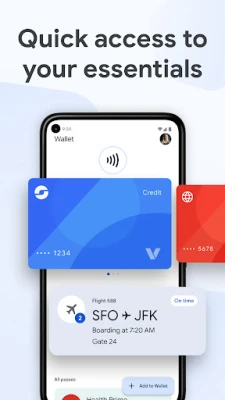
Google Wallet is the safe, fast, and smart way to access your credit cards, debit cards, transit passes, tickets, digital IDs, and more wherever you are—on the go, online, and across Google.
Google Wallet brings contactless payments, passes, tickets, and selected digital IDs together in one place on compatible Android devices. It can make everyday checkout and travel more convenient, while using security features such as virtual card numbers for eligible tap-to-pay transactions.
Paying, travelling, and keeping important passes organized often means juggling several cards and apps. Google Wallet helps simplify that routine by bringing eligible payment cards, loyalty cards, tickets, boarding passes, transit passes, and supported digital IDs together in a convenient Android wallet.
Its appeal is straightforward: when contactless payments are supported, you can pay with a compatible phone instead of reaching for a physical card. Availability depends on your device, country, bank, and the specific pass or service, but for supported users, Wallet can be a handy everyday companion.
Google Wallet is Google’s digital wallet app for storing and using supported payment cards and passes. Depending on local availability, you may also add loyalty and gift cards, event tickets, transit passes, airline boarding passes, and digital identification credentials. The app is designed for Android users who want quick access to these items without carrying every physical card or ticket.
An APK is the Android application package format used to distribute and install apps. Downloading a Google Wallet APK can allow manual installation, but updates and compatibility may differ from the version offered through Google Play. Use the official store when possible, especially for an app that handles payment cards and personal information.
Pros
Cons
User feedback commonly highlights the convenience of paying with a phone and keeping travel, loyalty, and event passes together. Many users appreciate being able to access a payment method quickly without taking out a wallet.
Common frustrations tend to involve setup or availability rather than the core idea: a bank or card may not be supported, verification can take extra steps, and certain features may not work in every country or on every device. As with other payment apps, occasional device-specific issues can also affect the experience. Ratings and review themes change over time, so check the current store listing for the latest user feedback.
Google Wallet is a practical choice for Android users who want supported payment cards, travel passes, tickets, and loyalty cards close at hand. Its strongest points are convenience and the ability to consolidate everyday digital items, while its biggest limitation is that availability depends on your location, bank, device, and the providers you use.
If contactless payments and digital passes are supported where you live, Google Wallet is worth trying—particularly if you already use Android and want fewer physical cards in your pocket. Just install it from a trusted source and confirm that your cards and passes are compatible before relying on it for a journey or purchase.
Google Wallet includes security protections, but users should still protect their Google Account and phone with a strong screen lock and keep device software up to date. For eligible tap-to-pay transactions, Wallet uses a virtual card number rather than sharing the actual card number with the merchant. Available protections and features can vary by device and account.
Download the app from Google Play or another trusted source whenever possible. If you choose to install an APK manually, Android may require you to allow installation from that source in your settings—sometimes described as “Install unknown apps” or “Install from Unknown Sources.” Only enable this permission for a source you trust, and consider turning it off afterward. Unofficial or altered APKs may contain malware, expose personal or payment information, or fail to receive safe updates.
Q1: Is Google Wallet free to use?
A1: Google Wallet is generally free to download and use. Your bank, card issuer, mobile provider, or other service may apply its own fees or terms.
Q2: What Android version does Google Wallet require?
A2: The provided app information lists Android 9.0 (Pie) or later. Requirements and available features can change, so check the current Google Play listing for your device.
Q3: Do I need NFC to use Google Wallet?
A3: NFC is required for contactless tap-to-pay on a phone. You may still be able to use other Wallet features, such as viewing supported passes, without NFC.
Q4: Can I use Google Wallet in every country?
A4: No. Payments, banks, transit systems, digital IDs, and other features are available only in supported regions and with participating providers.
Q5: Is it safe to download the Google Wallet APK?
A5: The safest option is to install Google Wallet through Google Play. If you use an APK, choose a reputable source and verify that the file is genuine; unofficial files may contain malware or put your data at risk.
Google Wallet APK
📱 Google Wallet APK Summary
Google Wallet brings contactless payments, passes, tickets, and selected digital IDs together in one place on compatible Android devices. It can make everyday checkout and travel more convenient, while using security features such as virtual card numbers for eligible tap-to-pay transactions.
- App Name: Google Wallet
- Current Version: Version varies by device and rollout; check Google Play for the latest release
- Last Updated: The update date varies by region and release; check Google Play for the current listing
- Category: Finance
- Developer: Google LLC
- Google Play Rating: Rating and review count change over time and can vary by region; see Google Play for current figures
💡 Introduction
Paying, travelling, and keeping important passes organized often means juggling several cards and apps. Google Wallet helps simplify that routine by bringing eligible payment cards, loyalty cards, tickets, boarding passes, transit passes, and supported digital IDs together in a convenient Android wallet.
Its appeal is straightforward: when contactless payments are supported, you can pay with a compatible phone instead of reaching for a physical card. Availability depends on your device, country, bank, and the specific pass or service, but for supported users, Wallet can be a handy everyday companion.
❓ What Is Google Wallet APK?
Google Wallet is Google’s digital wallet app for storing and using supported payment cards and passes. Depending on local availability, you may also add loyalty and gift cards, event tickets, transit passes, airline boarding passes, and digital identification credentials. The app is designed for Android users who want quick access to these items without carrying every physical card or ticket.
An APK is the Android application package format used to distribute and install apps. Downloading a Google Wallet APK can allow manual installation, but updates and compatibility may differ from the version offered through Google Play. Use the official store when possible, especially for an app that handles payment cards and personal information.
🧑💻 How to Use
- Install and open the app: Get Google Wallet from Google Play where available, then open it and sign in with your Google Account.
- Check compatibility: Make sure your Android device meets the app’s requirements. For contactless payments, your phone needs NFC and the feature must be supported in your region.
- Add a payment card: Follow the in-app instructions to add an eligible debit or credit card. Your bank may ask you to verify the card before it can be used.
- Set up tap to pay: Enable NFC in your phone settings and select a default payment method if prompted. To pay, unlock your phone, hold it near a compatible terminal, and wait for the confirmation.
- Add passes and tickets: Use the available add or save options for supported loyalty cards, gift cards, event tickets, boarding passes, or transit passes. Some passes may be added from another app or website.
- Use Wallet when needed: Open the relevant pass or ticket to show it at an entrance, or use your phone at a supported transit reader. Online checkout may also offer Google Pay or saved-card autofill.
- Manage your account and security: Review saved items and device security settings regularly. If your phone is lost, Google’s account tools may help you locate, secure, or remotely erase it.
⚙️ Features
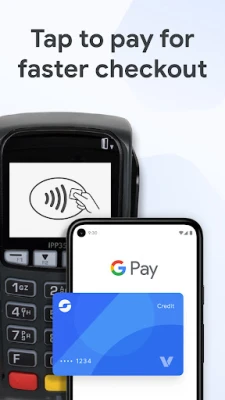
- Contactless payments: Pay at supported terminals with a compatible Android phone and eligible card. For supported transactions, a virtual card number is shared with the merchant instead of your actual card number.
- Cards in one digital wallet: Keep eligible debit and credit cards accessible from your device, reducing the need to carry them all physically.
- Loyalty and gift cards: Save supported rewards and gift cards so they are easier to find when checking out or redeeming benefits.
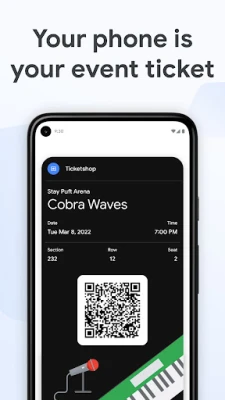
- Tickets and boarding passes: Store supported event tickets and airline boarding passes for quick access. Some passes can display updated event or journey information.
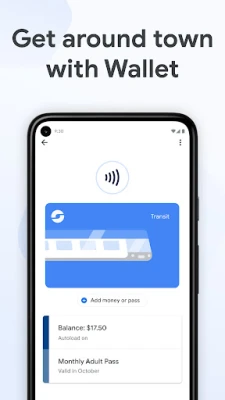
- Transit passes: Add supported transit passes and use them at participating systems, where available, to make commuting more convenient.
- Online checkout support: Use Google Pay where offered, or access saved payment details through supported Chrome autofill features.
- Transaction and order information: Wallet can show receipts for supported transactions. In the United States, linking Gmail may also make eligible online order updates available in the app.
- Digital IDs: In supported locations and for eligible credentials, Wallet can store digital versions of items such as driver’s licenses or student IDs.
- Built-in security tools: Android device protections and Google Account features—including screen locking, two-step verification, and remote device management—help protect access to Wallet.
✅ Pros and ❌ Cons
Pros
- Combines supported payments, tickets, passes, and other useful items in one app.
- Contactless checkout can be quick and convenient where accepted.
- Eligible tap-to-pay transactions use a virtual card number instead of exposing the actual card number to the merchant.
- Helpful for keeping travel and event passes close at hand.
- Works with supported Android phones, Wear OS devices, and select Fitbit devices.
Cons
- Feature availability varies by country, bank, device, and participating merchant or transit provider.
- Some card issuers require additional verification or may not support Wallet.
- Contactless payments require compatible hardware, including NFC, and an eligible setup.
- Digital IDs and certain pass features are available only in specific regions.
- Users who install an unofficial APK may face security and update risks.
📋 App Details
- App Name: Google Wallet
- Current Version: Varies by device and rollout; check Google Play for the latest version
- Last Updated: Varies by release and region
- File Size: Varies by version and device; check the download listing for the current size
- Requires Android: Android 9.0 (Pie) or later, according to the app description; availability and features may vary by device
- Developer: Google LLC
- Content Rating: Check the current Google Play listing for the rating in your region
💬 User Reviews
User feedback commonly highlights the convenience of paying with a phone and keeping travel, loyalty, and event passes together. Many users appreciate being able to access a payment method quickly without taking out a wallet.
Common frustrations tend to involve setup or availability rather than the core idea: a bank or card may not be supported, verification can take extra steps, and certain features may not work in every country or on every device. As with other payment apps, occasional device-specific issues can also affect the experience. Ratings and review themes change over time, so check the current store listing for the latest user feedback.
🔍 5 Best Alternative Apps
- Apple Wallet: A digital wallet for compatible Apple devices, with support for payment cards, tickets, passes, and selected IDs where available.
- Samsung Wallet: Samsung’s wallet app for supported Galaxy devices, combining eligible payment cards and digital items in one place. Its features depend on device and region.
- PayPal: A widely used payment service for online purchases and money transfers. It can be a useful companion for shopping, though it is not a direct replacement for every Wallet pass feature.
- Garmin Pay: A contactless payment option available on selected Garmin wearables with participating cards and banks, useful for people who prefer paying from a watch.
- Curve: A payment-card management service available in supported markets that can bring eligible cards together and provide tools for managing spending.
🧠 My Opinion
Google Wallet is a practical choice for Android users who want supported payment cards, travel passes, tickets, and loyalty cards close at hand. Its strongest points are convenience and the ability to consolidate everyday digital items, while its biggest limitation is that availability depends on your location, bank, device, and the providers you use.
If contactless payments and digital passes are supported where you live, Google Wallet is worth trying—particularly if you already use Android and want fewer physical cards in your pocket. Just install it from a trusted source and confirm that your cards and passes are compatible before relying on it for a journey or purchase.
🛡️ Privacy and Security
Google Wallet includes security protections, but users should still protect their Google Account and phone with a strong screen lock and keep device software up to date. For eligible tap-to-pay transactions, Wallet uses a virtual card number rather than sharing the actual card number with the merchant. Available protections and features can vary by device and account.
Download the app from Google Play or another trusted source whenever possible. If you choose to install an APK manually, Android may require you to allow installation from that source in your settings—sometimes described as “Install unknown apps” or “Install from Unknown Sources.” Only enable this permission for a source you trust, and consider turning it off afterward. Unofficial or altered APKs may contain malware, expose personal or payment information, or fail to receive safe updates.
❓ Frequently Asked Questions (FAQs)
Q1: Is Google Wallet free to use?
A1: Google Wallet is generally free to download and use. Your bank, card issuer, mobile provider, or other service may apply its own fees or terms.
Q2: What Android version does Google Wallet require?
A2: The provided app information lists Android 9.0 (Pie) or later. Requirements and available features can change, so check the current Google Play listing for your device.
Q3: Do I need NFC to use Google Wallet?
A3: NFC is required for contactless tap-to-pay on a phone. You may still be able to use other Wallet features, such as viewing supported passes, without NFC.
Q4: Can I use Google Wallet in every country?
A4: No. Payments, banks, transit systems, digital IDs, and other features are available only in supported regions and with participating providers.
Q5: Is it safe to download the Google Wallet APK?
A5: The safest option is to install Google Wallet through Google Play. If you use an APK, choose a reputable source and verify that the file is genuine; unofficial files may contain malware or put your data at risk.
Rate the App
Add Comment & Review
User Reviews
Based on 0 reviews
No reviews added yet.
Comments will not be approved to be posted if they are SPAM, abusive, off-topic, use profanity, contain a personal attack, or promote hate of any kind.






More »

Popular Apps

TradingView: Track All MarketsTradingView Inc.

Bus Fever Party!Lumi Games

Claude by AnthropicAnthropic PBC

Block Craft 3D:Building GameWildlife Studios

Malwarebytes - Mobile SecurityMalwarebytes

Block Blast!HungryStudio

Canva: AI Photo & Video EditorCanva

Candy Crush SagaKing

Carrom Pool: Disc GameMiniclip.com

EA SPORTS FC Soccer Mobile 27ELECTRONIC ARTS
More »
Editor's Choice

Kahoot! Play & Create QuizzesKahoot!

United AirlinesUnited Airlines

Tripwoa: Travel Plan & Trailtripwoa

trivago: Compare hotel pricestrivago N.V.

Planner 5D: AI Home DesignPlanner 5D

ibis Paint Xibis inc.

Agoda: Cheap Flights & Hotelsagoda.com

Hopper: Hotels, Flights & CarsHopper Inc.

Brilliant: Learn Math & CodingBrilliant.org

Google ClassroomGoogle LLC