




Latest Version
Version
9.4.0
9.4.0
Update
October 18, 2026
October 18, 2026
Developer
ClassDojo
ClassDojo
Categories
Education
Education
Platforms
Android
Android
Downloads
0
0
License
Free
Free
Package Name
com.classdojo.android
com.classdojo.android
Report
Report a Problem
Report a Problem
More About ClassDojo
It's time to build better classrooms.
ClassDojo helps teachers, families, and students stay connected through classroom updates, messaging, and learning activities. It is designed to make school communication more engaging and help build a stronger classroom community.
Keeping up with classroom life can be difficult when school updates, learning activities, and family communication are spread across different channels. ClassDojo brings many of these interactions together in one place, giving teachers a way to share news and families a convenient way to stay involved.
With classroom photos and videos, direct messaging, school announcements, and kid-friendly learning content, the app aims to make the connection between home and school more personal. Its core communication features are free, while an optional ClassDojo Plus subscription offers families additional features and keepsake-style memories.
ClassDojo is an education and classroom-community app for teachers, parents, and students. Teachers can share classroom moments and announcements, communicate with families, and support positive classroom habits. Parents can follow updates from their child’s teacher, while students can access age-appropriate activities and learning content at school or at home.
An APK is the package file format Android uses to install apps. Downloading and installing a ClassDojo APK manually can be useful in some situations, but APK files should be obtained only from a source you trust and should match your device and Android version.
Pros
Cons
User feedback commonly highlights the convenience of seeing classroom updates and contacting teachers from one place. Parents value photo and video posts that help them feel included, while teachers appreciate having a dedicated channel for family communication. Some users report occasional issues with notifications, account setup, or app performance, and others note that the experience depends heavily on how consistently their school uses the platform. Subscription features and privacy controls are also worth reviewing before use.
ClassDojo is a practical choice for families and teachers who want a more connected view of classroom life. Its best qualities are straightforward communication, convenient classroom updates, and features that include students as well as adults. The main limitation is that it works best when the school community is actively using it, and some extras are part of a paid subscription.
If your child’s teacher uses ClassDojo, the app is worth trying for its core communication and update features. Families should explore the privacy settings and subscription details, but for many school communities, it can make staying in the loop simpler and more engaging.
ClassDojo can involve information and media related to children, so parents and teachers should take care with account access, privacy settings, and what they share. Review app permissions and the service’s current privacy information, use a strong password, and avoid posting sensitive personal details.
For an APK installation, download only from a reputable source and verify that the file is genuine and compatible with your device. Android may ask you to allow installation from that source through an “Install unknown apps” setting. Enable this only when needed, then turn it off afterward. Unofficial or modified APKs can contain malware, compromise personal information, or fail to receive safe updates; installing through Google Play is generally the safer option.
Q1: Is ClassDojo APK free to use?
A: ClassDojo is free to download and offers core features for classroom communication. Some additional family features are available through the optional ClassDojo Plus subscription.
Q2: Who can use ClassDojo?
A: The app is designed for teachers, parents, and students. The tools available depend on the user’s role and the school or class setup.
Q3: Do I need an internet connection to use ClassDojo?
A: An internet connection is generally needed to sign in, receive updates, send messages, and load shared content. Offline access may be limited.
Q4: Is it safe to download a ClassDojo APK?
A: Safety depends on where the file comes from. Prefer Google Play or another trusted source, avoid modified APKs, and review permissions before installing.
Q5: How do parents join their child’s class?
A: Parents typically create or sign in to an account and use an invitation or class code provided by the teacher. Follow the in-app instructions or ask the school for help.
ClassDojo APK
📱 ClassDojo APK Summary
ClassDojo helps teachers, families, and students stay connected through classroom updates, messaging, and learning activities. It is designed to make school communication more engaging and help build a stronger classroom community.
- App Name: ClassDojo
- Current Version: Version details vary by release and region; check Google Play for the latest listing
- Last Updated: Check Google Play for the current update date
- Category: Education
- Developer: ClassDojo
- Google Play Rating: Rating and review count change over time; see Google Play for current figures
💡 Introduction
Keeping up with classroom life can be difficult when school updates, learning activities, and family communication are spread across different channels. ClassDojo brings many of these interactions together in one place, giving teachers a way to share news and families a convenient way to stay involved.
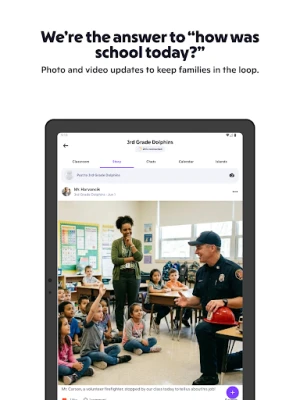
With classroom photos and videos, direct messaging, school announcements, and kid-friendly learning content, the app aims to make the connection between home and school more personal. Its core communication features are free, while an optional ClassDojo Plus subscription offers families additional features and keepsake-style memories.
❓ What Is ClassDojo APK?
ClassDojo is an education and classroom-community app for teachers, parents, and students. Teachers can share classroom moments and announcements, communicate with families, and support positive classroom habits. Parents can follow updates from their child’s teacher, while students can access age-appropriate activities and learning content at school or at home.
An APK is the package file format Android uses to install apps. Downloading and installing a ClassDojo APK manually can be useful in some situations, but APK files should be obtained only from a source you trust and should match your device and Android version.
🧑💻 How to Use
- Install the app: Get ClassDojo from Google Play or, if installing manually, use a reputable APK source and review the requested permissions.
- Choose your role: Create or sign in to an account as a parent, teacher, or student, following the setup instructions in the app.
- Connect to a class: Parents generally join using an invitation or class code provided by the teacher. Teachers can set up a class and invite families.
- Check the class feed: Browse shared photos, videos, classroom stories, and announcements to keep up with school activity.
- Communicate: Use the messaging tools to contact a teacher or family member, subject to the account’s role and school settings.
- Explore learning content: Look for activities and resources students can use at school or at home.
- Review optional features: Families interested in extra memories and features can check the current details of ClassDojo Plus in the app.
⚙️ Features
- Teacher–parent messaging: Built-in communication helps families and teachers share questions and updates without relying on separate channels.
- Classroom photo and video updates: Teachers can share snapshots of classroom life, helping parents feel closer to their child’s school day.
- Class stories and announcements: A shared feed makes it easier to follow classroom news, activities, and important reminders.
- Student learning content: Kids can explore engaging activities and learning resources designed for use at school or at home.
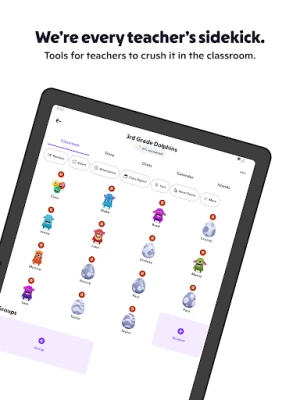
- Classroom community tools: ClassDojo supports positive classroom habits and helps teachers encourage participation and a welcoming learning environment.
- Family involvement: Parents can stay informed and take a more active interest in classroom experiences and school milestones.
- Optional ClassDojo Plus: A paid upgrade offers additional family-focused features and ways to preserve memories; availability and features may vary.
- International community: The service is used by school communities around the world, with language and availability depending on the app and region.
✅ Pros and ❌ Cons
Pros
- Brings classroom communication and updates together in one app.
- Photo and video posts can make school news feel more personal for families.
- Offers useful tools for teachers, parents, and students rather than serving only one group.
- Core communication features are available without a paid subscription.
- Can help families stay engaged with learning and classroom activities.
Cons
- The app is most useful when a child’s teacher or school actively uses it.
- Some additional family features require a ClassDojo Plus subscription.
- Notifications and frequent updates may feel distracting if not adjusted.
- Features and access can vary according to account role, school settings, and location.
- As with any app involving children and school communities, users should review privacy settings and shared content carefully.
📋 App Details
- App Name: ClassDojo
- Current Version: Check Google Play or the developer’s official listing for the latest release
- Last Updated: Check the current store listing; update dates change as new releases are published
- File Size: Varies by version and device; check the download listing before installing
- Requires Android: Minimum Android requirement can change between releases; confirm compatibility on Google Play or the installer listing
- Developer: ClassDojo
- Category: Education
- Content Rating: Check the current Google Play listing for the rating in your region
- Pricing: Free to download, with optional ClassDojo Plus features that may require a subscription
💬 User Reviews
User feedback commonly highlights the convenience of seeing classroom updates and contacting teachers from one place. Parents value photo and video posts that help them feel included, while teachers appreciate having a dedicated channel for family communication. Some users report occasional issues with notifications, account setup, or app performance, and others note that the experience depends heavily on how consistently their school uses the platform. Subscription features and privacy controls are also worth reviewing before use.
🔍 5 Best Alternative Apps
- Seesaw: A learning platform where students can share work and teachers can communicate progress with families. It is a strong option for classrooms focused on student portfolios and learning activities.
- Remind: A school communication app for sending messages and announcements to families and students. It may suit communities that primarily need simple, timely updates.
- ParentSquare: A school-home communication platform that brings messages, notices, and family engagement tools together. Its available features depend on whether a school or district uses it.
- Bloomz: A classroom communication tool for teachers and families, with features for announcements, messaging, and sharing classroom moments.
- Google Classroom: A learning management app for organizing assignments, class materials, and student work. It is a useful alternative for managing coursework, though its focus differs from ClassDojo’s community feed.
🧠 My Opinion
ClassDojo is a practical choice for families and teachers who want a more connected view of classroom life. Its best qualities are straightforward communication, convenient classroom updates, and features that include students as well as adults. The main limitation is that it works best when the school community is actively using it, and some extras are part of a paid subscription.
If your child’s teacher uses ClassDojo, the app is worth trying for its core communication and update features. Families should explore the privacy settings and subscription details, but for many school communities, it can make staying in the loop simpler and more engaging.
🛡️ Privacy and Security
ClassDojo can involve information and media related to children, so parents and teachers should take care with account access, privacy settings, and what they share. Review app permissions and the service’s current privacy information, use a strong password, and avoid posting sensitive personal details.
For an APK installation, download only from a reputable source and verify that the file is genuine and compatible with your device. Android may ask you to allow installation from that source through an “Install unknown apps” setting. Enable this only when needed, then turn it off afterward. Unofficial or modified APKs can contain malware, compromise personal information, or fail to receive safe updates; installing through Google Play is generally the safer option.
❓ Frequently Asked Questions (FAQs)
Q1: Is ClassDojo APK free to use?
A: ClassDojo is free to download and offers core features for classroom communication. Some additional family features are available through the optional ClassDojo Plus subscription.
Q2: Who can use ClassDojo?
A: The app is designed for teachers, parents, and students. The tools available depend on the user’s role and the school or class setup.
Q3: Do I need an internet connection to use ClassDojo?
A: An internet connection is generally needed to sign in, receive updates, send messages, and load shared content. Offline access may be limited.
Q4: Is it safe to download a ClassDojo APK?
A: Safety depends on where the file comes from. Prefer Google Play or another trusted source, avoid modified APKs, and review permissions before installing.
Q5: How do parents join their child’s class?
A: Parents typically create or sign in to an account and use an invitation or class code provided by the teacher. Follow the in-app instructions or ask the school for help.
Rate the App
Add Comment & Review
User Reviews
Based on 0 reviews
No reviews added yet.
Comments will not be approved to be posted if they are SPAM, abusive, off-topic, use profanity, contain a personal attack, or promote hate of any kind.





More »

Popular Apps

TradingView: Track All MarketsTradingView Inc.

Bus Fever Party!Lumi Games

Claude by AnthropicAnthropic PBC

Block Craft 3D:Building GameWildlife Studios

Malwarebytes - Mobile SecurityMalwarebytes

Block Blast!HungryStudio

Canva: AI Photo & Video EditorCanva

Candy Crush SagaKing

Carrom Pool: Disc GameMiniclip.com

EA SPORTS FC Soccer Mobile 27ELECTRONIC ARTS
More »
Editor's Choice

Kahoot! Play & Create QuizzesKahoot!

United AirlinesUnited Airlines

Tripwoa: Travel Plan & Trailtripwoa

trivago: Compare hotel pricestrivago N.V.

Planner 5D: AI Home DesignPlanner 5D

ibis Paint Xibis inc.

Agoda: Cheap Flights & Hotelsagoda.com

Hopper: Hotels, Flights & CarsHopper Inc.

Brilliant: Learn Math & CodingBrilliant.org

Google ClassroomGoogle LLC