



Latest Version
Version
6.45.2
6.45.2
Update
November 05, 2026
November 05, 2026
Developer
Knowunity
Knowunity
Categories
Education
Education
Platforms
Android
Android
Downloads
0
0
License
Free
Free
Package Name
de.knowunity.app
de.knowunity.app
Report
Report a Problem
Report a Problem
More About Knowunity: AI Study & Homework
Hey, I'm Knowie - your new way of learning. Whatever you're working on, I'll help you understand it, remember it, and walk into your next SAT, ACT, or AP feeling ready. 30 million students already study with me, I am created by the best students and the core tools are free.
Knowunity is an AI-powered study app that brings study planning, flashcards, quizzes, summaries, homework help, and exam practice together in one place. It helps students organize revision around their courses and test dates, then focus on the topics they still need to master.
Keeping up with classes, homework, and exam preparation can quickly become overwhelming. Knowunity aims to make studying more manageable by combining a personalized daily plan with AI-created learning materials and a large collection of student-shared resources.
Instead of jumping between separate apps for notes, flashcards, and practice tests, students can use Knowunity to plan revision, test their knowledge, and get help with challenging questions. It is designed for school subjects as well as standardized exam preparation, including SAT, ACT, and AP study.
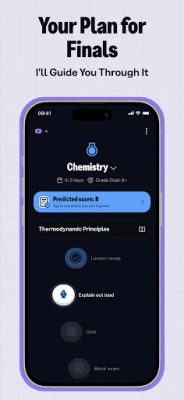
Knowunity is a learning and study-planning app for students. Its central feature is a study plan tailored to a learner’s exam date, subjects, and topics. The app can organize tasks day by day, account for a class timetable, and adjust revision as the test approaches. Flashcards, quizzes, summaries, voice-based recall, and mock exams help students practise rather than simply reread their notes.
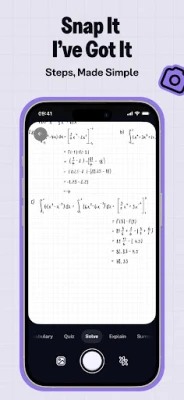
The app also offers AI-assisted homework support: students can photograph a problem and receive a step-by-step explanation. They can turn their own materials—including documents, slides, photos, handwritten notes, text, links, flashcard decks, and some video content—into study resources. A community library adds notes, summaries, and past-paper solutions shared by other students.
An APK is the package file format Android uses to distribute and install applications. Downloading an APK can allow manual installation, but an unofficial file may not be the latest release and should be checked carefully before use.
Pros
Cons
Knowunity’s appeal is its all-in-one approach: students can plan revision, make practice materials, and find help without switching between several study tools. Users may also appreciate the accessible interface, student-shared resources, and features that make regular revision feel more structured.
As with many AI-powered learning apps, results can vary. Generated answers or summaries may require verification, and the usefulness of shared notes depends on their accuracy and how closely they match a learner’s course. Users should also check the app’s current listing for details about available features, account requirements, and any limits that apply to their region or plan.
Knowunity is a compelling option for students who want more structure in their revision. Its strongest idea is connecting an exam-focused plan with active-recall tools, material creation, homework explanations, and progress tracking. That combination can make it easier to turn a broad goal—such as preparing for a test—into manageable daily tasks.
The app is best viewed as a study companion rather than a substitute for teachers, textbooks, or checking your work. AI-generated content and community resources should be reviewed for accuracy, particularly when preparing for an important exam. If you want one place to organize study and practise across different subjects, Knowunity is worth considering.
For the safest installation, download Knowunity through Google Play or another reputable source. If you install an APK manually, use a trusted provider, check that the file is authentic and up to date, and scan it with a reputable security tool. Unofficial or modified APKs may contain malware, expose personal information, or behave differently from the official app.
Manual installation may require enabling Install unknown apps for the browser or file manager you are using in Android settings. The wording and location vary by Android version. Allow this permission only when necessary, avoid granting unnecessary access, and turn it off again after installation. Review the app’s privacy information before uploading personal documents, photos, or voice recordings.
Q1: Is Knowunity APK free to use?
A1: Knowunity offers core study tools for students, but available features, limits, or paid options may change. Check the current app listing and in-app details for the latest information.
Q2: Can Knowunity help me prepare for SAT, ACT, and AP exams?
A2: The app is designed to support school subjects and standardized-test study, including SAT, ACT, and AP preparation. Confirm that the specific practice materials you need are available for your exam and course.
Q3: Do I need an internet connection to use Knowunity?
A3: An internet connection is generally needed for online resources, AI features, uploads, and community content. Offline access may differ by feature and app version.
Q4: Is it safe to download the Knowunity APK?
A4: The safest option is to install the official app through Google Play. If you use an APK, choose a trusted source and avoid modified files, which can carry malware or privacy risks.
Q5: Can Knowunity create flashcards from my notes?
A5: Knowunity can turn supported study materials into resources such as flashcards, quizzes, and summaries. The exact file types and features available may depend on the current version.
Knowunity APK
📱 Knowunity APK Summary
Knowunity is an AI-powered study app that brings study planning, flashcards, quizzes, summaries, homework help, and exam practice together in one place. It helps students organize revision around their courses and test dates, then focus on the topics they still need to master.
- App Name: Knowunity
- Current Version: Version varies by release and region; check the app listing for the latest version
- Last Updated: Check the current Google Play listing for the latest update date
- Category: Education
- Developer: Knowunity GmbH
- Google Play Rating: Rating and review count change over time; check Google Play for the current figures
💡 Introduction
Keeping up with classes, homework, and exam preparation can quickly become overwhelming. Knowunity aims to make studying more manageable by combining a personalized daily plan with AI-created learning materials and a large collection of student-shared resources.
Instead of jumping between separate apps for notes, flashcards, and practice tests, students can use Knowunity to plan revision, test their knowledge, and get help with challenging questions. It is designed for school subjects as well as standardized exam preparation, including SAT, ACT, and AP study.
❓ What Is Knowunity APK?
Knowunity is a learning and study-planning app for students. Its central feature is a study plan tailored to a learner’s exam date, subjects, and topics. The app can organize tasks day by day, account for a class timetable, and adjust revision as the test approaches. Flashcards, quizzes, summaries, voice-based recall, and mock exams help students practise rather than simply reread their notes.
The app also offers AI-assisted homework support: students can photograph a problem and receive a step-by-step explanation. They can turn their own materials—including documents, slides, photos, handwritten notes, text, links, flashcard decks, and some video content—into study resources. A community library adds notes, summaries, and past-paper solutions shared by other students.
An APK is the package file format Android uses to distribute and install applications. Downloading an APK can allow manual installation, but an unofficial file may not be the latest release and should be checked carefully before use.
🧑💻 How to Use
- Install and open the app: Get Knowunity from Google Play or another source you trust, then launch it on your Android device.
- Set up your studies: Choose the subjects or courses you want to work on and add your exam date and topics where available.
- Build a realistic plan: Enter your class schedule if you want the app to arrange study sessions around lessons and other commitments.
- Choose a study activity: Follow the plan using flashcards, quizzes, summaries, voice recall, or practice exams.
- Add your own materials: Upload or provide course notes and other supported materials to create study resources for your plan.
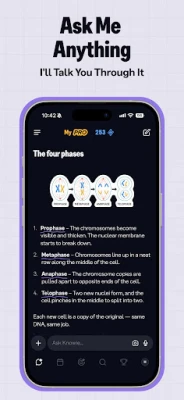
- Ask for help when stuck: Use chat for a question or photograph a supported homework problem to request a guided explanation.
- Review your progress: Check which topics feel secure and which need more practice, then use the updated plan to decide what to study next.
⚙️ Features
- Personalized exam plans: Create a day-by-day revision schedule based on your subjects, topics, and test date. Adding a timetable can help fit study around classes.
- Flashcards and quizzes: Practise retrieving information from memory instead of relying only on rereading. This makes it easier to spot topics that need another review.
- Topic mastery tracking: Monitor progress as subjects move from uncertain to more confident, helping you choose what to work on next.
- Voice-based recall and tutoring: Say answers aloud during recall practice or use voice mode to ask questions in a conversational format.
- AI homework assistance: Photograph problems in subjects such as maths and science to get a step-by-step explanation intended to teach the process, not just supply an answer.
- Study materials from your files: Turn supported PDFs, slides, images, notes, text, links, and existing flashcard decks into summaries, quizzes, and flashcards.
- Mock exams and exam preparation: Practise with exam-style tests for supported SAT and AP subjects. Results can help identify areas to revisit in your plan.
- Student-shared resources: Explore notes, summaries, and past-paper solutions contributed by other students, with availability depending on the subject and course.
- Study streaks and leagues: Earn XP and take part in weekly leagues for a bit of friendly motivation while building a regular study habit.
✅ Pros and ❌ Cons
Pros
- Combines planning, practice, notes, and study support in one app.
- Encourages active recall through quizzes, flashcards, and spoken practice.
- Can adapt study tasks to an exam date and personal schedule.
- Supports a wide range of school subjects and standardized-test preparation.
- Lets students create study resources from their own materials.
- Offers community resources and motivational features alongside individual study tools.
Cons
- AI-generated explanations and study materials may need checking against a teacher’s notes or trusted course materials.
- Some features, content, or usage limits may vary by region, account, or subscription plan.
- Creating a useful plan requires time to enter accurate subjects, topics, and deadlines.
- Community materials can vary in quality and may not match every class or syllabus exactly.
- Features that process uploads, images, or voice may require an internet connection and access to relevant device permissions.
📋 App Details
- App Name: Knowunity
- Current Version: Check Google Play or the trusted download listing for the latest release
- Last Updated: Check the current app listing; update dates can change with new releases
- File Size: Varies by version and device; check the download listing before installation
- Requires Android: Minimum Android version can vary by release; confirm compatibility on the app listing
- Developer: Knowunity GmbH
- Category: Education
- Content Rating: Check the current Google Play listing for the rating in your region
💬 User Reviews
Knowunity’s appeal is its all-in-one approach: students can plan revision, make practice materials, and find help without switching between several study tools. Users may also appreciate the accessible interface, student-shared resources, and features that make regular revision feel more structured.
As with many AI-powered learning apps, results can vary. Generated answers or summaries may require verification, and the usefulness of shared notes depends on their accuracy and how closely they match a learner’s course. Users should also check the app’s current listing for details about available features, account requirements, and any limits that apply to their region or plan.
🔍 5 Best Alternative Apps
- Quizlet: A popular flashcard and practice platform for learning vocabulary, definitions, and course topics. It is a good option for students who mainly want quick revision sets and self-testing.
- StudySmarter: A study organizer with tools for notes, flashcards, and exam preparation. It may suit learners looking for a structured place to manage revision materials.
- AnkiDroid Flashcards: An Android flashcard app built around spaced repetition. It is a strong choice for users who want detailed control over flashcard review and scheduling.
- Khan Academy: A learning platform with lessons and practice across many subjects. It is especially useful for students who want guided explanations and structured practice.
- Photomath: A maths learning app that can explain how to solve problems step by step. It can complement Knowunity for learners who want focused help with mathematical exercises.
🧠 My Opinion
Knowunity is a compelling option for students who want more structure in their revision. Its strongest idea is connecting an exam-focused plan with active-recall tools, material creation, homework explanations, and progress tracking. That combination can make it easier to turn a broad goal—such as preparing for a test—into manageable daily tasks.
The app is best viewed as a study companion rather than a substitute for teachers, textbooks, or checking your work. AI-generated content and community resources should be reviewed for accuracy, particularly when preparing for an important exam. If you want one place to organize study and practise across different subjects, Knowunity is worth considering.
🛡️ Privacy and Security
For the safest installation, download Knowunity through Google Play or another reputable source. If you install an APK manually, use a trusted provider, check that the file is authentic and up to date, and scan it with a reputable security tool. Unofficial or modified APKs may contain malware, expose personal information, or behave differently from the official app.
Manual installation may require enabling Install unknown apps for the browser or file manager you are using in Android settings. The wording and location vary by Android version. Allow this permission only when necessary, avoid granting unnecessary access, and turn it off again after installation. Review the app’s privacy information before uploading personal documents, photos, or voice recordings.
❓ Frequently Asked Questions (FAQs)
Q1: Is Knowunity APK free to use?
A1: Knowunity offers core study tools for students, but available features, limits, or paid options may change. Check the current app listing and in-app details for the latest information.
Q2: Can Knowunity help me prepare for SAT, ACT, and AP exams?
A2: The app is designed to support school subjects and standardized-test study, including SAT, ACT, and AP preparation. Confirm that the specific practice materials you need are available for your exam and course.
Q3: Do I need an internet connection to use Knowunity?
A3: An internet connection is generally needed for online resources, AI features, uploads, and community content. Offline access may differ by feature and app version.
Q4: Is it safe to download the Knowunity APK?
A4: The safest option is to install the official app through Google Play. If you use an APK, choose a trusted source and avoid modified files, which can carry malware or privacy risks.
Q5: Can Knowunity create flashcards from my notes?
A5: Knowunity can turn supported study materials into resources such as flashcards, quizzes, and summaries. The exact file types and features available may depend on the current version.
Rate the App
Add Comment & Review
User Reviews
Based on 0 reviews
No reviews added yet.
Comments will not be approved to be posted if they are SPAM, abusive, off-topic, use profanity, contain a personal attack, or promote hate of any kind.





More »

Popular Apps

TradingView: Track All MarketsTradingView Inc.

Bus Fever Party!Lumi Games

Claude by AnthropicAnthropic PBC

Block Craft 3D:Building GameWildlife Studios

Malwarebytes - Mobile SecurityMalwarebytes

Block Blast!HungryStudio

Canva: AI Photo & Video EditorCanva

Candy Crush SagaKing

Carrom Pool: Disc GameMiniclip.com

EA SPORTS FC Soccer Mobile 27ELECTRONIC ARTS
More »
Editor's Choice

Kahoot! Play & Create QuizzesKahoot!

United AirlinesUnited Airlines

Tripwoa: Travel Plan & Trailtripwoa

trivago: Compare hotel pricestrivago N.V.

Planner 5D: AI Home DesignPlanner 5D

ibis Paint Xibis inc.

Agoda: Cheap Flights & Hotelsagoda.com

Hopper: Hotels, Flights & CarsHopper Inc.

Brilliant: Learn Math & CodingBrilliant.org

Google ClassroomGoogle LLC