




Latest Version
Version
3.0.2
3.0.2
Update
October 17, 2026
October 17, 2026
Developer
Oumi Software
Oumi Software
Categories
Media
Media
Platforms
Android
Android
Downloads
0
0
License
Free
Free
Package Name
com.oumi.utility.media.hub
com.oumi.utility.media.hub
Report
Report a Problem
Report a Problem
More About VidHub: Video Player & Library
VidHub is a video player and media library manager for Android. Watch your movies and TV shows in HD, 4K HDR and Dolby Vision, play MP4, MKV and ISO files, and use embedded or external subtitles. Stream videos from cloud storage, download files from your connected cloud drives, and access your NAS and media servers in one app.
VidHub brings videos stored across cloud drives, network storage, and media servers into one player. It can stream compatible files directly or download them for local playback, with support for a broad range of video formats and subtitles.
Keeping a movie collection spread across cloud storage, a NAS, and media servers can make it difficult to find and watch what you want. VidHub aims to solve that problem by bringing supported sources together in one video player, so you can browse your collection, stream files, or download them for offline playback.
With format support ranging from common MP4 files to ISO images, plus subtitle and library features, VidHub is designed for people who want more than a basic local video player. Playback quality and availability of features depend on your device, media files, connected services, and subscription or account requirements.
VidHub is a video player and media library app for accessing personal video collections. It can connect to supported cloud services such as Google Drive, OneDrive, and Dropbox, as well as network storage and protocols including NAS, SMB/CIFS, and WebDAV. The app also supports connections to personal media servers such as Emby, Jellyfin, Plex, and fnOS, allowing users to browse and play compatible content through a single interface.
The app is aimed at movie and TV fans who store their files in several places, as well as users with a home NAS or media server. Depending on the source and connection, videos can be streamed or downloaded for local playback. An APK is the package file format used to distribute Android apps; installing one manually is an alternative to installing through an app store, but it requires care to ensure the file is authentic and safe.
Pros
Cons
Review themes can change as the app is updated, and a current verified sample of user reviews is not available here. Based on the app’s feature set, users looking for a unified way to browse cloud storage, NAS folders, and media servers may value its broad connectivity and format support. Potential friction points for this type of app include configuring network connections, differences in playback across devices, and streaming performance that depends on the user’s internet or home network. Check recent reviews on the official store to see how the latest release performs on devices like yours.
VidHub’s main strength is its all-in-one approach: it can help bring cloud drives, network folders, and personal media servers into a single viewing experience. Its format support, subtitle options, downloads, and library tools make it particularly relevant for people with a sizeable video collection spread across different storage locations.
It is worth considering if you already use compatible cloud or network services and want one place to browse and play your videos. However, users should check device compatibility and the latest store details, and remember that streaming quality depends on the connection and source. For a personal media collection that lives in multiple places, VidHub offers a convenient idea: less switching between storage apps and more time finding something to watch.
Download VidHub from Google Play or another trusted source whenever possible. If you install an APK manually, verify that it comes from a reputable publisher and that the file has not been altered. Unofficial or modified APKs may contain malware, compromise personal information, or request unnecessary permissions.
Android may ask you to allow installation from the specific app used to open the APK, such as a browser or file manager. Enable this permission only when needed, and turn it off again afterward. Review the permissions requested by VidHub and consider the privacy implications before connecting cloud accounts or entering media-server credentials.
Q1: Is VidHub APK free to use?
A1: Pricing and access to specific features can change by version, platform, or region. Check the current official listing and in-app information for the latest details.
Q2: Do I need an internet connection to use VidHub?
A2: An internet or local network connection is needed to access cloud drives, NAS shares, and remote media servers. Videos already downloaded to your device may be available for local playback without an internet connection.
Q3: Can VidHub play MKV and ISO files?
A3: VidHub lists support for MKV videos and ISO disc images. Successful playback can still depend on the file’s encoding, audio and video tracks, and your device.
Q4: Does VidHub support subtitles?
A4: Yes. It supports embedded subtitles and external subtitle files, including formats such as SRT, SSA, and SUB.
Q5: Is it safe to download the VidHub APK?
A5: Safety depends on where the APK comes from. Prefer the official app store or a trusted distributor, avoid modified files, and review permissions before installing or connecting accounts.
VidHub APK
📱 VidHub APK Summary
VidHub brings videos stored across cloud drives, network storage, and media servers into one player. It can stream compatible files directly or download them for local playback, with support for a broad range of video formats and subtitles.
- App Name: VidHub
- Current Version: Check the official Google Play listing for the latest version; a verified current number is not available here.
- Last Updated: Check the official Google Play listing for the latest update date.
- Category: Video Players & Editors
- Developer: Vidhub Team (confirm the publisher name on the current Play Store listing)
- Google Play Rating: Check Google Play for the current rating and review count, as these change over time.
💡 Introduction
Keeping a movie collection spread across cloud storage, a NAS, and media servers can make it difficult to find and watch what you want. VidHub aims to solve that problem by bringing supported sources together in one video player, so you can browse your collection, stream files, or download them for offline playback.
With format support ranging from common MP4 files to ISO images, plus subtitle and library features, VidHub is designed for people who want more than a basic local video player. Playback quality and availability of features depend on your device, media files, connected services, and subscription or account requirements.
❓ What Is VidHub APK?
VidHub is a video player and media library app for accessing personal video collections. It can connect to supported cloud services such as Google Drive, OneDrive, and Dropbox, as well as network storage and protocols including NAS, SMB/CIFS, and WebDAV. The app also supports connections to personal media servers such as Emby, Jellyfin, Plex, and fnOS, allowing users to browse and play compatible content through a single interface.
The app is aimed at movie and TV fans who store their files in several places, as well as users with a home NAS or media server. Depending on the source and connection, videos can be streamed or downloaded for local playback. An APK is the package file format used to distribute Android apps; installing one manually is an alternative to installing through an app store, but it requires care to ensure the file is authentic and safe.
🧑💻 How to Use
- Install and open VidHub. Get the app from a trusted source and launch it on your compatible device.
- Choose a storage source. Add a supported cloud account, connect to a NAS or shared folder using SMB/CIFS or WebDAV, or sign in to a compatible media server.
- Browse your files or library. Open folders or use the available movie and TV library views to locate a title.
- Start playback. Tap a compatible video to stream it. For offline viewing, use the app’s download option where available.
- Set up subtitles. Select embedded subtitles or load a supported external subtitle file, such as SRT, SSA, or SUB.
- Adjust playback and library options. Use the available controls and organization tools to make browsing and viewing more convenient.
⚙️ Features
- Cloud drive connections: Connect supported services such as Google Drive, OneDrive, and Dropbox to browse and watch videos without first moving every file onto your device.
- Video downloads: Download supported cloud videos for local playback when you want to watch without relying on a live streaming connection.
- Wide format compatibility: Play a range of formats, including MP4, MKV, AVI, MOV, RMVB, and WMV. VidHub also supports opening ISO disc images.
- HD and high-dynamic-range playback: The app supports HD and 4K playback, as well as HDR and Dolby Vision on compatible devices and media. Actual playback quality depends on the file, device, and display.
- NAS and network access: Browse and stream from network-attached storage and shared folders through SMB/CIFS or WebDAV connections.
- Media server support: Connect to Emby, Jellyfin, Plex, or fnOS to access personal movie and TV libraries in the player.
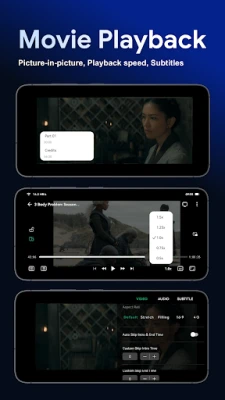
- Subtitle options: Use embedded subtitles or load external SRT, SSA, and SUB files, with the option to enable or disable subtitles during viewing.
- Library organization: Browse collections with movie and TV artwork, and organize or sort content using available library tools.
- Cloud file management: Rename or delete files on supported cloud connections, bringing some basic file organization into the same app.
- Movie metadata and artwork: Movie and TV information and artwork are sourced from TMDB, a community-maintained database.
✅ Pros and ❌ Cons
Pros
- Combines several cloud, network, and media-server sources in one player.
- Supports many popular video formats, including MKV and ISO.
- Offers subtitle support for embedded tracks and common external formats.
- Can download compatible videos for local playback.
- Includes library browsing and artwork to make large collections easier to navigate.
- Supports high-resolution and HDR formats on compatible hardware and files.
Cons
- Some features require accounts, a stable internet connection, or access to a configured NAS or media server.
- 4K, HDR, and Dolby Vision playback depend on the device, display, and video file; they are not guaranteed in every setup.
- Initial setup for network shares and media servers may be less straightforward for beginners.
- Streaming performance depends on network speed, cloud service limits, and the source device.
- Current pricing, supported Android versions, and feature availability may vary by region and app version.
📋 App Details
- App Name: VidHub
- Current Version: Check the current official app listing; the latest verified version number is not available here.
- Last Updated: Check the official app listing for the current date.
- File Size: Varies by version and device; check the download listing for the exact APK size.
- Requires Android: The minimum Android version can vary by release. Confirm compatibility on the current official listing before installing.
- Developer: Vidhub Team (verify the exact publisher name in the app listing).
- Content Rating: Check the current Google Play listing for the rating applicable to your region.
💬 User Reviews
Review themes can change as the app is updated, and a current verified sample of user reviews is not available here. Based on the app’s feature set, users looking for a unified way to browse cloud storage, NAS folders, and media servers may value its broad connectivity and format support. Potential friction points for this type of app include configuring network connections, differences in playback across devices, and streaming performance that depends on the user’s internet or home network. Check recent reviews on the official store to see how the latest release performs on devices like yours.
🔍 5 Best Alternative Apps
- VLC for Android: A versatile media player known for broad format and subtitle support. It is a strong option for users who primarily play files stored locally or on a network.
- Kodi: A customizable media-center app for organizing and playing personal video collections. It suits users who want extensive library controls and are comfortable setting up add-ons and sources.
- Plex: A media-server platform for organizing and streaming personal libraries across devices. It is a good fit for people who want a managed media collection and remote access through a Plex server.
- Jellyfin: An open-source media-server option for organizing and streaming a personal collection. It is appealing to users who prefer a self-hosted approach and want to manage their own server.
- Nova Video Player: A media player focused on local and network video libraries, with browsing and subtitle features. It can suit users seeking a dedicated player for files on their device or home network.
🧠 My Opinion
VidHub’s main strength is its all-in-one approach: it can help bring cloud drives, network folders, and personal media servers into a single viewing experience. Its format support, subtitle options, downloads, and library tools make it particularly relevant for people with a sizeable video collection spread across different storage locations.
It is worth considering if you already use compatible cloud or network services and want one place to browse and play your videos. However, users should check device compatibility and the latest store details, and remember that streaming quality depends on the connection and source. For a personal media collection that lives in multiple places, VidHub offers a convenient idea: less switching between storage apps and more time finding something to watch.
🛡️ Privacy and Security
Download VidHub from Google Play or another trusted source whenever possible. If you install an APK manually, verify that it comes from a reputable publisher and that the file has not been altered. Unofficial or modified APKs may contain malware, compromise personal information, or request unnecessary permissions.
Android may ask you to allow installation from the specific app used to open the APK, such as a browser or file manager. Enable this permission only when needed, and turn it off again afterward. Review the permissions requested by VidHub and consider the privacy implications before connecting cloud accounts or entering media-server credentials.
❓ Frequently Asked Questions (FAQs)
Q1: Is VidHub APK free to use?
A1: Pricing and access to specific features can change by version, platform, or region. Check the current official listing and in-app information for the latest details.
Q2: Do I need an internet connection to use VidHub?
A2: An internet or local network connection is needed to access cloud drives, NAS shares, and remote media servers. Videos already downloaded to your device may be available for local playback without an internet connection.
Q3: Can VidHub play MKV and ISO files?
A3: VidHub lists support for MKV videos and ISO disc images. Successful playback can still depend on the file’s encoding, audio and video tracks, and your device.
Q4: Does VidHub support subtitles?
A4: Yes. It supports embedded subtitles and external subtitle files, including formats such as SRT, SSA, and SUB.
Q5: Is it safe to download the VidHub APK?
A5: Safety depends on where the APK comes from. Prefer the official app store or a trusted distributor, avoid modified files, and review permissions before installing or connecting accounts.
Rate the App
Add Comment & Review
User Reviews
Based on 0 reviews
No reviews added yet.
Comments will not be approved to be posted if they are SPAM, abusive, off-topic, use profanity, contain a personal attack, or promote hate of any kind.










More »

Popular Apps

TradingView: Track All MarketsTradingView Inc.

Bus Fever Party!Lumi Games

Claude by AnthropicAnthropic PBC

Block Craft 3D:Building GameWildlife Studios

Malwarebytes - Mobile SecurityMalwarebytes

Block Blast!HungryStudio

Canva: AI Photo & Video EditorCanva

Candy Crush SagaKing

Carrom Pool: Disc GameMiniclip.com

EA SPORTS FC Soccer Mobile 27ELECTRONIC ARTS
More »
Editor's Choice

Kahoot! Play & Create QuizzesKahoot!

United AirlinesUnited Airlines

Tripwoa: Travel Plan & Trailtripwoa

trivago: Compare hotel pricestrivago N.V.

Planner 5D: AI Home DesignPlanner 5D

ibis Paint Xibis inc.

Agoda: Cheap Flights & Hotelsagoda.com

Hopper: Hotels, Flights & CarsHopper Inc.

Brilliant: Learn Math & CodingBrilliant.org

Google ClassroomGoogle LLC