




Latest Version
Version
2026.20.0
2026.20.0
Update
October 17, 2026
October 17, 2026
Developer
Plex, Inc.
Plex, Inc.
Categories
Media
Media
Platforms
Android
Android
Downloads
0
0
License
Free
Free
Package Name
com.plexapp.android
com.plexapp.android
Report
Report a Problem
Report a Problem
More About Plex: Find Movies & TV Shows
Plex is the free social and discovery app for movie and TV lovers.
Plex brings discovery, streaming, and personal media together in one app. Browse connected streaming services, watch free on-demand titles and live TV, or stream your own library with Plex Media Server.
With films and shows spread across multiple streaming subscriptions, finding something to watch can take longer than watching it. Plex helps bring discovery into one place, with a watchlist, recommendations, free entertainment, live TV, and connections to supported streaming services.
It also offers a way to enjoy your own movies, shows, music, and photos from a personal library. Whether you want a free channel to put on in the background or a better-organized home for your media, Plex combines several entertainment tools in one app.
Plex is an entertainment app for discovering and watching movies and TV shows, browsing supported streaming services, and accessing free on-demand content and live TV channels. Users can save titles to a watchlist, explore recommendations and reviews, and personalize parts of the app around their interests. With Plex Media Server set up, the app can also stream a user's personal media library to compatible devices.
An APK is the package file format Android uses to install apps. Downloading a Plex APK allows manual installation, but it is important to use a trustworthy source and make sure the file is genuine and compatible with your device.
Pros
Cons
User experiences with Plex commonly reflect its broad range of features. Viewers appreciate having free entertainment, live channels, discovery tools, and personal media access in one app. The watchlist and library organization can also be useful for people who juggle several services or maintain their own media collection.
Common drawbacks include differences in what is available by location, advertisements in supported areas, and the extra setup needed for personal media streaming. Some users may also find that browsing across services does not mean every title can be played directly in Plex; subscriptions, service availability, or opening another app may still be required. App performance can vary with the device, network, and server setup.
Plex is a strong choice for viewers who want more than a single streaming catalog. It combines discovery, free movies and live TV, social recommendations, and access to a personal media server in one flexible app. Its biggest advantage is variety; its main trade-offs are regional availability, advertising, and the setup required to stream a personal library.
Plex is worth considering if you want a central place to explore entertainment or organize your own media. If you expect every streaming subscription to play directly inside one app, or you only need a simple video player, its broader feature set may be more than you need.
For the safest installation, download Plex from Google Play or another source you trust. If you install an APK manually, confirm that the file is authentic and intended for your Android version. Unofficial or modified APKs can contain malware, compromise your device, or expose personal information.
Manual installation may require enabling permission to install unknown apps for the browser or file manager you use. Android labels this setting differently across versions. Allow it only when needed, then disable it again if you do not regularly install apps this way. Plex notes that some features use interest-based advertising; review its in-app privacy options and policies if you want to understand available choices.
Q1: Is Plex APK free to use?
A1: The Plex app and some of its entertainment are available free. Certain content, services, or features may require a separate subscription, account, or compatible Plex Media Server.
Q2: Do I need an internet connection to use Plex?
A2: An internet connection is generally needed for streaming services, free online content, live TV, and discovery features. Streaming personal media to another device also requires your Plex Media Server and network to be available.
Q3: Do I need Plex Media Server?
A3: No, not for browsing Plex’s available entertainment. You do need Plex Media Server version 1.41.2 or higher installed and running if you want to stream your personal media library to other devices.
Q4: Can Plex play every movie from my connected streaming services?
A4: Plex can help you discover supported services and where titles are available, but playback depends on the service, your region, and any required subscription. Some titles may open in the provider’s own app.
Q5: Is it safe to download a Plex APK?
A5: It is safest to install Plex through Google Play. If you choose a manual APK, use a trusted source and avoid modified or unverified files, which may carry malware or privacy risks.
Plex APK
📱 Plex APK Summary
Plex brings discovery, streaming, and personal media together in one app. Browse connected streaming services, watch free on-demand titles and live TV, or stream your own library with Plex Media Server.
- App Name: Plex: Stream Movies & TV
- Current Version: Version varies by device and Google Play rollout
- Last Updated: Check Google Play for the latest update date
- Category: Entertainment
- Developer: Plex, Inc.
- Google Play Rating: Ratings and review counts change over time; see Google Play for the current figures
💡 Introduction
With films and shows spread across multiple streaming subscriptions, finding something to watch can take longer than watching it. Plex helps bring discovery into one place, with a watchlist, recommendations, free entertainment, live TV, and connections to supported streaming services.
It also offers a way to enjoy your own movies, shows, music, and photos from a personal library. Whether you want a free channel to put on in the background or a better-organized home for your media, Plex combines several entertainment tools in one app.
❓ What is Plex APK?
Plex is an entertainment app for discovering and watching movies and TV shows, browsing supported streaming services, and accessing free on-demand content and live TV channels. Users can save titles to a watchlist, explore recommendations and reviews, and personalize parts of the app around their interests. With Plex Media Server set up, the app can also stream a user's personal media library to compatible devices.
An APK is the package file format Android uses to install apps. Downloading a Plex APK allows manual installation, but it is important to use a trustworthy source and make sure the file is genuine and compatible with your device.
🧑💻 How to Use
- Install and open Plex: Get the app from Google Play or install a verified APK. Open it and follow the on-screen setup.
- Sign in or create an account: An account helps you personalize your experience and keep your watchlist and preferences together.
- Explore what’s available: Browse free movies, TV shows, live channels, and recommendations from the app’s home screen.
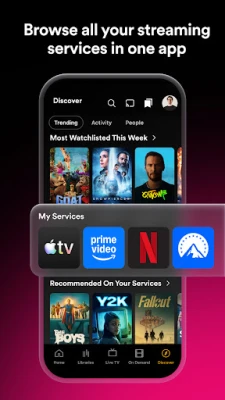
- Connect streaming services: Add supported services to make it easier to browse where titles are available. Availability and playback may depend on the service, region, and subscription.
- Save titles for later: Add movies and shows to your watchlist so you can find them again without searching from scratch.
- Start watching: Select available content and follow the prompts to stream it. Some titles may open in another service or require its subscription.
- Set up personal media: Install and run Plex Media Server on a compatible computer or device, organize your media, and connect the Android app to your server. Streaming personal media requires Plex Media Server version 1.41.2 or higher.
⚙️ Features
- Streaming discovery in one place: Browse supported services to find where movies and shows are available, reducing the need to search each app separately.
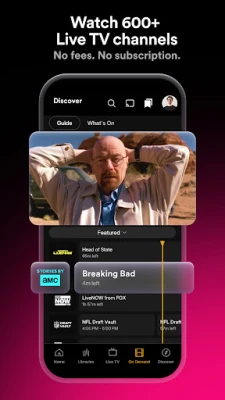
- Free on-demand entertainment: Explore a large, changing selection of free movies and TV shows across different genres. The available catalog may vary by location.
- Free live TV: Watch hundreds of live channels, including news, sports, kids’ programming, and other entertainment. Channel availability can depend on your region.
- Personal watchlist: Save titles you find from different places and keep your plans for future viewing organized in one list.
- Personalized browsing: Adjust preferences and shape parts of the home screen around the kinds of content you enjoy.
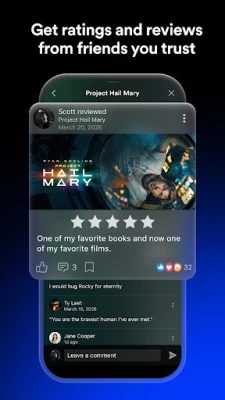
- Reviews, lists, and discussions: Share opinions, create collections, and discover recommendations from other viewers.
- Personal media streaming: Connect to Plex Media Server to organize and stream your own movies, shows, music, and photos across supported devices.
- Media library organization: Plex Media Server scans supported files and presents them in a browsable library, making a large personal collection easier to navigate.
✅ Pros and ❌ Cons
Pros
- Combines content discovery, a watchlist, free streaming, and personal media access.
- Offers free on-demand titles and live TV channels.
- Helps users browse supported streaming services from one place.
- Personal media can be organized and streamed through Plex Media Server.
- Social features offer reviews, lists, and recommendations from other viewers.
Cons
- Content and channel availability can differ by country.
- Some titles require a separate streaming subscription or may play through another service.
- Streaming a personal library requires a compatible, running Plex Media Server.
- Some app features are supported by interest-based advertising.
- DRM-protected content, ISO disc images, and video_ts folders are not supported for personal media streaming.
📋 App Details
- App Name: Plex: Stream Movies & TV
- Current Version: Varies by device and rollout; check Google Play or the app listing for the installed version
- Last Updated: Check the current Google Play listing
- File Size: Varies by version and Android device
- Requires Android: Minimum requirement can change with app updates; check the current store listing for your device
- Developer: Plex, Inc.
- Category: Entertainment
- Content Rating: Check Google Play for the current rating in your region
- Personal Media Requirement: Plex Media Server version 1.41.2 or higher must be installed and running to stream personal media to other devices
💬 User Reviews
User experiences with Plex commonly reflect its broad range of features. Viewers appreciate having free entertainment, live channels, discovery tools, and personal media access in one app. The watchlist and library organization can also be useful for people who juggle several services or maintain their own media collection.
Common drawbacks include differences in what is available by location, advertisements in supported areas, and the extra setup needed for personal media streaming. Some users may also find that browsing across services does not mean every title can be played directly in Plex; subscriptions, service availability, or opening another app may still be required. App performance can vary with the device, network, and server setup.
🔍 5 Best Alternative Apps
- JustWatch: A streaming guide that helps users search for movies and shows across services and check where they are available. It is a useful alternative if discovery is your main priority.
- Google TV: Brings supported streaming services, recommendations, and watchlist tools together in a central viewing interface. Its features and service integrations vary by device and region.
- Stremio: A media-center app for organizing and discovering video content through its supported add-ons. Check each add-on’s source and permissions carefully.
- Emby: A personal media server and playback platform for organizing and streaming a library across devices. It suits users who mainly want to manage their own media collection.
- Jellyfin: A free, open-source media server and client ecosystem for streaming personal media. It is a good option for technically confident users who want control over a self-hosted library.
🧠 My Opinion
Plex is a strong choice for viewers who want more than a single streaming catalog. It combines discovery, free movies and live TV, social recommendations, and access to a personal media server in one flexible app. Its biggest advantage is variety; its main trade-offs are regional availability, advertising, and the setup required to stream a personal library.
Plex is worth considering if you want a central place to explore entertainment or organize your own media. If you expect every streaming subscription to play directly inside one app, or you only need a simple video player, its broader feature set may be more than you need.
🛡️ Privacy and Security
For the safest installation, download Plex from Google Play or another source you trust. If you install an APK manually, confirm that the file is authentic and intended for your Android version. Unofficial or modified APKs can contain malware, compromise your device, or expose personal information.
Manual installation may require enabling permission to install unknown apps for the browser or file manager you use. Android labels this setting differently across versions. Allow it only when needed, then disable it again if you do not regularly install apps this way. Plex notes that some features use interest-based advertising; review its in-app privacy options and policies if you want to understand available choices.
❓ Frequently Asked Questions (FAQs)
Q1: Is Plex APK free to use?
A1: The Plex app and some of its entertainment are available free. Certain content, services, or features may require a separate subscription, account, or compatible Plex Media Server.
Q2: Do I need an internet connection to use Plex?
A2: An internet connection is generally needed for streaming services, free online content, live TV, and discovery features. Streaming personal media to another device also requires your Plex Media Server and network to be available.
Q3: Do I need Plex Media Server?
A3: No, not for browsing Plex’s available entertainment. You do need Plex Media Server version 1.41.2 or higher installed and running if you want to stream your personal media library to other devices.
Q4: Can Plex play every movie from my connected streaming services?
A4: Plex can help you discover supported services and where titles are available, but playback depends on the service, your region, and any required subscription. Some titles may open in the provider’s own app.
Q5: Is it safe to download a Plex APK?
A5: It is safest to install Plex through Google Play. If you choose a manual APK, use a trusted source and avoid modified or unverified files, which may carry malware or privacy risks.
Rate the App
Add Comment & Review
User Reviews
Based on 0 reviews
No reviews added yet.
Comments will not be approved to be posted if they are SPAM, abusive, off-topic, use profanity, contain a personal attack, or promote hate of any kind.








More »

Popular Apps

TradingView: Track All MarketsTradingView Inc.

Bus Fever Party!Lumi Games

Claude by AnthropicAnthropic PBC

Block Craft 3D:Building GameWildlife Studios

Malwarebytes - Mobile SecurityMalwarebytes

Block Blast!HungryStudio

Canva: AI Photo & Video EditorCanva

Candy Crush SagaKing

Carrom Pool: Disc GameMiniclip.com

EA SPORTS FC Soccer Mobile 27ELECTRONIC ARTS
More »
Editor's Choice

Kahoot! Play & Create QuizzesKahoot!

United AirlinesUnited Airlines

Tripwoa: Travel Plan & Trailtripwoa

trivago: Compare hotel pricestrivago N.V.

Planner 5D: AI Home DesignPlanner 5D

ibis Paint Xibis inc.

Agoda: Cheap Flights & Hotelsagoda.com

Hopper: Hotels, Flights & CarsHopper Inc.

Brilliant: Learn Math & CodingBrilliant.org

Google ClassroomGoogle LLC