




Latest Version
Version
3.3.1
3.3.1
Update
October 17, 2026
October 17, 2026
Developer
Amazon Mobile LLC
Amazon Mobile LLC
Categories
Media
Media
Platforms
Android
Android
Downloads
0
0
License
Free
Free
Package Name
com.mxtech.videoplayer.ad
com.mxtech.videoplayer.ad
Report
Report a Problem
Report a Problem
More About MX Player
Powerful video and music player with advanced hardware acceleration and subtitle support
MX Player is an Android media player designed to play a wide range of video and subtitle formats, with playback controls that make watching on a phone or tablet easier. It offers hardware-accelerated decoding, subtitle gestures, a private folder, and a Kids Lock feature.
Finding a player that can handle different video files and subtitles without complicated setup can make a big difference on Android. MX Player is a familiar choice for local video playback, combining flexible decoding options with gesture-based controls and support for many subtitle formats.
Whether you want to adjust subtitle timing and size, zoom into a scene, or keep children from tapping away from a video, MX Player offers practical tools for everyday viewing. Its exact features and availability may vary by app version, device, and region.
MX Player is a video-player application for Android. Its main purpose is to play media stored on a device while giving viewers control over playback, screen zoom, subtitle appearance, and, on supported devices, hardware-accelerated decoding. It can suit people who watch downloaded videos, use subtitles, or want more playback controls than a basic gallery player provides.
An APK is the package file format Android uses to distribute and install apps. Installing an APK manually can be useful when an app is unavailable through a device’s app store, but users should choose a trustworthy source and verify that the file is compatible with their device.
Pros
Cons
MX Player is commonly valued for its format and subtitle support, responsive playback controls, and convenient gestures. People who watch local video files often appreciate being able to adjust subtitle size and position or zoom into a video without switching apps.
Common concerns can include device-specific playback problems, changes to features between versions, and requests for clearer permission controls. Experiences with advertising, performance, and available features may vary depending on the app version, device, and region.
MX Player remains a practical choice for Android users who want flexible local video playback, gesture-based subtitle controls, and support for a wide range of subtitle formats. Its decoding options and viewing protections add useful touches, although exact performance and features depend on the device and current app version.
It is worth considering if you regularly watch video files stored on your phone and want more control than a basic player offers. Review permissions carefully, use a trusted installation source, and compare alternatives such as VLC if you prefer a different feature set.
For the safest installation, use Google Play or another reputable distribution channel. If you install an APK manually, enable Android’s “Install unknown apps” permission only for the source you are using, and turn it off again afterward when appropriate. The exact setting name may differ between Android versions.
Unofficial or modified APK files can be altered to include malware, unwanted advertising, or code that puts personal information at risk. Check that the file comes from a trusted publisher and consider scanning it before installation. Grant only the permissions needed for the features you use: media access is relevant to local playback, while camera, nearby-device, location, and system-setting permissions described for file transfer can generally be declined if you do not use that feature. Optional notification, overlay, and phone permissions should also be reviewed before approval.
Q1: Is MX Player free to use?
A1: Availability and monetization can vary by region and version. Check the current app-store listing for pricing, in-app purchases, or advertising details.
Q2: Does MX Player need an internet connection?
A2: Internet access is generally not required to play videos already stored on your device. Online services or file-transfer features may need a connection.
Q3: Is it safe to download the MX Player APK?
A3: An APK’s safety depends on its source and whether the file has been modified. Prefer the official app store or a reputable source, and avoid unknown or modified packages.
Q4: Which subtitle formats does MX Player support?
A4: The supplied feature information includes SRT, SSA/ASS, SAMI, MicroDVD, VobSub, WebVTT, and several other formats. Compatibility may depend on the subtitle file and app version.
Q5: Does MX Player require every listed permission?
A5: No. Media access is used to find and play local files. Permissions for file transfer and optional features can be denied if you do not plan to use those functions, though the related feature may not work.
MX Player APK
📱 MX Player APK Summary
MX Player is an Android media player designed to play a wide range of video and subtitle formats, with playback controls that make watching on a phone or tablet easier. It offers hardware-accelerated decoding, subtitle gestures, a private folder, and a Kids Lock feature.
- App Name: MX Player
- Current Version: Version varies by device and region; check the Google Play listing for the latest release
- Last Updated: The latest update date can vary by region; check the current Google Play listing
- Category: Video Players & Editors
- Developer: MX Media (formerly J2 Interactive)
- Google Play Rating: Rating and review count change over time; see Google Play for the current figures
💡 Introduction
Finding a player that can handle different video files and subtitles without complicated setup can make a big difference on Android. MX Player is a familiar choice for local video playback, combining flexible decoding options with gesture-based controls and support for many subtitle formats.
Whether you want to adjust subtitle timing and size, zoom into a scene, or keep children from tapping away from a video, MX Player offers practical tools for everyday viewing. Its exact features and availability may vary by app version, device, and region.
❓ What is MX Player APK?
MX Player is a video-player application for Android. Its main purpose is to play media stored on a device while giving viewers control over playback, screen zoom, subtitle appearance, and, on supported devices, hardware-accelerated decoding. It can suit people who watch downloaded videos, use subtitles, or want more playback controls than a basic gallery player provides.
An APK is the package file format Android uses to distribute and install apps. Installing an APK manually can be useful when an app is unavailable through a device’s app store, but users should choose a trustworthy source and verify that the file is compatible with their device.
🧑💻 How to Use
- Install and open the app: Get MX Player from Google Play or another source you trust, then launch it.
- Grant access as needed: Allow media access if you want the player to find videos and subtitle files on your device. You can decline permissions that are not needed for your intended use.
- Choose a video: Browse the detected media or open a video file using MX Player from your file manager.
- Control playback: Tap the screen to reveal playback controls. Use the available on-screen options to pause, resume, or adjust playback.
- Adjust the picture: Pinch to zoom, or use the zoom and pan controls where available to change how the video fits the screen.
- Manage subtitles: Select a subtitle track or open a supported subtitle file. Swipe vertically to reposition subtitle text, swipe horizontally to move between lines, and pinch to change text size.
- Use viewing protections: Turn on Kids Lock when children are watching. If supported in your version, use the Privacy Folder to keep selected videos out of ordinary browsing.
⚙️ Features
- Hardware acceleration: The HW+ decoder can use device hardware to help decode compatible videos. Results depend on the phone, video format, and app version.
- Multi-core decoding: MX Player supports multi-core decoding on compatible devices, helping make video playback more efficient on supported hardware.
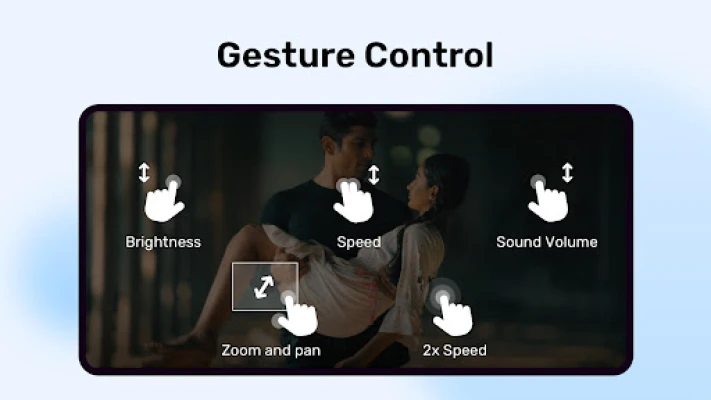
- Pinch to zoom and pan: Zoom into a video with a pinch gesture and reposition the view to focus on the part of the picture you want to see.
- Subtitle gestures: Swipe to move through subtitle text or adjust its position, and pinch to change subtitle size without interrupting viewing.
- Broad subtitle support: The supplied feature information lists DVD and DVB tracks, SSA/ASS, SAMI, SRT, MicroDVD, VobSub, SubViewer 2.0, MPL2, TMPlayer, Teletext, PJS, and WebVTT formats. Styling and compatibility can vary by file.
- Privacy Folder: A private folder can help hide selected videos from casual browsing. It should not be treated as a substitute for secure, encrypted storage.
- Kids Lock: Lock playback controls or restrict screen interaction so children are less likely to exit a video or open other apps accidentally.
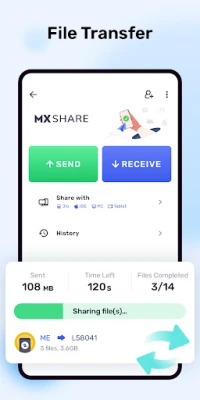
- Optional file transfer tools: Where available, file transfer can use camera access to scan QR codes and nearby-device or connection permissions to discover and connect to other devices.
✅ Pros and ❌ Cons
Pros
- Plays many common video and subtitle formats.
- Offers useful zoom, pan, and subtitle gestures.
- Hardware- and multi-core decoding are available on supported devices.
- Kids Lock is helpful for uninterrupted viewing with children.
- Users can generally deny file-transfer permissions and still use the player’s other functions.
Cons
- Decoder performance and format support can differ between Android devices.
- Some features, including file transfer and picture-in-picture controls, may require additional permissions or may not be available on every device.
- Broad storage access may concern users who prefer to limit app permissions.
- The Privacy Folder is a convenience feature, not a guarantee of strong data protection.
- Current version details, ratings, and features can change by region and release.
📋 App Details
- App Name: MX Player
- Current Version: Varies by device and region; check the current app-store listing
- Last Updated: Check the current Google Play listing for the release date in your region
- File Size: Varies by version, device, and download package
- Requires Android: Minimum Android requirement varies by release; confirm compatibility on the app listing before installing
- Developer: MX Media
- Category: Video Players & Editors
- Content Rating: Check the current store listing, as the rating may vary by region
💬 User Reviews
MX Player is commonly valued for its format and subtitle support, responsive playback controls, and convenient gestures. People who watch local video files often appreciate being able to adjust subtitle size and position or zoom into a video without switching apps.
Common concerns can include device-specific playback problems, changes to features between versions, and requests for clearer permission controls. Experiences with advertising, performance, and available features may vary depending on the app version, device, and region.
🔍 5 Best Alternative Apps
- VLC for Android: A versatile media player known for broad file and subtitle support. It is a strong option for users seeking an open-source alternative.
- Just Player: A lightweight Android video player with a straightforward interface and support for common media formats and subtitles.
- mpv-android: A player based on the mpv media engine, offering extensive playback options for users comfortable with a more configurable experience.
- BSPlayer: A feature-rich video player with subtitle and playback tools that may suit viewers who want additional controls.
- Nova Video Player: A media-library-focused player that organizes video collections and supports subtitles, making it useful for people with larger local libraries.
🧠 My Opinion
MX Player remains a practical choice for Android users who want flexible local video playback, gesture-based subtitle controls, and support for a wide range of subtitle formats. Its decoding options and viewing protections add useful touches, although exact performance and features depend on the device and current app version.
It is worth considering if you regularly watch video files stored on your phone and want more control than a basic player offers. Review permissions carefully, use a trusted installation source, and compare alternatives such as VLC if you prefer a different feature set.
🛡️ Privacy and Security
For the safest installation, use Google Play or another reputable distribution channel. If you install an APK manually, enable Android’s “Install unknown apps” permission only for the source you are using, and turn it off again afterward when appropriate. The exact setting name may differ between Android versions.
Unofficial or modified APK files can be altered to include malware, unwanted advertising, or code that puts personal information at risk. Check that the file comes from a trusted publisher and consider scanning it before installation. Grant only the permissions needed for the features you use: media access is relevant to local playback, while camera, nearby-device, location, and system-setting permissions described for file transfer can generally be declined if you do not use that feature. Optional notification, overlay, and phone permissions should also be reviewed before approval.
❓ Frequently Asked Questions (FAQs)
Q1: Is MX Player free to use?
A1: Availability and monetization can vary by region and version. Check the current app-store listing for pricing, in-app purchases, or advertising details.
Q2: Does MX Player need an internet connection?
A2: Internet access is generally not required to play videos already stored on your device. Online services or file-transfer features may need a connection.
Q3: Is it safe to download the MX Player APK?
A3: An APK’s safety depends on its source and whether the file has been modified. Prefer the official app store or a reputable source, and avoid unknown or modified packages.
Q4: Which subtitle formats does MX Player support?
A4: The supplied feature information includes SRT, SSA/ASS, SAMI, MicroDVD, VobSub, WebVTT, and several other formats. Compatibility may depend on the subtitle file and app version.
Q5: Does MX Player require every listed permission?
A5: No. Media access is used to find and play local files. Permissions for file transfer and optional features can be denied if you do not plan to use those functions, though the related feature may not work.
Rate the App
Add Comment & Review
User Reviews
Based on 0 reviews
No reviews added yet.
Comments will not be approved to be posted if they are SPAM, abusive, off-topic, use profanity, contain a personal attack, or promote hate of any kind.










More »

Popular Apps

TradingView: Track All MarketsTradingView Inc.

Bus Fever Party!Lumi Games

Claude by AnthropicAnthropic PBC

Block Craft 3D:Building GameWildlife Studios

Malwarebytes - Mobile SecurityMalwarebytes

Block Blast!HungryStudio

Canva: AI Photo & Video EditorCanva

Candy Crush SagaKing

Carrom Pool: Disc GameMiniclip.com

EA SPORTS FC Soccer Mobile 27ELECTRONIC ARTS
More »
Editor's Choice

Kahoot! Play & Create QuizzesKahoot!

United AirlinesUnited Airlines

Tripwoa: Travel Plan & Trailtripwoa

trivago: Compare hotel pricestrivago N.V.

Planner 5D: AI Home DesignPlanner 5D

ibis Paint Xibis inc.

Agoda: Cheap Flights & Hotelsagoda.com

Hopper: Hotels, Flights & CarsHopper Inc.

Brilliant: Learn Math & CodingBrilliant.org

Google ClassroomGoogle LLC