



Latest Version
Version
3.24.0
3.24.0
Update
October 19, 2026
October 19, 2026
Developer
RightNow Media
RightNow Media
Categories
Media
Media
Platforms
Android
Android
Downloads
0
0
License
Free
Free
Package Name
com.rightnowmedia.rightnowmedia
com.rightnowmedia.rightnowmedia
Report
Report a Problem
Report a Problem
More About RightNow Media
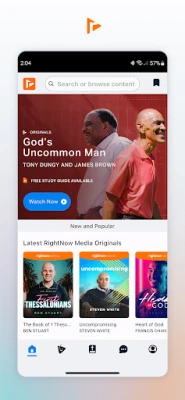
Access the world’s largest library of Bible study video resources with the RightNow Media app. Stream content for small groups, find shows for kids, and download helpful guides for leaders. All of it available anytime, anywhere.
RightNow Media is a Christian video-streaming app with a large library of Bible studies, teaching series, and faith-focused content. It is available at no additional charge to people whose church, school, business, or other organization provides a RightNow Media subscription.
Finding trustworthy Christian teaching and study materials can take time, especially when you want resources for personal devotion, group study, or family viewing. RightNow Media brings a broad collection of faith-based videos into one app, with tools for saving, searching, streaming, and studying content.
Its extensive library and access through participating organizations make it a convenient option for members who want Christian media available at home or on the go. The app is designed for more than passive viewing: study guides, assignments, Bible access, and audio playback help users engage with the material in different ways.
RightNow Media is a subscription-based Christian media service offered through churches, ministries, schools, businesses, and other organizations. Eligible users can stream thousands of videos, including Bible studies, teaching series, leadership content, and programs for different ages. The service features contributors such as Francis Chan, Jennie Allen, Tony Evans, J.D. Greear, Tony Dungy, and other Christian leaders.
An APK is the Android application package format used to install apps on Android devices. Installing an app manually from an APK is an alternative to downloading it through an app store, but users should make sure the file comes from a trustworthy source and is an authentic, current release.
Pros
Cons
Overall, users are drawn to the breadth of the video collection and the convenience of having Bible studies and Christian teaching in one place. Commonly appreciated features include the ability to search by topic, save videos, continue watching, and use the app for personal or group study. Casting and access to content for different ages can also make the service useful for households and church communities.
As with many streaming apps, some users may encounter playback, sign-in, casting, or compatibility problems on particular devices. Library access can also be confusing if an organization has not yet provided an account or if certain titles are unavailable for that user. Experiences may differ depending on the device, connection, app version, and subscription setup.
RightNow Media is a compelling resource for people who already have access through a church, school, business, or ministry. Its extensive library, study guides, search tools, and flexible playback options make it useful for both individual learning and group-based study.
The main limitation is that access depends on an organizational subscription, and some features or titles may not be available to every account. If your organization provides access and you want a convenient collection of Christian teaching and study videos, RightNow Media is well worth trying. For people without an eligible subscription, a Bible app or another service with a direct individual plan may be a better fit.
For the safest installation, download RightNow Media through Google Play or another trusted distribution channel. If you install an APK manually, verify that it comes from a reputable source and matches the legitimate app. Unofficial or modified APK files can contain malware, expose personal information, or compromise your device.
Manual installation may require you to allow installs from unknown sources for the specific browser or file manager you use. Enable this permission only when necessary, avoid APKs that request unexpected access, and turn the permission off again after installation. Keep Android and the app updated, and review the app’s permissions and privacy information before signing in.
Q1: Is RightNow Media APK free to use?
A1: The app is available at no additional charge to users whose organization provides a RightNow Media subscription. Access is not automatically available to everyone, so check with your church, school, business, or ministry.
Q2: Do I need an internet connection to watch videos?
A2: Streaming normally requires an internet connection. The app also offers temporary offline access for eligible content, subject to the title and account’s available options.
Q3: Can I use RightNow Media without an organizational account?
A3: RightNow Media subscriptions are offered through organizations such as churches, schools, businesses, and ministries. Contact your organization to find out whether it provides access.
Q4: Can I watch RightNow Media on my television?
A4: The app supports casting compatible content to supported devices, including Chromecast and Roku. Availability may depend on your device, network, and app setup.
Q5: Is it safe to download the RightNow Media APK?
A5: It is safest to install the official app from Google Play. If you choose a manual APK, use a trusted source and be cautious: unofficial or altered files may contain malware or create privacy and security risks.
RightNow Media APK
📱 RightNow Media APK Summary
RightNow Media is a Christian video-streaming app with a large library of Bible studies, teaching series, and faith-focused content. It is available at no additional charge to people whose church, school, business, or other organization provides a RightNow Media subscription.
- App Name: RightNow Media
- Current Version: Varies by release; check Google Play for the latest version
- Last Updated: Check the current Google Play listing for the latest update date
- Category: Education / Video Players & Editors
- Developer: RightNow Media
- Google Play Rating: Ratings and review counts change over time; check Google Play for the current figures
💡 Introduction
Finding trustworthy Christian teaching and study materials can take time, especially when you want resources for personal devotion, group study, or family viewing. RightNow Media brings a broad collection of faith-based videos into one app, with tools for saving, searching, streaming, and studying content.
Its extensive library and access through participating organizations make it a convenient option for members who want Christian media available at home or on the go. The app is designed for more than passive viewing: study guides, assignments, Bible access, and audio playback help users engage with the material in different ways.
❓ What Is RightNow Media APK?
RightNow Media is a subscription-based Christian media service offered through churches, ministries, schools, businesses, and other organizations. Eligible users can stream thousands of videos, including Bible studies, teaching series, leadership content, and programs for different ages. The service features contributors such as Francis Chan, Jennie Allen, Tony Evans, J.D. Greear, Tony Dungy, and other Christian leaders.
An APK is the Android application package format used to install apps on Android devices. Installing an app manually from an APK is an alternative to downloading it through an app store, but users should make sure the file comes from a trustworthy source and is an authentic, current release.
🧑💻 How to Use
- Install RightNow Media from Google Play or another trusted source.
- Open the app and sign in using the account provided through your participating organization. If you do not have access, ask your church, school, business, or ministry whether it offers a subscription.
- Browse the available collections or search by topic, title, or keyword. Filters can help narrow down the results.
- Choose a video to start watching. Where available, open its study guide or Bible tools to follow along.
- Add useful videos to My Saved so you can return to them later, or use Keep Watching to resume a video you started previously.
- Use supported download or offline-playback options when you expect to be without a reliable connection. Availability may depend on the title and app settings.
- For a larger-screen experience, cast compatible content to a supported TV device, such as Chromecast or Roku.
⚙️ Features
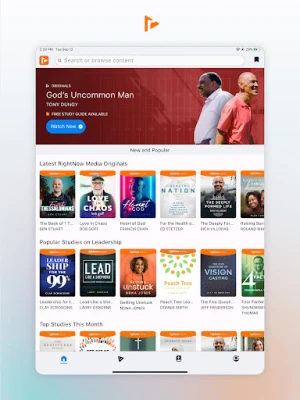
- Extensive streaming library: Explore more than 25,000 videos covering Bible study, Christian living, leadership, and other faith-related topics.
- In-app study guides: Follow along with guides for RightNow Media Original series and make video-based study easier to use individually or with a group.
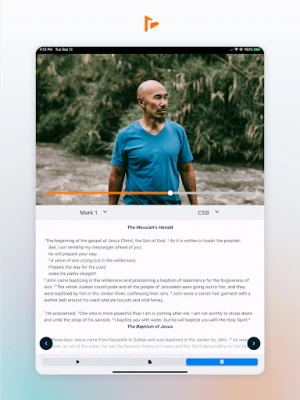
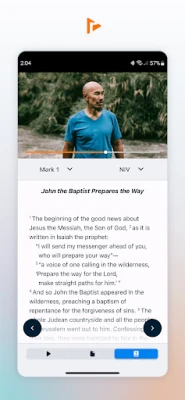
- Bible access: Read Scripture on its own or alongside videos. The listed Bible feature offers 16 translations and is available for church and ministry accounts.
- Multiple languages: Selected content is available in up to 12 languages, including dubbed audio and subtitles where provided.
- Offline playback: Temporarily access eligible content when an internet connection is unavailable, which can be useful while travelling.
- Audio-only mode: Listen without playing video, making suitable content easier to enjoy during a commute, workout, or other activity.
- Saved videos and viewing progress: Add titles to My Saved and return to unfinished videos through Keep Watching.
- Search and discovery tools: Browse topic-based collections or use keyword search and advanced filters to find relevant material.
- Assignments and interactive content: View and complete assigned material from a mobile device when your organization uses these features.
- TV casting: Send supported video to a television using compatible casting devices, including Chromecast and Roku.
- Light and dark modes: Choose a viewing appearance that suits your preference, with navigation designed for easier access to your organization’s library.
- Recommendations and sharing: Receive notifications about new or relevant content and share videos or information about RightNow Media access with others.
✅ Pros and ❌ Cons
Pros
- A large library covering a wide range of Christian topics and audiences.
- Included access for eligible users through a participating organization.
- Study guides, Bible tools, assignments, and playback options support different learning styles.
- Search, filters, saved titles, and viewing history make it easier to find and revisit content.
- Language options, audio-only playback, and casting add flexibility.
Cons
- A qualifying organization’s subscription is generally required; it is not an open, free-for-everyone service.
- Content, Bible access, language tracks, and offline availability may vary by account or title.
- Streaming requires a reliable internet connection unless eligible content has been made available for offline playback.
- The size of the library may feel overwhelming without using search or filters.
- App compatibility and performance can vary by Android device and software version.
📋 App Details
- App Name: RightNow Media
- Current Version: Varies by release; verify the latest version in Google Play
- Last Updated: Check Google Play for the current update date
- File Size: Varies by version and device; check the app listing before downloading
- Requires Android: Minimum requirements can change between releases; consult the current Google Play listing for your device
- Developer: RightNow Media
- Content Rating: Check the current store listing for the official rating
- Access: Available to users covered by a participating organization’s subscription
💬 User Reviews
Overall, users are drawn to the breadth of the video collection and the convenience of having Bible studies and Christian teaching in one place. Commonly appreciated features include the ability to search by topic, save videos, continue watching, and use the app for personal or group study. Casting and access to content for different ages can also make the service useful for households and church communities.
As with many streaming apps, some users may encounter playback, sign-in, casting, or compatibility problems on particular devices. Library access can also be confusing if an organization has not yet provided an account or if certain titles are unavailable for that user. Experiences may differ depending on the device, connection, app version, and subscription setup.
🔍 5 Best Alternative Apps
- Faithlife TV: Offers Christian films, Bible teaching, and other faith-focused video content. It may suit viewers looking for another service centered on Christian media and study.
- Pure Flix: Focuses largely on family-friendly and faith-oriented films and series, making it a possible alternative for users who primarily want Christian entertainment.
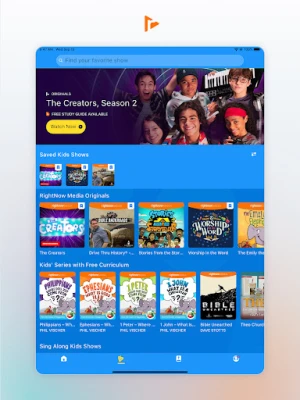
- Minno: Provides Christian and Bible-themed programming for children. Families seeking age-focused viewing options may find it a useful complement or substitute.
- YouVersion Bible App: A Bible reading and study app with translations, reading plans, and devotional resources. It is a strong choice for users whose main interest is Scripture rather than video streaming.
- Abide: Offers Christian meditation, prayer, and devotional audio experiences. It may appeal to people looking for guided reflection and listening content instead of a large video library.
🧠 My Opinion
RightNow Media is a compelling resource for people who already have access through a church, school, business, or ministry. Its extensive library, study guides, search tools, and flexible playback options make it useful for both individual learning and group-based study.
The main limitation is that access depends on an organizational subscription, and some features or titles may not be available to every account. If your organization provides access and you want a convenient collection of Christian teaching and study videos, RightNow Media is well worth trying. For people without an eligible subscription, a Bible app or another service with a direct individual plan may be a better fit.
🛡️ Privacy and Security
For the safest installation, download RightNow Media through Google Play or another trusted distribution channel. If you install an APK manually, verify that it comes from a reputable source and matches the legitimate app. Unofficial or modified APK files can contain malware, expose personal information, or compromise your device.
Manual installation may require you to allow installs from unknown sources for the specific browser or file manager you use. Enable this permission only when necessary, avoid APKs that request unexpected access, and turn the permission off again after installation. Keep Android and the app updated, and review the app’s permissions and privacy information before signing in.
❓ Frequently Asked Questions (FAQs)
Q1: Is RightNow Media APK free to use?
A1: The app is available at no additional charge to users whose organization provides a RightNow Media subscription. Access is not automatically available to everyone, so check with your church, school, business, or ministry.
Q2: Do I need an internet connection to watch videos?
A2: Streaming normally requires an internet connection. The app also offers temporary offline access for eligible content, subject to the title and account’s available options.
Q3: Can I use RightNow Media without an organizational account?
A3: RightNow Media subscriptions are offered through organizations such as churches, schools, businesses, and ministries. Contact your organization to find out whether it provides access.
Q4: Can I watch RightNow Media on my television?
A4: The app supports casting compatible content to supported devices, including Chromecast and Roku. Availability may depend on your device, network, and app setup.
Q5: Is it safe to download the RightNow Media APK?
A5: It is safest to install the official app from Google Play. If you choose a manual APK, use a trusted source and be cautious: unofficial or altered files may contain malware or create privacy and security risks.
Rate the App
Add Comment & Review
User Reviews
Based on 0 reviews
No reviews added yet.
Comments will not be approved to be posted if they are SPAM, abusive, off-topic, use profanity, contain a personal attack, or promote hate of any kind.









More »

Popular Apps

TradingView: Track All MarketsTradingView Inc.

Bus Fever Party!Lumi Games

Claude by AnthropicAnthropic PBC

Block Craft 3D:Building GameWildlife Studios

Malwarebytes - Mobile SecurityMalwarebytes

Block Blast!HungryStudio

Canva: AI Photo & Video EditorCanva

Candy Crush SagaKing

Carrom Pool: Disc GameMiniclip.com

EA SPORTS FC Soccer Mobile 27ELECTRONIC ARTS
More »
Editor's Choice

Kahoot! Play & Create QuizzesKahoot!

United AirlinesUnited Airlines

Tripwoa: Travel Plan & Trailtripwoa

trivago: Compare hotel pricestrivago N.V.

Planner 5D: AI Home DesignPlanner 5D

ibis Paint Xibis inc.

Agoda: Cheap Flights & Hotelsagoda.com

Hopper: Hotels, Flights & CarsHopper Inc.

Brilliant: Learn Math & CodingBrilliant.org

Google ClassroomGoogle LLC