




Latest Version
Version
2.7.52.6
2.7.52.6
Update
October 17, 2026
October 17, 2026
Developer
PLAYIT TECHNOLOGY PTE. LTD.
PLAYIT TECHNOLOGY PTE. LTD.
Categories
Media
Media
Platforms
Android
Android
Downloads
0
0
License
Free
Free
Package Name
com.playit.videoplayer
com.playit.videoplayer
Report
Report a Problem
Report a Problem
More About PLAYit-All in One Video Player
In need of an all-in-one video and music player🎦, 🎮game hall, video transfer, and media manager?
PLAYit is an Android media player for watching videos and listening to music, with tools for managing local files and playing content in a floating or background window. It supports many common media formats and also includes features such as subtitle search, video-to-audio conversion, private video storage, and a built-in game hall.
Watching videos and listening to music on a phone should be simple, even when your files come in different formats or you want to multitask. PLAYit brings video playback, music controls, local media management, and a collection of extra tools together in one Android app.
Its appeal lies in the combination of broad format support and practical playback options. Whether you want to resume a movie, keep audio playing in the background, or find media stored on an SD card, PLAYit aims to make everyday playback more convenient.
PLAYit is a media player and file-management app designed for Android phones and tablets. It can scan your device and SD card for video and audio files, organize them for browsing, and play supported formats—including common HD and 4K video files. Its additional tools include floating-window playback, background audio, gesture controls, subtitle search, a private folder, and video-to-audio conversion.
An APK is the package file format used to distribute and install Android apps. Installing a PLAYit APK manually can be useful when an app is unavailable through your usual app store, but it is important to obtain the file from a source you trust and verify that it is an authentic, current release.
Pros
Cons
Feedback about PLAYit commonly highlights its broad format support, straightforward access to local media, and convenient playback options. Users who like floating or background playback may find it especially useful for multitasking, while the extra tools can reduce the need to install separate apps for basic media tasks.
Common concerns for media-player apps include advertisements, occasional playback or compatibility problems, and features that behave differently across phones. Performance with 4K or other demanding files depends on device hardware, while subtitle and online-content features may depend on an internet connection and regional availability. Ratings and review trends can change, so check recent feedback for your device before installing.
PLAYit is a versatile option for people who want one app to handle everyday video and music playback alongside local file browsing. Its floating player, gesture controls, format support, and conversion tools make it more than a basic player, although not every feature will suit every user.
If you regularly watch downloaded videos, listen to music stored on your phone, or switch between playback and other apps, PLAYit is worth considering. Download it through a trusted source, review its permissions, and check recent compatibility feedback for your device before installing.
For the safest installation, use Google Play or another reputable distribution channel and check that the app name and developer match the release you intend to install. Avoid modified or repackaged APKs, which may contain malware or make unwanted changes to the app.
Manually installing an APK may require enabling the Android setting commonly called Install unknown apps for the browser or file manager you use. The setting name and location vary by Android version. Allow installation only for a trusted source, then turn the permission off again when finished. Review requested permissions carefully, especially access to files and media, and remember that unofficial APKs can create security and data-privacy risks.
Q1: Is PLAYit free to use?
A: PLAYit is generally offered as a free app, but features, ads, and in-app options can change. Check the current listing and the app itself for up-to-date details.
Q2: Can PLAYit play videos without an internet connection?
A: Local video and audio files can generally be played offline after installation. Online content and features such as subtitle searching may require an internet connection.
Q3: Does PLAYit support 4K video?
A: The app is designed to support 4K playback, but smooth performance depends on your device’s hardware, the video file, and the installed app version.
Q4: Can PLAYit convert a video into an audio file?
A: PLAYit includes a video-to-audio conversion feature for compatible files. Available formats and conversion options may vary by version.
Q5: Is it safe to download the PLAYit APK?
A: Safety depends on where the APK comes from. Prefer the official app store or a reputable source, avoid modified files, and review permissions before installing. Unofficial APKs may contain malware or pose privacy risks.
PLAYit APK
📱 PLAYit APK Summary
PLAYit is an Android media player for watching videos and listening to music, with tools for managing local files and playing content in a floating or background window. It supports many common media formats and also includes features such as subtitle search, video-to-audio conversion, private video storage, and a built-in game hall.
- App Name: PLAYit
- Current Version: Version varies by release and device; check the official Google Play listing for the latest version
- Last Updated: Check the official Google Play listing for the latest update date
- Category: Video Players & Editors
- Developer: PLAYIT TECHNOLOGY PTE. LTD.
- Google Play Rating: Ratings and review totals change over time; see Google Play for the current figures
💡 Introduction
Watching videos and listening to music on a phone should be simple, even when your files come in different formats or you want to multitask. PLAYit brings video playback, music controls, local media management, and a collection of extra tools together in one Android app.
Its appeal lies in the combination of broad format support and practical playback options. Whether you want to resume a movie, keep audio playing in the background, or find media stored on an SD card, PLAYit aims to make everyday playback more convenient.
❓ What is PLAYit APK?
PLAYit is a media player and file-management app designed for Android phones and tablets. It can scan your device and SD card for video and audio files, organize them for browsing, and play supported formats—including common HD and 4K video files. Its additional tools include floating-window playback, background audio, gesture controls, subtitle search, a private folder, and video-to-audio conversion.
An APK is the package file format used to distribute and install Android apps. Installing a PLAYit APK manually can be useful when an app is unavailable through your usual app store, but it is important to obtain the file from a source you trust and verify that it is an authentic, current release.
🧑💻 How to Use
- Install and open the app: Get PLAYit from an official app store or a reputable APK provider, then launch it.
- Allow media access if needed: Grant the permissions required for PLAYit to find and manage videos and audio stored on your device. Review each permission before approving it.
- Browse your library: Open the video or music section to view detected files. Browse folders or use search and sorting options to find something specific.
- Start playback: Tap a video or audio file. During video playback, use the on-screen controls and gestures to adjust brightness, volume, or playback speed.
- Choose how to play: Use background playback for audio or supported content, or enable the floating player to keep a small video window visible while using another app.
- Try additional tools: Look for available subtitle search, private-folder, conversion, sharing, and game-hall features in the app.
⚙️ Features
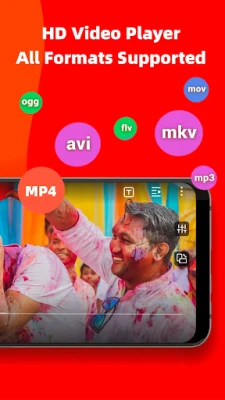
- Wide video-format support: PLAYit is designed to play a variety of video formats, including MKV, FLV, 3GP, M4V, TS, and MPG, as well as HD and 4K files when supported by the device.
- Music playback and library management: Find audio files stored in phone memory or on an SD card, then play individual tracks or playlists.
- Automatic media scanning: The app can detect local media files and help sort and browse them, making large collections easier to manage.
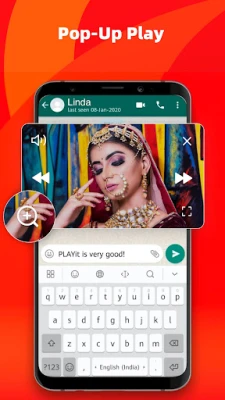
- Floating and background playback: Keep a video in a movable window while using other apps, or continue listening when you switch screens. Feature availability may depend on the app version and device settings.
- Gesture controls and playback resume: Adjust brightness, volume, or playback speed with playback gestures, and return to a video from its previous position.
- Subtitle search: Search for available subtitles, including options in languages such as English, Hindi, and Tamil. Subtitle availability can vary by title.
- Video-to-audio conversion: Convert compatible video files into audio, such as MP4 to MP3, using the app’s conversion tool.
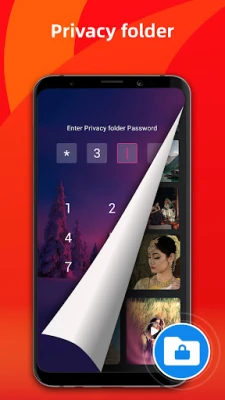
- Private folder: Move selected videos into a protected area to keep them separate from the main library. This feature should not be treated as a replacement for secure device backups or encryption.
- Sharing and game hall: Share media using supported options, and explore the collection of casual and action-oriented games included in the app.
✅ Pros and ❌ Cons
Pros
- Combines video and music playback with local media browsing.
- Supports many widely used video formats and high-resolution files, depending on device capabilities.
- Floating and background playback can make multitasking easier.
- Includes useful extras such as gesture controls, subtitle search, and audio conversion.
- Can find media stored in both internal storage and on an SD card.
Cons
- Some features may require an internet connection or may not be available in every region or app version.
- Playing high-resolution video depends on the phone’s hardware and the video file itself.
- Media scanning and management require access to relevant files and folders.
- Ads or promotional content may affect the experience, depending on the current release.
- Manual installation carries security risks if the APK comes from an untrusted source.
📋 App Details
- App Name: PLAYit
- Current Version: Varies by release; confirm the latest version in the official app listing
- Last Updated: Check the official app listing for the current date
- File Size: Varies by version and device; check the download details before installing
- Requires Android: Minimum Android requirement varies by release; check the app’s installation information for your device
- Developer: PLAYIT TECHNOLOGY PTE. LTD.
- Category: Video Players & Editors
- Content Rating: Check the current store listing, as ratings may vary by region and release
💬 User Reviews
Feedback about PLAYit commonly highlights its broad format support, straightforward access to local media, and convenient playback options. Users who like floating or background playback may find it especially useful for multitasking, while the extra tools can reduce the need to install separate apps for basic media tasks.
Common concerns for media-player apps include advertisements, occasional playback or compatibility problems, and features that behave differently across phones. Performance with 4K or other demanding files depends on device hardware, while subtitle and online-content features may depend on an internet connection and regional availability. Ratings and review trends can change, so check recent feedback for your device before installing.
🔍 5 Best Alternative Apps
- VLC for Android: A popular open-source player for local video and audio, known for broad format support and playback tools.
- MX Player: A feature-rich video player with gesture controls and support for many common media formats.
- KMPlayer: A multimedia player offering playback options for a range of video and audio files.
- XPlayer (Video Player All Format): A dedicated Android video player with format support and private-folder features in some releases.
- Nova Video Player: A video-focused player that helps organize and play a personal collection of locally stored media.
🧠 My Opinion
PLAYit is a versatile option for people who want one app to handle everyday video and music playback alongside local file browsing. Its floating player, gesture controls, format support, and conversion tools make it more than a basic player, although not every feature will suit every user.
If you regularly watch downloaded videos, listen to music stored on your phone, or switch between playback and other apps, PLAYit is worth considering. Download it through a trusted source, review its permissions, and check recent compatibility feedback for your device before installing.
🛡️ Privacy and Security
For the safest installation, use Google Play or another reputable distribution channel and check that the app name and developer match the release you intend to install. Avoid modified or repackaged APKs, which may contain malware or make unwanted changes to the app.
Manually installing an APK may require enabling the Android setting commonly called Install unknown apps for the browser or file manager you use. The setting name and location vary by Android version. Allow installation only for a trusted source, then turn the permission off again when finished. Review requested permissions carefully, especially access to files and media, and remember that unofficial APKs can create security and data-privacy risks.
❓ Frequently Asked Questions (FAQs)
Q1: Is PLAYit free to use?
A: PLAYit is generally offered as a free app, but features, ads, and in-app options can change. Check the current listing and the app itself for up-to-date details.
Q2: Can PLAYit play videos without an internet connection?
A: Local video and audio files can generally be played offline after installation. Online content and features such as subtitle searching may require an internet connection.
Q3: Does PLAYit support 4K video?
A: The app is designed to support 4K playback, but smooth performance depends on your device’s hardware, the video file, and the installed app version.
Q4: Can PLAYit convert a video into an audio file?
A: PLAYit includes a video-to-audio conversion feature for compatible files. Available formats and conversion options may vary by version.
Q5: Is it safe to download the PLAYit APK?
A: Safety depends on where the APK comes from. Prefer the official app store or a reputable source, avoid modified files, and review permissions before installing. Unofficial APKs may contain malware or pose privacy risks.
Rate the App
Add Comment & Review
User Reviews
Based on 0 reviews
No reviews added yet.
Comments will not be approved to be posted if they are SPAM, abusive, off-topic, use profanity, contain a personal attack, or promote hate of any kind.










More »

Popular Apps

TradingView: Track All MarketsTradingView Inc.

Bus Fever Party!Lumi Games

Claude by AnthropicAnthropic PBC

Block Craft 3D:Building GameWildlife Studios

Malwarebytes - Mobile SecurityMalwarebytes

Block Blast!HungryStudio

Canva: AI Photo & Video EditorCanva

Candy Crush SagaKing

Carrom Pool: Disc GameMiniclip.com

EA SPORTS FC Soccer Mobile 27ELECTRONIC ARTS
More »
Editor's Choice

Kahoot! Play & Create QuizzesKahoot!

United AirlinesUnited Airlines

Tripwoa: Travel Plan & Trailtripwoa

trivago: Compare hotel pricestrivago N.V.

Planner 5D: AI Home DesignPlanner 5D

ibis Paint Xibis inc.

Agoda: Cheap Flights & Hotelsagoda.com

Hopper: Hotels, Flights & CarsHopper Inc.

Brilliant: Learn Math & CodingBrilliant.org

Google ClassroomGoogle LLC