





Latest Version
Version
16.2.44.0
16.2.44.0
Update
October 17, 2026
October 17, 2026
Developer
Samsung Electronics Co., Ltd.
Samsung Electronics Co., Ltd.
Categories
Media
Media
Platforms
Android
Android
Downloads
0
0
License
Free
Free
Package Name
com.sec.android.app.music
com.sec.android.app.music
Report
Report a Problem
Report a Problem
More About Samsung Music
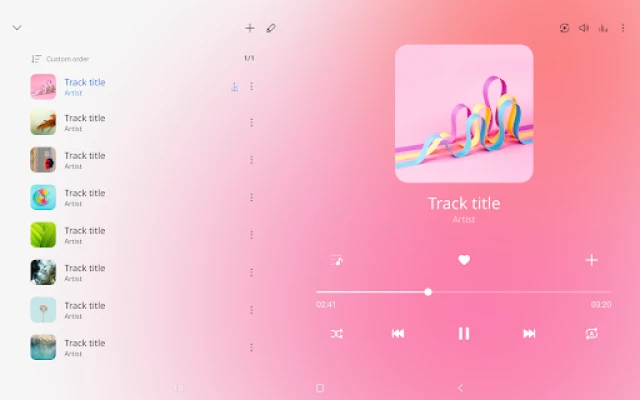
Samsung Music is optimized for Samsung android device and provides a powerful music play functionality and the best user interface.
Samsung Music is an Android audio player for browsing and listening to music stored on your device. It supports popular audio formats, organizes tracks into useful categories, and may show Spotify recommendations in supported regions.
Finding a particular song among folders, albums, and downloaded tracks can be frustrating. Samsung Music makes that everyday task easier with a straightforward player that sorts your library in several ways and supports formats such as MP3, AAC, and FLAC, subject to device compatibility.
Its clean interface keeps the focus on your music, while a Spotify tab can offer playlist recommendations in countries where Spotify is available. Whether you listen to a carefully arranged collection or simply want a dependable way to play audio stored on your phone, Samsung Music is designed to keep your library accessible.
Samsung Music is a music player developed by Samsung Electronics. It lets users play compatible audio files stored on their Android device or SD card and browse them by track, album, artist, genre, folder, or composer. The app is primarily suited to people who want an organized local music library, with Spotify recommendations available in supported regions.
An APK is the package format Android uses to distribute and install apps. Installing an APK manually can be useful in some situations, but availability and compatibility depend on the device, Android version, and app release. Samsung Music may be intended for Samsung devices, and certain features or formats can differ across phones.
Pros
Cons
User feedback commonly highlights Samsung Music’s straightforward layout and useful ways to sort a local music library. Listeners who keep audio files on their phone often appreciate being able to browse by artist, album, genre, and folder, along with support for popular file types.
Some users may find that the app’s usefulness depends on their device or preferred listening setup. Format support can differ between phones, Spotify recommendations are region-dependent, and people looking for a full streaming catalog may prefer a dedicated streaming service. Ratings and review themes can change, so consult the current store listing for the latest user feedback.
Samsung Music is a practical choice for listeners who already keep their songs on a phone or SD card and want an easy way to organize them. Its category-based browsing, clean interface, and support for common formats cover the essentials without making everyday playback complicated.
It is not a replacement for a full streaming service, and some functions depend on device compatibility or location. Still, if your main goal is to manage and play a personal music collection, Samsung Music is a solid app to try—especially on a compatible Samsung device.
For the safest installation, use a trusted app store and verify that the app is published by Samsung Electronics Co., Ltd. If you install an APK manually, use a reputable source and check that the file is authentic and compatible with your device. Unofficial or modified APKs can expose your device to malware, unwanted software, or privacy risks.
Android may require you to allow installation from unknown sources for the specific browser or file manager used to open an APK. Enable this only when needed, understand the risks, and turn the permission off again afterward. Samsung Music requires music and audio access for its core library features; notifications are optional, and the phone permission described for the app applies to Korean devices.
Q1: Is Samsung Music free to use?
A1: Samsung Music is generally offered as a free music player through supported app stores. Availability and any related service terms can vary by region.
Q2: Can I use Samsung Music without an internet connection?
A2: You can play compatible music files already stored on your device without an internet connection. Spotify recommendations and other online services require connectivity and may not be available in every country.
Q3: Which audio formats does Samsung Music support?
A3: The app lists formats such as MP3, AAC, and FLAC. Supported formats may vary depending on your device and software.
Q4: Is Samsung Music available on every Android phone?
A4: Availability and compatibility can depend on the phone, Android version, and store region. Check the relevant app-store listing for your device before installing.
Q5: Is it safe to download the Samsung Music APK?
A5: An APK’s safety depends on where it comes from. Prefer a trusted store or verified source, avoid modified files, and remember that unofficial APKs can contain malware or create privacy risks.
Samsung Music APK
📱 Samsung Music APK Summary
Samsung Music is an Android audio player for browsing and listening to music stored on your device. It supports popular audio formats, organizes tracks into useful categories, and may show Spotify recommendations in supported regions.
- App Name: Samsung Music
- Current Version: Varies by device and release; check the Google Play Store or Galaxy Store for the latest version available to you.
- Last Updated: The date varies by regional store listing and rollout.
- Category: Music & Audio
- Developer: Samsung Electronics Co., Ltd.
- Google Play Rating: Rating and review count vary over time and by region; see the current Google Play listing for live figures.
💡 Introduction
Finding a particular song among folders, albums, and downloaded tracks can be frustrating. Samsung Music makes that everyday task easier with a straightforward player that sorts your library in several ways and supports formats such as MP3, AAC, and FLAC, subject to device compatibility.
Its clean interface keeps the focus on your music, while a Spotify tab can offer playlist recommendations in countries where Spotify is available. Whether you listen to a carefully arranged collection or simply want a dependable way to play audio stored on your phone, Samsung Music is designed to keep your library accessible.
❓ What is Samsung Music APK?
Samsung Music is a music player developed by Samsung Electronics. It lets users play compatible audio files stored on their Android device or SD card and browse them by track, album, artist, genre, folder, or composer. The app is primarily suited to people who want an organized local music library, with Spotify recommendations available in supported regions.
An APK is the package format Android uses to distribute and install apps. Installing an APK manually can be useful in some situations, but availability and compatibility depend on the device, Android version, and app release. Samsung Music may be intended for Samsung devices, and certain features or formats can differ across phones.
🧑💻 How to Use
- Install and open the app: Get Samsung Music from a trusted app store when it is available for your device, then launch it.
- Grant library access: Allow the required music and audio permission so the player can find and play supported files stored on your device or SD card.
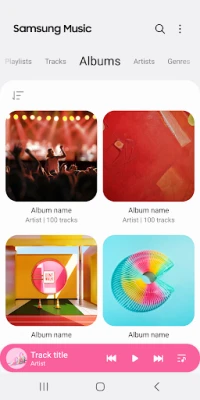
- Browse your collection: Choose a category such as Tracks, Albums, Artists, Genres, Folders, or Composers.
- Play music: Tap a song to start playback, then use the playback controls to pause, skip, or select another track.
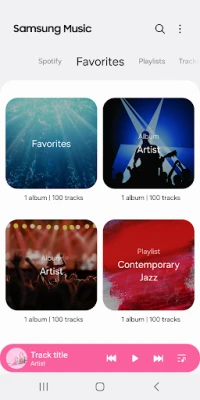
- Explore recommendations: If the Spotify tab is available in your country, open it to discover Spotify playlist suggestions. Spotify availability and related services may depend on your region.
- Get help: Open the app’s three-dot menu, choose Settings, then Contact us. Using this support option requires Samsung Members to be installed.
⚙️ Features
- Support for common audio formats: Play formats including MP3, AAC, and FLAC. Actual format support can vary depending on your device.
- Multiple library views: Browse music by track, album, artist, genre, folder, or composer to find what you want faster.
- Simple, clean interface: The uncluttered design makes everyday listening and library navigation easy to understand.
- Spotify playlist recommendations: In countries where Spotify operates, a dedicated tab can surface playlist recommendations and help you discover music you may enjoy.
- Local storage and SD card access: With the required permission, the player can read compatible music files from device storage and an SD card.
- Notification support: Optional notifications can provide music-player updates and related information.
- In-app support route: Users can access Samsung Music support through the app’s settings; Samsung Members must be installed to use the Contact us feature.
✅ Pros and ❌ Cons
Pros
- Organizes a music collection using several practical categories.
- Supports widely used formats, including MP3, AAC, and FLAC, depending on the device.
- Offers a clear interface that is easy to navigate.
- Can provide Spotify playlist recommendations in supported countries.
- Can read music from device storage and SD cards when permission is granted.
Cons
- Some features and file formats may vary by device or region.
- The Spotify recommendation tab is not available everywhere.
- It is focused on local music playback rather than serving as a complete streaming service.
- The Contact us feature requires Samsung Members.
- Compatibility and availability may be limited on non-Samsung devices or particular Android versions.
📋 App Details
- App Name: Samsung Music
- Current Version: Varies by device and store release; check the store listing for the version offered to your device.
- Last Updated: Varies by region and rollout.
- File Size: Varies by version and device; check the installation listing for the current download size.
- Requires Android: Minimum requirements vary by release and device. Confirm compatibility in the relevant store listing.
- Developer: Samsung Electronics Co., Ltd.
- Category: Music & Audio
- Content Rating: Check the current store listing for the rating shown in your region.
💬 User Reviews
User feedback commonly highlights Samsung Music’s straightforward layout and useful ways to sort a local music library. Listeners who keep audio files on their phone often appreciate being able to browse by artist, album, genre, and folder, along with support for popular file types.
Some users may find that the app’s usefulness depends on their device or preferred listening setup. Format support can differ between phones, Spotify recommendations are region-dependent, and people looking for a full streaming catalog may prefer a dedicated streaming service. Ratings and review themes can change, so consult the current store listing for the latest user feedback.
🔍 5 Best Alternative Apps
- VLC for Android: A versatile media player known for broad audio and video format support. It is a useful option for people who want one player for many kinds of local media.
- Musicolet Music Player: A local music player with library browsing and queue-management tools. It may suit listeners who want a dedicated offline player with more playback controls.
- Poweramp Music Player: A feature-rich music player with extensive audio settings and library options. It is worth considering if sound customization is a priority.
- AIMP: A lightweight audio player with support for multiple file types and playlist features. It offers another option for managing and playing music stored on an Android device.
- Spotify: A music-streaming service for discovering and playing a large online catalog, with availability and features that vary by region and plan. It is a better fit for listeners who prioritize streaming over local-file playback.
🧠 My Opinion
Samsung Music is a practical choice for listeners who already keep their songs on a phone or SD card and want an easy way to organize them. Its category-based browsing, clean interface, and support for common formats cover the essentials without making everyday playback complicated.
It is not a replacement for a full streaming service, and some functions depend on device compatibility or location. Still, if your main goal is to manage and play a personal music collection, Samsung Music is a solid app to try—especially on a compatible Samsung device.
🛡️ Privacy and Security
For the safest installation, use a trusted app store and verify that the app is published by Samsung Electronics Co., Ltd. If you install an APK manually, use a reputable source and check that the file is authentic and compatible with your device. Unofficial or modified APKs can expose your device to malware, unwanted software, or privacy risks.
Android may require you to allow installation from unknown sources for the specific browser or file manager used to open an APK. Enable this only when needed, understand the risks, and turn the permission off again afterward. Samsung Music requires music and audio access for its core library features; notifications are optional, and the phone permission described for the app applies to Korean devices.
❓ Frequently Asked Questions (FAQs)
Q1: Is Samsung Music free to use?
A1: Samsung Music is generally offered as a free music player through supported app stores. Availability and any related service terms can vary by region.
Q2: Can I use Samsung Music without an internet connection?
A2: You can play compatible music files already stored on your device without an internet connection. Spotify recommendations and other online services require connectivity and may not be available in every country.
Q3: Which audio formats does Samsung Music support?
A3: The app lists formats such as MP3, AAC, and FLAC. Supported formats may vary depending on your device and software.
Q4: Is Samsung Music available on every Android phone?
A4: Availability and compatibility can depend on the phone, Android version, and store region. Check the relevant app-store listing for your device before installing.
Q5: Is it safe to download the Samsung Music APK?
A5: An APK’s safety depends on where it comes from. Prefer a trusted store or verified source, avoid modified files, and remember that unofficial APKs can contain malware or create privacy risks.
Rate the App
Add Comment & Review
User Reviews
Based on 0 reviews
No reviews added yet.
Comments will not be approved to be posted if they are SPAM, abusive, off-topic, use profanity, contain a personal attack, or promote hate of any kind.







More »

Popular Apps

TradingView: Track All MarketsTradingView Inc.

Bus Fever Party!Lumi Games

Claude by AnthropicAnthropic PBC

Block Craft 3D:Building GameWildlife Studios

Malwarebytes - Mobile SecurityMalwarebytes

Block Blast!HungryStudio

Canva: AI Photo & Video EditorCanva

Candy Crush SagaKing

Carrom Pool: Disc GameMiniclip.com

EA SPORTS FC Soccer Mobile 27ELECTRONIC ARTS
More »
Editor's Choice

Kahoot! Play & Create QuizzesKahoot!

United AirlinesUnited Airlines

Tripwoa: Travel Plan & Trailtripwoa

trivago: Compare hotel pricestrivago N.V.

Planner 5D: AI Home DesignPlanner 5D

ibis Paint Xibis inc.

Agoda: Cheap Flights & Hotelsagoda.com

Hopper: Hotels, Flights & CarsHopper Inc.

Brilliant: Learn Math & CodingBrilliant.org

Google ClassroomGoogle LLC