



Latest Version
Update
October 17, 2026
October 17, 2026
Developer
Proton AG
Proton AG
Categories
Tools
Tools
Platforms
Android
Android
Downloads
0
0
License
Free
Free
Package Name
ch.protonvpn.android
ch.protonvpn.android
Report
Report a Problem
Report a Problem
More About Proton VPN: Secure & Fast VPN
Proton VPN is the world's only free VPN app that is safe to use and respects your privacy.
Proton VPN is a privacy-focused VPN app for encrypting your internet connection and helping protect your activity on public and private networks. Its free plan offers unlimited data and access to servers in 10 countries, while paid plans add a larger server network and extra features.
When you connect to public Wi-Fi or browse on a network you don’t fully trust, a VPN can add an important layer of protection. Proton VPN routes your connection through encrypted VPN servers, helping shield your internet traffic from local snooping while offering tools for more private browsing.
Proton VPN stands out for its free plan, which the app describes as having no data limits or speed caps. It also offers paid features for users who want more server locations, simultaneous connections, and additional security tools.
Proton VPN is a virtual private network app developed by Proton AG. It encrypts internet traffic between your Android device and a VPN server, helping protect data on Wi-Fi, mobile networks, and other connections. The service also provides a strict no-logs policy, according to the developer, and uses DNS leak protection and a kill switch to reduce the risk of exposing traffic if the VPN connection is interrupted.
The free plan provides access to VPN servers in 10 countries with unlimited data, while premium subscriptions offer access to more than 20,000 servers in over 140 countries, along with features such as NetShield ad and tracker blocking, Secure Core multi-hop routing, and split tunneling. Availability and specific features can depend on the plan, app version, and region.
An APK is the Android application package format. It is the file format Android uses to install apps, and downloading an APK can allow manual installation rather than installing through Google Play.
Pros
Cons
Users commonly appreciate Proton VPN’s straightforward connection process, unlimited-data free plan, and focus on privacy. The range of platform support and the availability of advanced security options are also frequent positives, particularly for people already using other Proton services.
Some users report that connection speed and server choice can vary, especially on the free plan or during busy periods. Others would like more free features or find that advanced options require a subscription. As with any app, experiences can differ by device, Android version, region, and network quality.
Proton VPN is a compelling choice for Android users who want an easy way to encrypt their connection and try a free VPN without a stated data allowance. Its privacy-focused approach and security tools give it more depth than a basic one-tap connection app, while premium plans add features for users who need broader server access.
It is worth considering if you want a reputable VPN service with a usable free option. Just remember that a VPN is one part of online security, not a guarantee of anonymity or protection from every threat. Review the plan details and current Android requirements before installing.
For the safest installation, download Proton VPN through Google Play or another official distribution channel. If you install an APK manually, use a reputable source and check that the app package is authentic. Unofficial or modified APKs can contain malware, request invasive permissions, or expose personal data.
Manual installation may require enabling permission to install unknown apps for the browser or file manager you use. Android’s wording and settings location vary by version; grant this permission only to a trusted installer, and turn it off again when you no longer need it. Keep Android and the app updated, review permissions, and remember that using a VPN does not prevent all tracking or online threats.
Q1: Is Proton VPN APK free to use?
A1: Proton VPN offers a free plan with unlimited data and access to servers in 10 countries. Premium features and broader server access require an eligible paid plan.
Q2: Do I need an internet connection to use Proton VPN?
A2: Yes. Proton VPN needs an active Wi-Fi or mobile data connection to connect to its servers and protect your internet traffic.
Q3: Is it safe to download the Proton VPN APK?
A3: It is safest to install the app from Google Play or an official source. APK files from unknown sites may be altered or bundled with malware, so verify the source before installing.
Q4: Does Proton VPN’s free plan have a data limit?
A4: Proton VPN describes its free plan as offering unlimited data. Server options and some advanced features are more limited than on paid plans.
Q5: Does a VPN make me completely anonymous online?
A5: No. A VPN encrypts the connection between your device and the VPN server, but it does not eliminate cookies, account-based tracking, phishing, or every other privacy risk.
Proton VPN APK
📱 Proton VPN APK Summary
Proton VPN is a privacy-focused VPN app for encrypting your internet connection and helping protect your activity on public and private networks. Its free plan offers unlimited data and access to servers in 10 countries, while paid plans add a larger server network and extra features.
- App Name: Proton VPN
- Current Version: Version varies by release and device; check Google Play for the latest
- Last Updated: Check Google Play for the current update date
- Category: Tools
- Developer: Proton AG
- Google Play Rating: Rating and review count change over time; check Google Play for current figures
💡 Introduction
When you connect to public Wi-Fi or browse on a network you don’t fully trust, a VPN can add an important layer of protection. Proton VPN routes your connection through encrypted VPN servers, helping shield your internet traffic from local snooping while offering tools for more private browsing.
Proton VPN stands out for its free plan, which the app describes as having no data limits or speed caps. It also offers paid features for users who want more server locations, simultaneous connections, and additional security tools.
❓ What is Proton VPN APK?
Proton VPN is a virtual private network app developed by Proton AG. It encrypts internet traffic between your Android device and a VPN server, helping protect data on Wi-Fi, mobile networks, and other connections. The service also provides a strict no-logs policy, according to the developer, and uses DNS leak protection and a kill switch to reduce the risk of exposing traffic if the VPN connection is interrupted.
The free plan provides access to VPN servers in 10 countries with unlimited data, while premium subscriptions offer access to more than 20,000 servers in over 140 countries, along with features such as NetShield ad and tracker blocking, Secure Core multi-hop routing, and split tunneling. Availability and specific features can depend on the plan, app version, and region.
An APK is the Android application package format. It is the file format Android uses to install apps, and downloading an APK can allow manual installation rather than installing through Google Play.
🧑💻 How to Use
- Install the app: Get Proton VPN from Google Play or install a verified APK from a source you trust.
- Choose your plan: Start with the free plan or sign in to use a paid subscription. Some features require an account or an eligible plan.
- Allow the VPN connection: When Android displays a VPN connection request, review it and approve it to let the app create a VPN connection.
- Connect to a server: Tap the quick-connect option or select an available server location. The free plan has a smaller selection than premium.
- Check your connection: Confirm the app shows that the VPN is connected before using sensitive apps or public Wi-Fi.
- Adjust settings if needed: Review options such as the kill switch, DNS leak protection, and—where available—split tunneling or NetShield.
- Disconnect when finished: Return to the app and tap disconnect when you no longer want to route traffic through the VPN.
⚙️ Features
- Free VPN with unlimited data: The free plan is promoted without monthly bandwidth limits or speed caps, making it suitable for regular browsing.
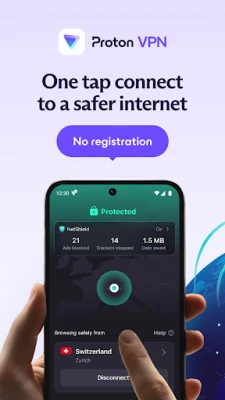
- One-tap connection: Quickly connect to an available VPN server without navigating complicated network settings.
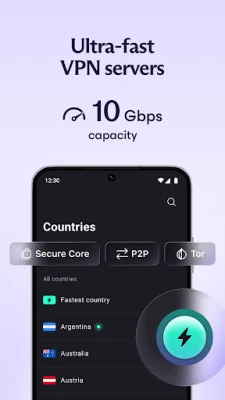
- Servers in multiple countries: Free users can connect to servers in 10 countries; premium plans expand access to more than 20,000 servers across over 140 countries.
- Encryption and DNS leak protection: These protections help secure traffic and reduce the chance that DNS requests will bypass the VPN tunnel.
- Kill switch: If the VPN connection drops, the kill switch can help prevent internet traffic from continuing outside the protected connection.
- No-logs privacy policy: Proton says it does not track or store users’ browsing activity. A VPN cannot make someone completely anonymous, so users should still consider their account, device, and browsing habits.
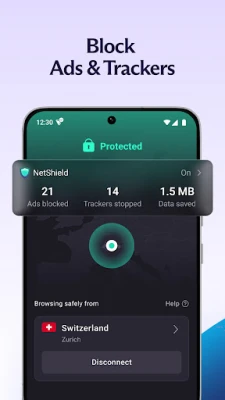
- NetShield protection: Available with eligible paid plans, NetShield can help block ads, trackers, and some malware-related domains.
- Secure Core and split tunneling: Premium tools include multi-hop routing through Secure Core and the ability to select which apps use the VPN with split tunneling.
- Multiple device platforms: Proton VPN is available for Android and other major operating systems, with browser extensions also offered for supported browsers.
✅ Pros and ❌ Cons
Pros
- Free plan includes unlimited data, according to the service’s stated offering.
- No-cost access to VPN servers in 10 countries.
- Includes security features such as encryption, DNS leak protection, and a kill switch.
- Offers advanced tools like NetShield, Secure Core, and split tunneling on eligible premium plans.
- Open-source apps and independent security audits support transparency.
- Available across several operating systems, not just Android.
Cons
- The free plan has fewer server locations and features than paid plans.
- Server availability and connection performance can vary depending on location, network conditions, and demand.
- Some advanced privacy and customization tools require a subscription.
- A VPN does not prevent every form of tracking, phishing, malware, or account compromise.
- App version, Android requirements, ratings, and file size can change with updates.
📋 App Details
- App Name: Proton VPN
- Current Version: Varies by release; check Google Play or the app’s official distribution channel
- Last Updated: Check Google Play for the latest update date
- File Size: Varies by version and device; check the installer listing before downloading
- Requires Android: Minimum Android version may change; check the current store listing for compatibility
- Developer: Proton AG
- Content Rating: Check Google Play for the current rating in your region
- Category: Tools
- Pricing: Free plan available; premium features require an eligible paid plan
💬 User Reviews
Users commonly appreciate Proton VPN’s straightforward connection process, unlimited-data free plan, and focus on privacy. The range of platform support and the availability of advanced security options are also frequent positives, particularly for people already using other Proton services.
Some users report that connection speed and server choice can vary, especially on the free plan or during busy periods. Others would like more free features or find that advanced options require a subscription. As with any app, experiences can differ by device, Android version, region, and network quality.
🔍 5 Best Alternative Apps
- Mullvad VPN: A privacy-oriented VPN known for a simple approach to account creation and a clear subscription model. It may suit users who prioritize privacy-focused design over a free tier.
- IVPN: A security-focused VPN service with privacy tools and straightforward apps. It is a paid alternative for people looking for a strong emphasis on transparency.
- Windscribe VPN: Offers VPN apps and privacy features, with free and paid options subject to the service’s current terms and limits.
- hide.me VPN: Provides VPN protection across several platforms and offers plan options for different needs. Check its current free-plan limits and features before choosing.
- Cloudflare One Agent (formerly 1.1.1.1 with WARP): Helps secure connections using Cloudflare’s network technology. Its service works differently from a traditional location-selecting VPN, so compare its privacy and location features with your requirements.
🧠 My Opinion
Proton VPN is a compelling choice for Android users who want an easy way to encrypt their connection and try a free VPN without a stated data allowance. Its privacy-focused approach and security tools give it more depth than a basic one-tap connection app, while premium plans add features for users who need broader server access.
It is worth considering if you want a reputable VPN service with a usable free option. Just remember that a VPN is one part of online security, not a guarantee of anonymity or protection from every threat. Review the plan details and current Android requirements before installing.
🛡️ Privacy and Security
For the safest installation, download Proton VPN through Google Play or another official distribution channel. If you install an APK manually, use a reputable source and check that the app package is authentic. Unofficial or modified APKs can contain malware, request invasive permissions, or expose personal data.
Manual installation may require enabling permission to install unknown apps for the browser or file manager you use. Android’s wording and settings location vary by version; grant this permission only to a trusted installer, and turn it off again when you no longer need it. Keep Android and the app updated, review permissions, and remember that using a VPN does not prevent all tracking or online threats.
❓ Frequently Asked Questions (FAQs)
Q1: Is Proton VPN APK free to use?
A1: Proton VPN offers a free plan with unlimited data and access to servers in 10 countries. Premium features and broader server access require an eligible paid plan.
Q2: Do I need an internet connection to use Proton VPN?
A2: Yes. Proton VPN needs an active Wi-Fi or mobile data connection to connect to its servers and protect your internet traffic.
Q3: Is it safe to download the Proton VPN APK?
A3: It is safest to install the app from Google Play or an official source. APK files from unknown sites may be altered or bundled with malware, so verify the source before installing.
Q4: Does Proton VPN’s free plan have a data limit?
A4: Proton VPN describes its free plan as offering unlimited data. Server options and some advanced features are more limited than on paid plans.
Q5: Does a VPN make me completely anonymous online?
A5: No. A VPN encrypts the connection between your device and the VPN server, but it does not eliminate cookies, account-based tracking, phishing, or every other privacy risk.
Rate the App
Add Comment & Review
User Reviews
Based on 0 reviews
No reviews added yet.
Comments will not be approved to be posted if they are SPAM, abusive, off-topic, use profanity, contain a personal attack, or promote hate of any kind.




More »

Popular Apps

TradingView: Track All MarketsTradingView Inc.

Bus Fever Party!Lumi Games

Claude by AnthropicAnthropic PBC

Block Craft 3D:Building GameWildlife Studios

Malwarebytes - Mobile SecurityMalwarebytes

Block Blast!HungryStudio

Canva: AI Photo & Video EditorCanva

Candy Crush SagaKing

Carrom Pool: Disc GameMiniclip.com

EA SPORTS FC Soccer Mobile 27ELECTRONIC ARTS
More »
Editor's Choice

Kahoot! Play & Create QuizzesKahoot!

United AirlinesUnited Airlines

Tripwoa: Travel Plan & Trailtripwoa

trivago: Compare hotel pricestrivago N.V.

Planner 5D: AI Home DesignPlanner 5D

ibis Paint Xibis inc.

Agoda: Cheap Flights & Hotelsagoda.com

Hopper: Hotels, Flights & CarsHopper Inc.

Brilliant: Learn Math & CodingBrilliant.org

Google ClassroomGoogle LLC