

Latest Version
Version
1.12735.987346843.0-release
1.12735.987346843.0-release
Update
October 17, 2026
October 17, 2026
Developer
Google LLC
Google LLC
Categories
Tools
Tools
Platforms
Android
Android
Downloads
5
5
License
Free
Free
Package Name
com.google.android.apps.nbu.files
com.google.android.apps.nbu.files
Report
Report a Problem
Report a Problem
More About Files by Google
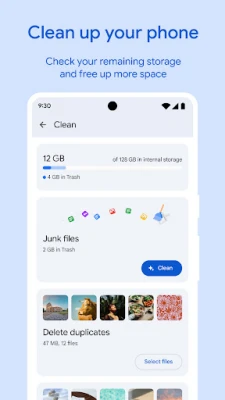
✨ Free up space on your device with cleaning recommendations
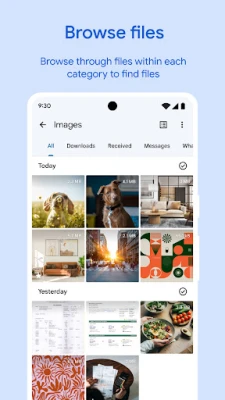
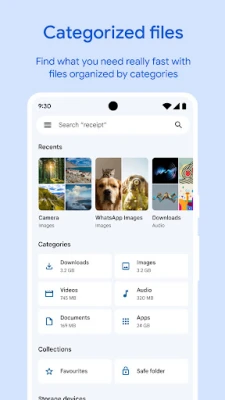
Files by Google is a lightweight file manager that helps you organize, find, share, and back up files on your Android device. It also offers storage-cleanup suggestions, offline sharing, and a private folder protected by a PIN or pattern.
Running out of storage or struggling to find a downloaded file can make everyday phone use frustrating. Files by Google brings file browsing, cleanup tools, offline sharing, and private storage together in a simple app designed for Android.
Its practical tools make it useful for people who want to clear space, locate documents and media quickly, or move files without relying on an internet connection. The app is also designed to take up little storage and does not display ads.
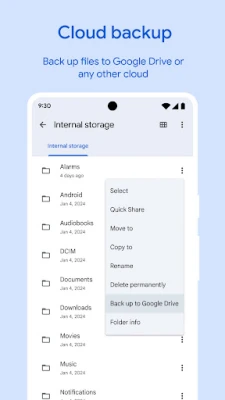
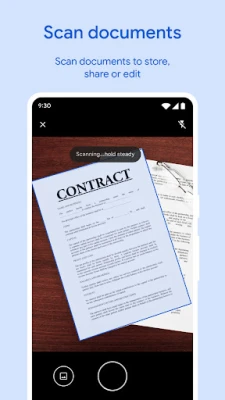
Files by Google is a file-management app for Android. It lets you browse and search files, review storage usage, remove items you no longer need, organize private files, and transfer content to nearby compatible devices. You can also move files to an SD card or back them up to Google Drive or another cloud-storage app installed on your phone.
An APK is the package file format Android uses to distribute and install apps. Installing an APK manually can be useful in some situations, but users should choose a trusted source and make sure the file is compatible with their device and Android version.
Pros
Cons
Users commonly appreciate the straightforward interface, quick file search, storage-cleanup tools, and the convenience of sharing files without an internet connection. The app’s ad-free experience and small footprint are also appealing to people who want a simple utility rather than a feature-heavy file manager.
Some users report that specific features behave differently across devices or after updates, and that cleanup suggestions may not always match their personal preferences. As with any cleanup tool, it is wise to review files before deleting them. Ratings and review themes can change as the app is updated.
Files by Google is a strong choice for Android users who want everyday file management without a complicated interface. Its most useful combination is quick browsing, practical storage suggestions, offline sharing, and a protected folder—all in a lightweight, ad-free app.
It is especially suitable for people who regularly download files, need to free up phone storage, or share media with nearby devices. If you need advanced network tools or highly customizable file operations, a more specialized manager may be a better fit. For most users looking for a dependable Android file organizer, it is well worth considering.
Install Files by Google through Google Play or another source you trust. If you choose to install an APK manually, verify that it comes from a reputable provider and matches your device. Unofficial or modified APKs can contain malware, expose personal information, or compromise your device.
Android may ask you to allow installation from that particular unknown-source app, such as your browser or file manager. Enable this permission only when needed, use it for a source you trust, and turn it off again afterward. Review requested permissions, keep Android updated, and avoid sharing sensitive files with people or devices you do not recognize.
Q1: Is Files by Google free to use?
A1: The app is free to download and use. Some connected services, such as cloud storage, may have their own account, storage, or data-use limits.
Q2: Does Files by Google work without an internet connection?
A2: You can browse local files and play media stored on your device offline. Quick Share can also transfer files without internet when the participating devices support the feature. Online backups require a connection.
Q3: Is it safe to download the Files by Google APK?
A3: The app is safest to install from Google Play. If you use an APK, download it only from a trusted source and avoid modified versions, which may contain malware or create privacy risks.
Q4: Can Files by Google recover a file after I delete it?
A4: Do not assume a deleted file can be recovered. Check the app’s current behavior and any available trash or recovery options before removing important items, and back up files you want to keep.
Q5: Can I protect files with a lock separate from my phone lock?
A5: The Safe folder lets you use a PIN or pattern that can be different from your device lock, helping keep selected files private.
Files by Google APK
📱 Files by Google APK Summary
Files by Google is a lightweight file manager that helps you organize, find, share, and back up files on your Android device. It also offers storage-cleanup suggestions, offline sharing, and a private folder protected by a PIN or pattern.
- App Name: Files by Google
- Current Version: Version varies by device and rollout; check Google Play for the latest release
- Last Updated: The date varies by release and region; check the current Google Play listing
- Category: Tools
- Developer: Google LLC
- Google Play Rating: Ratings and review counts change over time and by region; see Google Play for the current figures
💡 Introduction
Running out of storage or struggling to find a downloaded file can make everyday phone use frustrating. Files by Google brings file browsing, cleanup tools, offline sharing, and private storage together in a simple app designed for Android.
Its practical tools make it useful for people who want to clear space, locate documents and media quickly, or move files without relying on an internet connection. The app is also designed to take up little storage and does not display ads.
❓ What is Files by Google APK?
Files by Google is a file-management app for Android. It lets you browse and search files, review storage usage, remove items you no longer need, organize private files, and transfer content to nearby compatible devices. You can also move files to an SD card or back them up to Google Drive or another cloud-storage app installed on your phone.
An APK is the package file format Android uses to distribute and install apps. Installing an APK manually can be useful in some situations, but users should choose a trusted source and make sure the file is compatible with their device and Android version.
🧑💻 How to Use
- Install Files by Google from Google Play or another source you trust, then open the app.
- Review the available file categories or browse your device storage to find downloads, images, videos, audio, and documents.
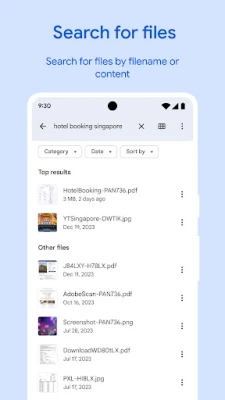
- Use search to locate a file, or sort items by size when you want to identify large files.
- Open the app’s cleanup suggestions to review items such as duplicate files, old downloads, or media you may no longer need. Check each suggestion before deleting anything.
- To share a file, select it and choose the sharing option. Follow the prompts to connect with a nearby compatible device using Quick Share.
- To protect sensitive items, open the Safe folder feature and set a PIN or pattern that can differ from your device lock.
- To make a backup or free up local storage, move or copy selected files to an SD card, Google Drive, or another supported cloud-storage app.
⚙️ Features
- Storage cleanup suggestions: Review recommendations for freeing space, including large files, duplicate items, and older media. You remain in control of what gets removed.
- Quick file search and browsing: Find photos, videos, downloads, and documents with search or browse by file type instead of digging through folders.
- Storage overview: Check available space on your device and supported SD cards or USB storage, and sort files by size to see what is using the most room.
- Quick Share: Send files to nearby compatible Android devices and Chromebooks without needing an internet connection for the transfer. Availability and transfer speed depend on the devices and conditions.
- Safe folder: Keep selected sensitive files behind a PIN or pattern that can be different from your phone’s screen lock.
- Cloud and SD-card backups: Move files to Google Drive, an SD card, or other supported storage apps to help preserve them and reclaim device space.
- Offline media playback: Play music and videos stored on your device with controls such as shuffle and playback-speed adjustment.
- Lightweight, ad-free design: The app is designed to use little storage and offers its file-management tools without displaying ads.
✅ Pros and ❌ Cons
Pros
- Combines file browsing, storage management, and sharing in one app.
- Cleanup suggestions make it easier to spot files that may be safe to remove.
- Quick Share can transfer files offline between compatible nearby devices.
- The Safe folder adds PIN- or pattern-protected storage for selected files.
- Supports moving files to an SD card and backing them up to cloud storage.
- Lightweight and free of in-app advertising.
Cons
- Some features depend on device hardware, Android version, or nearby-device compatibility.
- Cloud backup requires an account and may use mobile data unless you adjust your connection settings.
- Cleanup recommendations still need careful review to avoid deleting files you want to keep.
- Menu names and available tools can differ between app versions and devices.
- It is a practical file manager rather than a full replacement for advanced desktop-style file-management tools.
📋 App Details
- App Name: Files by Google
- Current Version: Varies by device and rollout; check Google Play for the latest version
- Last Updated: Release dates vary; check Google Play for the current listing
- File Size: Varies by version and device; the app is designed to use less than 20 MB of storage, though the installed footprint may differ
- Requires Android: Minimum requirement can change by release; check the current store listing for your device
- Developer: Google LLC
- Content Rating: Generally rated for everyone; the displayed rating can vary by region
💬 User Reviews
Users commonly appreciate the straightforward interface, quick file search, storage-cleanup tools, and the convenience of sharing files without an internet connection. The app’s ad-free experience and small footprint are also appealing to people who want a simple utility rather than a feature-heavy file manager.
Some users report that specific features behave differently across devices or after updates, and that cleanup suggestions may not always match their personal preferences. As with any cleanup tool, it is wise to review files before deleting them. Ratings and review themes can change as the app is updated.
🔍 5 Best Alternative Apps
- Files by Google alternatives: Solid Explorer: A feature-rich file manager with a dual-pane layout, archive support, and cloud-storage connections. It may suit users who want more control over file organization.
- Files by Google alternatives: CX File Explorer: Offers local file browsing, storage analysis, and network or cloud features. It is a useful option for people who want several management tools in one interface.
- Files by Google alternatives: Total Commander: A long-running file manager with a two-panel workflow and many advanced options. Its interface is less minimal, but it can appeal to experienced users.
- Files by Google alternatives: MiXplorer: A customizable file manager with broad file-format and storage support. Availability and features may depend on where you obtain it.
- Files by Google alternatives: Amaze File Manager: An open-source file manager focused on everyday browsing and file operations. It is worth considering if you prefer a community-developed option.
🧠 My Opinion
Files by Google is a strong choice for Android users who want everyday file management without a complicated interface. Its most useful combination is quick browsing, practical storage suggestions, offline sharing, and a protected folder—all in a lightweight, ad-free app.
It is especially suitable for people who regularly download files, need to free up phone storage, or share media with nearby devices. If you need advanced network tools or highly customizable file operations, a more specialized manager may be a better fit. For most users looking for a dependable Android file organizer, it is well worth considering.
🛡️ Privacy and Security
Install Files by Google through Google Play or another source you trust. If you choose to install an APK manually, verify that it comes from a reputable provider and matches your device. Unofficial or modified APKs can contain malware, expose personal information, or compromise your device.
Android may ask you to allow installation from that particular unknown-source app, such as your browser or file manager. Enable this permission only when needed, use it for a source you trust, and turn it off again afterward. Review requested permissions, keep Android updated, and avoid sharing sensitive files with people or devices you do not recognize.
❓ Frequently Asked Questions (FAQs)
Q1: Is Files by Google free to use?
A1: The app is free to download and use. Some connected services, such as cloud storage, may have their own account, storage, or data-use limits.
Q2: Does Files by Google work without an internet connection?
A2: You can browse local files and play media stored on your device offline. Quick Share can also transfer files without internet when the participating devices support the feature. Online backups require a connection.
Q3: Is it safe to download the Files by Google APK?
A3: The app is safest to install from Google Play. If you use an APK, download it only from a trusted source and avoid modified versions, which may contain malware or create privacy risks.
Q4: Can Files by Google recover a file after I delete it?
A4: Do not assume a deleted file can be recovered. Check the app’s current behavior and any available trash or recovery options before removing important items, and back up files you want to keep.
Q5: Can I protect files with a lock separate from my phone lock?
A5: The Safe folder lets you use a PIN or pattern that can be different from your device lock, helping keep selected files private.
Rate the App
Add Comment & Review
User Reviews
Based on 0 reviews
No reviews added yet.
Comments will not be approved to be posted if they are SPAM, abusive, off-topic, use profanity, contain a personal attack, or promote hate of any kind.



More »

Popular Apps

TradingView: Track All MarketsTradingView Inc.

Bus Fever Party!Lumi Games

Claude by AnthropicAnthropic PBC

Block Craft 3D:Building GameWildlife Studios

Malwarebytes - Mobile SecurityMalwarebytes

Block Blast!HungryStudio

Canva: AI Photo & Video EditorCanva

Candy Crush SagaKing

Carrom Pool: Disc GameMiniclip.com

EA SPORTS FC Soccer Mobile 27ELECTRONIC ARTS
More »
Editor's Choice

Kahoot! Play & Create QuizzesKahoot!

United AirlinesUnited Airlines

Tripwoa: Travel Plan & Trailtripwoa

trivago: Compare hotel pricestrivago N.V.

Planner 5D: AI Home DesignPlanner 5D

ibis Paint Xibis inc.

Agoda: Cheap Flights & Hotelsagoda.com

Hopper: Hotels, Flights & CarsHopper Inc.

Brilliant: Learn Math & CodingBrilliant.org

Google ClassroomGoogle LLC