

Latest Version
Update
October 17, 2026
October 17, 2026
Developer
Google LLC
Google LLC
Categories
Tools
Tools
Platforms
Android
Android
Downloads
0
0
License
Free
Free
Package Name
com.google.android.apps.docs
com.google.android.apps.docs
Report
Report a Problem
Report a Problem
More About Google Drive
Google Drive lets you securely store, intelligently organize and collaborate on files and folders from anywhere, on any device.
Google Drive is a cloud storage and file-management app for saving, finding, sharing, and viewing files across devices. It also supports document scanning, offline access, and collaboration with other Google users.
Keeping work documents, photos, and other important files organized can be difficult when they are spread across devices. Google Drive brings cloud storage, file search, sharing, and document access together in one Android app, making it easier to work with your files at home or on the go.
Whether you need to back up a document, scan a paper receipt, send a folder to a colleague, or open a file while offline, Drive offers practical tools for everyday personal and professional use.
Google Drive is Google’s cloud storage and file-management service. The Android app lets you upload and organize files, search by filename or content, preview many file types, share items with selected people, and manage access permissions. Google accounts include 15 GB of storage shared across Drive, Gmail, and Google Photos. More space is available through Google One, with plans and prices varying by region.
Some additional features are available to Google Workspace subscribers. Depending on the plan and organization settings, these can include AI-assisted file insights, administrator controls, shared drives, group sharing, and electronic signature tools.
An APK is the package format Android uses to distribute and install apps. Installing an APK manually is an alternative to using an app store, but users should choose a trusted source and verify that the file is genuine and up to date.
Pros
Cons
Google Drive’s broad usefulness and familiar interface are commonly appreciated. Users value being able to find files, share them with others, scan documents, and access selected content across devices. Its integration with Google services is another frequent advantage for people who already use Gmail or Google Workspace.
Common frustrations include limited free storage, occasional syncing or upload problems, and features that work differently depending on the device or account. Some users also find cloud storage management less convenient when they have a slow connection or want more space without upgrading.
Google Drive is a useful choice for Android users who want one place to store, organize, search, and share files. Its scanning, offline access, and Google-service integration make it practical for students, professionals, and households alike. The main trade-offs are the shared 15 GB free allowance and the fact that some advanced tools require a paid or organization-managed plan.
For most people already using a Google account, Drive is worth trying, particularly when convenient file access and collaboration matter more than keeping everything on a single device.
Download Google Drive from Google Play or another reputable source, and avoid APK files from unknown websites. Unofficial or modified APKs can contain malware, request excessive permissions, or put your files and account details at risk. Check the app developer and file authenticity before installing.
Manual APK installation may require enabling an option such as Install unknown apps for the browser or file manager you are using. Android settings differ by device, so enable this only when needed and turn it off again afterward. Review Drive’s sharing permissions carefully, protect your Google account with strong security settings, and avoid sharing sensitive files with unintended recipients.
Q1: Is Google Drive free to use?
A1: Yes. A Google account includes 15 GB of storage shared across Drive, Gmail, and Google Photos. You can purchase additional storage through Google One, with prices and plans varying by region.
Q2: Can I use Google Drive without an internet connection?
A2: You can access files that you have made available offline. Uploading, syncing, and most cloud features require an internet connection.
Q3: Is it safe to download the Google Drive APK?
A3: It is safest to install the official app through Google Play. If you use an APK, download it only from a trusted source and be cautious: unofficial or altered files may contain malware or compromise your privacy.
Q4: Can I share files with people who do not use Google Drive?
A4: Drive offers sharing controls that can allow access by link or by invited people, depending on account and organization settings. Review the permissions and sharing scope before sending a file.
Q5: Does Google Drive support document scanning?
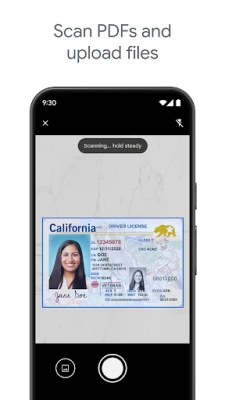
A5: Yes. The Android app can use your device’s camera to scan paper documents and save digital copies to Drive.
Google Drive APK
📱 Google Drive APK Summary
Google Drive is a cloud storage and file-management app for saving, finding, sharing, and viewing files across devices. It also supports document scanning, offline access, and collaboration with other Google users.
- App Name: Google Drive
- Current Version: Varies by device and rollout; check Google Play for the latest release
- Last Updated: Varies by release and region; check Google Play for the current date
- Category: Productivity
- Developer: Google LLC
- Google Play Rating: Ratings and review counts change over time and by region; see Google Play for the current figures
💡 Introduction
Keeping work documents, photos, and other important files organized can be difficult when they are spread across devices. Google Drive brings cloud storage, file search, sharing, and document access together in one Android app, making it easier to work with your files at home or on the go.
Whether you need to back up a document, scan a paper receipt, send a folder to a colleague, or open a file while offline, Drive offers practical tools for everyday personal and professional use.
❓ What Is Google Drive APK?
Google Drive is Google’s cloud storage and file-management service. The Android app lets you upload and organize files, search by filename or content, preview many file types, share items with selected people, and manage access permissions. Google accounts include 15 GB of storage shared across Drive, Gmail, and Google Photos. More space is available through Google One, with plans and prices varying by region.
Some additional features are available to Google Workspace subscribers. Depending on the plan and organization settings, these can include AI-assisted file insights, administrator controls, shared drives, group sharing, and electronic signature tools.
An APK is the package format Android uses to distribute and install apps. Installing an APK manually is an alternative to using an app store, but users should choose a trusted source and verify that the file is genuine and up to date.
🧑💻 How to Use
- Install and open Drive: Get the app from Google Play or another trusted source, then launch it on your Android device.
- Sign in: Use your Google account to access your Drive files and available storage.
- Upload files: Tap the add button and choose an upload option to select files from your device.
- Scan paper documents: Use the camera scanning option to capture a document and save it to Drive.
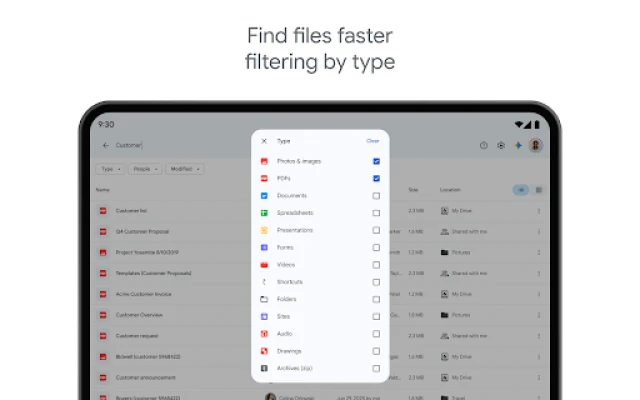
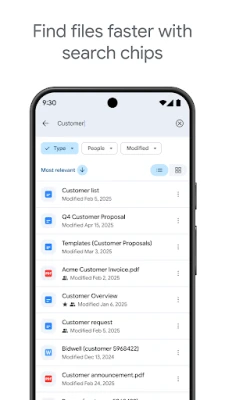
- Find what you need: Search by file name or content, or use filters such as file type and last modified date.
- Share securely: Select a file or folder, choose the sharing controls, and set who can view, comment on, or edit it.
- Work offline: Mark supported files for offline access before you lose your connection. Changes and availability may depend on the file and account.
⚙️ Features
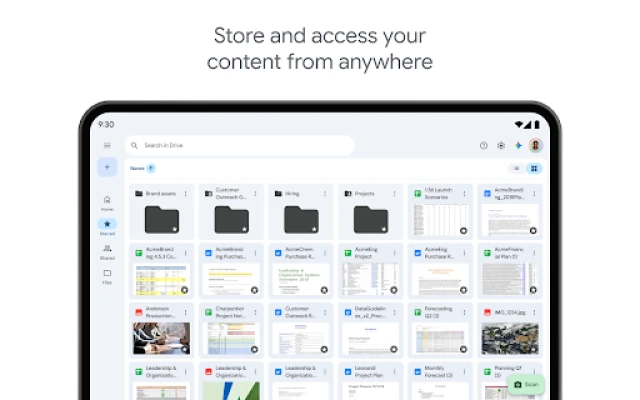
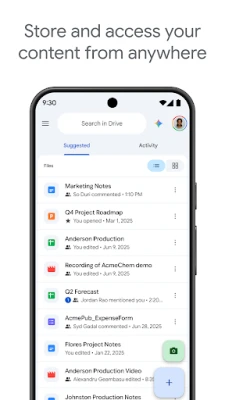
- Cloud storage and access: Store files online and reach them from supported devices when signed in to your account.
- Broad file support: View and work with many types of content, including PDFs, Office documents, and videos. Editing options may depend on the file and installed apps.
- Document scanning: Capture paper documents with your device’s camera and upload digital copies to Drive.
- Fast search and filtering: Search by name or content and narrow results using available filters, such as file type or modification date.
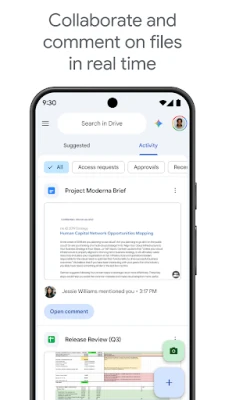
- Sharing and permissions: Share files and folders while controlling who can access them and what they can do.
- Offline access: Make selected files available without an internet connection, useful for travel or unreliable networks.
- Recent and important files: Quickly return to files you have recently used or marked as important.
- Activity notifications: Get updates about relevant activity on shared files, subject to your notification settings.
- Tablet-friendly tools: On supported Android tablets, features such as side-by-side viewing and drag-and-drop can make multitasking easier.
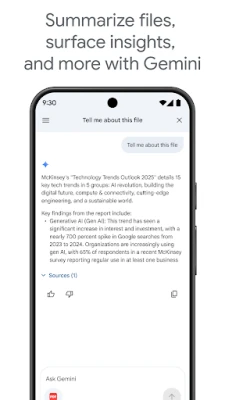
- Workspace features: Eligible subscribers may get organization-focused tools, including shared drives, admin controls, and AI-assisted file insights.
✅ Pros and ❌ Cons
Pros
- Works across devices with a Google account.
- Combines storage, search, file sharing, and document scanning.
- Supports offline access for selected files.
- Permission controls make it easier to share files thoughtfully.
- Connects with other Google services and productivity tools.
Cons
- The free 15 GB allowance is shared with Gmail and Google Photos, so it can fill up quickly.
- Some collaboration and business features require a Google Workspace subscription.
- Uploading, syncing, and accessing cloud files generally require an internet connection.
- Editing and preview options can vary depending on file format and the apps installed on your device.
- Users who prefer local-only storage may not want to rely on a cloud account.
📋 App Details
- App Name: Google Drive
- Current Version: Varies by device and rollout; check Google Play for the latest release
- Last Updated: Varies by release and region
- File Size: Varies by device, Android version, and app build; check the installer listing for the current download size
- Requires Android: Minimum requirement can change between releases; check Google Play or the APK listing for your device’s compatibility
- Developer: Google LLC
- Category: Productivity
- Content Rating: Check Google Play for the current rating in your region
- Storage: Google accounts include 15 GB shared across Drive, Gmail, and Google Photos; additional storage is available through Google One
💬 User Reviews
Google Drive’s broad usefulness and familiar interface are commonly appreciated. Users value being able to find files, share them with others, scan documents, and access selected content across devices. Its integration with Google services is another frequent advantage for people who already use Gmail or Google Workspace.
Common frustrations include limited free storage, occasional syncing or upload problems, and features that work differently depending on the device or account. Some users also find cloud storage management less convenient when they have a slow connection or want more space without upgrading.
🔍 5 Best Alternative Apps
- Microsoft OneDrive: A cloud storage and file-sharing service that works especially well with Microsoft 365 and Office documents.
- Dropbox: A well-known file-syncing service with straightforward sharing tools and support across multiple platforms.
- Box: A cloud content-management service with collaboration and administration features suited to personal and business use.
- MEGA: A cloud storage option known for emphasizing encrypted file storage and sharing; available features and limits depend on the plan.
- Proton Drive: A privacy-focused cloud storage service offering file storage and sharing within Proton’s ecosystem.
🧠 My Opinion
Google Drive is a useful choice for Android users who want one place to store, organize, search, and share files. Its scanning, offline access, and Google-service integration make it practical for students, professionals, and households alike. The main trade-offs are the shared 15 GB free allowance and the fact that some advanced tools require a paid or organization-managed plan.
For most people already using a Google account, Drive is worth trying, particularly when convenient file access and collaboration matter more than keeping everything on a single device.
🛡️ Privacy and Security
Download Google Drive from Google Play or another reputable source, and avoid APK files from unknown websites. Unofficial or modified APKs can contain malware, request excessive permissions, or put your files and account details at risk. Check the app developer and file authenticity before installing.
Manual APK installation may require enabling an option such as Install unknown apps for the browser or file manager you are using. Android settings differ by device, so enable this only when needed and turn it off again afterward. Review Drive’s sharing permissions carefully, protect your Google account with strong security settings, and avoid sharing sensitive files with unintended recipients.
❓ Frequently Asked Questions (FAQs)
Q1: Is Google Drive free to use?
A1: Yes. A Google account includes 15 GB of storage shared across Drive, Gmail, and Google Photos. You can purchase additional storage through Google One, with prices and plans varying by region.
Q2: Can I use Google Drive without an internet connection?
A2: You can access files that you have made available offline. Uploading, syncing, and most cloud features require an internet connection.
Q3: Is it safe to download the Google Drive APK?
A3: It is safest to install the official app through Google Play. If you use an APK, download it only from a trusted source and be cautious: unofficial or altered files may contain malware or compromise your privacy.
Q4: Can I share files with people who do not use Google Drive?
A4: Drive offers sharing controls that can allow access by link or by invited people, depending on account and organization settings. Review the permissions and sharing scope before sending a file.
Q5: Does Google Drive support document scanning?
A5: Yes. The Android app can use your device’s camera to scan paper documents and save digital copies to Drive.
Rate the App
Add Comment & Review
User Reviews
Based on 0 reviews
No reviews added yet.
Comments will not be approved to be posted if they are SPAM, abusive, off-topic, use profanity, contain a personal attack, or promote hate of any kind.


More »

Popular Apps

TradingView: Track All MarketsTradingView Inc.

Bus Fever Party!Lumi Games

Claude by AnthropicAnthropic PBC

Block Craft 3D:Building GameWildlife Studios

Malwarebytes - Mobile SecurityMalwarebytes

Block Blast!HungryStudio

Canva: AI Photo & Video EditorCanva

Candy Crush SagaKing

Carrom Pool: Disc GameMiniclip.com

EA SPORTS FC Soccer Mobile 27ELECTRONIC ARTS
More »
Editor's Choice

Kahoot! Play & Create QuizzesKahoot!

United AirlinesUnited Airlines

Tripwoa: Travel Plan & Trailtripwoa

trivago: Compare hotel pricestrivago N.V.

Planner 5D: AI Home DesignPlanner 5D

ibis Paint Xibis inc.

Agoda: Cheap Flights & Hotelsagoda.com

Hopper: Hotels, Flights & CarsHopper Inc.

Brilliant: Learn Math & CodingBrilliant.org

Google ClassroomGoogle LLC