


Latest Version
Version
1.0.971139365
1.0.971139365
Update
October 17, 2026
October 17, 2026
Developer
Google LLC
Google LLC
Categories
Tools
Tools
Platforms
Android
Android
Downloads
0
0
License
Free
Free
Package Name
com.google.android.apps.bard
com.google.android.apps.bard
Report
Report a Problem
Report a Problem
More About Google Gemini
From your morning commute to late-night deep dives, Google Gemini is your personal, proactive and powerful AI assistant.
Gemini is Google’s AI assistant for asking questions, working with files, exploring ideas, and creating text, images, and other content. Its available features and usage limits can vary by device, region, account, and Google AI plan.
Need help turning a rough idea into a plan, understanding a document, or creating something new? Google Gemini brings Google’s AI assistant into an Android app, making it easy to ask questions by typing, speaking, or sharing content.
Gemini is popular for its mix of everyday assistance and creative tools. Depending on availability, you can brainstorm in a live conversation, upload files for summaries, create or edit images, and connect supported Google services. It can be useful for students, professionals, and curious users—but AI responses can be inaccurate, so important details should always be checked.
Gemini is Google’s mobile AI assistant. It can help with writing, explanations, research, planning, study support, and creative tasks. Users can enter a prompt, speak to Gemini, share images or other supported files, and ask follow-up questions. Available tools may include Gemini Live, connections to selected Google apps, image generation and editing, NotebookLM-related features, and video or audio creation options for eligible users.
An APK is the Android application package format used to install apps. Downloading a Gemini APK may allow manual installation, but APKs from unofficial sources can be outdated, modified, or unsafe. For the most reliable installation and updates, use Google Play where available.
Pros
Cons
User feedback commonly highlights Gemini’s convenience, helpful writing and brainstorming support, and its ability to work with prompts, images, and files in one place. People also value its integration with Google services and the option to use voice-based conversations where supported.
Common concerns include occasional incorrect answers, differences in feature access between users, and limits on certain tools. Some users also report that results can be inconsistent or that a feature they want is unavailable in their region or plan. As with any AI assistant, reviewing important information independently is essential.
Gemini is a versatile Android assistant for people who want one app to help with questions, writing, files, study tasks, and creative experiments. Its strongest appeal is the range of ways users can interact with it, particularly when conversational assistance and supported Google services fit naturally into their routine.
It is worth trying if you want an accessible AI helper, but it should not be treated as an unquestionable authority. Check important answers, review permissions before connecting services, and compare plan details if you need advanced tools. For students, creators, and busy users, Gemini can be a valuable companion—as long as you stay in control of what you share and verify what it tells you.
Install Gemini through Google Play whenever possible, or choose a reputable APK provider if manual installation is required. Unofficial APKs may be altered, out of date, or bundled with malware, and may put personal information or device security at risk. Before installing an APK, verify its origin and review the permissions it requests.
Manual installation may require enabling permission to install unknown apps for the browser or file manager you use. Android’s setting name and location vary by version; enable it only for a trusted installer and turn it off again when finished. Avoid modified or “unlocked” APKs.
Think carefully before uploading sensitive documents, photos, or personal information, and review Google’s current Gemini privacy information and app permissions. If you choose Gemini as your phone’s primary assistant, it may replace Google Assistant for that role. Some Google Assistant voice features may not be available in Gemini, and you can switch back to Google Assistant in the relevant settings.
Q1: Is Gemini APK free to use?
A1: Gemini may be used without a paid plan, but access, usage limits, and included features vary. Some advanced capabilities may require an eligible Google AI subscription or Workspace access.
Q2: Does Gemini need an internet connection?
A2: Most AI responses and online features require an internet connection. Availability and behavior may vary depending on the task and device.
Q3: Is it safe to download the Gemini APK?
A3: The safest option is to install Gemini from Google Play. If you use an APK, download it only from a trusted source and understand that unofficial or modified packages may contain malware or create privacy risks.
Q4: Can Gemini use Google Assistant features?
A4: Gemini can act as the primary assistant on a phone if you opt in, but some Google Assistant voice features may not be available through Gemini. You can switch back to Google Assistant in settings.
Q5: Can Gemini analyze my documents or create images?
A5: Gemini can support file analysis and image creation or editing where those features are available. Supported formats, limits, and tools depend on the app version, account, region, device, and plan.
Gemini APK
📱 Gemini APK Summary
Gemini is Google’s AI assistant for asking questions, working with files, exploring ideas, and creating text, images, and other content. Its available features and usage limits can vary by device, region, account, and Google AI plan.
- App Name: Google Gemini
- Current Version: Varies by release and device; check Google Play for the latest version
- Last Updated: Changes over time; check the Google Play listing for the current date
- Category: Productivity
- Developer: Google LLC
- Google Play Rating: Ratings and review counts change regularly; see Google Play for current figures
💡 Introduction
Need help turning a rough idea into a plan, understanding a document, or creating something new? Google Gemini brings Google’s AI assistant into an Android app, making it easy to ask questions by typing, speaking, or sharing content.
Gemini is popular for its mix of everyday assistance and creative tools. Depending on availability, you can brainstorm in a live conversation, upload files for summaries, create or edit images, and connect supported Google services. It can be useful for students, professionals, and curious users—but AI responses can be inaccurate, so important details should always be checked.
❓ What Is Gemini APK?
Gemini is Google’s mobile AI assistant. It can help with writing, explanations, research, planning, study support, and creative tasks. Users can enter a prompt, speak to Gemini, share images or other supported files, and ask follow-up questions. Available tools may include Gemini Live, connections to selected Google apps, image generation and editing, NotebookLM-related features, and video or audio creation options for eligible users.
An APK is the Android application package format used to install apps. Downloading a Gemini APK may allow manual installation, but APKs from unofficial sources can be outdated, modified, or unsafe. For the most reliable installation and updates, use Google Play where available.
🧑💻 How to Use
- Install the app: Get Gemini from Google Play, or use a reputable APK source if manual installation is necessary.
- Sign in: Open the app and follow the prompts to use a Google Account. Some features may require an eligible account or plan.
- Ask a question: Type a request in the prompt box or use the available voice input. Be specific about the result you want.
- Continue the conversation: Ask follow-up questions, request a different format, or ask Gemini to clarify its response.
- Share content: Use the attachment options to provide supported documents, images, or other files for summaries and analysis.
- Try creative tools: Where available, use image, video, or audio features by describing what you want to create or change.
- Review the result: Check facts, privacy-sensitive details, and generated content before relying on or sharing it.
⚙️ Features
- AI assistance for everyday tasks: Ask for explanations, ideas, drafts, summaries, or help organizing a project. Follow-up prompts make it easier to refine an answer.
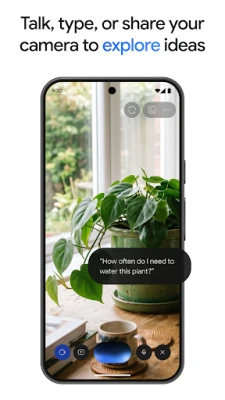
- Gemini Live conversations: Talk with Gemini in a more natural back-and-forth format. Depending on device and availability, you may also be able to share your screen or camera view to discuss what you are seeing.
- Responses with visual elements: Some answers can include structured layouts, images, timelines, or interactive visuals rather than only a plain block of text.
- File and image assistance: Upload supported documents, spreadsheets, photos, and other content to request summaries, explanations, or insights.
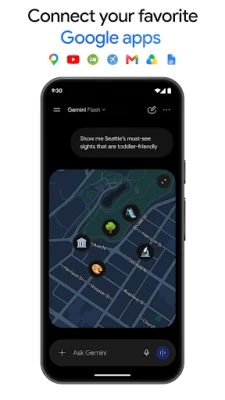
- Connections to Google services: With the relevant settings and permissions, Gemini can work with supported Google apps and services, such as Gmail, Calendar, Google Photos, YouTube, and Search. Availability depends on account, region, and feature rollout.
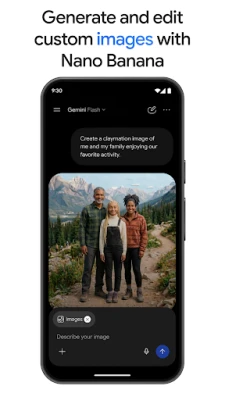
- Image creation and editing: Available image tools can help generate or revise visuals, create mockups, explore design ideas, and make diagrams. Specific models and controls may vary over time.
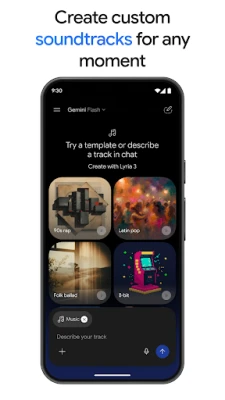
- Video and music creation options: Eligible users may have access to tools for generating cinematic videos or custom soundtracks. Access can depend on a Google AI plan, Workspace eligibility, location, and current product availability.
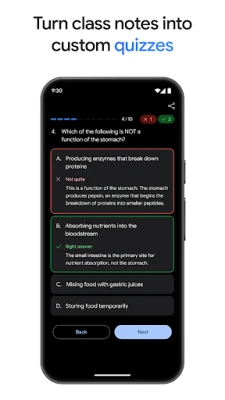
- Study and research support: Gemini can help turn notes into practice questions and learning materials. NotebookLM offers source-grounded research features for users working with notebooks.
- Prototyping and content formats: Prompts can help develop ideas for web pages, games, or dashboards. Some experiences may also convert content into an audio-style overview.
- Optional paid plans: Google AI plans may offer higher limits or access to additional capabilities for complex tasks. Features, pricing, and limits can change, so check the current plan details before subscribing.
✅ Pros and ❌ Cons
Pros
- Combines conversational assistance with writing, study, research, and creative tools.
- Supports text and, where available, voice conversations and file-based prompts.
- Can work alongside selected Google services when the user enables relevant connections.
- Follow-up prompts make it simple to improve or reshape a response.
- Some features are available without a paid plan, subject to current limits and eligibility.
Cons
- AI responses can contain errors, omissions, or outdated information.
- Feature availability and usage limits vary by country, account, device, and subscription.
- Many tasks require an internet connection.
- Some advanced creative tools and higher usage limits may require a paid plan.
- Connecting services or uploading personal files requires careful consideration of privacy and permissions.
📋 App Details
- App Name: Google Gemini
- Current Version: Varies by release; check Google Play or the installed app for the version available to your device
- Last Updated: Check Google Play for the latest release date
- File Size: Varies by version and device; check the download listing for the current package size
- Requires Android: Minimum requirements can change; confirm compatibility on Google Play before installing
- Developer: Google LLC
- Content Rating: Check the current Google Play listing for the rating in your region
- In-App Purchases: Some features or higher usage limits may require an eligible Google AI plan
💬 User Reviews
User feedback commonly highlights Gemini’s convenience, helpful writing and brainstorming support, and its ability to work with prompts, images, and files in one place. People also value its integration with Google services and the option to use voice-based conversations where supported.
Common concerns include occasional incorrect answers, differences in feature access between users, and limits on certain tools. Some users also report that results can be inconsistent or that a feature they want is unavailable in their region or plan. As with any AI assistant, reviewing important information independently is essential.
🔍 5 Best Alternative Apps
- ChatGPT: OpenAI’s assistant offers conversational help with writing, learning, brainstorming, and supported multimodal tasks. It is a strong general-purpose alternative for users comparing AI assistants.
- Microsoft Copilot: A conversational AI tool that can help with questions, writing, and creative tasks, with connections to Microsoft’s ecosystem and services.
- Claude: Anthropic’s AI assistant is often used for writing, analysis, summarizing, and working through longer prompts or documents, subject to plan and regional availability.
- Perplexity: An AI-powered search and answer app designed to help users explore topics and research questions, with a focus on presenting supporting sources in its responses.
- NotebookLM: Google’s research and study assistant helps users work with materials they provide, making it a useful option for source-based summaries and learning workflows.
🧠 My Opinion
Gemini is a versatile Android assistant for people who want one app to help with questions, writing, files, study tasks, and creative experiments. Its strongest appeal is the range of ways users can interact with it, particularly when conversational assistance and supported Google services fit naturally into their routine.
It is worth trying if you want an accessible AI helper, but it should not be treated as an unquestionable authority. Check important answers, review permissions before connecting services, and compare plan details if you need advanced tools. For students, creators, and busy users, Gemini can be a valuable companion—as long as you stay in control of what you share and verify what it tells you.
🛡️ Privacy and Security
Install Gemini through Google Play whenever possible, or choose a reputable APK provider if manual installation is required. Unofficial APKs may be altered, out of date, or bundled with malware, and may put personal information or device security at risk. Before installing an APK, verify its origin and review the permissions it requests.
Manual installation may require enabling permission to install unknown apps for the browser or file manager you use. Android’s setting name and location vary by version; enable it only for a trusted installer and turn it off again when finished. Avoid modified or “unlocked” APKs.
Think carefully before uploading sensitive documents, photos, or personal information, and review Google’s current Gemini privacy information and app permissions. If you choose Gemini as your phone’s primary assistant, it may replace Google Assistant for that role. Some Google Assistant voice features may not be available in Gemini, and you can switch back to Google Assistant in the relevant settings.
❓ Frequently Asked Questions (FAQs)
Q1: Is Gemini APK free to use?
A1: Gemini may be used without a paid plan, but access, usage limits, and included features vary. Some advanced capabilities may require an eligible Google AI subscription or Workspace access.
Q2: Does Gemini need an internet connection?
A2: Most AI responses and online features require an internet connection. Availability and behavior may vary depending on the task and device.
Q3: Is it safe to download the Gemini APK?
A3: The safest option is to install Gemini from Google Play. If you use an APK, download it only from a trusted source and understand that unofficial or modified packages may contain malware or create privacy risks.
Q4: Can Gemini use Google Assistant features?
A4: Gemini can act as the primary assistant on a phone if you opt in, but some Google Assistant voice features may not be available through Gemini. You can switch back to Google Assistant in settings.
Q5: Can Gemini analyze my documents or create images?
A5: Gemini can support file analysis and image creation or editing where those features are available. Supported formats, limits, and tools depend on the app version, account, region, device, and plan.
Rate the App
Add Comment & Review
User Reviews
Based on 0 reviews
No reviews added yet.
Comments will not be approved to be posted if they are SPAM, abusive, off-topic, use profanity, contain a personal attack, or promote hate of any kind.





More »

Popular Apps

TradingView: Track All MarketsTradingView Inc.

Bus Fever Party!Lumi Games

Claude by AnthropicAnthropic PBC

Block Craft 3D:Building GameWildlife Studios

Malwarebytes - Mobile SecurityMalwarebytes

Block Blast!HungryStudio

Canva: AI Photo & Video EditorCanva

Candy Crush SagaKing

Carrom Pool: Disc GameMiniclip.com

EA SPORTS FC Soccer Mobile 27ELECTRONIC ARTS
More »
Editor's Choice

Kahoot! Play & Create QuizzesKahoot!

United AirlinesUnited Airlines

Tripwoa: Travel Plan & Trailtripwoa

trivago: Compare hotel pricestrivago N.V.

Planner 5D: AI Home DesignPlanner 5D

ibis Paint Xibis inc.

Agoda: Cheap Flights & Hotelsagoda.com

Hopper: Hotels, Flights & CarsHopper Inc.

Brilliant: Learn Math & CodingBrilliant.org

Google ClassroomGoogle LLC