



Latest Version
Update
October 17, 2026
October 17, 2026
Developer
Google LLC
Google LLC
Categories
Tools
Tools
Platforms
Android
Android
Downloads
0
0
License
Free
Free
Package Name
com.android.chrome
com.android.chrome
Report
Report a Problem
Report a Problem
More About Google Chrome
Chrome helps you do what’s possible on the web. Choose the fast, secure browser by Google.
Google Chrome is a fast, feature-rich web browser for Android, bringing Google Search, translation, password management, and syncing together in one app. Its current features and availability can vary by device, country, and language.
Looking up information, translating a page, and keeping track of open tabs can quickly become a hassle when you switch between devices or apps. Google Chrome for Android brings everyday browsing tools into one familiar place, with Google Search, Google Lens, translation, and account syncing built in.
Chrome is popular for its straightforward interface and close integration with Google services. Whether you are reading the news, researching a topic, shopping online, or opening bookmarks from your computer, it aims to make browsing convenient while offering security tools to help protect your data.
Google Chrome is a mobile web browser developed by Google. It lets you visit websites, search the web, manage tabs, save bookmarks, and access browser data across signed-in devices. Its additional tools include voice search, Google Lens, page translation, Safety Check, and Google Password Manager features.
An APK is the package format Android uses to install apps. An APK download can be used for manual installation, but it may not receive the same automatic updates or verification as an installation through Google Play. For the safest and simplest setup, use the official store when it is available for your device.
Pros
Cons
Chrome’s large user base commonly values its familiar layout, fast access to Google Search, and ability to sync browsing information between devices. Users also appreciate features such as translation, saved passwords, and tab organization when these are available and work as expected.
Common frustrations include occasional slowdowns on older or lower-powered devices, heavy resource use when many tabs are open, and changes to the interface or features after updates. Some users also prefer more privacy-focused defaults or want greater control over how browsing data is handled. Experiences can differ by device, settings, and version.
Google Chrome is a strong everyday browser for people who want reliable web access alongside Google Search, translation, password tools, and cross-device syncing. Its main appeal is convenience: many essential browsing tasks are available without needing a collection of separate apps.
It is worth considering if you use Google services or want a familiar browser on Android. If privacy customization is your top priority, compare its settings with alternatives before choosing. Overall, Chrome remains a practical option for users who value broad compatibility and an integrated set of browsing tools.
Download Chrome from Google Play or another source you trust, and keep it updated to receive available fixes and improvements. Review browser permissions, saved passwords, sync settings, and Safe Browsing options so they match your preferences. Security features can reduce some risks, but they do not make every website or download safe.
If you install an APK manually, Android may ask you to allow installation from that particular source. Enable this permission only when necessary, use a reputable provider, and disable it again afterward if you do not need it. Unofficial or modified APKs can contain malware, compromise personal data, or fail to receive legitimate updates.
Q1: Is Chrome APK free to use?
A1: Google Chrome is generally free to download and use. Your internet provider may charge for mobile data, and availability can vary by region and device.
Q2: Do I need an internet connection to use Chrome?
A2: An internet connection is needed to load most websites and perform web searches. Some previously downloaded or cached content may remain available temporarily, but Chrome is not a full offline browsing service.
Q3: Is it safe to download the Chrome APK?
A3: The safest option is to install Chrome through Google Play or another authorized source. Unofficial APK files may be altered or unsafe, so verify the source and avoid modified packages.
Q4: Can I sync Chrome data between my phone and computer?
A4: Yes. Sign in to the same Google Account on compatible devices and choose the data you want to sync. Available sync options depend on your settings and device.
Q5: Does Chrome translate every webpage?
A5: Chrome can offer translation for supported pages and languages, but translation availability and accuracy vary. Review important translated information carefully.
Chrome APK
📱 Chrome APK Summary
Google Chrome is a fast, feature-rich web browser for Android, bringing Google Search, translation, password management, and syncing together in one app. Its current features and availability can vary by device, country, and language.
- App Name: Google Chrome
- Current Version: Varies by device and rollout; check Google Play for the latest release
- Last Updated: Varies by release; see Google Play for the current date
- Category: Communication / Web Browser
- Developer: Google LLC
- Google Play Rating: Rating and review count change over time and by region; check the current Google Play listing
💡 Introduction
Looking up information, translating a page, and keeping track of open tabs can quickly become a hassle when you switch between devices or apps. Google Chrome for Android brings everyday browsing tools into one familiar place, with Google Search, Google Lens, translation, and account syncing built in.
Chrome is popular for its straightforward interface and close integration with Google services. Whether you are reading the news, researching a topic, shopping online, or opening bookmarks from your computer, it aims to make browsing convenient while offering security tools to help protect your data.
❓ What Is Chrome APK?
Google Chrome is a mobile web browser developed by Google. It lets you visit websites, search the web, manage tabs, save bookmarks, and access browser data across signed-in devices. Its additional tools include voice search, Google Lens, page translation, Safety Check, and Google Password Manager features.
An APK is the package format Android uses to install apps. An APK download can be used for manual installation, but it may not receive the same automatic updates or verification as an installation through Google Play. For the safest and simplest setup, use the official store when it is available for your device.
🧑💻 How to Use
- Install Chrome: Get it from Google Play or another trusted distribution channel, then open the app.
- Search or enter a website: Tap the address bar, type a search query or web address, and press the keyboard’s search or go button.
- Use voice search: Tap the microphone icon, allow microphone access if requested, and say what you want to find.
- Explore with Lens or translate: Use Google Lens where available to search using your camera, or open a webpage and use Chrome’s translation option when offered.
- Organize your browsing: Open the tab switcher to move between pages, create tab groups, or close tabs you no longer need.
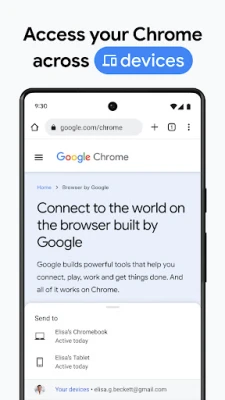
- Sync your data: Sign in to your Google Account and choose which Chrome data, such as bookmarks and passwords, to sync across devices.
- Review security and privacy: Visit Chrome’s settings to manage Safety Check, Safe Browsing protection, passwords, site permissions, and other browser preferences.
⚙️ Features
- Google Search and voice search: Search from the address bar and, where available, speak a query instead of typing it.
- Google Lens: Use your camera to look up objects and visual information around you. Availability and functionality can depend on your device and region.
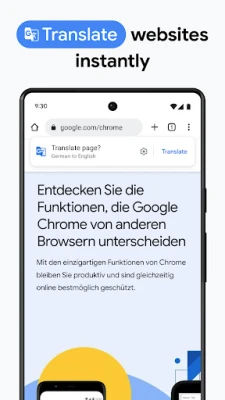
- Page translation: Translate supported webpages into another language, making international content easier to explore. Language support and options may vary.
- Security protections: Chrome includes Safe Browsing features, and Enhanced Protection may offer a higher level of protection when enabled and supported.
- Safety Check: Review security issues such as potentially compromised saved passwords and other browser safety concerns.
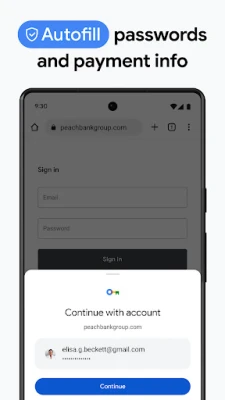
- Google Password Manager: Save and generate passwords for supported sign-ins, then access them through your Google Account where the feature is available.
- Sync across devices: Sign in to access supported Chrome data, including bookmarks, passwords, and tabs, on compatible devices.
- Tab groups: Group related pages to keep busy browsing sessions more organized. Support and syncing behavior can differ across devices.
- Autofill: Use saved information, such as addresses and payment details, to complete forms more quickly. You control what information is saved.
✅ Pros and ❌ Cons
Pros
- Simple interface that is familiar to many Android users.
- Useful Google Search, Lens, and translation tools are integrated into the browsing experience.
- Syncing can make bookmarks and other supported data available across signed-in devices.
- Includes security checks and password-management features.
- Tab groups and autofill can make everyday browsing more convenient.
Cons
- Some tools and security options vary by country, language, device, or account settings.
- Syncing requires signing in and depends on Google Account settings and connectivity.
- Advanced privacy controls may take time for new users to understand.
- Performance and battery use can vary depending on device hardware, open tabs, and browsing activity.
- Users who prefer to avoid Google services may find its account integration less appealing.
📋 App Details
- App Name: Google Chrome
- Current Version: Varies by device and rollout; check Google Play for the latest version
- Last Updated: Release date varies; check Google Play for the latest update information
- File Size: Varies by device, Android version, and installation package
- Requires Android: Minimum requirements can change by release; check the app listing on your device
- Developer: Google LLC
- Category: Communication / Web Browser
- Content Rating: Check Google Play for the rating displayed in your region
- Price: Free to download; data charges from your mobile or internet provider may apply
💬 User Reviews
Chrome’s large user base commonly values its familiar layout, fast access to Google Search, and ability to sync browsing information between devices. Users also appreciate features such as translation, saved passwords, and tab organization when these are available and work as expected.
Common frustrations include occasional slowdowns on older or lower-powered devices, heavy resource use when many tabs are open, and changes to the interface or features after updates. Some users also prefer more privacy-focused defaults or want greater control over how browsing data is handled. Experiences can differ by device, settings, and version.
🔍 5 Best Alternative Apps
- Mozilla Firefox: A well-known browser with customizable settings, extensions on supported platforms, and privacy-focused tools.
- Microsoft Edge: A Chromium-based browser with syncing options and Microsoft services, making it a convenient choice for users in that ecosystem.
- Brave Browser: A browser that emphasizes privacy controls and includes built-in features designed to limit certain trackers and advertisements.
- Opera Browser: Offers a range of browsing tools and customization options in a mobile-friendly interface.
- DuckDuckGo Browser: A privacy-oriented option with straightforward controls for limiting tracking while browsing.
🧠 My Opinion
Google Chrome is a strong everyday browser for people who want reliable web access alongside Google Search, translation, password tools, and cross-device syncing. Its main appeal is convenience: many essential browsing tasks are available without needing a collection of separate apps.
It is worth considering if you use Google services or want a familiar browser on Android. If privacy customization is your top priority, compare its settings with alternatives before choosing. Overall, Chrome remains a practical option for users who value broad compatibility and an integrated set of browsing tools.
🛡️ Privacy and Security
Download Chrome from Google Play or another source you trust, and keep it updated to receive available fixes and improvements. Review browser permissions, saved passwords, sync settings, and Safe Browsing options so they match your preferences. Security features can reduce some risks, but they do not make every website or download safe.
If you install an APK manually, Android may ask you to allow installation from that particular source. Enable this permission only when necessary, use a reputable provider, and disable it again afterward if you do not need it. Unofficial or modified APKs can contain malware, compromise personal data, or fail to receive legitimate updates.
❓ Frequently Asked Questions (FAQs)
Q1: Is Chrome APK free to use?
A1: Google Chrome is generally free to download and use. Your internet provider may charge for mobile data, and availability can vary by region and device.
Q2: Do I need an internet connection to use Chrome?
A2: An internet connection is needed to load most websites and perform web searches. Some previously downloaded or cached content may remain available temporarily, but Chrome is not a full offline browsing service.
Q3: Is it safe to download the Chrome APK?
A3: The safest option is to install Chrome through Google Play or another authorized source. Unofficial APK files may be altered or unsafe, so verify the source and avoid modified packages.
Q4: Can I sync Chrome data between my phone and computer?
A4: Yes. Sign in to the same Google Account on compatible devices and choose the data you want to sync. Available sync options depend on your settings and device.
Q5: Does Chrome translate every webpage?
A5: Chrome can offer translation for supported pages and languages, but translation availability and accuracy vary. Review important translated information carefully.
Rate the App
Add Comment & Review
User Reviews
Based on 0 reviews
No reviews added yet.
Comments will not be approved to be posted if they are SPAM, abusive, off-topic, use profanity, contain a personal attack, or promote hate of any kind.






More »

Popular Apps

TradingView: Track All MarketsTradingView Inc.

Bus Fever Party!Lumi Games

Claude by AnthropicAnthropic PBC

Block Craft 3D:Building GameWildlife Studios

Malwarebytes - Mobile SecurityMalwarebytes

Block Blast!HungryStudio

Canva: AI Photo & Video EditorCanva

Candy Crush SagaKing

Carrom Pool: Disc GameMiniclip.com

EA SPORTS FC Soccer Mobile 27ELECTRONIC ARTS
More »
Editor's Choice

Kahoot! Play & Create QuizzesKahoot!

United AirlinesUnited Airlines

Tripwoa: Travel Plan & Trailtripwoa

trivago: Compare hotel pricestrivago N.V.

Planner 5D: AI Home DesignPlanner 5D

ibis Paint Xibis inc.

Agoda: Cheap Flights & Hotelsagoda.com

Hopper: Hotels, Flights & CarsHopper Inc.

Brilliant: Learn Math & CodingBrilliant.org

Google ClassroomGoogle LLC