


Latest Version
Update
October 17, 2026
October 17, 2026
Developer
Google LLC
Google LLC
Categories
Tools
Tools
Platforms
Android
Android
Downloads
0
0
License
Free
Free
Package Name
com.google.android.apps.adm
com.google.android.apps.adm
Report
Report a Problem
Report a Problem
More About Google’s Find Hub
For your devices and items
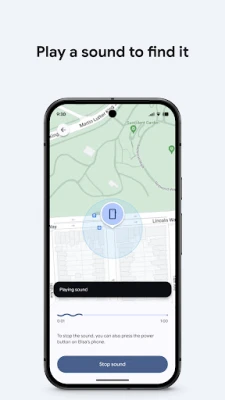
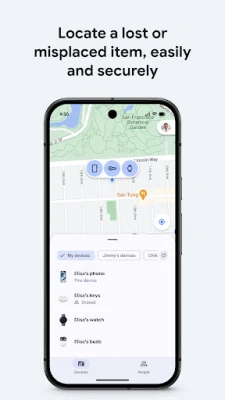
Google Find Hub helps you locate compatible Android devices and accessories, play a sound to find a nearby item, and protect a lost device remotely. It also lets you share your live location with people you trust.
Losing a phone, tablet, pair of headphones, or other compatible accessory can be stressful—especially when it is out of sight or offline. Google Find Hub brings supported devices and items together in one place, helping users check their location, make nearby devices ring, and take steps to secure a missing phone.
The app is also useful when you are not searching for anything: live location sharing can help friends coordinate a meeting or let family members check that someone has arrived safely. Its combination of device recovery and location sharing makes it a practical tool for everyday Android users.
Google Find Hub is Google’s device-finding and location-sharing app for supported Android devices. Depending on device compatibility, settings, and network availability, it can show phones, tablets, headphones, and other accessories on a map—even when a device is offline. If a device is nearby, you can ask it to play a sound. For a lost device, supported remote actions can include securing or erasing it, and adding a message to its lock screen so someone who finds it can contact you.
The app also supports live location sharing, which you can use to coordinate with friends or keep in touch with family. Google says location data in the Find Hub network is encrypted and not visible to Google. Features and availability may differ according to the device, account, region, and settings.
An APK is the package file format Android uses to distribute and install apps. Installing an APK manually can be useful in some situations, but it is important to use a trustworthy source and make sure the file is compatible with your device.
Pros
Cons
Users generally value the convenience of having device-finding and location-sharing tools in one place. Commonly appreciated capabilities include checking a device’s map location, ringing a nearby phone, and taking action when a device is lost. Location sharing can also be helpful for coordinating with friends and family.
Experiences can vary, and location accuracy or update speed may be affected by connectivity, device settings, and compatibility. Some users may also find that not every accessory or recovery feature works identically across devices. Check recent reviews on Google Play for feedback about the version currently available to you.
Google Find Hub is a useful Android utility for people who want a straightforward way to locate compatible devices, make nearby items ring, and take protective steps if a phone goes missing. Its location-sharing tools add practical value beyond recovery, while offline finding support can be helpful when available for a particular device and network.
It is worth using if you have compatible Android devices or accessories, but it works best when you review the required settings and permissions before you need them. For everyday peace of mind, keeping Find Hub configured is a sensible step—just remember to share your location thoughtfully and treat remote erase as a last resort.
For the safest installation, download Google Find Hub from Google Play or another official, trusted source. If you install an APK manually, Android may ask you to allow installation from that source in its settings. Enable this permission only when necessary, use a source you trust, and turn it off again afterward if your Android version provides that option.
Unofficial or modified APK files can contain malware, request excessive permissions, or put personal data at risk. Check that the file is genuine and compatible with your device before installing it. Review location-sharing recipients and durations regularly, protect your Google Account, and remember that remotely erasing a device may permanently remove data stored on it.
Q1: Is Google Find Hub free to use?
A1: The app’s core finding and location-sharing functions are generally available without a separate purchase, though device, service, or regional requirements may apply. Check the current Google Play listing for details.
Q2: Can Google Find Hub locate a device that is offline?
A2: It can help locate supported devices while offline when the required device settings and Find Hub network support are available. Results depend on compatibility and network conditions.
Q3: Can I use Find Hub to protect a lost phone?
A3: Supported devices may offer options to secure the phone, display a custom message, or erase it remotely. Available controls depend on the device and its settings.
Q4: Is it safe to install the Google Find Hub APK?
A4: Installing from Google Play or an official source is the safest choice. APKs from unofficial sites may be altered or contain malware, so verify the source and file before installing.
Q5: Can I share my live location with someone?
A5: Yes. You can share your live location with selected people to coordinate a meeting or check in with family. Review who can see your location and how long sharing remains active.
Google Find Hub APK
📱 Google Find Hub APK Summary
Google Find Hub helps you locate compatible Android devices and accessories, play a sound to find a nearby item, and protect a lost device remotely. It also lets you share your live location with people you trust.
- App Name: Google Find Hub
- Current Version: Version varies by device and rollout; check Google Play for the latest release
- Last Updated: Update date varies by region and Play Store listing
- Category: Tools
- Developer: Google LLC
- Google Play Rating: Rating and review count change over time; see the current Google Play listing for the latest figures
💡 Introduction
Losing a phone, tablet, pair of headphones, or other compatible accessory can be stressful—especially when it is out of sight or offline. Google Find Hub brings supported devices and items together in one place, helping users check their location, make nearby devices ring, and take steps to secure a missing phone.
The app is also useful when you are not searching for anything: live location sharing can help friends coordinate a meeting or let family members check that someone has arrived safely. Its combination of device recovery and location sharing makes it a practical tool for everyday Android users.
❓ What Is Google Find Hub APK?
Google Find Hub is Google’s device-finding and location-sharing app for supported Android devices. Depending on device compatibility, settings, and network availability, it can show phones, tablets, headphones, and other accessories on a map—even when a device is offline. If a device is nearby, you can ask it to play a sound. For a lost device, supported remote actions can include securing or erasing it, and adding a message to its lock screen so someone who finds it can contact you.
The app also supports live location sharing, which you can use to coordinate with friends or keep in touch with family. Google says location data in the Find Hub network is encrypted and not visible to Google. Features and availability may differ according to the device, account, region, and settings.
An APK is the package file format Android uses to distribute and install apps. Installing an APK manually can be useful in some situations, but it is important to use a trustworthy source and make sure the file is compatible with your device.
🧑💻 How to Use
- Install and open the app: Get Google Find Hub through Google Play where it is available, then open it on your Android device.
- Sign in: Use the Google Account associated with the devices you want to find.
- Review permissions and settings: Allow the relevant location and device permissions, and check that the devices you want to locate have the required Find Hub settings enabled.
- Choose a device or item: Select it from the app’s device list to view available location information on the map.
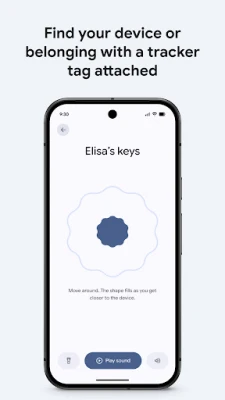
- Find something nearby: If the option is available, use the sound feature to make a nearby device ring.
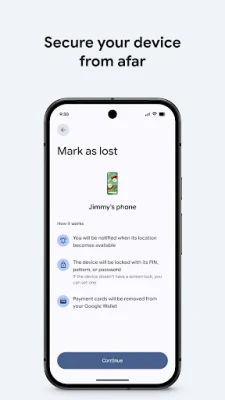
- Protect a lost device: Select the missing device and use the available security options, such as securing it or displaying a custom lock-screen message. Remote erase may also be available; use it carefully because it can remove data.
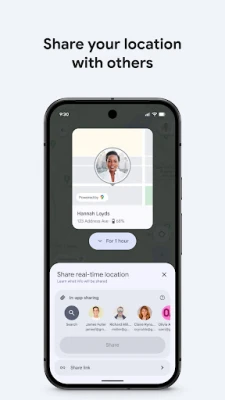
- Share your location: Open location sharing, choose a person and sharing duration, and confirm before sharing your live location.
⚙️ Features
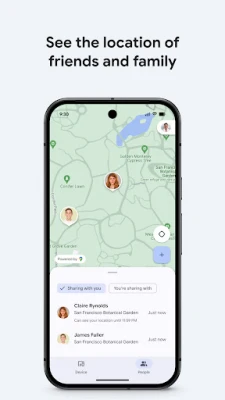
- Map-based device finding: View supported phones, tablets, headphones, and accessories on a map to help narrow down where they may be.
- Offline finding support: Depending on device and network compatibility, Find Hub can help locate devices even when they are offline.
- Play a sound: Make a nearby compatible device ring so it is easier to find under a cushion, in a bag, or in another room.
- Remote device security: Use supported controls to secure a lost device and help protect its contents.
- Custom lock-screen message: Add a message with contact information so a person who finds your device may know how to return it.
- Remote erase option: Where supported, erase a missing device as a last-resort step to protect personal information.
- Live location sharing: Share your location with selected people to arrange meetups or let family know you are safe.
- Encrypted location data: Google states that location data in the Find Hub network is encrypted and not visible to Google.
- Mobile and supported Wear OS access: Find devices and items using compatible mobile devices and supported Wear OS devices.
✅ Pros and ❌ Cons
Pros
- Combines device finding, lost-device protection, and location sharing in one app.
- Can help locate compatible items even when they are offline, depending on network and device support.
- Sound alerts make nearby devices easier to locate.
- Remote security controls and lock-screen messages can help when a device goes missing.
- Location sharing is useful for meetups and everyday check-ins.
- Google says Find Hub network location data is encrypted and not visible to Google.
Cons
- Some features depend on device compatibility, account settings, permissions, and regional availability.
- Location results may not be immediate or precise, particularly when a device is offline or has limited connectivity.
- Remote actions require the relevant device and account settings to be in place before a loss occurs.
- Erasing a device can delete its data, so it should be considered carefully.
- Location sharing requires users to make deliberate choices about who can see their location and for how long.
📋 App Details
- App Name: Google Find Hub
- Current Version: Version varies by device and rollout; check Google Play for the latest release
- Last Updated: Date varies by region and listing; check Google Play for the current update date
- File Size: Varies by device and app version
- Requires Android: Minimum requirement varies by release and device; check the Google Play listing for your device
- Developer: Google LLC
- Category: Tools
- Content Rating: Check the current Google Play listing for the rating applicable to your region
💬 User Reviews
Users generally value the convenience of having device-finding and location-sharing tools in one place. Commonly appreciated capabilities include checking a device’s map location, ringing a nearby phone, and taking action when a device is lost. Location sharing can also be helpful for coordinating with friends and family.
Experiences can vary, and location accuracy or update speed may be affected by connectivity, device settings, and compatibility. Some users may also find that not every accessory or recovery feature works identically across devices. Check recent reviews on Google Play for feedback about the version currently available to you.
🔍 5 Best Alternative Apps
- Samsung Find: A device-finding option for compatible Samsung phones, tablets, watches, and accessories. It is especially relevant for people who use Samsung’s Galaxy ecosystem.
- Life360: A location-sharing app focused on keeping family members or groups connected. Its features and availability may depend on the plan and region.
- Google Maps: Offers location sharing and navigation tools, making it a useful alternative for meeting friends or checking someone’s shared location.
- Tile: Helps users locate compatible Bluetooth trackers and items through Tile’s app and network. Check device compatibility and service terms before choosing it.
- Apple Find My: Apple’s device and item-finding service for supported Apple products and accessories. It is a strong option for users who primarily use Apple devices.
🧠 My Opinion
Google Find Hub is a useful Android utility for people who want a straightforward way to locate compatible devices, make nearby items ring, and take protective steps if a phone goes missing. Its location-sharing tools add practical value beyond recovery, while offline finding support can be helpful when available for a particular device and network.
It is worth using if you have compatible Android devices or accessories, but it works best when you review the required settings and permissions before you need them. For everyday peace of mind, keeping Find Hub configured is a sensible step—just remember to share your location thoughtfully and treat remote erase as a last resort.
🛡️ Privacy and Security
For the safest installation, download Google Find Hub from Google Play or another official, trusted source. If you install an APK manually, Android may ask you to allow installation from that source in its settings. Enable this permission only when necessary, use a source you trust, and turn it off again afterward if your Android version provides that option.
Unofficial or modified APK files can contain malware, request excessive permissions, or put personal data at risk. Check that the file is genuine and compatible with your device before installing it. Review location-sharing recipients and durations regularly, protect your Google Account, and remember that remotely erasing a device may permanently remove data stored on it.
❓ Frequently Asked Questions (FAQs)
Q1: Is Google Find Hub free to use?
A1: The app’s core finding and location-sharing functions are generally available without a separate purchase, though device, service, or regional requirements may apply. Check the current Google Play listing for details.
Q2: Can Google Find Hub locate a device that is offline?
A2: It can help locate supported devices while offline when the required device settings and Find Hub network support are available. Results depend on compatibility and network conditions.
Q3: Can I use Find Hub to protect a lost phone?
A3: Supported devices may offer options to secure the phone, display a custom message, or erase it remotely. Available controls depend on the device and its settings.
Q4: Is it safe to install the Google Find Hub APK?
A4: Installing from Google Play or an official source is the safest choice. APKs from unofficial sites may be altered or contain malware, so verify the source and file before installing.
Q5: Can I share my live location with someone?
A5: Yes. You can share your live location with selected people to coordinate a meeting or check in with family. Review who can see your location and how long sharing remains active.
Rate the App
Add Comment & Review
User Reviews
Based on 0 reviews
No reviews added yet.
Comments will not be approved to be posted if they are SPAM, abusive, off-topic, use profanity, contain a personal attack, or promote hate of any kind.




More »

Popular Apps

TradingView: Track All MarketsTradingView Inc.

Bus Fever Party!Lumi Games

Claude by AnthropicAnthropic PBC

Block Craft 3D:Building GameWildlife Studios

Malwarebytes - Mobile SecurityMalwarebytes

Block Blast!HungryStudio

Canva: AI Photo & Video EditorCanva

Candy Crush SagaKing

Carrom Pool: Disc GameMiniclip.com

EA SPORTS FC Soccer Mobile 27ELECTRONIC ARTS
More »
Editor's Choice

Kahoot! Play & Create QuizzesKahoot!

United AirlinesUnited Airlines

Tripwoa: Travel Plan & Trailtripwoa

trivago: Compare hotel pricestrivago N.V.

Planner 5D: AI Home DesignPlanner 5D

ibis Paint Xibis inc.

Agoda: Cheap Flights & Hotelsagoda.com

Hopper: Hotels, Flights & CarsHopper Inc.

Brilliant: Learn Math & CodingBrilliant.org

Google ClassroomGoogle LLC