




Latest Version
Update
October 17, 2026
October 17, 2026
Developer
Yahoo
Yahoo
Categories
Communication
Communication
Platforms
Android
Android
Downloads
0
0
License
Free
Free
Package Name
com.yahoo.mobile.client.android.mail
com.yahoo.mobile.client.android.mail
Report
Report a Problem
Report a Problem
More About Yahoo Mail: Email & Planner
YAHOO MAIL: THE SMART INBOX DESIGNED TO SIMPLIFY YOUR LIFE
Yahoo Mail is an email app for managing messages, calendars, tasks, orders, and multiple email accounts in one place. Its inbox tools include spam protection, package tracking, AI-assisted email features, and a Planner designed to turn details in emails into actionable plans.
Email can quickly become a jumble of messages, receipts, booking confirmations, and newsletters. Yahoo Mail aims to make that daily overload easier to manage with a unified inbox, practical organization tools, and features that bring important information—such as deliveries and upcoming plans—closer to the surface.
Although it works with Yahoo accounts, the app can also connect to services such as Gmail, Outlook, and AOL. That makes it a useful option for people who want to check several inboxes without constantly switching apps.
Yahoo Mail is a mobile email client for reading, sending, and organizing email. Beyond standard inbox functions, it offers tools for finding receipts and package updates, managing subscriptions, and bringing events or tasks from messages into its Planner. Some AI-powered features, such as email summaries and writing assistance, may vary by availability, account, or app version.
An APK is the Android application package format used to distribute and install apps. Installing Yahoo Mail through an APK is a manual alternative to installing it through an app store; users should check that the file is genuine and compatible with their device before proceeding.
Pros
Cons
User feedback commonly highlights Yahoo Mail’s straightforward interface, convenient account switching, and tools for searching and organizing messages. Order tracking and inbox-cleanup features can also be helpful for people who receive frequent receipts and newsletters.
Some users report concerns such as occasional bugs, notification or syncing issues, and changes to the interface. Others dislike promotional content or find that automatic organization and tracking do not work for every message. Performance and feature availability can vary by device, account, and app version.
Yahoo Mail is more than a basic email reader: it combines multi-account access with tools for handling subscriptions, deliveries, receipts, and plans. The Planner and Orders Hub are particularly appealing for anyone who relies on email confirmations to manage everyday commitments, while spam filtering and sender cleanup help keep routine clutter under control.
It is worth considering if you want one place to manage several supported inboxes and prefer practical organization features. Keep in mind that automatic detection and AI assistance are conveniences rather than guarantees, and current availability can depend on your account and app version. For the best experience, install the official app and review its permissions and account settings.
Yahoo Mail includes spam and phishing defenses, but users should still be cautious with unexpected links, attachments, and requests for personal information. Review the app’s privacy information and permissions, use a strong unique password, and enable available account-security protections.
For APK installation, choose a reputable source and verify that the package is authentic and compatible with your device. Android may ask you to allow installation from that particular source—sometimes described as enabling “Install unknown apps” or “Install from unknown sources.” Allow it only when necessary, then disable the permission afterward. Unofficial or modified APKs may contain malware, expose account data, or fail to receive secure updates; installing through Google Play is generally the safer option.
Q1: Is Yahoo Mail free to use?
A1: Yahoo Mail can be used for free, with an advertised 20 GB of free storage. Features, limits, and optional paid offerings may depend on current account terms.
Q2: Can I use Yahoo Mail with Gmail or Outlook?
A2: The app supports connecting certain third-party email accounts, including Gmail and Outlook. Availability and setup requirements may change, so check the options shown in your app.
Q3: Do I need an internet connection?
A3: An internet connection is generally needed to sync messages, send email, retrieve current delivery updates, and use online features. Some previously loaded content may remain viewable temporarily, depending on the app and device.
Q4: Is it safe to download the Yahoo Mail APK?
A4: The app is safest to install from Google Play or another official distribution channel. APKs from unverified sources could be modified or bundled with harmful software, so confirm the source and avoid suspicious files.
Q5: Does Yahoo Mail automatically track every package?
A5: No. Package details are surfaced when the app can recognize relevant order or tracking information. Coverage may depend on the retailer, carrier, message format, and account settings.
Yahoo Mail APK
📱 Yahoo Mail APK Summary
Yahoo Mail is an email app for managing messages, calendars, tasks, orders, and multiple email accounts in one place. Its inbox tools include spam protection, package tracking, AI-assisted email features, and a Planner designed to turn details in emails into actionable plans.
- App Name: Yahoo Mail
- Current Version: Version numbers vary by release and device; check Google Play for the latest version.
- Last Updated: Check Google Play for the current update date.
- Category: Communication
- Developer: Yahoo
- Google Play Rating: Ratings and review counts change over time; see the Google Play listing for the current figures.
💡 Introduction
Email can quickly become a jumble of messages, receipts, booking confirmations, and newsletters. Yahoo Mail aims to make that daily overload easier to manage with a unified inbox, practical organization tools, and features that bring important information—such as deliveries and upcoming plans—closer to the surface.
Although it works with Yahoo accounts, the app can also connect to services such as Gmail, Outlook, and AOL. That makes it a useful option for people who want to check several inboxes without constantly switching apps.
❓ What is Yahoo Mail APK?
Yahoo Mail is a mobile email client for reading, sending, and organizing email. Beyond standard inbox functions, it offers tools for finding receipts and package updates, managing subscriptions, and bringing events or tasks from messages into its Planner. Some AI-powered features, such as email summaries and writing assistance, may vary by availability, account, or app version.
An APK is the Android application package format used to distribute and install apps. Installing Yahoo Mail through an APK is a manual alternative to installing it through an app store; users should check that the file is genuine and compatible with their device before proceeding.
🧑💻 How to Use
- Install and open the app: Get Yahoo Mail from Google Play or another source you trust, then launch it.
- Sign in or add an account: Log in with a Yahoo account, or follow the prompts to connect a supported email provider.
- Explore your inbox: Open messages, use search to find older mail, and check the primary inbox for important updates.
- Organize messages: Archive, delete, or move emails as needed. Use unsubscribe or sender-based cleanup tools when available to reduce clutter.
- Check orders and plans: Look for surfaced delivery details in Orders Hub and use Planner to review or add eligible events and tasks from messages.
- Write and send email: Tap the compose button, enter a recipient and message, then send. Where available, use writing assistance to refine a draft.
- Adjust settings: Review notifications, account connections, and privacy options to tailor the app to your needs.
⚙️ Features
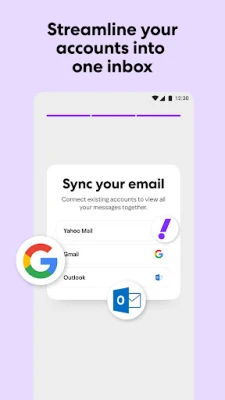
- Unified inbox: Connect supported Yahoo, Gmail, Outlook, and AOL accounts to manage multiple mailboxes from one app.
- Planner: Bring eligible events and tasks from email into a consolidated view, making it easier to keep track of bookings and to-dos.
- Orders Hub and package tracking: Find order details, receipts, tracking information, and delivery updates without manually searching through every message. Availability can depend on the email and shipment.
- AI email assistance: Available tools may summarize longer messages or help draft and adjust the tone of an email, reducing time spent composing and catching up.
- Spam and phishing filtering: Built-in detection helps keep unwanted or suspicious messages out of the inbox. No filter can identify every threat, so use care with links and attachments.
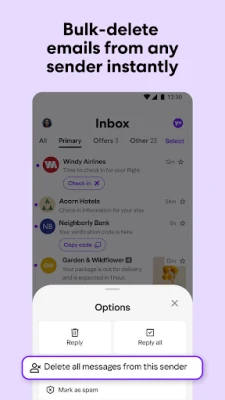
- Unsubscribe and sender cleanup: Unsubscribe from supported mailing lists or remove multiple emails from a sender to make a crowded inbox easier to manage.
- 20 GB of free storage: Yahoo Mail advertises 20 GB of free storage for messages and attachments, subject to account terms and current service policies.
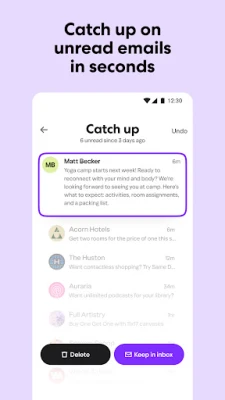
- Unread-mail catch-up: Review unread messages quickly and decide whether to keep or delete them, helping you clear routine inbox clutter.
✅ Pros and ❌ Cons
Pros
- Combines email accounts from several supported providers in one interface.
- Useful tools for organizing subscriptions, receipts, and delivery updates.
- Planner can make dates and tasks found in email easier to act on.
- Includes spam filtering and convenient inbox-cleanup options.
- Offers a substantial advertised free storage allowance.
Cons
- Some features may not be available in every region, account, or app version.
- AI tools and automatic message detection may not always interpret content correctly.
- Package tracking depends on supported merchants, shipping information, and email content.
- Connecting several accounts can require additional permissions and setup.
- Promotional content or upgrade prompts may be unwelcome to some users.
📋 App Details
- App Name: Yahoo Mail
- Current Version: Varies by release; check Google Play or the app’s official distribution listing.
- Last Updated: Check the official app listing for the latest update date.
- File Size: Varies by version and Android device; confirm the download size before installation.
- Requires Android: Minimum requirements can change between releases; check the listing for the version compatible with your device.
- Developer: Yahoo
- Content Rating: Check the current store listing for the rating in your region.
💬 User Reviews
User feedback commonly highlights Yahoo Mail’s straightforward interface, convenient account switching, and tools for searching and organizing messages. Order tracking and inbox-cleanup features can also be helpful for people who receive frequent receipts and newsletters.
Some users report concerns such as occasional bugs, notification or syncing issues, and changes to the interface. Others dislike promotional content or find that automatic organization and tracking do not work for every message. Performance and feature availability can vary by device, account, and app version.
🔍 5 Best Alternative Apps
- Gmail: Google’s email app offers inbox organization, search, spam filtering, and integration with Google services. It is a natural choice for people who mainly use a Google account.
- Microsoft Outlook: Outlook combines email with calendar tools and supports Microsoft and other email accounts, making it a strong option for work and personal use.
- Proton Mail: A privacy-focused email service with encrypted email features. It is worth considering if privacy is a higher priority than connecting many existing inboxes.
- AOL Mail: AOL’s email app provides a familiar inbox experience and is a suitable alternative for users who already use an AOL account.
- Spark Mail: Spark offers inbox organization and productivity tools for managing email. Its available features and supported account options may differ by platform and plan.
🧠 My Opinion
Yahoo Mail is more than a basic email reader: it combines multi-account access with tools for handling subscriptions, deliveries, receipts, and plans. The Planner and Orders Hub are particularly appealing for anyone who relies on email confirmations to manage everyday commitments, while spam filtering and sender cleanup help keep routine clutter under control.
It is worth considering if you want one place to manage several supported inboxes and prefer practical organization features. Keep in mind that automatic detection and AI assistance are conveniences rather than guarantees, and current availability can depend on your account and app version. For the best experience, install the official app and review its permissions and account settings.
🛡️ Privacy and Security
Yahoo Mail includes spam and phishing defenses, but users should still be cautious with unexpected links, attachments, and requests for personal information. Review the app’s privacy information and permissions, use a strong unique password, and enable available account-security protections.
For APK installation, choose a reputable source and verify that the package is authentic and compatible with your device. Android may ask you to allow installation from that particular source—sometimes described as enabling “Install unknown apps” or “Install from unknown sources.” Allow it only when necessary, then disable the permission afterward. Unofficial or modified APKs may contain malware, expose account data, or fail to receive secure updates; installing through Google Play is generally the safer option.
❓ Frequently Asked Questions (FAQs)
Q1: Is Yahoo Mail free to use?
A1: Yahoo Mail can be used for free, with an advertised 20 GB of free storage. Features, limits, and optional paid offerings may depend on current account terms.
Q2: Can I use Yahoo Mail with Gmail or Outlook?
A2: The app supports connecting certain third-party email accounts, including Gmail and Outlook. Availability and setup requirements may change, so check the options shown in your app.
Q3: Do I need an internet connection?
A3: An internet connection is generally needed to sync messages, send email, retrieve current delivery updates, and use online features. Some previously loaded content may remain viewable temporarily, depending on the app and device.
Q4: Is it safe to download the Yahoo Mail APK?
A4: The app is safest to install from Google Play or another official distribution channel. APKs from unverified sources could be modified or bundled with harmful software, so confirm the source and avoid suspicious files.
Q5: Does Yahoo Mail automatically track every package?
A5: No. Package details are surfaced when the app can recognize relevant order or tracking information. Coverage may depend on the retailer, carrier, message format, and account settings.
Rate the App
Add Comment & Review
User Reviews
Based on 0 reviews
No reviews added yet.
Comments will not be approved to be posted if they are SPAM, abusive, off-topic, use profanity, contain a personal attack, or promote hate of any kind.











More »

Popular Apps

TradingView: Track All MarketsTradingView Inc.

Bus Fever Party!Lumi Games

Claude by AnthropicAnthropic PBC

Block Craft 3D:Building GameWildlife Studios

Malwarebytes - Mobile SecurityMalwarebytes

Block Blast!HungryStudio

Canva: AI Photo & Video EditorCanva

Candy Crush SagaKing

Carrom Pool: Disc GameMiniclip.com

EA SPORTS FC Soccer Mobile 27ELECTRONIC ARTS
More »
Editor's Choice

Kahoot! Play & Create QuizzesKahoot!

United AirlinesUnited Airlines

Tripwoa: Travel Plan & Trailtripwoa

trivago: Compare hotel pricestrivago N.V.

Planner 5D: AI Home DesignPlanner 5D

ibis Paint Xibis inc.

Agoda: Cheap Flights & Hotelsagoda.com

Hopper: Hotels, Flights & CarsHopper Inc.

Brilliant: Learn Math & CodingBrilliant.org

Google ClassroomGoogle LLC