



Latest Version
Update
October 17, 2026
October 17, 2026
Developer
Telegram FZ-LLC
Telegram FZ-LLC
Categories
Communication
Communication
Platforms
Android
Android
Downloads
0
0
License
Free
Free
Package Name
org.telegram.messenger
org.telegram.messenger
Report
Report a Problem
Report a Problem
More About Telegram
Pure instant messaging — simple, fast, secure, and synced across all your devices. One of the top 5 most downloaded apps in the world with over 1 billion active users.
Telegram is a cloud-based messaging app for sending messages, making calls, and sharing files across Android, iOS, desktop, and web. It combines large group chats, fast syncing, and privacy features, including optional end-to-end encrypted Secret Chats.
Telegram is a messaging platform built for people who want quick conversations, flexible file sharing, and access to their chats on multiple devices. Its clean interface is easy to pick up, while channels, bots, large groups, and customization options make it useful for much more than one-to-one messaging.
Whether you are keeping in touch with family, following public channels, or coordinating a community, Telegram brings conversations and shared content together in one app. Its cloud-based design also means you can continue a conversation from another signed-in device without keeping your phone connected.
Telegram is a messaging and social communication app for private conversations, group discussions, voice and video calls, and sharing media or documents. It is designed for everyday users as well as teams, creators, and online communities. Users can join channels to follow updates, use bots for automated tasks, and customize their experience with themes, stickers, and other expressive tools.
An APK is the package file format Android uses to distribute and install applications. Installing Telegram from an APK is a manual alternative to using an app store; it is important to obtain the file from a trustworthy source and ensure it is an authentic, unmodified release.
Pros
Cons
User feedback commonly highlights Telegram’s fast messaging, cross-device access, customization options, and useful community tools. Many users appreciate being able to share different kinds of content and follow channels or manage large groups in the same app.
Common concerns include the learning curve created by its many features, unwanted messages or spam in some public spaces, and confusion about which chats are end-to-end encrypted. Users should also review privacy settings and be cautious when interacting with unfamiliar accounts, channels, or bots.
Telegram is a capable choice for users who want more than basic texting. Its synchronized cloud chats, file sharing, channels, groups, bots, and customization make it versatile for personal conversations and community use. The main point to understand is that standard cloud chats are not end-to-end encrypted by default; users who need that protection should learn how Secret Chats work and use them where appropriate.
It is worth considering if you want flexible communication across devices, but take time to adjust privacy controls and be selective about public groups and bots. Download the official app from a trusted source, and Telegram can be a convenient, feature-rich addition to your messaging toolkit.
Download Telegram only from Google Play or a source you trust. If you install an APK manually, Android may ask you to allow installation from that source in your settings. Enable this permission only when necessary, and switch it off again afterward if you do not need it.
Unofficial or altered APK files may contain malware, request intrusive permissions, or put your account and personal data at risk. Verify that an APK is genuine before installing it. Within Telegram, use the available privacy and security settings, protect your account with additional verification options, and remember that regular cloud chats differ from end-to-end encrypted Secret Chats.
Q1: Is Telegram free to use?
A1: Telegram’s core messaging features are available without charge. Optional paid features may be offered depending on the current app and region.
Q2: Do I need an internet connection to use Telegram?
A2: Yes. Telegram needs an internet connection to send and receive messages, sync chats, and make calls. You can view some previously loaded content while offline, but new communication requires connectivity.
Q3: Is it safe to download the Telegram APK?
A3: An APK can be safe when it comes from an authentic, trusted source and has not been modified. Unofficial files can contain malware or compromise privacy, so avoid unknown download sites.
Q4: Are all Telegram chats end-to-end encrypted?
A4: No. Secret Chats use end-to-end encryption, while regular cloud chats use a different encryption model and sync across devices. Choose the chat type that fits your privacy needs.
Q5: Can I use Telegram on more than one device?
A5: Yes. You can sign in on multiple supported devices and access regular cloud chats across them. Secret Chats are device-specific and do not sync in the same way.
Telegram APK
📱 Telegram APK Summary
Telegram is a cloud-based messaging app for sending messages, making calls, and sharing files across Android, iOS, desktop, and web. It combines large group chats, fast syncing, and privacy features, including optional end-to-end encrypted Secret Chats.
- App Name: Telegram
- Current Version: Version numbers vary by release and device; check Google Play for the latest version available to your device.
- Last Updated: The release date can vary by app listing and region; see Google Play for the current update date.
- Category: Communication
- Developer: Telegram FZ-LLC
- Google Play Rating: Ratings and review counts change over time and by region; check the current Google Play listing for the latest figures.
💡 Introduction
Telegram is a messaging platform built for people who want quick conversations, flexible file sharing, and access to their chats on multiple devices. Its clean interface is easy to pick up, while channels, bots, large groups, and customization options make it useful for much more than one-to-one messaging.
Whether you are keeping in touch with family, following public channels, or coordinating a community, Telegram brings conversations and shared content together in one app. Its cloud-based design also means you can continue a conversation from another signed-in device without keeping your phone connected.
❓ What is Telegram APK?
Telegram is a messaging and social communication app for private conversations, group discussions, voice and video calls, and sharing media or documents. It is designed for everyday users as well as teams, creators, and online communities. Users can join channels to follow updates, use bots for automated tasks, and customize their experience with themes, stickers, and other expressive tools.
An APK is the package file format Android uses to distribute and install applications. Installing Telegram from an APK is a manual alternative to using an app store; it is important to obtain the file from a trustworthy source and ensure it is an authentic, unmodified release.
🧑💻 How to Use
- Install and open Telegram: Get the app from Google Play or another trusted official distribution channel.
- Register your account: Enter your phone number and complete the verification steps. Add a name and, if you wish, a profile photo.
- Find people and conversations: Use search to look for contacts, public groups, or channels. You can also start a new chat with a contact who uses Telegram.
- Send messages and files: Open a conversation to send text, photos, videos, voice messages, or documents. You can also make voice or video calls where available.
- Create or join groups: Start a group for a team or community, or use an invitation link to join one. Channels are useful for following one-way updates from publishers and organizations.
- Personalize your experience: Explore notification settings, themes, privacy controls, stickers, and other preferences.
- Use multiple devices: Sign in on other supported devices to access your cloud chats and continue conversations. Secret Chats are device-specific and do not sync like regular cloud chats.
⚙️ Features
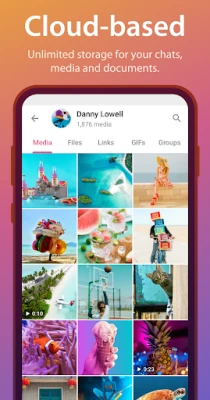
- Cloud-synced messaging: Regular chats sync across supported devices, making it easy to pick up a conversation on your phone, tablet, or computer.
- File and media sharing: Telegram supports sharing many common file types, alongside photos, videos, and voice messages. File-size limits can change, so check the app for current limits.
- Groups and channels: Groups support community discussions, while channels let creators and organizations broadcast updates to subscribers.
- Secret Chats: Optional Secret Chats use end-to-end encryption and can include self-destruct timers. Unlike regular cloud chats, they are tied to the devices involved.
- Voice and video calls: Contact friends and colleagues directly through calls, subject to device, network, and app availability.
- Bots and automation: Bots can provide services, answer queries, and automate tasks within chats. Choose bots carefully and avoid sharing sensitive information with untrusted ones.
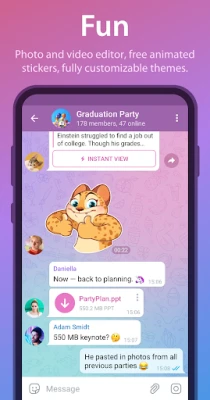
- Customization and expression: Themes, animated stickers, emoji, and GIFs give users ways to personalize chats and communicate more expressively.
- Data-efficient messaging: The app is designed to work across a range of network conditions, although performance depends on your connection and device.
✅ Pros and ❌ Cons
Pros
- Regular cloud chats are available across multiple signed-in devices.
- Supports messaging, calls, file sharing, groups, channels, and bots in one app.
- Offers optional end-to-end encrypted Secret Chats with self-destruct settings.
- Provides extensive customization and expressive chat features.
- Useful for both personal communication and large online communities.
Cons
- Regular cloud chats are not end-to-end encrypted by default; users seeking that protection need to use Secret Chats where supported.
- The range of groups, channels, and features can feel overwhelming to new users.
- Public communities and third-party bots may expose users to spam, scams, or misleading content.
- Some features and file limits may change over time or differ by platform.
- Using an unofficial or modified APK can create security and privacy risks.
📋 App Details
- App Name: Telegram
- Current Version: Varies by release; check the official Google Play listing for the latest version compatible with your device.
- Last Updated: Varies by release and region; check Google Play for the current date.
- File Size: Varies by version, device, and Android build. Check the download listing or installation prompt for the exact size.
- Requires Android: Minimum requirements can change with releases; confirm compatibility on the current Google Play listing.
- Developer: Telegram FZ-LLC
- Content Rating: Check the current Google Play listing for the rating in your region.
💬 User Reviews
User feedback commonly highlights Telegram’s fast messaging, cross-device access, customization options, and useful community tools. Many users appreciate being able to share different kinds of content and follow channels or manage large groups in the same app.
Common concerns include the learning curve created by its many features, unwanted messages or spam in some public spaces, and confusion about which chats are end-to-end encrypted. Users should also review privacy settings and be cautious when interacting with unfamiliar accounts, channels, or bots.
🔍 5 Best Alternative Apps
- WhatsApp: A widely used messaging app for chats, calls, and group conversations. It is a familiar choice for keeping in touch with contacts who already use it.
- Signal: A messaging app focused on privacy, with end-to-end encryption for its core conversations and calls. It is a strong option for users who prioritize private communication.
- Viber: Offers messaging, voice and video calls, and group conversations. It may suit users looking for a broad communication app with an established contact network.
- Discord: Built around servers and communities, with text, voice, and video features. It is particularly useful for organized group discussions, gaming communities, and shared-interest spaces.
- Facebook Messenger: Provides chats, calls, and group conversations, especially convenient for people who already connect through Facebook.
🧠 My Opinion
Telegram is a capable choice for users who want more than basic texting. Its synchronized cloud chats, file sharing, channels, groups, bots, and customization make it versatile for personal conversations and community use. The main point to understand is that standard cloud chats are not end-to-end encrypted by default; users who need that protection should learn how Secret Chats work and use them where appropriate.
It is worth considering if you want flexible communication across devices, but take time to adjust privacy controls and be selective about public groups and bots. Download the official app from a trusted source, and Telegram can be a convenient, feature-rich addition to your messaging toolkit.
🛡️ Privacy and Security
Download Telegram only from Google Play or a source you trust. If you install an APK manually, Android may ask you to allow installation from that source in your settings. Enable this permission only when necessary, and switch it off again afterward if you do not need it.
Unofficial or altered APK files may contain malware, request intrusive permissions, or put your account and personal data at risk. Verify that an APK is genuine before installing it. Within Telegram, use the available privacy and security settings, protect your account with additional verification options, and remember that regular cloud chats differ from end-to-end encrypted Secret Chats.
❓ Frequently Asked Questions (FAQs)
Q1: Is Telegram free to use?
A1: Telegram’s core messaging features are available without charge. Optional paid features may be offered depending on the current app and region.
Q2: Do I need an internet connection to use Telegram?
A2: Yes. Telegram needs an internet connection to send and receive messages, sync chats, and make calls. You can view some previously loaded content while offline, but new communication requires connectivity.
Q3: Is it safe to download the Telegram APK?
A3: An APK can be safe when it comes from an authentic, trusted source and has not been modified. Unofficial files can contain malware or compromise privacy, so avoid unknown download sites.
Q4: Are all Telegram chats end-to-end encrypted?
A4: No. Secret Chats use end-to-end encryption, while regular cloud chats use a different encryption model and sync across devices. Choose the chat type that fits your privacy needs.
Q5: Can I use Telegram on more than one device?
A5: Yes. You can sign in on multiple supported devices and access regular cloud chats across them. Secret Chats are device-specific and do not sync in the same way.
Rate the App
Add Comment & Review
User Reviews
Based on 0 reviews
No reviews added yet.
Comments will not be approved to be posted if they are SPAM, abusive, off-topic, use profanity, contain a personal attack, or promote hate of any kind.











More »

Popular Apps

TradingView: Track All MarketsTradingView Inc.

Bus Fever Party!Lumi Games

Claude by AnthropicAnthropic PBC

Block Craft 3D:Building GameWildlife Studios

Malwarebytes - Mobile SecurityMalwarebytes

Block Blast!HungryStudio

Canva: AI Photo & Video EditorCanva

Candy Crush SagaKing

Carrom Pool: Disc GameMiniclip.com

EA SPORTS FC Soccer Mobile 27ELECTRONIC ARTS
More »
Editor's Choice

Kahoot! Play & Create QuizzesKahoot!

United AirlinesUnited Airlines

Tripwoa: Travel Plan & Trailtripwoa

trivago: Compare hotel pricestrivago N.V.

Planner 5D: AI Home DesignPlanner 5D

ibis Paint Xibis inc.

Agoda: Cheap Flights & Hotelsagoda.com

Hopper: Hotels, Flights & CarsHopper Inc.

Brilliant: Learn Math & CodingBrilliant.org

Google ClassroomGoogle LLC