



Latest Version
Update
October 19, 2026
October 19, 2026
Developer
Meta Platforms, Inc.
Meta Platforms, Inc.
Categories
Communication
Communication
Platforms
Android
Android
Downloads
0
0
License
Free
Free
Package Name
com.facebook.katana
com.facebook.katana
Report
Report a Problem
Report a Problem
More About Facebook
Where real people propel your curiosity. Whether you’re thrifting gear, showing reels to that group who gets it, or sharing laughs over fun images reimagined by AI, Facebook helps you make things happen like no other social network.
Facebook is a social networking app for keeping up with friends, discovering communities, watching Reels, and sharing updates. It also brings together messaging, Marketplace, personalized feeds, and Meta AI features, although availability can vary by region.
Facebook has grown from a place to share status updates into a broad social platform for connecting with people, following creators, joining interest-based groups, and exploring short-form video. Its mix of familiar social tools and discovery features makes it useful for both catching up with friends and finding new things to enjoy.
Whether you want to browse Marketplace, share a moment, join a community, or message someone about a Reel, Facebook puts these activities in one app. Features such as Meta AI and some content tools may not be available in every country or account.
Facebook is Meta’s social networking application for Android. Users can create a profile, connect with friends, publish posts and Stories, watch Reels, take part in groups, browse Marketplace, and communicate through messages and calls. Feed personalization and discovery tools help users find content based on their interests.
An APK is the Android application package format used to install apps on Android devices. Downloading and installing an APK manually can be an alternative to using an app store, but unofficial files may be outdated or modified. For the safest and most reliable installation, use Google Play or another trusted distribution channel.
Pros
Cons
Facebook users often value the app’s broad range of features, including its groups, Marketplace, messaging, and ability to keep up with friends and local communities. Reels and personalized recommendations are also popular with people who enjoy discovering videos and creators.
Common criticisms include a crowded experience, frequent suggested content, and changes to the Feed or interface. Some users also report performance or notification issues on particular devices. Experiences differ by account, app version, location, and settings, so checking recent reviews for your device can offer a useful snapshot.
Facebook remains a versatile choice for people who want friends, interest groups, Marketplace, video, and messaging in one place. Its broad feature set is its biggest advantage, though the experience can feel crowded if you mainly want a simple social feed.
It is worth considering if your friends, community groups, or local listings are active on the platform. Review your privacy and feed settings after installation, and use the tools that matter to you rather than feeling obliged to use every feature. For many users, Facebook’s value comes from the communities and connections they find there.
Download Facebook from Google Play or another reputable source. If you install an APK manually, verify that it comes from a trustworthy distributor and has not been altered. Unofficial or modified APKs can contain malware, request excessive permissions, or put personal information at risk.
Manual installation may require allowing your browser or file manager to install unknown apps in Android settings. Enable this permission only for a source you trust, and turn it off again when you are finished if it is not needed. Keep Android and the app updated, use a strong account password, enable available security protections, and check your privacy and audience controls regularly.
Q1: Is Facebook APK free to use?
A: Facebook is generally free to download and use. Some features may involve optional purchases or other terms, and mobile data charges may apply.
Q2: Do I need an internet connection to use Facebook?
A: Yes. An internet connection is needed for most functions, including loading the Feed, watching Reels, messaging, and browsing Marketplace.
Q3: Is it safe to download the Facebook APK?
A: The safest option is to install Facebook through Google Play. If you use an APK, choose a reputable source and understand that unofficial files may be outdated, modified, or unsafe.
Q4: Is Meta AI available in every country?
A: No. Meta AI and other features may be limited by country, region, account, or app version.
Q5: Can I control who sees my Facebook posts?
A: Facebook provides audience controls for posts and profile settings. Review the audience selector before sharing and check your privacy settings periodically.
Facebook APK
📱 Facebook APK Summary
Facebook is a social networking app for keeping up with friends, discovering communities, watching Reels, and sharing updates. It also brings together messaging, Marketplace, personalized feeds, and Meta AI features, although availability can vary by region.
- App Name: Facebook
- Current Version: Version numbers vary by device and rollout; check Google Play for the latest release
- Last Updated: Varies by release and region; check the Google Play listing for the current date
- Category: Social
- Developer: Meta Platforms, Inc.
- Google Play Rating: Ratings and review counts change over time; see Google Play for the current figures
💡 Introduction
Facebook has grown from a place to share status updates into a broad social platform for connecting with people, following creators, joining interest-based groups, and exploring short-form video. Its mix of familiar social tools and discovery features makes it useful for both catching up with friends and finding new things to enjoy.
Whether you want to browse Marketplace, share a moment, join a community, or message someone about a Reel, Facebook puts these activities in one app. Features such as Meta AI and some content tools may not be available in every country or account.
❓ What Is Facebook APK?
Facebook is Meta’s social networking application for Android. Users can create a profile, connect with friends, publish posts and Stories, watch Reels, take part in groups, browse Marketplace, and communicate through messages and calls. Feed personalization and discovery tools help users find content based on their interests.
An APK is the Android application package format used to install apps on Android devices. Downloading and installing an APK manually can be an alternative to using an app store, but unofficial files may be outdated or modified. For the safest and most reliable installation, use Google Play or another trusted distribution channel.
🧑💻 How to Use
- Install the app: Get Facebook from Google Play, or use a trusted source if you need an APK. Check that the app name and developer are correct.
- Sign in or create an account: Follow the prompts to log in or register, then review your profile and privacy settings.
- Explore your Feed: Browse posts from friends, Pages, and groups. Use available feedback and follow options to shape what appears in your feed.
- Find content: Search for people, topics, Pages, or groups, or browse Reels and Marketplace listings.
- Connect with others: Add friends, join groups, react to posts, and use messaging or calling features where available.
- Share an update: Create a post, Story, or Reel, choose the audience, and publish when you’re ready.
- Manage your account: Adjust notifications, audience controls, and security settings to suit how you want to use Facebook.
⚙️ Features
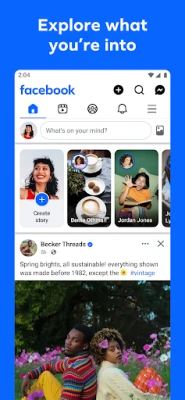
- Personalized Feed: See posts and recommendations from friends, groups, Pages, and creators, with options to influence the content shown to you.
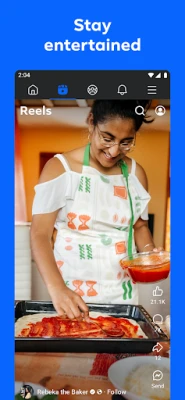
- Reels and video discovery: Watch short videos selected around your interests, and share or message Reels with friends.
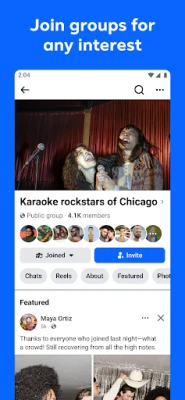
- Groups and communities: Join discussions, ask questions, and learn from people who share your hobbies, goals, or experiences.
- Marketplace: Browse local listings and discover secondhand goods, collectibles, and other items. Listings and availability depend on your location.
- Messaging and calls: Contact friends through private messages and, where supported, voice or video calls.
- Stories and sharing tools: Post quick updates, photos, and videos, or create Reels using templates and editing features available in the app.
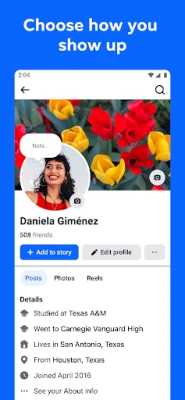
- Profile and audience controls: Customize parts of your profile and choose who can see particular posts using the available privacy settings.
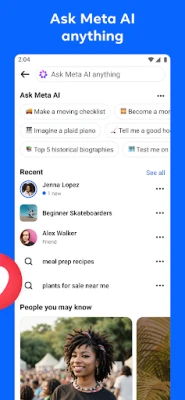
- Meta AI and creative tools: In supported regions, ask Meta AI questions and use generative features such as custom images or stickers.
✅ Pros and ❌ Cons
Pros
- Combines social networking, groups, video discovery, Marketplace, and communication tools.
- Offers many ways to find communities and content based on personal interests.
- Supports posts, Stories, Reels, and a range of creative tools.
- Audience and feed settings provide some control over what users share and see.
- Useful for staying in touch with friends, organizations, and local communities.
Cons
- The large number of features and recommendations can make the app feel busy.
- Some users may prefer a simpler feed with fewer suggested posts and videos.
- Meta AI and certain features are not available everywhere.
- Performance and data use can vary depending on the device, connection, and content viewed.
- Privacy settings require attention, and users should consider carefully what they share.
📋 App Details
- App Name: Facebook
- Current Version: Varies by device and rollout; check Google Play for the latest version
- Last Updated: Varies by release; check Google Play for the latest update date
- File Size: Varies by version and device; check the download listing before installing
- Requires Android: Minimum requirements can change with updates and device compatibility; check Google Play for your device
- Developer: Meta Platforms, Inc.
- Content Rating: Varies by storefront and region; check the current Google Play listing
💬 User Reviews
Facebook users often value the app’s broad range of features, including its groups, Marketplace, messaging, and ability to keep up with friends and local communities. Reels and personalized recommendations are also popular with people who enjoy discovering videos and creators.
Common criticisms include a crowded experience, frequent suggested content, and changes to the Feed or interface. Some users also report performance or notification issues on particular devices. Experiences differ by account, app version, location, and settings, so checking recent reviews for your device can offer a useful snapshot.
🔍 5 Best Alternative Apps
- Instagram: A social platform focused on photos, Stories, Reels, creators, and direct messages. It is a strong option for visual sharing and short-form video.
- Threads: Meta’s text-focused social app for public conversations, updates, and following creators. It suits users who want a more discussion-oriented feed.
- Reddit: A collection of topic-based communities where people share posts, recommendations, questions, and discussions. It is particularly useful for finding conversations about specific interests.
- Snapchat: A messaging and social app built around camera sharing, Stories, and short-lived posts. It may appeal to users who prefer casual, visual communication with friends.
- TikTok: A short-video platform with a personalized discovery feed and a wide range of creators. It is a suitable alternative for users whose main interest is watching and making videos.
🧠 My Opinion
Facebook remains a versatile choice for people who want friends, interest groups, Marketplace, video, and messaging in one place. Its broad feature set is its biggest advantage, though the experience can feel crowded if you mainly want a simple social feed.
It is worth considering if your friends, community groups, or local listings are active on the platform. Review your privacy and feed settings after installation, and use the tools that matter to you rather than feeling obliged to use every feature. For many users, Facebook’s value comes from the communities and connections they find there.
🛡️ Privacy and Security
Download Facebook from Google Play or another reputable source. If you install an APK manually, verify that it comes from a trustworthy distributor and has not been altered. Unofficial or modified APKs can contain malware, request excessive permissions, or put personal information at risk.
Manual installation may require allowing your browser or file manager to install unknown apps in Android settings. Enable this permission only for a source you trust, and turn it off again when you are finished if it is not needed. Keep Android and the app updated, use a strong account password, enable available security protections, and check your privacy and audience controls regularly.
❓ Frequently Asked Questions (FAQs)
Q1: Is Facebook APK free to use?
A: Facebook is generally free to download and use. Some features may involve optional purchases or other terms, and mobile data charges may apply.
Q2: Do I need an internet connection to use Facebook?
A: Yes. An internet connection is needed for most functions, including loading the Feed, watching Reels, messaging, and browsing Marketplace.
Q3: Is it safe to download the Facebook APK?
A: The safest option is to install Facebook through Google Play. If you use an APK, choose a reputable source and understand that unofficial files may be outdated, modified, or unsafe.
Q4: Is Meta AI available in every country?
A: No. Meta AI and other features may be limited by country, region, account, or app version.
Q5: Can I control who sees my Facebook posts?
A: Facebook provides audience controls for posts and profile settings. Review the audience selector before sharing and check your privacy settings periodically.
Rate the App
Add Comment & Review
User Reviews
Based on 0 reviews
No reviews added yet.
Comments will not be approved to be posted if they are SPAM, abusive, off-topic, use profanity, contain a personal attack, or promote hate of any kind.










More »

Popular Apps

TradingView: Track All MarketsTradingView Inc.

Bus Fever Party!Lumi Games

Claude by AnthropicAnthropic PBC

Block Craft 3D:Building GameWildlife Studios

Malwarebytes - Mobile SecurityMalwarebytes

Block Blast!HungryStudio

Canva: AI Photo & Video EditorCanva

Candy Crush SagaKing

Carrom Pool: Disc GameMiniclip.com

EA SPORTS FC Soccer Mobile 27ELECTRONIC ARTS
More »
Editor's Choice

Kahoot! Play & Create QuizzesKahoot!

United AirlinesUnited Airlines

Tripwoa: Travel Plan & Trailtripwoa

trivago: Compare hotel pricestrivago N.V.

Planner 5D: AI Home DesignPlanner 5D

ibis Paint Xibis inc.

Agoda: Cheap Flights & Hotelsagoda.com

Hopper: Hotels, Flights & CarsHopper Inc.

Brilliant: Learn Math & CodingBrilliant.org

Google ClassroomGoogle LLC