




Latest Version
Update
October 17, 2026
October 17, 2026
Developer
Google LLC
Google LLC
Categories
Communication
Communication
Platforms
Android
Android
Downloads
0
0
License
Free
Free
Package Name
com.google.android.apps.dynamite
com.google.android.apps.dynamite
Report
Report a Problem
Report a Problem
More About Google Chat
Google Chat is the best way for teams using Workspace to connect, collaborate and get things done.
Google Chat is a messaging and collaboration app for conversations, team spaces, and real-time meetings. Gemini-powered features can help eligible users summarize discussions, translate messages, find information, and keep track of action items.
Keeping conversations, files, and decisions organized can be difficult when a team relies on several different tools. Google Chat brings messaging and workplace collaboration together, with features designed to help people communicate, share information, and coordinate tasks.
Its integration with Google Workspace makes it especially useful for people who already work with Gmail, Drive, Calendar, Meet, and Tasks. Whether you’re messaging a colleague or coordinating a project in a shared space, Chat provides a central place to keep teamwork moving.
Google Chat is Google’s messaging and collaboration app for individuals, teams, schools, and businesses. Users can have one-to-one or group conversations, create spaces for ongoing projects, share files, and connect through audio or video huddles. Workspace integrations and available AI features can make it easier to locate information and follow conversations, although access to some features depends on the account, subscription, and rollout.
An APK is the package file format Android uses to install apps. Downloading an APK can allow manual installation, but updates and compatibility may differ from the version delivered through Google Play.
Pros
Cons
Users commonly value Google Chat’s connection to Workspace, its ability to keep project conversations in spaces, and the convenience of sharing information alongside Drive and other Google tools. It can be particularly helpful for teams that already use Google accounts throughout their workday.
Common frustrations can include differences between personal and managed accounts, features that are unavailable under some plans, and occasional notification or interface issues. Experiences also vary with device performance, organization settings, and app updates. Ratings and review themes change over time, so check the current Play Store listing for the latest user feedback.
Google Chat is a practical choice for teams that already use Google Workspace. Its strongest advantage is bringing everyday messaging closer to files, calendars, tasks, meetings, and other work tools. Spaces, huddles, and eligible AI features can make collaboration easier to manage without switching between as many apps.
It may be less compelling if your contacts or organization primarily use another platform, and not every feature is available to every account. If your work already revolves around Google services, Google Chat is worth trying; just confirm that its features and subscription requirements match your needs.
Google describes Chat as using its cloud security infrastructure and offering protections that can include phishing and malware detection and data loss prevention controls. Available safeguards depend on the account type, subscription, and administrator settings. Review your organization’s policies before sharing confidential or sensitive information.
For the safest installation, use Google Play or another source you trust. If you install an APK manually, Android may ask you to allow installation from that source in its security settings, sometimes described as enabling “Install unknown apps.” Turn that permission off again when it’s no longer needed. Unofficial or modified APKs may contain malware, compromise account details, or receive no reliable updates, so check the file’s origin and avoid packages that request unnecessary access.
Q1: Is Google Chat free to use?
A1: Google Chat is included with supported consumer, education, and business accounts. Some advanced features require an eligible paid Google Workspace subscription.
Q2: Do I need an internet connection to use Google Chat?
A2: Yes. Messaging and collaboration features require an internet connection to communicate and synchronize with Google’s services.
Q3: Is it safe to download the Google Chat APK?
A3: The safest option is to install the app through Google Play. If you use an APK, choose a trusted source and avoid modified or unknown files, which could expose your device or data to security risks.
Q4: Can I use Google Chat without a business account?
A4: Google Chat is available to supported personal Google accounts as well as eligible work and school accounts. Some features are limited to particular account types or plans.
Q5: Does Google Chat include AI features?
A5: Google promotes AI-assisted features such as summaries, search, translation, and action-item support. Availability may depend on your account, subscription, region, and administrator settings.
Google Chat APK
📱 Google Chat APK Summary
Google Chat is a messaging and collaboration app for conversations, team spaces, and real-time meetings. Gemini-powered features can help eligible users summarize discussions, translate messages, find information, and keep track of action items.
- App Name: Google Chat
- Current Version: Version varies by device and rollout
- Last Updated: The latest update date varies by Play Store region
- Category: Communication
- Developer: Google LLC
- Google Play Rating: Rating and review count change over time and vary by region
💡 Introduction
Keeping conversations, files, and decisions organized can be difficult when a team relies on several different tools. Google Chat brings messaging and workplace collaboration together, with features designed to help people communicate, share information, and coordinate tasks.
Its integration with Google Workspace makes it especially useful for people who already work with Gmail, Drive, Calendar, Meet, and Tasks. Whether you’re messaging a colleague or coordinating a project in a shared space, Chat provides a central place to keep teamwork moving.
❓ What is Google Chat APK?
Google Chat is Google’s messaging and collaboration app for individuals, teams, schools, and businesses. Users can have one-to-one or group conversations, create spaces for ongoing projects, share files, and connect through audio or video huddles. Workspace integrations and available AI features can make it easier to locate information and follow conversations, although access to some features depends on the account, subscription, and rollout.
An APK is the package file format Android uses to install apps. Downloading an APK can allow manual installation, but updates and compatibility may differ from the version delivered through Google Play.
🧑💻 How to Use
- Install the app: Get Google Chat from Google Play, or use a trusted APK source if you need to install it manually.
- Sign in: Open the app and sign in with a Google account. For work or school features, use the account provided by your organization.
- Start a conversation: Choose a colleague or create a group chat to message multiple people.
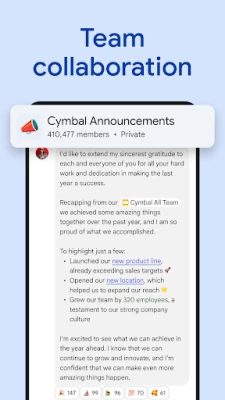
- Create or open a space: Use spaces to keep conversations, files, and project discussions organized around a team or topic.
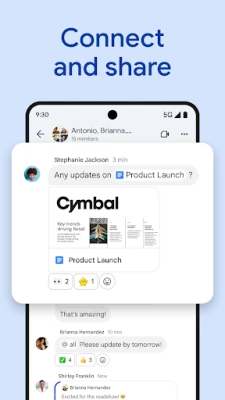
- Share information: Send messages, links, and supported files, or use audio and video messages where available.
- Connect live: Start or join a huddle when a real-time conversation is more convenient than typing.
- Use Workspace tools: Open supported Drive, Calendar, Meet, Tasks, and other integrations from Chat. Availability depends on your account and administrator settings.
⚙️ Features
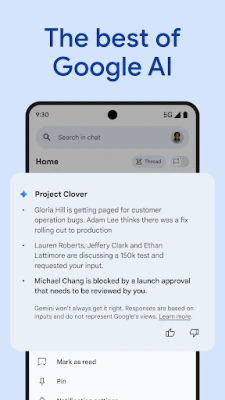
- AI-assisted conversation tools: Eligible accounts may get features such as conversation summaries, AI-powered search, and action-item assistance, helping users catch up and find relevant details faster.
- Message translation: Available translation tools can help users communicate across languages. The description promotes support for more than 120 languages, though feature availability may vary.
- Direct messages and group chats: Start a private conversation, coordinate with a group, or communicate with a wider team.
- Spaces for ongoing teamwork: Keep project discussions and shared information in dedicated spaces rather than scattering everything across separate chats.
- Audio and video messages: Share a more detailed update when a written message isn’t enough or a live meeting isn’t practical.
- Real-time huddles: Quickly connect with teammates for a live conversation without relying on a long back-and-forth message thread.
- Google Workspace integration: Work with services such as Gmail, Calendar, Drive, Tasks, and Meet, and use smart chips to link people, files, and spaces.
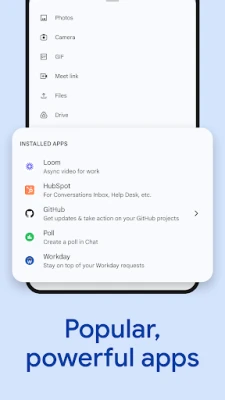
- Third-party apps and automation: Connect supported tools, including services used for project management and IT workflows. Organizations can also build custom integrations using Chat APIs.
- Security controls: Google describes Chat as protected by its cloud security systems, with features such as phishing and malware detection and data loss prevention options for eligible organizations.
✅ Pros and ❌ Cons
Pros
- Works closely with Google Workspace apps many teams already use.
- Supports one-to-one chats, groups, and project-focused spaces.
- Provides several ways to communicate, including messages, huddles, and supported audio or video messages.
- AI-assisted tools may help eligible users catch up on conversations and identify action items.
- Useful for organizations that need managed accounts, integrations, and administrative controls.
Cons
- Some advanced AI and business features require an eligible paid Workspace plan or administrator configuration.
- People outside the Google Workspace ecosystem may prefer a messaging app their contacts already use.
- Feature availability and interface options can vary by account, device, and region.
- Workspace integrations may take time to set up or may be restricted by an organization’s administrator.
- Manual APK installation requires extra care and may not receive updates as conveniently as Google Play installations.
📋 App Details
- App Name: Google Chat
- Current Version: Version varies by device and rollout; check Google Play or the installed app for the current build.
- Last Updated: Varies by region and app rollout.
- File Size: Varies by version, device, and installation package.
- Requires Android: Minimum requirements can change; check the Google Play listing for compatibility with your device.
- Developer: Google LLC
- Content Rating: Check the Google Play listing in your region for the current rating.
- Category: Communication
- Pricing: Chat is included with supported consumer, education, and business Google Workspace accounts. Some premium features require a paid subscription.
💬 User Reviews
Users commonly value Google Chat’s connection to Workspace, its ability to keep project conversations in spaces, and the convenience of sharing information alongside Drive and other Google tools. It can be particularly helpful for teams that already use Google accounts throughout their workday.
Common frustrations can include differences between personal and managed accounts, features that are unavailable under some plans, and occasional notification or interface issues. Experiences also vary with device performance, organization settings, and app updates. Ratings and review themes change over time, so check the current Play Store listing for the latest user feedback.
🔍 5 Best Alternative Apps
- Slack: A team messaging platform with channels, direct messages, and a broad selection of integrations. It’s a strong option for organizations that want to connect many workplace tools.
- Microsoft Teams: Combines chat, meetings, file sharing, and Microsoft 365 integration. It may suit businesses and schools that already rely on Microsoft services.
- Zoom Workplace: Offers messaging alongside its well-known video meeting features. It can be a good fit for teams that prioritize live calls and meeting workflows.
- Discord: Provides text and voice channels for communities and groups. Its flexible servers can work well for informal teams, interest groups, and online communities.
- WhatsApp: A widely used messaging app for personal and group conversations, with voice and video calling. It’s a practical alternative when simple communication with friends or contacts is the main goal.
🧠 My Opinion
Google Chat is a practical choice for teams that already use Google Workspace. Its strongest advantage is bringing everyday messaging closer to files, calendars, tasks, meetings, and other work tools. Spaces, huddles, and eligible AI features can make collaboration easier to manage without switching between as many apps.
It may be less compelling if your contacts or organization primarily use another platform, and not every feature is available to every account. If your work already revolves around Google services, Google Chat is worth trying; just confirm that its features and subscription requirements match your needs.
🛡️ Privacy and Security
Google describes Chat as using its cloud security infrastructure and offering protections that can include phishing and malware detection and data loss prevention controls. Available safeguards depend on the account type, subscription, and administrator settings. Review your organization’s policies before sharing confidential or sensitive information.
For the safest installation, use Google Play or another source you trust. If you install an APK manually, Android may ask you to allow installation from that source in its security settings, sometimes described as enabling “Install unknown apps.” Turn that permission off again when it’s no longer needed. Unofficial or modified APKs may contain malware, compromise account details, or receive no reliable updates, so check the file’s origin and avoid packages that request unnecessary access.
❓ Frequently Asked Questions (FAQs)
Q1: Is Google Chat free to use?
A1: Google Chat is included with supported consumer, education, and business accounts. Some advanced features require an eligible paid Google Workspace subscription.
Q2: Do I need an internet connection to use Google Chat?
A2: Yes. Messaging and collaboration features require an internet connection to communicate and synchronize with Google’s services.
Q3: Is it safe to download the Google Chat APK?
A3: The safest option is to install the app through Google Play. If you use an APK, choose a trusted source and avoid modified or unknown files, which could expose your device or data to security risks.
Q4: Can I use Google Chat without a business account?
A4: Google Chat is available to supported personal Google accounts as well as eligible work and school accounts. Some features are limited to particular account types or plans.
Q5: Does Google Chat include AI features?
A5: Google promotes AI-assisted features such as summaries, search, translation, and action-item support. Availability may depend on your account, subscription, region, and administrator settings.
Rate the App
Add Comment & Review
User Reviews
Based on 0 reviews
No reviews added yet.
Comments will not be approved to be posted if they are SPAM, abusive, off-topic, use profanity, contain a personal attack, or promote hate of any kind.











More »

Popular Apps

TradingView: Track All MarketsTradingView Inc.

Bus Fever Party!Lumi Games

Claude by AnthropicAnthropic PBC

Block Craft 3D:Building GameWildlife Studios

Malwarebytes - Mobile SecurityMalwarebytes

Block Blast!HungryStudio

Canva: AI Photo & Video EditorCanva

Candy Crush SagaKing

Carrom Pool: Disc GameMiniclip.com

EA SPORTS FC Soccer Mobile 27ELECTRONIC ARTS
More »
Editor's Choice

Kahoot! Play & Create QuizzesKahoot!

United AirlinesUnited Airlines

Tripwoa: Travel Plan & Trailtripwoa

trivago: Compare hotel pricestrivago N.V.

Planner 5D: AI Home DesignPlanner 5D

ibis Paint Xibis inc.

Agoda: Cheap Flights & Hotelsagoda.com

Hopper: Hotels, Flights & CarsHopper Inc.

Brilliant: Learn Math & CodingBrilliant.org

Google ClassroomGoogle LLC