



Latest Version
Update
October 17, 2026
October 17, 2026
Developer
Google LLC
Google LLC
Categories
Communication
Communication
Platforms
Android
Android
Downloads
0
0
License
Free
Free
Package Name
com.google.android.gm
com.google.android.gm
Report
Report a Problem
Report a Problem
More About Gmail
The official Gmail app brings the best of Gmail to your Android phone or tablet with enhanced security protections, multiple account support, and powerful search to find the details you need. Use the power of Google AI to help you write, organize, search, and clear your inbox even faster. Gmail is also available on Wear OS so you can stay productive and manage emails right from your wrist.
Gmail is Google’s email app for managing messages, accounts, and everyday communication on Android. It combines inbox organization, powerful search, spam protection, and Google Workspace tools, with some Gemini features available to eligible subscribers.
Email remains essential for work, school, shopping, and personal communication, but keeping an inbox organized can quickly become a chore. Gmail brings message management, search, spam filtering, and connections to Google services together in one familiar app.
Its appeal comes from being useful for both everyday email and larger productivity workflows. Whether you use one Gmail address or manage several accounts, the app helps you find important messages, respond efficiently, and stay connected across devices.
Gmail is an email application developed by Google. It lets users send and receive messages, manage multiple accounts, search their inbox, organize correspondence, and work with services such as Google Calendar. It is designed for anyone who needs convenient access to email, from individual users to teams using Google Workspace.
An APK is the package format Android uses to distribute and install applications. Installing a Gmail APK manually can be useful in certain situations, but users should prefer Google Play or another trusted source to reduce the risk of altered or unsafe files. Availability and compatibility can vary by device.
Pros
Cons
Gmail’s large user base generally values its dependable email access, easy account switching, familiar layout, search tools, and integration with Google services. Spam filtering and the convenience of managing messages across devices are also common strengths.
Some users report frustrations with interface changes, notification or synchronization issues, and difficulty finding particular settings. Others would like more control over inbox categories or fewer prompts to use additional Google services. Experiences can differ depending on the device, account configuration, and app version.
Gmail remains a versatile choice for Android users who want reliable email, capable search, useful spam filtering, and convenient connections to Google services. Its everyday tools are valuable even if you do not use its optional AI features.
The app is especially well suited to people who already use a Google Account or Google Workspace. If you want a familiar, feature-rich way to handle messages across accounts, Gmail is worth considering; just review permissions, notification settings, and any paid AI requirements before relying on specific features.
For the safest installation, download Gmail from Google Play or another trusted source. If you install an APK manually, Android may ask you to allow installation from that source in your settings. Enable this permission only when needed, and turn it off afterward if appropriate.
Unofficial APKs can be modified or bundled with malware, and may put account credentials or personal data at risk. Check that the file comes from a reputable provider, keep Android and Gmail updated, and avoid entering your password into apps or websites you do not trust. Review your account security and app permissions regularly.
Q1: Is Gmail APK free to use?
A1: Gmail is generally free to download and use with a Google Account. Some Gemini or Google Workspace capabilities require an eligible paid plan.
Q2: Do I need an internet connection to use Gmail?
A2: An internet connection is needed to sync new messages and use most online features. Some previously loaded content may remain viewable offline, depending on your device and settings.
Q3: Is it safe to download the Gmail APK?
A3: It is safest to install Gmail through Google Play. If you use an APK, choose a trusted source and remember that unofficial or modified files can contain malware or compromise your privacy.
Q4: Can I add non-Gmail email accounts?
A4: Gmail supports adding accounts from other email providers, although the available setup options can vary by provider and account configuration.
Q5: Are Gemini features available to everyone?
A5: No. Availability can depend on a qualifying Google AI or Workspace plan, internet access, language, country, and feature rollout. Review AI-generated responses for accuracy.
Gmail APK
📱 Gmail APK Summary
Gmail is Google’s email app for managing messages, accounts, and everyday communication on Android. It combines inbox organization, powerful search, spam protection, and Google Workspace tools, with some Gemini features available to eligible subscribers.
- App Name: Gmail
- Current Version: Varies by device and rollout; check Google Play for the latest version
- Last Updated: Updated regularly; the latest date may vary by region and device
- Category: Communication
- Developer: Google LLC
- Google Play Rating: Rating and review count change over time and vary by storefront; check Google Play for current figures
💡 Introduction
Email remains essential for work, school, shopping, and personal communication, but keeping an inbox organized can quickly become a chore. Gmail brings message management, search, spam filtering, and connections to Google services together in one familiar app.
Its appeal comes from being useful for both everyday email and larger productivity workflows. Whether you use one Gmail address or manage several accounts, the app helps you find important messages, respond efficiently, and stay connected across devices.
❓ What Is Gmail APK?
Gmail is an email application developed by Google. It lets users send and receive messages, manage multiple accounts, search their inbox, organize correspondence, and work with services such as Google Calendar. It is designed for anyone who needs convenient access to email, from individual users to teams using Google Workspace.
An APK is the package format Android uses to distribute and install applications. Installing a Gmail APK manually can be useful in certain situations, but users should prefer Google Play or another trusted source to reduce the risk of altered or unsafe files. Availability and compatibility can vary by device.
🧑💻 How to Use
- Install and open Gmail: Get the app through Google Play, then launch it on your Android device.
- Sign in: Add a Google Account, or choose the option to add another supported email account if available.
- Review your inbox: Open messages, use categories or labels where available, and check important details shown in message summaries.
- Write an email: Tap the compose button, enter a recipient and subject, write your message, and tap send.
- Find messages: Use the search bar with a sender, phrase, or other relevant keywords. Eligible Gemini features may also help locate information, subject to plan and availability requirements.
- Keep your inbox tidy: Archive, delete, label, or unsubscribe from unwanted senders using the options available in the app.
- Connect other services: Use supported Calendar actions or Workspace integrations to manage related tasks without leaving your email workflow.
⚙️ Features
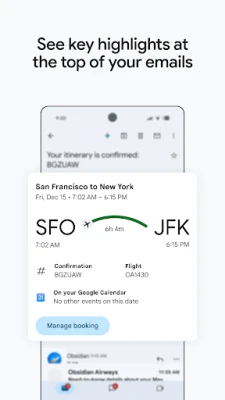
- Inbox summaries: Summary cards can surface useful details near the top of messages, helping you scan for key information more quickly.
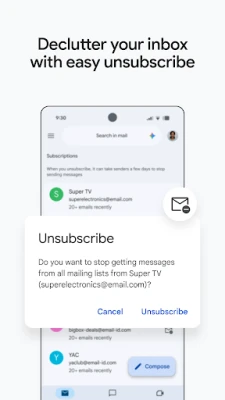
- Unsubscribe tools: Manage unwanted email subscriptions from one place, making it easier to cut down on marketing messages and inbox clutter.
- Powerful search: Search messages using relevant words and details. For eligible users, Gemini can help find information in Gmail or Google Drive; access depends on plan, language, country, and internet availability.
- AI writing assistance: Features such as Help me write and contextual Smart Reply can help draft or respond to messages. Gemini features may require a qualifying Google AI plan and should be reviewed for accuracy.
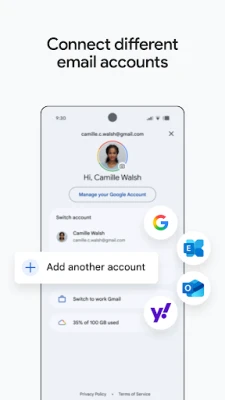
- Multiple email accounts: Switch between accounts from different email providers, so personal and work correspondence can be managed in one app.
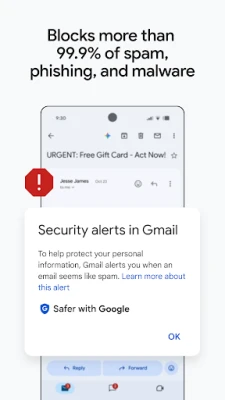
- Spam and threat protection: Gmail says it automatically blocks more than 99.9% of spam, phishing, and malware from reaching inboxes, helping reduce exposure to unwanted or harmful messages.
- Calendar actions: Supported messages can be turned into Google Calendar events. Some AI-assisted calendar features may have additional eligibility requirements.
- Wear OS support: A Gmail tile or complication on supported Wear OS devices can provide a quick view of email activity.
- Google Workspace integration: Workspace users can connect email with tools such as Meet, Chat, Calendar, and Tasks, with available features depending on their plan.
✅ Pros and ❌ Cons
Pros
- Clean, familiar interface that is straightforward for new users.
- Useful search and inbox organization tools.
- Supports multiple accounts, including accounts from other providers.
- Strong built-in spam and phishing protections.
- Works closely with Google Calendar and other Workspace services.
- Optional AI features can help with writing and finding information when available.
Cons
- Some Gemini features require a qualifying paid plan and may not be available in every country or language.
- Many functions depend on an internet connection.
- Frequent email notifications can become distracting without careful settings.
- Users who prefer a minimal, non-Google workflow may find the Workspace integrations unnecessary.
- Features and interface details can change as Google updates the app.
📋 App Details
- App Name: Gmail
- Current Version: Varies by device and rollout; see Google Play for the current release
- Last Updated: Regularly updated; check the store listing for the latest date
- File Size: Varies by version, device, and installation package; check the download listing before installing
- Requires Android: Minimum requirement varies by release and device; refer to the current Google Play listing
- Developer: Google LLC
- Content Rating: Everyone (store rating classifications can vary by region)
💬 User Reviews
Gmail’s large user base generally values its dependable email access, easy account switching, familiar layout, search tools, and integration with Google services. Spam filtering and the convenience of managing messages across devices are also common strengths.
Some users report frustrations with interface changes, notification or synchronization issues, and difficulty finding particular settings. Others would like more control over inbox categories or fewer prompts to use additional Google services. Experiences can differ depending on the device, account configuration, and app version.
🔍 5 Best Alternative Apps
- Microsoft Outlook: A strong choice for users who rely on Microsoft 365, Outlook email, calendars, and contacts. Its focused inbox and scheduling tools make it suitable for work as well as personal use.
- Yahoo Mail: A general-purpose email app with inbox organization and support for Yahoo accounts. It can be a convenient option for users already in the Yahoo ecosystem.
- Proton Mail: An email service focused on privacy, with encrypted email features for supported communications. It suits users who prioritize privacy tools, although some features depend on the selected plan.
- Samsung Email: A practical option for compatible Samsung devices and users who want a straightforward client for supported email accounts. Availability and features may depend on the device.
- FairEmail: An open-source email client designed for users who want detailed controls and a privacy-conscious approach. Its interface and setup may feel more technical than mainstream alternatives.
🧠 My Opinion
Gmail remains a versatile choice for Android users who want reliable email, capable search, useful spam filtering, and convenient connections to Google services. Its everyday tools are valuable even if you do not use its optional AI features.
The app is especially well suited to people who already use a Google Account or Google Workspace. If you want a familiar, feature-rich way to handle messages across accounts, Gmail is worth considering; just review permissions, notification settings, and any paid AI requirements before relying on specific features.
🛡️ Privacy and Security
For the safest installation, download Gmail from Google Play or another trusted source. If you install an APK manually, Android may ask you to allow installation from that source in your settings. Enable this permission only when needed, and turn it off afterward if appropriate.
Unofficial APKs can be modified or bundled with malware, and may put account credentials or personal data at risk. Check that the file comes from a reputable provider, keep Android and Gmail updated, and avoid entering your password into apps or websites you do not trust. Review your account security and app permissions regularly.
❓ Frequently Asked Questions (FAQs)
Q1: Is Gmail APK free to use?
A1: Gmail is generally free to download and use with a Google Account. Some Gemini or Google Workspace capabilities require an eligible paid plan.
Q2: Do I need an internet connection to use Gmail?
A2: An internet connection is needed to sync new messages and use most online features. Some previously loaded content may remain viewable offline, depending on your device and settings.
Q3: Is it safe to download the Gmail APK?
A3: It is safest to install Gmail through Google Play. If you use an APK, choose a trusted source and remember that unofficial or modified files can contain malware or compromise your privacy.
Q4: Can I add non-Gmail email accounts?
A4: Gmail supports adding accounts from other email providers, although the available setup options can vary by provider and account configuration.
Q5: Are Gemini features available to everyone?
A5: No. Availability can depend on a qualifying Google AI or Workspace plan, internet access, language, country, and feature rollout. Review AI-generated responses for accuracy.
Rate the App
Add Comment & Review
User Reviews
Based on 0 reviews
No reviews added yet.
Comments will not be approved to be posted if they are SPAM, abusive, off-topic, use profanity, contain a personal attack, or promote hate of any kind.










More »

Popular Apps

TradingView: Track All MarketsTradingView Inc.

Bus Fever Party!Lumi Games

Claude by AnthropicAnthropic PBC

Block Craft 3D:Building GameWildlife Studios

Malwarebytes - Mobile SecurityMalwarebytes

Block Blast!HungryStudio

Canva: AI Photo & Video EditorCanva

Candy Crush SagaKing

Carrom Pool: Disc GameMiniclip.com

EA SPORTS FC Soccer Mobile 27ELECTRONIC ARTS
More »
Editor's Choice

Kahoot! Play & Create QuizzesKahoot!

United AirlinesUnited Airlines

Tripwoa: Travel Plan & Trailtripwoa

trivago: Compare hotel pricestrivago N.V.

Planner 5D: AI Home DesignPlanner 5D

ibis Paint Xibis inc.

Agoda: Cheap Flights & Hotelsagoda.com

Hopper: Hotels, Flights & CarsHopper Inc.

Brilliant: Learn Math & CodingBrilliant.org

Google ClassroomGoogle LLC