




Latest Version
Update
October 17, 2026
October 17, 2026
Developer
Samsung Electronics Co., Ltd.
Samsung Electronics Co., Ltd.
Categories
Internet
Internet
Platforms
Android
Android
Downloads
0
0
License
Free
Free
Package Name
com.sec.android.app.sbrowser
com.sec.android.app.sbrowser
Report
Report a Problem
Report a Problem
More About Samsung Browser
Samsung Browser provides the best web browsing experience for you with Video Assistant, Dark Mode, Customize menu, Extensions such as Translator, and by protecting your privacy with Secret mode, Smart Anti-Tracking and Smart Protection.
Samsung Internet Browser is an Android web browser focused on everyday browsing, privacy tools, and convenient features such as content blocking and tab management. It also supports Samsung Galaxy Watch devices running Wear OS, including Galaxy Watch 4 and later models.
Samsung Internet Browser gives Android users a straightforward way to browse websites, manage tabs, and adjust privacy settings. Its appeal comes from practical tools such as smart anti-tracking, protected browsing, third-party content blockers, and a window manager that makes multitasking easier.
Whether you are looking up information, shopping online, or visiting familiar websites, Samsung Internet combines everyday browser essentials with options designed to make browsing more private and manageable.
Samsung Internet Browser is Samsung’s mobile web browser for Android. It lets you visit websites, open and organize tabs, upload files to webpages, and use browser privacy features. Depending on the version, device, and region, it may also offer Smart Shopping coupon suggestions and support on compatible Wear OS Galaxy Watch devices.
An APK is the package file format Android uses to distribute and install applications. Installing an APK manually can be useful when an app is unavailable through your usual store, but it requires extra care: unofficial files may be outdated, altered, or unsafe.
Pros
Cons
User feedback can vary by version, device, and region. Common reasons people choose Samsung Internet include its privacy tools, familiar interface on Samsung devices, tab features, and support for content blockers. Smart Shopping and watch compatibility may also appeal to users whose devices and regions support them.
As with any browser, some users may prefer a different interface or find that particular features are unavailable on their device. Performance can also depend on the phone, Android version, website, and installed extensions or content-blocking tools. Check recent reviews on your app store for feedback specific to the current release.
Samsung Internet Browser is a capable everyday browser, especially for people who value privacy controls, content-blocking options, and practical tab management. Smart Shopping and Galaxy Watch support add useful extras for eligible users, though neither feature is universal.
If you want a browser with built-in protections and do not mind checking which features your device supports, Samsung Internet is worth considering. Download it from an official store where possible, review permissions as they appear, and choose the browser that best fits your privacy and workflow preferences.
Samsung Internet includes features intended to improve browsing security and privacy, but no browser can guarantee complete protection. Keep the app and Android updated, use Protected Browsing warnings carefully, and grant optional permissions only when you need the related function.
For APK installation, use trusted sources and avoid files that have been modified or repackaged. Android may ask you to allow installation from that source in settings—often described as “Install unknown apps.” Enable it only for a source you trust, then disable the permission when finished. Unofficial APKs can contain malware, request excessive access, or expose personal data.
Q1: Is Samsung Internet Browser free to use?
A: Samsung Internet is generally available as a free browser through supported app stores. Availability and included features may vary by device and region.
Q2: Does Samsung Internet work on Galaxy Watch?
A: The browser supports compatible Galaxy Watch devices running Wear OS, including the Galaxy Watch 4 series and models released later. Check your watch’s store listing and compatibility before installing.
Q3: Does the browser block every ad and tracker?
A: No. Smart Anti-Tracking is designed to restrict certain cross-site tracking, while content filtering depends on compatible third-party blocker apps. These tools do not guarantee that all ads or tracking will be stopped.
Q4: Is it safe to download the Samsung Internet APK?
A: The safest option is to install the app from Google Play or the Galaxy Store. If you use an APK, choose a reputable source and verify the file; unofficial or altered packages may contain malware or create privacy risks.
Q5: Why does Samsung Internet request optional permissions?
A: Optional permissions support specific functions, such as location-based webpage content, QR scanning, recording, or uploading media. Basic browsing does not require the optional permissions listed in the supplied app information.
Samsung Internet Browser APK
📱 Samsung Internet Browser APK Summary
Samsung Internet Browser is an Android web browser focused on everyday browsing, privacy tools, and convenient features such as content blocking and tab management. It also supports Samsung Galaxy Watch devices running Wear OS, including Galaxy Watch 4 and later models.
- App Name: Samsung Internet Browser
- Current Version: Version varies by device and release; check Google Play or Galaxy Store for the latest listing
- Last Updated: Varies by release and region
- Category: Communication / Web browser
- Developer: Samsung Electronics Co., Ltd.
- Google Play Rating: Rating and review count vary by region and may change over time
💡 Introduction
Samsung Internet Browser gives Android users a straightforward way to browse websites, manage tabs, and adjust privacy settings. Its appeal comes from practical tools such as smart anti-tracking, protected browsing, third-party content blockers, and a window manager that makes multitasking easier.
Whether you are looking up information, shopping online, or visiting familiar websites, Samsung Internet combines everyday browser essentials with options designed to make browsing more private and manageable.
❓ What is Samsung Internet Browser APK?
Samsung Internet Browser is Samsung’s mobile web browser for Android. It lets you visit websites, open and organize tabs, upload files to webpages, and use browser privacy features. Depending on the version, device, and region, it may also offer Smart Shopping coupon suggestions and support on compatible Wear OS Galaxy Watch devices.
An APK is the package file format Android uses to distribute and install applications. Installing an APK manually can be useful when an app is unavailable through your usual store, but it requires extra care: unofficial files may be outdated, altered, or unsafe.
🧑💻 How to Use
- Install the browser: Get Samsung Internet from Google Play or the Galaxy Store when available for your device. If installing an APK, use a reputable source and verify that the file is genuine.
- Open a website: Launch the app, tap the address bar, enter a web address or search term, and choose a result.
- Manage tabs: Open the tab manager to switch between pages. Use the Manage windows menu, where available, to view and organize multiple browser windows.
- Adjust privacy: Open the browser settings to review available privacy protections, including Smart Anti-Tracking and Protected Browsing.
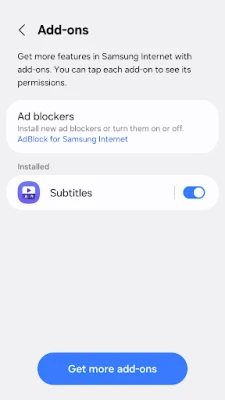
- Customize content blocking: Install a compatible third-party content-blocking app if you want to filter supported page content.
- Use optional features: Allow permissions only when a feature needs them—for example, camera access for QR scanning or location access for a webpage-requested location feature.
- Browse on a watch: On supported Galaxy Watch models running Wear OS, open the browser and use its tiles or complications where available.
⚙️ Features
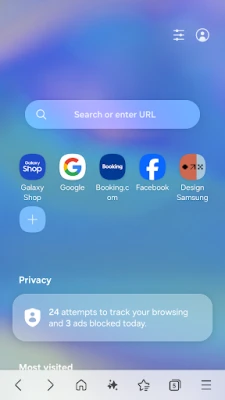
- Smart Anti-Tracking: Identifies domains that may track activity across websites and blocks their access to cookie storage, helping limit certain forms of cross-site tracking.
- Protected Browsing: Warns you before opening known harmful websites, helping reduce the chance of visiting pages designed to steal information.
- Third-party content blockers: Compatible apps can provide filters that block supported page content, making browsing cleaner and potentially more streamlined.
- Manage windows: The tab manager’s Manage windows menu provides an at-a-glance way to view and handle multiple browser windows.
- Smart Shopping: In supported countries and on eligible shopping sites, the browser can recommend available coupons. Some participating sites may apply a suitable coupon during checkout.
- Galaxy Watch support: Samsung Internet is available on compatible Wear OS Galaxy Watch devices, including the Galaxy Watch 4 series and later models, with tiles and complication support.
- Webpage media and file access: When you choose to use a webpage feature, the browser can request relevant access for tasks such as uploading files, photos, videos, or audio, scanning QR codes, and recording audio.
✅ Pros and ❌ Cons
Pros
- Includes privacy protections such as Smart Anti-Tracking and warnings for known malicious sites.
- Supports compatible third-party content blockers.
- Provides window management for users who browse across multiple pages.
- Smart Shopping may help eligible users find coupons on supported sites.
- Offers browser support on compatible Galaxy Watch models.
- Optional permissions can be granted when needed rather than being required for basic browsing.
Cons
- Some features, including Smart Shopping, depend on country, website, and software availability.
- Galaxy Watch features are limited to supported Wear OS devices.
- Some privacy and content-blocking options may require additional setup or compatible apps.
- Permissions for camera, microphone, location, or media are needed for particular webpage functions, which may not suit every user.
- Version numbers, ratings, and update availability vary by device, region, and store listing.
📋 App Details
- App Name: Samsung Internet Browser
- Current Version: Varies by device and release; check the official store listing for the version available to you
- Last Updated: Varies by release and region
- File Size: Varies by version, device, and installation package; check the download listing before installing
- Requires Android: Minimum requirement varies by version and device; confirm compatibility in the official store listing
- Developer: Samsung Electronics Co., Ltd.
- Content Rating: Store rating may vary by region; check the official listing for the current classification
- Required Permissions: None are listed as required in the supplied app information
- Optional Permissions: May include location, camera, microphone, phone information on Android 11, nearby devices on Android 12 or later, audio and photos/videos on Android 13 or later, files or storage on older Android versions, and notifications on Android 13 or later
💬 User Reviews
User feedback can vary by version, device, and region. Common reasons people choose Samsung Internet include its privacy tools, familiar interface on Samsung devices, tab features, and support for content blockers. Smart Shopping and watch compatibility may also appeal to users whose devices and regions support them.
As with any browser, some users may prefer a different interface or find that particular features are unavailable on their device. Performance can also depend on the phone, Android version, website, and installed extensions or content-blocking tools. Check recent reviews on your app store for feedback specific to the current release.
🔍 5 Best Alternative Apps
- Google Chrome: A widely used Android browser with Google account syncing, password tools, and broad website compatibility. It is a familiar option for users who rely on Google services.
- Mozilla Firefox: An Android browser with privacy controls and support for selected extensions. It is worth considering if customization and open-source software matter to you.
- Microsoft Edge: A feature-rich browser with Microsoft account syncing and tools for users who work across Windows and mobile devices.
- Brave Browser: A privacy-focused browser with built-in ad and tracker blocking. Its default protections may suit users who want fewer page interruptions without adding a separate blocker.
- Opera Browser: A mobile browser offering a range of convenience features and a customizable browsing experience. Available tools can differ by version and region.
🧠 My Opinion
Samsung Internet Browser is a capable everyday browser, especially for people who value privacy controls, content-blocking options, and practical tab management. Smart Shopping and Galaxy Watch support add useful extras for eligible users, though neither feature is universal.
If you want a browser with built-in protections and do not mind checking which features your device supports, Samsung Internet is worth considering. Download it from an official store where possible, review permissions as they appear, and choose the browser that best fits your privacy and workflow preferences.
🛡️ Privacy and Security
Samsung Internet includes features intended to improve browsing security and privacy, but no browser can guarantee complete protection. Keep the app and Android updated, use Protected Browsing warnings carefully, and grant optional permissions only when you need the related function.
For APK installation, use trusted sources and avoid files that have been modified or repackaged. Android may ask you to allow installation from that source in settings—often described as “Install unknown apps.” Enable it only for a source you trust, then disable the permission when finished. Unofficial APKs can contain malware, request excessive access, or expose personal data.
❓ Frequently Asked Questions (FAQs)
Q1: Is Samsung Internet Browser free to use?
A: Samsung Internet is generally available as a free browser through supported app stores. Availability and included features may vary by device and region.
Q2: Does Samsung Internet work on Galaxy Watch?
A: The browser supports compatible Galaxy Watch devices running Wear OS, including the Galaxy Watch 4 series and models released later. Check your watch’s store listing and compatibility before installing.
Q3: Does the browser block every ad and tracker?
A: No. Smart Anti-Tracking is designed to restrict certain cross-site tracking, while content filtering depends on compatible third-party blocker apps. These tools do not guarantee that all ads or tracking will be stopped.
Q4: Is it safe to download the Samsung Internet APK?
A: The safest option is to install the app from Google Play or the Galaxy Store. If you use an APK, choose a reputable source and verify the file; unofficial or altered packages may contain malware or create privacy risks.
Q5: Why does Samsung Internet request optional permissions?
A: Optional permissions support specific functions, such as location-based webpage content, QR scanning, recording, or uploading media. Basic browsing does not require the optional permissions listed in the supplied app information.
Rate the App
Add Comment & Review
User Reviews
Based on 0 reviews
No reviews added yet.
Comments will not be approved to be posted if they are SPAM, abusive, off-topic, use profanity, contain a personal attack, or promote hate of any kind.









More »

Popular Apps

TradingView: Track All MarketsTradingView Inc.

Bus Fever Party!Lumi Games

Claude by AnthropicAnthropic PBC

Block Craft 3D:Building GameWildlife Studios

Malwarebytes - Mobile SecurityMalwarebytes

Block Blast!HungryStudio

Canva: AI Photo & Video EditorCanva

Candy Crush SagaKing

Carrom Pool: Disc GameMiniclip.com

EA SPORTS FC Soccer Mobile 27ELECTRONIC ARTS
More »
Editor's Choice

Kahoot! Play & Create QuizzesKahoot!

United AirlinesUnited Airlines

Tripwoa: Travel Plan & Trailtripwoa

trivago: Compare hotel pricestrivago N.V.

Planner 5D: AI Home DesignPlanner 5D

ibis Paint Xibis inc.

Agoda: Cheap Flights & Hotelsagoda.com

Hopper: Hotels, Flights & CarsHopper Inc.

Brilliant: Learn Math & CodingBrilliant.org

Google ClassroomGoogle LLC