




Latest Version
Update
October 17, 2026
October 17, 2026
Developer
Opera
Opera
Categories
Internet
Internet
Platforms
Android
Android
Downloads
0
0
License
Free
Free
Package Name
com.opera.browser
com.opera.browser
Report
Report a Problem
Report a Problem
More About Opera: Private Web Browser
Ditch the default and switch to a browser that works as hard as you do. Opera combines high-performance browsing with a built-in VPN, an advanced Ad Blocker, and a cutting-edge AI assistant. Experience a cleaner, faster, and more private web, no extensions required.
Opera Browser is a feature-rich Android web browser with AI tools, an ad blocker, a free built-in VPN, and options for saving data and browsing offline. It combines everyday web browsing with news, downloads, privacy controls, and syncing between devices.
Opera Browser brings a wide range of useful tools into one mobile app, making it more than a place to open websites. Its built-in ad blocker, VPN, AI assistant, download manager, and customizable newsfeed can help make browsing more convenient, private, and tailored to your routine.
Whether you want to cut down on distracting ads, save pages for a journey, keep up with sports, or continue browsing across devices, Opera offers practical features without requiring you to install a separate app for each task. Its combination of browsing and productivity tools is a major reason it remains a popular choice among Android users.
Opera Browser is a mobile web browser developed by Opera. It lets you search the web, open and organize tabs, follow news, download supported content, and personalize your browsing experience. Extra features include an AI assistant for questions and summaries, an AI image generator, an ad blocker, a free VPN, and Opera Flow for sharing links and files between devices.
An APK is the package format Android uses to install apps. Downloading an Opera Browser APK allows manual installation, which can be useful when an app is unavailable through the usual store on a device. However, APK files should be obtained only from sources you trust and checked carefully before installation.
Pros
Cons
User feedback commonly highlights Opera’s all-in-one approach, customizable interface, ad-blocking tools, and useful options for saving or sharing content. People who use multiple devices may also appreciate Flow and account-based syncing.
Some users may prefer a simpler browser with fewer built-in features, and experiences can differ across devices and app versions. VPN availability, download behavior, and other tools may also depend on location or network conditions. Ratings and review themes change over time, so check the current store listing for the latest user feedback.
Opera Browser is a strong choice for Android users who want useful extras alongside standard web browsing. Its combination of an ad blocker, built-in VPN, AI assistance, data-saving tools, offline pages, and device syncing can reduce the need to switch between several apps.
It may be less appealing if you want an extremely lightweight browser or prefer to choose separate services for privacy and AI features. Overall, Opera is worth considering for people who value convenience and customization. Download it from a trusted source, review its privacy settings, and check that its features meet your needs.
For the safest installation, download Opera through Google Play or another reputable source. If you install an APK manually, verify that it comes from a trustworthy distributor and that the file matches the intended app. Unofficial or modified APKs can contain malware, request unnecessary permissions, or put personal information at risk.
Android may ask you to allow installation from the browser or file manager used to open the APK. Enable this permission only for a trusted source, and turn it off again after installation if you do not need it. Keep the app updated, review its permissions, and remember that a VPN does not make every online activity completely anonymous or eliminate all privacy risks.
Q1: Is Opera Browser APK free to use?
A1: Opera Browser is generally available to download and use for free. Some features or services may have separate terms or availability depending on your region and version.
Q2: Does Opera Browser work offline?
A2: You need an internet connection for regular browsing and most online tools. You can save supported pages for offline reading and open them later without a connection.
Q3: Is it safe to download the Opera Browser APK?
A3: It can be safe when downloaded from a trusted source and verified before installation. Unofficial APK files may be modified or harmful, so avoid unknown download sites.
Q4: Does Opera’s free VPN protect all activity on my phone?
A4: Opera’s built-in VPN is intended for browsing within the Opera app; it should not be assumed to protect all other apps or traffic on your device. Check the current app settings for how the feature operates.
Q5: Can I sync Opera between my phone and computer?
A5: Yes. Sign in to an Opera Account on supported devices to sync available browser data and use Flow to share links, notes, and files.
Opera Browser APK
📱 Opera Browser APK Summary
Opera Browser is a feature-rich Android web browser with AI tools, an ad blocker, a free built-in VPN, and options for saving data and browsing offline. It combines everyday web browsing with news, downloads, privacy controls, and syncing between devices.
- App Name: Opera Browser
- Current Version: Version varies by release and device; check Google Play for the latest version
- Last Updated: Varies by release; check Google Play for the latest update date
- Category: Communication
- Developer: Opera
- Google Play Rating: Rating and review count change over time; see the current Google Play listing for the latest figures
💡 Introduction
Opera Browser brings a wide range of useful tools into one mobile app, making it more than a place to open websites. Its built-in ad blocker, VPN, AI assistant, download manager, and customizable newsfeed can help make browsing more convenient, private, and tailored to your routine.
Whether you want to cut down on distracting ads, save pages for a journey, keep up with sports, or continue browsing across devices, Opera offers practical features without requiring you to install a separate app for each task. Its combination of browsing and productivity tools is a major reason it remains a popular choice among Android users.
❓ What is Opera Browser APK?
Opera Browser is a mobile web browser developed by Opera. It lets you search the web, open and organize tabs, follow news, download supported content, and personalize your browsing experience. Extra features include an AI assistant for questions and summaries, an AI image generator, an ad blocker, a free VPN, and Opera Flow for sharing links and files between devices.
An APK is the package format Android uses to install apps. Downloading an Opera Browser APK allows manual installation, which can be useful when an app is unavailable through the usual store on a device. However, APK files should be obtained only from sources you trust and checked carefully before installation.
🧑💻 How to Use
- Install and open Opera: Get the app through Google Play or install a verified APK, then launch it.
- Choose your setup: Set your preferred search engine, homepage, theme, and other browsing options.
- Browse the web: Enter a website address or search term in the address bar. Open new tabs to visit multiple pages.
- Use privacy tools: Turn on the ad blocker or enable the built-in VPN from Opera’s browser controls or settings. Review the available VPN locations and privacy options.
- Try the AI assistant: Ask questions, request a summary of a long article, or use the image-generation feature where available.
- Save content: Download supported files, save pages for offline reading, or use the PDF option when available.
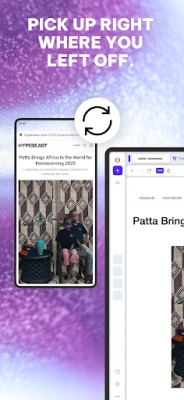
- Sync your devices: Sign in to an Opera Account and use Flow to share links, notes, and files or sync bookmarks and browsing data.
⚙️ Features
- AI browsing assistant: Ask questions, get quick explanations, summarize lengthy articles, or brainstorm ideas without leaving the browser.
- AI image generator: Turn written prompts into images for creative projects, wallpapers, or social content, subject to feature availability.
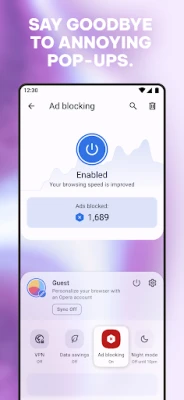
- Built-in ad blocker: Reduce many intrusive ads and pop-ups for a cleaner browsing experience. Blocking ads may also help pages load more smoothly and reduce unnecessary data use.
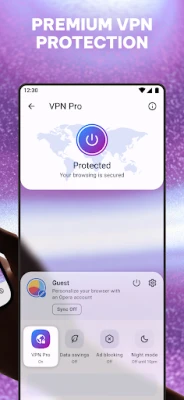
- Free built-in VPN: Encrypt your connection through Opera’s VPN feature and choose from available virtual locations. It does not require a separate VPN subscription or login, though availability and features may vary.
- Download manager and offline pages: Manage supported downloads in the background, resume interrupted transfers, and save pages to read later without an internet connection.
- Data-saving mode: Compresses web content to help reduce data use, which can be useful on limited mobile plans or slower connections.
- Opera Flow and sync: Send links, files, and notes between supported devices. Signing in can also sync items such as bookmarks and browsing history.
- Custom newsfeed and sports updates: Personalize the topics shown in your feed and follow relevant news, including sports information and alerts where available.
- Private browsing and Night Mode: Use incognito tabs for browsing sessions that are not saved to regular history, and adjust the display for more comfortable nighttime use.
- Personalization options: Customize the homepage, wallpaper, search settings, and other browser preferences to suit your needs.
✅ Pros and ❌ Cons
Pros
- Includes an ad blocker, VPN, AI tools, and download features in one browser.
- Offers helpful options for offline reading and saving pages as PDFs.
- Data compression can be useful for users on limited or slower connections.
- Flow and account sync make it easier to move between mobile and desktop devices.
- Homepage, newsfeed, and display settings offer a good level of personalization.
Cons
- Some features may vary by region, device, or app version.
- The free VPN is a browser feature, not a replacement for every use case requiring a dedicated VPN service.
- AI tools and some additional services may depend on an internet connection and may change over time.
- News, sports, and other feed content may not appeal to users who prefer a minimal browser.
- Manual APK installation carries security risks if the file comes from an unreliable source.
📋 App Details
- App Name: Opera Browser
- Current Version: Version varies by release and device; check Google Play for the latest version
- Last Updated: Varies by release; check Google Play for the latest update date
- File Size: Varies by version and device; check the installer listing before downloading
- Requires Android: Minimum Android requirement varies by release; check the current store listing or APK compatibility details
- Developer: Opera
- Content Rating: Generally suitable for a broad audience; confirm the current rating in the app listing for your region
💬 User Reviews
User feedback commonly highlights Opera’s all-in-one approach, customizable interface, ad-blocking tools, and useful options for saving or sharing content. People who use multiple devices may also appreciate Flow and account-based syncing.
Some users may prefer a simpler browser with fewer built-in features, and experiences can differ across devices and app versions. VPN availability, download behavior, and other tools may also depend on location or network conditions. Ratings and review themes change over time, so check the current store listing for the latest user feedback.
🔍 5 Best Alternative Apps
- Google Chrome: A familiar browser with Google Account syncing, translation tools, and broad compatibility with web services. It is a good fit for users who rely heavily on Google products.
- Mozilla Firefox: A flexible browser known for privacy settings, extensions on supported devices, and cross-device syncing. It suits users who want more control over how their browser works.
- Brave Browser: Focuses on privacy features and blocking many trackers and ads. It is worth considering if reducing tracking is a priority.
- Microsoft Edge: Offers syncing with a Microsoft account and features that work well with Windows and Microsoft services. It can be a convenient choice for users already in that ecosystem.
- Samsung Internet Browser: A customizable Android browser with privacy and content-blocking options. It is especially convenient for Samsung device owners, though availability depends on the device and region.
🧠 My Opinion
Opera Browser is a strong choice for Android users who want useful extras alongside standard web browsing. Its combination of an ad blocker, built-in VPN, AI assistance, data-saving tools, offline pages, and device syncing can reduce the need to switch between several apps.
It may be less appealing if you want an extremely lightweight browser or prefer to choose separate services for privacy and AI features. Overall, Opera is worth considering for people who value convenience and customization. Download it from a trusted source, review its privacy settings, and check that its features meet your needs.
🛡️ Privacy and Security
For the safest installation, download Opera through Google Play or another reputable source. If you install an APK manually, verify that it comes from a trustworthy distributor and that the file matches the intended app. Unofficial or modified APKs can contain malware, request unnecessary permissions, or put personal information at risk.
Android may ask you to allow installation from the browser or file manager used to open the APK. Enable this permission only for a trusted source, and turn it off again after installation if you do not need it. Keep the app updated, review its permissions, and remember that a VPN does not make every online activity completely anonymous or eliminate all privacy risks.
❓ Frequently Asked Questions (FAQs)
Q1: Is Opera Browser APK free to use?
A1: Opera Browser is generally available to download and use for free. Some features or services may have separate terms or availability depending on your region and version.
Q2: Does Opera Browser work offline?
A2: You need an internet connection for regular browsing and most online tools. You can save supported pages for offline reading and open them later without a connection.
Q3: Is it safe to download the Opera Browser APK?
A3: It can be safe when downloaded from a trusted source and verified before installation. Unofficial APK files may be modified or harmful, so avoid unknown download sites.
Q4: Does Opera’s free VPN protect all activity on my phone?
A4: Opera’s built-in VPN is intended for browsing within the Opera app; it should not be assumed to protect all other apps or traffic on your device. Check the current app settings for how the feature operates.
Q5: Can I sync Opera between my phone and computer?
A5: Yes. Sign in to an Opera Account on supported devices to sync available browser data and use Flow to share links, notes, and files.
Rate the App
Add Comment & Review
User Reviews
Based on 0 reviews
No reviews added yet.
Comments will not be approved to be posted if they are SPAM, abusive, off-topic, use profanity, contain a personal attack, or promote hate of any kind.









More »

Popular Apps

TradingView: Track All MarketsTradingView Inc.

Bus Fever Party!Lumi Games

Claude by AnthropicAnthropic PBC

Block Craft 3D:Building GameWildlife Studios

Malwarebytes - Mobile SecurityMalwarebytes

Block Blast!HungryStudio

Canva: AI Photo & Video EditorCanva

Candy Crush SagaKing

Carrom Pool: Disc GameMiniclip.com

EA SPORTS FC Soccer Mobile 27ELECTRONIC ARTS
More »
Editor's Choice

Kahoot! Play & Create QuizzesKahoot!

United AirlinesUnited Airlines

Tripwoa: Travel Plan & Trailtripwoa

trivago: Compare hotel pricestrivago N.V.

Planner 5D: AI Home DesignPlanner 5D

ibis Paint Xibis inc.

Agoda: Cheap Flights & Hotelsagoda.com

Hopper: Hotels, Flights & CarsHopper Inc.

Brilliant: Learn Math & CodingBrilliant.org

Google ClassroomGoogle LLC