





Latest Version
Version
158.0
158.0
Update
October 17, 2026
October 17, 2026
Developer
Mozilla
Mozilla
Categories
Internet
Internet
Platforms
Android
Android
Downloads
0
0
License
Free
Free
Package Name
org.mozilla.firefox
org.mozilla.firefox
Report
Report a Problem
Report a Problem
More About Firefox Fast & Private Browser
The internet. As it should be.
Firefox is a customizable browser with privacy protections designed to block common trackers and make everyday browsing simpler. It includes private tabs, password management, Reader View, cross-device sync, and optional extensions.
Choosing a browser means trusting it with a large part of your online life. Firefox aims to make that choice feel more user-controlled, combining everyday browsing tools with features that limit tracking and let you personalize how the web works for you.
Whether you want to read articles without clutter, keep browsing history out of private tabs, or sync bookmarks between devices, Firefox brings those tasks together in one Android app. Its focus on customization makes it a compelling option for people who want more control than a basic browser provides.
Firefox is Mozilla’s web browser for Android. It lets you visit websites, search the web, manage tabs and save bookmarks, while offering privacy tools such as Enhanced Tracking Protection and private browsing. You can also add supported extensions, adjust the browser layout, and sync selected browsing information with other devices signed in to your Firefox account.
An APK is the package file format Android uses to distribute and install apps. Installing Firefox from an APK allows manual installation, but the file should come from a trustworthy source and match your device to reduce security and compatibility risks.
Pros
Cons
Feedback about Firefox commonly highlights its privacy settings, clean browsing experience, customization, and ability to sync with desktop Firefox. Users who like extensions and a more flexible interface often value the control the browser provides.
Some users report occasional website compatibility issues, changes in the interface, or differences in speed and performance across devices. Experiences with particular extensions can also vary. App ratings and reviews change over time, so consult the current Google Play listing for the latest feedback.
Firefox is a strong everyday browser for Android users who value privacy controls, customization, and continuity across devices. Its mix of tracking protection, private tabs, password tools, extensions, and reading features makes it more than a basic way to open websites.
It may not be the ideal choice for everyone, particularly if you rely on a specific extension or prefer the closest possible integration with another platform. Still, Firefox is worth considering if you want a capable browser that gives you practical ways to shape your browsing experience and manage your privacy.
Download Firefox from Google Play or another source you trust. If you install an APK manually, verify that it comes from a reputable provider and is intended for your device. Unofficial or modified APKs can contain malware, request unsafe permissions, or expose personal data.
Android may require you to allow installation from the specific app handling the APK, sometimes described as enabling “Install unknown apps” or “Install from unknown sources.” Only grant this permission when necessary, and consider turning it off again after installation. Keep the browser and Android system updated, review app permissions, and remember that private browsing does not make you anonymous to websites, networks, or internet providers.
Q1: Is Firefox APK free to use?
A1: Firefox is generally free to download and use. Check the official app listing for current availability in your region.
Q2: Do I need an internet connection to use Firefox?
A2: An internet connection is needed to load websites and use online search. Some previously downloaded content or saved information may remain accessible offline, but browsing features are primarily online.
Q3: Is it safe to download the Firefox APK?
A3: It can be safe when obtained from a trusted source and verified as a genuine, unmodified package. Unofficial APKs may be altered or contain harmful code, so use caution.
Q4: Does private browsing make me completely anonymous?
A4: No. Private tabs help prevent browsing activity from being saved in your local history, but they do not hide your activity from websites, your network, or your internet provider.
Q5: Can I sync Firefox data between my phone and computer?
A5: Yes. Sign in to a Firefox account and choose the supported data you want to sync, such as bookmarks and tabs. Available sync options may depend on your settings and app version.
Firefox APK
📱 Firefox APK Summary
Firefox is a customizable browser with privacy protections designed to block common trackers and make everyday browsing simpler. It includes private tabs, password management, Reader View, cross-device sync, and optional extensions.
- App Name: Firefox Browser
- Current Version: Version numbers change with updates; check Google Play for the latest release.
- Last Updated: Check Google Play for the current update date.
- Category: Communication
- Developer: Mozilla
- Google Play Rating: Ratings and review counts change over time; see Google Play for the current figures.
💡 Introduction
Choosing a browser means trusting it with a large part of your online life. Firefox aims to make that choice feel more user-controlled, combining everyday browsing tools with features that limit tracking and let you personalize how the web works for you.
Whether you want to read articles without clutter, keep browsing history out of private tabs, or sync bookmarks between devices, Firefox brings those tasks together in one Android app. Its focus on customization makes it a compelling option for people who want more control than a basic browser provides.
❓ What is Firefox APK?
Firefox is Mozilla’s web browser for Android. It lets you visit websites, search the web, manage tabs and save bookmarks, while offering privacy tools such as Enhanced Tracking Protection and private browsing. You can also add supported extensions, adjust the browser layout, and sync selected browsing information with other devices signed in to your Firefox account.
An APK is the package file format Android uses to distribute and install apps. Installing Firefox from an APK allows manual installation, but the file should come from a trustworthy source and match your device to reduce security and compatibility risks.
🧑💻 How to Use
- Install Firefox: Get the app through Google Play or install a verified APK that is compatible with your Android device.
- Open the browser: Read the setup prompts, then choose whether to make Firefox your default browser.
- Search or browse: Tap the address bar, enter a website or search phrase, and choose your preferred search engine if you want to change the default.
- Manage tabs: Open new tabs for separate pages, switch between them, and use private tabs when you do not want the session saved to browsing history.
- Customize privacy and layout: Explore Settings to adjust tracking protection, move the search bar, change the home screen, or manage extensions.
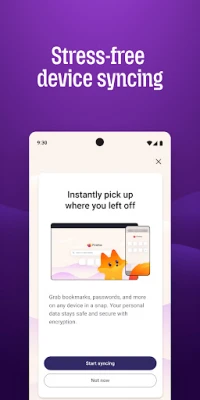
- Save and sync: Bookmark useful pages or sign in to a Firefox account to sync supported items, such as bookmarks and tabs, across devices.
- Read and watch comfortably: Use Reader View on supported pages to reduce visual clutter, or Picture-in-Picture where available to keep a video visible while multitasking.
⚙️ Features
- Enhanced Tracking Protection: Blocks many common trackers, including social media trackers, cross-site cookies, crypto miners, and fingerprinting scripts, helping limit unwanted tracking.
- Total Cookie Protection: Keeps cookies separated by website, making it harder for activity on one site to be used to track you across others.
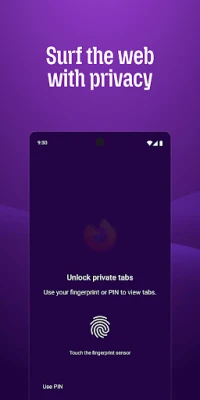
- Private browsing: Private tabs are designed not to save your browsing history, searches, or cookies after the session. You can also use device security to lock private tabs where supported.
- Password tools: Generate, save, and autofill passwords to make account sign-ins more convenient.
- Tab management and sync: Organize open pages and, with account sync enabled, continue browsing with supported data on other devices.
- Reader View and Picture-in-Picture: Reduce distractions when reading supported articles and keep compatible videos visible while using other apps.
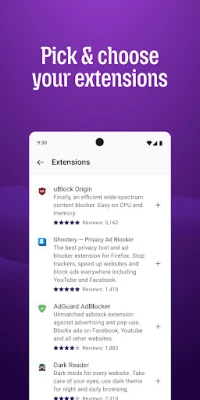
- Extensions and customization: Add supported extensions, including some content blockers, and personalize the home screen, shortcuts, settings, and search bar.
- Optional AI features: Firefox provides controls for managing available AI features, including turning them off or adjusting them where supported.
- Page summaries: A shake-to-summarize feature may be available for supported pages and app versions; availability can vary by device and release.
✅ Pros and ❌ Cons
Pros
- Includes several privacy protections enabled by default.
- Private tabs offer a convenient way to browse without adding activity to regular history.
- Supports extensions and useful display options such as Reader View.
- Password management and cross-device sync can simplify everyday browsing.
- Offers meaningful options to personalize the browser experience.
Cons
- Some websites or extensions may behave differently than they do in other browsers.
- Not every desktop extension or feature is available on Android.
- Sync requires setup and an account, and some users may prefer not to create one.
- Page-summary and AI options may vary by app version, device, or availability.
- Exact performance and compatibility can differ across Android devices and websites.
📋 App Details
- App Name: Firefox Browser
- Current Version: Varies by release; check Google Play or the app’s official listing for the latest version.
- Last Updated: Changes as Mozilla publishes updates; verify the current date in Google Play.
- File Size: Varies by version, device, and installation package.
- Requires Android: The minimum requirement can change between releases; check the current store listing or APK compatibility details.
- Developer: Mozilla
- Content Rating: Check Google Play for the current regional rating.
💬 User Reviews
Feedback about Firefox commonly highlights its privacy settings, clean browsing experience, customization, and ability to sync with desktop Firefox. Users who like extensions and a more flexible interface often value the control the browser provides.
Some users report occasional website compatibility issues, changes in the interface, or differences in speed and performance across devices. Experiences with particular extensions can also vary. App ratings and reviews change over time, so consult the current Google Play listing for the latest feedback.
🔍 5 Best Alternative Apps
- Google Chrome: A widely used browser with Google account sync, broad website compatibility, and close integration with Android services.
- Microsoft Edge: Offers browsing tools, account sync, and Microsoft service integration, making it a practical choice for people who use Windows and Microsoft products.
- Brave Browser: Focuses on privacy and includes built-in protections against many ads and trackers.
- Opera Browser: Provides a range of built-in browsing tools and customization options in a mobile-friendly interface.
- DuckDuckGo Private Browser: A privacy-focused alternative with tracker protections and a straightforward approach to private searching.
🧠 My Opinion
Firefox is a strong everyday browser for Android users who value privacy controls, customization, and continuity across devices. Its mix of tracking protection, private tabs, password tools, extensions, and reading features makes it more than a basic way to open websites.
It may not be the ideal choice for everyone, particularly if you rely on a specific extension or prefer the closest possible integration with another platform. Still, Firefox is worth considering if you want a capable browser that gives you practical ways to shape your browsing experience and manage your privacy.
🛡️ Privacy and Security
Download Firefox from Google Play or another source you trust. If you install an APK manually, verify that it comes from a reputable provider and is intended for your device. Unofficial or modified APKs can contain malware, request unsafe permissions, or expose personal data.
Android may require you to allow installation from the specific app handling the APK, sometimes described as enabling “Install unknown apps” or “Install from unknown sources.” Only grant this permission when necessary, and consider turning it off again after installation. Keep the browser and Android system updated, review app permissions, and remember that private browsing does not make you anonymous to websites, networks, or internet providers.
❓ Frequently Asked Questions (FAQs)
Q1: Is Firefox APK free to use?
A1: Firefox is generally free to download and use. Check the official app listing for current availability in your region.
Q2: Do I need an internet connection to use Firefox?
A2: An internet connection is needed to load websites and use online search. Some previously downloaded content or saved information may remain accessible offline, but browsing features are primarily online.
Q3: Is it safe to download the Firefox APK?
A3: It can be safe when obtained from a trusted source and verified as a genuine, unmodified package. Unofficial APKs may be altered or contain harmful code, so use caution.
Q4: Does private browsing make me completely anonymous?
A4: No. Private tabs help prevent browsing activity from being saved in your local history, but they do not hide your activity from websites, your network, or your internet provider.
Q5: Can I sync Firefox data between my phone and computer?
A5: Yes. Sign in to a Firefox account and choose the supported data you want to sync, such as bookmarks and tabs. Available sync options may depend on your settings and app version.
Rate the App
Add Comment & Review
User Reviews
Based on 0 reviews
No reviews added yet.
Comments will not be approved to be posted if they are SPAM, abusive, off-topic, use profanity, contain a personal attack, or promote hate of any kind.









More »

Popular Apps

TradingView: Track All MarketsTradingView Inc.

Bus Fever Party!Lumi Games

Claude by AnthropicAnthropic PBC

Block Craft 3D:Building GameWildlife Studios

Malwarebytes - Mobile SecurityMalwarebytes

Block Blast!HungryStudio

Canva: AI Photo & Video EditorCanva

Candy Crush SagaKing

Carrom Pool: Disc GameMiniclip.com

EA SPORTS FC Soccer Mobile 27ELECTRONIC ARTS
More »
Editor's Choice

Kahoot! Play & Create QuizzesKahoot!

United AirlinesUnited Airlines

Tripwoa: Travel Plan & Trailtripwoa

trivago: Compare hotel pricestrivago N.V.

Planner 5D: AI Home DesignPlanner 5D

ibis Paint Xibis inc.

Agoda: Cheap Flights & Hotelsagoda.com

Hopper: Hotels, Flights & CarsHopper Inc.

Brilliant: Learn Math & CodingBrilliant.org

Google ClassroomGoogle LLC