




Latest Version
Version
14.65.0-gn
14.65.0-gn
Update
October 17, 2026
October 17, 2026
Developer
Zhigu Corporation Limited
Zhigu Corporation Limited
Categories
Internet
Internet
Platforms
Android
Android
Downloads
0
0
License
Free
Free
Package Name
com.mi.globalbrowser
com.mi.globalbrowser
Report
Report a Problem
Report a Problem
More About Mi Browser
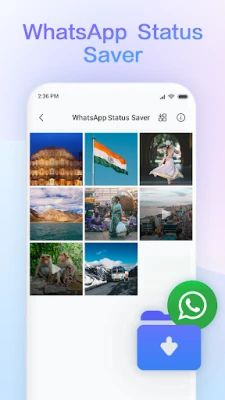
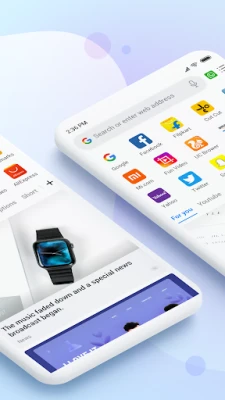
Mi Browser is a fast and secure full-featured web browser for mobile devices. Top performance and amazing user experience allow you to surf the web, use search, watch videos, shop online, and play games. Additional trendy features, such as downloading images and videos from social media, file management tools, and private folder, will have all your needs covered!
Mi Browser Pro is an Android web browser from Xiaomi that combines everyday browsing with tools for saving media, managing files, translating text, and browsing privately. Its features include incognito browsing with a control for aggregated data sharing, dark mode, voice search, and a private folder for personal files.
Mi Browser Pro is designed for Android users who want more than a basic way to open websites. Alongside standard browsing, it offers practical extras such as social media media downloads, file management, translation, and privacy controls in incognito mode.
These tools can make everyday browsing more convenient, especially for users who often save images or videos, read content in other languages, or want to keep some browsing sessions out of their history. Read on to see what the browser offers and what to consider before installing it.
Mi Browser Pro is a mobile web browser developed for Android phones. Its core purpose is to help users browse websites while providing additional tools for handling downloaded media and files. Depending on availability in your region and the app version, it can also offer instant text translation, voice search, reading mode, data-saving options, dark mode, and private browsing.
The APK is the package format Android uses to distribute and install apps. Installing an APK manually can be useful when an app is unavailable through your usual app store, but it requires extra care: the file should come from a trusted source, and its compatibility and authenticity should be checked before installation.
Pros
Cons
User feedback can differ considerably by device, region, and version. Common reasons people choose Mi Browser Pro include its convenient built-in download and file tools, simple access to browsing features, and extras such as dark mode and translation. As with many mobile browsers, some users may prefer alternatives for a different interface, more extensive customization, or their own privacy preferences. Check recent reviews for your device and region before installing, since older comments may describe a version that has since changed.
Mi Browser Pro is a practical option for Android users who want a browser with media-saving and file-management tools alongside everyday web access. Its dark mode, translation, voice search, and incognito data-sharing control add useful flexibility, although availability can depend on region and version.
It may suit users who value convenience and already use Xiaomi devices or services. Before installing, confirm the app’s current availability and compatibility, review its permissions and privacy settings, and choose an official or otherwise trusted distribution channel. If you want a straightforward browser with useful extras, Mi Browser Pro is worth considering; if privacy controls or a specific feature set is your top priority, compare it with the alternatives first.
Download Mi Browser Pro from Google Play or another source you trust, and avoid APK files from unfamiliar websites or unsolicited links. An unofficial or modified APK may contain malware, request unnecessary permissions, or put personal information at risk.
Manual APK installation may require enabling an option such as Install unknown apps for the app you use to open the installer. Android settings names can differ by version. Only grant this permission when necessary, install a file you have verified, and disable the permission again afterward. Also review the browser’s permissions and privacy settings. Incognito mode limits what is saved in the browser’s local history; it does not guarantee anonymity online.
Q1: Is Mi Browser Pro APK free to use?
A1: The app has been offered as a free browser, but availability and any included features may vary by region and version. Check the current official listing for the latest terms.
Q2: Can Mi Browser Pro download videos and images?
A2: Its described features include downloading supported videos and images from some social media services, as well as saving WhatsApp statuses. Availability may change, and downloads should follow copyright, platform rules, and privacy expectations.
Q3: Does incognito mode make my browsing completely private?
A3: No. It helps keep a session out of the browser’s regular history, but websites, network administrators, and internet providers may still be able to observe activity.
Q4: Is it safe to install the Mi Browser Pro APK?
A4: Safety depends on the APK’s authenticity and source. Prefer an official app store or a reputable distributor, check requested permissions, and avoid modified or unverified files.
Q5: Why can’t I find a particular feature or translation option?
A5: Features may differ by app version, region, Android device, or service policy. Update through a trusted source and check whether the feature is supported where you live.
Mi Browser Pro APK
📱 Mi Browser Pro APK Summary
Mi Browser Pro is an Android web browser from Xiaomi that combines everyday browsing with tools for saving media, managing files, translating text, and browsing privately. Its features include incognito browsing with a control for aggregated data sharing, dark mode, voice search, and a private folder for personal files.
- App Name: Mi Browser Pro
- Current Version: Version varies by release and device; check the listing or APK file details before downloading.
- Last Updated: The latest update date could not be independently verified.
- Category: Communication / Web Browser
- Developer: Mi Browser
- Google Play Rating: Rating and review count vary by region and listing availability; check Google Play for current figures.
💡 Introduction
Mi Browser Pro is designed for Android users who want more than a basic way to open websites. Alongside standard browsing, it offers practical extras such as social media media downloads, file management, translation, and privacy controls in incognito mode.
These tools can make everyday browsing more convenient, especially for users who often save images or videos, read content in other languages, or want to keep some browsing sessions out of their history. Read on to see what the browser offers and what to consider before installing it.
❓ What Is Mi Browser Pro APK?
Mi Browser Pro is a mobile web browser developed for Android phones. Its core purpose is to help users browse websites while providing additional tools for handling downloaded media and files. Depending on availability in your region and the app version, it can also offer instant text translation, voice search, reading mode, data-saving options, dark mode, and private browsing.
The APK is the package format Android uses to distribute and install apps. Installing an APK manually can be useful when an app is unavailable through your usual app store, but it requires extra care: the file should come from a trusted source, and its compatibility and authenticity should be checked before installation.
🧑💻 How to Use
- Install and open the browser: Install Mi Browser Pro from a trusted source, then launch it and review any permissions it requests.
- Browse the web: Enter a web address or search term in the address bar and open the results you need.
- Use private browsing: Open an incognito tab when you do not want that session added to the browser’s regular history. Review the aggregated data-sharing control available in incognito settings.
- Save supported media: When available, use the browser’s download tools to save supported videos, images, or WhatsApp statuses. Respect copyright, platform rules, and other people’s privacy.
- Manage downloads: Open the file manager to browse saved videos, audio, and images. Use the private folder for files you want kept separate from ordinary downloads.
- Translate text: Select text on a supported page and use the translation option. Availability may be limited by region; the described feature supports India, Indonesia, and Russia.
- Adjust your experience: Explore dark mode, voice search, reading mode, and data-saving settings to tailor browsing to your needs.
⚙️ Features
- Social media downloads: Save supported videos and images from services such as Facebook, Instagram, and Twitter. The browser also provides a way to save friends’ WhatsApp statuses, subject to platform availability and permissions.
- File management: Find and organize downloaded videos, audio files, and images from within the browser instead of searching through multiple folders.
- Private folder: Keep selected files in a separate folder intended for personal content. This can add convenience, but it should not be treated as a replacement for device-wide encryption.
- Incognito mode: Browse without adding the session’s searches and pages to the browser’s ordinary history. Incognito mode does not make activity invisible to websites, networks, or service providers.
- Aggregated data-sharing control: The described incognito settings let users switch aggregated data collection on or off, giving them a choice over sharing this type of usage data with Xiaomi.
- Translation: Select words or text on a page and translate them without manually copying everything into another app. Feature availability may depend on region and version.
- Dark mode: Use a darker interface that some people find more comfortable in dim surroundings.
- Voice search: Speak a search query instead of typing it, which can be useful when typing is inconvenient.
- Reading mode and data-saving options: Additional browsing tools can make pages easier to read and help reduce data use, depending on the version and settings.
✅ Pros and ❌ Cons
Pros
- Combines web browsing with file management and media-saving tools.
- Includes incognito browsing and a control for aggregated data sharing.
- Offers useful extras such as dark mode, voice search, translation, and reading mode.
- Can be convenient for users who want downloads and browsing tools in one app.
Cons
- Features and availability can vary by region, device, and app version.
- Media downloads may be subject to social platform restrictions, copyright, or privacy considerations.
- Incognito mode does not hide browsing activity from websites, internet providers, or network administrators.
- Current version details, update date, rating, and device requirements should be checked against the specific official listing or release.
- Users who install an unofficial APK take on additional security and privacy risks.
📋 App Details
- App Name: Mi Browser Pro
- Current Version: Varies by release; verify the version shown by the download source and check compatibility before installing.
- Last Updated: Not independently confirmed; consult the current store listing or release information.
- File Size: Varies by version and device architecture. Check the APK download details before installation.
- Requires Android: Minimum Android version varies by release and device; confirm the requirement for the specific version you intend to install.
- Developer: Mi Browser
- Category: Communication / Web Browser
- Content Rating: Check the current Google Play listing in your region, as the displayed rating may vary.
💬 User Reviews
User feedback can differ considerably by device, region, and version. Common reasons people choose Mi Browser Pro include its convenient built-in download and file tools, simple access to browsing features, and extras such as dark mode and translation. As with many mobile browsers, some users may prefer alternatives for a different interface, more extensive customization, or their own privacy preferences. Check recent reviews for your device and region before installing, since older comments may describe a version that has since changed.
🔍 5 Best Alternative Apps
- Google Chrome: A widely used browser with Google account syncing, tab management, and compatibility with many websites. It is a familiar option for users already using Google services.
- Mozilla Firefox: A flexible browser with privacy-focused features and support for add-ons on compatible versions. It suits users who want more control over their browsing experience.
- Microsoft Edge: A feature-rich browser with cross-device syncing and built-in productivity tools. It may be a good choice for people who also use Microsoft services.
- Opera Browser: A mobile browser that offers features such as a built-in ad blocker and data-saving tools in supported versions. Its interface and included tools make it an alternative for users seeking an all-in-one browser.
- Brave Browser: A privacy-oriented browser that blocks many trackers and intrusive ads by default. It is worth considering if reducing tracking is a priority.
🧠 My Opinion
Mi Browser Pro is a practical option for Android users who want a browser with media-saving and file-management tools alongside everyday web access. Its dark mode, translation, voice search, and incognito data-sharing control add useful flexibility, although availability can depend on region and version.
It may suit users who value convenience and already use Xiaomi devices or services. Before installing, confirm the app’s current availability and compatibility, review its permissions and privacy settings, and choose an official or otherwise trusted distribution channel. If you want a straightforward browser with useful extras, Mi Browser Pro is worth considering; if privacy controls or a specific feature set is your top priority, compare it with the alternatives first.
🛡️ Privacy and Security
Download Mi Browser Pro from Google Play or another source you trust, and avoid APK files from unfamiliar websites or unsolicited links. An unofficial or modified APK may contain malware, request unnecessary permissions, or put personal information at risk.
Manual APK installation may require enabling an option such as Install unknown apps for the app you use to open the installer. Android settings names can differ by version. Only grant this permission when necessary, install a file you have verified, and disable the permission again afterward. Also review the browser’s permissions and privacy settings. Incognito mode limits what is saved in the browser’s local history; it does not guarantee anonymity online.
❓ Frequently Asked Questions (FAQs)
Q1: Is Mi Browser Pro APK free to use?
A1: The app has been offered as a free browser, but availability and any included features may vary by region and version. Check the current official listing for the latest terms.
Q2: Can Mi Browser Pro download videos and images?
A2: Its described features include downloading supported videos and images from some social media services, as well as saving WhatsApp statuses. Availability may change, and downloads should follow copyright, platform rules, and privacy expectations.
Q3: Does incognito mode make my browsing completely private?
A3: No. It helps keep a session out of the browser’s regular history, but websites, network administrators, and internet providers may still be able to observe activity.
Q4: Is it safe to install the Mi Browser Pro APK?
A4: Safety depends on the APK’s authenticity and source. Prefer an official app store or a reputable distributor, check requested permissions, and avoid modified or unverified files.
Q5: Why can’t I find a particular feature or translation option?
A5: Features may differ by app version, region, Android device, or service policy. Update through a trusted source and check whether the feature is supported where you live.
Rate the App
Add Comment & Review
User Reviews
Based on 0 reviews
No reviews added yet.
Comments will not be approved to be posted if they are SPAM, abusive, off-topic, use profanity, contain a personal attack, or promote hate of any kind.










More »

Popular Apps

TradingView: Track All MarketsTradingView Inc.

Bus Fever Party!Lumi Games

Claude by AnthropicAnthropic PBC

Block Craft 3D:Building GameWildlife Studios

Malwarebytes - Mobile SecurityMalwarebytes

Block Blast!HungryStudio

Canva: AI Photo & Video EditorCanva

Candy Crush SagaKing

Carrom Pool: Disc GameMiniclip.com

EA SPORTS FC Soccer Mobile 27ELECTRONIC ARTS
More »
Editor's Choice

Kahoot! Play & Create QuizzesKahoot!

United AirlinesUnited Airlines

Tripwoa: Travel Plan & Trailtripwoa

trivago: Compare hotel pricestrivago N.V.

Planner 5D: AI Home DesignPlanner 5D

ibis Paint Xibis inc.

Agoda: Cheap Flights & Hotelsagoda.com

Hopper: Hotels, Flights & CarsHopper Inc.

Brilliant: Learn Math & CodingBrilliant.org

Google ClassroomGoogle LLC