




Latest Version
Version
9.30.2
9.30.2
Update
October 19, 2026
October 19, 2026
Developer
Direct Cursus Computer Systems Trading LLC
Direct Cursus Computer Systems Trading LLC
Categories
E-mail
Platforms
Android
Android
Downloads
0
0
License
Free
Free
Package Name
ru.yandex.mail
ru.yandex.mail
Report
Report a Problem
Report a Problem
More About Yandex Mail: Email & Cloud
Try Yandex Mail, a free email service for work and personal messages, with protection against spam and viruses.
Yandex Mail brings email, calendars, cloud files, documents, and notes together in one Android app. It helps users manage several inboxes, reduce unwanted mail, and keep up with messages—even when they are temporarily offline.
Keeping up with multiple email accounts, appointments, and important files can quickly become a chore. Yandex Mail aims to make that easier by combining inbox management with useful tools such as a calendar, cloud storage, document editing, and translation.
Its practical features—including spam filtering, offline access to received messages, and automatic inbox rules—make it a useful option for people who want more than a basic email app. Whether you use email for work, study, or everyday communication, Yandex Mail puts several common tasks within easy reach.
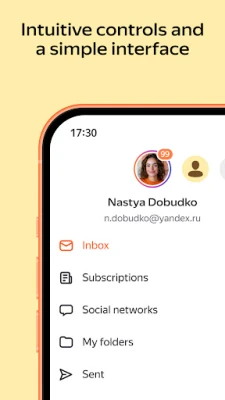
Yandex Mail is an email and productivity app for Android. You can use it to manage a Yandex mailbox and add accounts from supported email providers, helping bring messages from different addresses into one place. The app also connects email with Yandex Calendar, Yandex Disk, and Yandex Documents, so you can handle messages, files, and everyday planning from a shared interface.
An APK is the package file format Android uses to distribute and install apps. Installing an APK manually can be useful when an app is unavailable through your usual app store, but it is important to obtain the file from a trustworthy source and verify that it is genuine and up to date.
Pros
Cons
User feedback commonly values Yandex Mail for bringing several inboxes together and offering practical extras such as offline reading, message filtering, and connections to Yandex’s productivity services. People who regularly handle attachments, appointments, or messages in different languages may find the integrated tools especially convenient.
As with many email apps, some users may encounter account setup or synchronization issues, or prefer a simpler interface with fewer connected services. Experiences can differ by device, app version, email provider, and region, so checking recent reviews for your specific setup is worthwhile.
Yandex Mail is a capable option for anyone looking to bring email and everyday productivity tools together. Its strongest advantages are multi-account support, automatic sorting, offline access, and connections to calendar, cloud storage, and document tools.
It is particularly suitable for people who already use Yandex services or who want more organization than a basic inbox provides. If you prefer a minimal email client, or have strict requirements around data handling, compare its privacy options and service terms with those of other providers before choosing it. Overall, Yandex Mail is worth considering if its integrated tools match the way you work.
For the safest installation, download Yandex Mail through a trusted app store or obtain its APK only from a reputable source. Unofficial or modified APK files may contain malware, make unwanted changes, or put account and personal data at risk. Check the app’s name, developer, version, and requested permissions before installing.
Manual APK installation may require enabling permission to install unknown apps for the specific browser or file manager you are using. Android labels this setting differently across versions. Enable it only when necessary, install a file you trust, and turn the permission off again afterward. Keep Android and the app updated, use a strong account password, and review security and privacy settings regularly.
Q1: Is Yandex Mail APK free to use?
A1: The core email app is generally available at no charge. Some additional tools or storage options may be part of Yandex 360 plans, depending on availability.
Q2: Can I use Yandex Mail without an internet connection?
A2: You can read messages that have already been received and are available on your device. Emails composed offline can be sent when the device reconnects to the internet.
Q3: Can I add accounts from other email providers?
A3: The app supports adding accounts from providers such as Gmail, Outlook, Yahoo, Rambler, Mail, and iCloud. Setup and available functions may depend on each provider’s settings.
Q4: Is it safe to download the Yandex Mail APK?
A4: The app’s safety depends partly on where you get it. Use an official store or a reputable APK source, avoid modified packages, and review permissions before installation.
Q5: Does Yandex Mail include a calendar and document tools?
A5: Yandex Mail connects with Yandex Calendar, Yandex Disk, and Yandex Documents for events, cloud files, and supported documents. The exact tools available may vary by account, region, and app version.
Yandex Mail APK
📱 Yandex Mail APK Summary
Yandex Mail brings email, calendars, cloud files, documents, and notes together in one Android app. It helps users manage several inboxes, reduce unwanted mail, and keep up with messages—even when they are temporarily offline.
- App Name: Yandex Mail
- Current Version: Version varies by device and rollout; check the latest listing before downloading
- Last Updated: The date varies by release; check the current app listing
- Category: Communication
- Developer: Direct Cursus Computer Systems Trading LLC (Yandex)
- Google Play Rating: Rating and review count change over time; consult Google Play for the current figures
💡 Introduction
Keeping up with multiple email accounts, appointments, and important files can quickly become a chore. Yandex Mail aims to make that easier by combining inbox management with useful tools such as a calendar, cloud storage, document editing, and translation.
Its practical features—including spam filtering, offline access to received messages, and automatic inbox rules—make it a useful option for people who want more than a basic email app. Whether you use email for work, study, or everyday communication, Yandex Mail puts several common tasks within easy reach.
❓ What Is Yandex Mail APK?
Yandex Mail is an email and productivity app for Android. You can use it to manage a Yandex mailbox and add accounts from supported email providers, helping bring messages from different addresses into one place. The app also connects email with Yandex Calendar, Yandex Disk, and Yandex Documents, so you can handle messages, files, and everyday planning from a shared interface.
An APK is the package file format Android uses to distribute and install apps. Installing an APK manually can be useful when an app is unavailable through your usual app store, but it is important to obtain the file from a trustworthy source and verify that it is genuine and up to date.
🧑💻 How to Use
- Install and open the app: Download Yandex Mail from a trusted source, install it, and launch it on your Android device.
- Sign in or add an account: Log in with your Yandex account, or add a supported mailbox such as Gmail, Outlook, Yahoo, Rambler, Mail, or iCloud. Available account options may depend on provider settings.
- Browse your inbox: Open messages, use search to find specific emails, and tap attachments to view or download them.
- Write and reply: Tap the compose button to send a message. When replying, use the suggested responses if they fit, or write your own text.
- Organize messages: Create folders and rules to sort incoming email, forward selected messages, or set up automatic replies. You can also manage newsletter subscriptions in the app settings.
- Use connected tools: Add calendar events, work with files in Yandex Disk, edit supported documents, or attach a scan created with the built-in scanner.
- Check mail offline: Previously received messages may remain available without a connection. Messages you compose offline can be sent when internet access returns.
⚙️ Features
- Spam and virus filtering: Automated filters help keep unwanted or potentially harmful messages out of the main inbox.
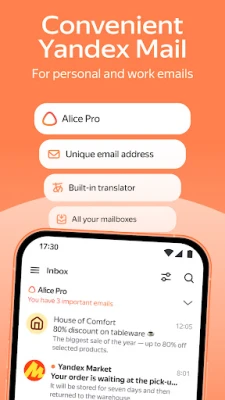
- Multiple mailbox support: Add compatible accounts from several email providers so you can check different addresses in one app.
- Offline access: Read messages that have already been received when you temporarily lose connectivity. Outgoing mail can be sent once the device reconnects.
- Smart replies and quick browsing: Suggested responses and a streamlined inbox make it easier to handle routine messages while on the move.
- Automatic organization: Set rules to sort emails into folders, forward messages, or activate an automatic reply without repeating the same steps manually.
- Built-in translation: Translate messages into your language to make correspondence in other languages easier to understand.
- Connected productivity tools: Use Yandex Calendar, Disk, and Documents for events, cloud files, and supported office documents without treating email as a separate task.
- Document scanning: Scan a document or photo with the app and attach the resulting file to an email.
- Privacy options and data backup: The app description highlights PIN sign-in and copies of email data and attachments stored in Yandex data centers. Review account and device security settings to choose options that suit you.
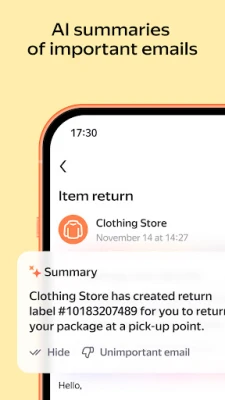
- Optional Yandex 360 features: Depending on plan availability, extra tools may include AI-assisted email summaries and replies, custom email addresses, and approval controls for promotional newsletters.
✅ Pros and ❌ Cons
Pros
- Combines email with calendar, cloud storage, documents, and notes.
- Supports adding several mailboxes in one place.
- Offline access can be helpful during commutes or temporary network outages.
- Rules and newsletter controls can reduce manual inbox cleanup.
- Translation, scanning, and attachment tools are useful for everyday work.
Cons
- Some advanced tools are tied to Yandex 360 and may require a paid plan or have regional availability limits.
- Users who only need basic email may find the collection of extra services unnecessary.
- Features and account setup can vary depending on the email provider, device, and region.
- As with any cloud-based email service, users should review privacy settings and consider where their data is stored.
- Current version, compatibility, rating, and file size can change with updates, so they should be checked before installation.
📋 App Details
- App Name: Yandex Mail
- Current Version: Version varies by device and rollout
- Last Updated: Check the current store listing for the latest release date
- File Size: Varies by version, device, and installation package
- Requires Android: Minimum Android requirement varies by release; check compatibility on the download listing before installing
- Developer: Direct Cursus Computer Systems Trading LLC (Yandex)
- Content Rating: Generally suitable for a broad audience; confirm the current rating in your app store
- Category: Communication
💬 User Reviews
User feedback commonly values Yandex Mail for bringing several inboxes together and offering practical extras such as offline reading, message filtering, and connections to Yandex’s productivity services. People who regularly handle attachments, appointments, or messages in different languages may find the integrated tools especially convenient.
As with many email apps, some users may encounter account setup or synchronization issues, or prefer a simpler interface with fewer connected services. Experiences can differ by device, app version, email provider, and region, so checking recent reviews for your specific setup is worthwhile.
🔍 5 Best Alternative Apps
- Gmail: Google’s email app supports Gmail and other accounts, with inbox organization, search, and integration with Google services. It is a natural alternative for users already working in Google’s ecosystem.
- Microsoft Outlook: Outlook combines email and calendar features and supports multiple accounts. It is a strong choice for users who rely on Microsoft 365 or want a familiar work-focused inbox.
- Yahoo Mail: Yahoo Mail provides mailbox management, search, and account features for Yahoo users, with support for adding other email accounts depending on availability.
- Proton Mail: Proton Mail focuses on privacy and encrypted email features. It may suit users who prioritize confidential communication, though its services and features differ from Yandex Mail’s broader productivity tools.
- FairEmail: FairEmail is an Android email client designed for users who want detailed control over mail accounts and settings. Its approach is more configurable and may appeal to people comfortable adjusting technical options.
🧠 My Opinion
Yandex Mail is a capable option for anyone looking to bring email and everyday productivity tools together. Its strongest advantages are multi-account support, automatic sorting, offline access, and connections to calendar, cloud storage, and document tools.
It is particularly suitable for people who already use Yandex services or who want more organization than a basic inbox provides. If you prefer a minimal email client, or have strict requirements around data handling, compare its privacy options and service terms with those of other providers before choosing it. Overall, Yandex Mail is worth considering if its integrated tools match the way you work.
🛡️ Privacy and Security
For the safest installation, download Yandex Mail through a trusted app store or obtain its APK only from a reputable source. Unofficial or modified APK files may contain malware, make unwanted changes, or put account and personal data at risk. Check the app’s name, developer, version, and requested permissions before installing.
Manual APK installation may require enabling permission to install unknown apps for the specific browser or file manager you are using. Android labels this setting differently across versions. Enable it only when necessary, install a file you trust, and turn the permission off again afterward. Keep Android and the app updated, use a strong account password, and review security and privacy settings regularly.
❓ Frequently Asked Questions (FAQs)
Q1: Is Yandex Mail APK free to use?
A1: The core email app is generally available at no charge. Some additional tools or storage options may be part of Yandex 360 plans, depending on availability.
Q2: Can I use Yandex Mail without an internet connection?
A2: You can read messages that have already been received and are available on your device. Emails composed offline can be sent when the device reconnects to the internet.
Q3: Can I add accounts from other email providers?
A3: The app supports adding accounts from providers such as Gmail, Outlook, Yahoo, Rambler, Mail, and iCloud. Setup and available functions may depend on each provider’s settings.
Q4: Is it safe to download the Yandex Mail APK?
A4: The app’s safety depends partly on where you get it. Use an official store or a reputable APK source, avoid modified packages, and review permissions before installation.
Q5: Does Yandex Mail include a calendar and document tools?
A5: Yandex Mail connects with Yandex Calendar, Yandex Disk, and Yandex Documents for events, cloud files, and supported documents. The exact tools available may vary by account, region, and app version.
Rate the App
Add Comment & Review
User Reviews
Based on 0 reviews
No reviews added yet.
Comments will not be approved to be posted if they are SPAM, abusive, off-topic, use profanity, contain a personal attack, or promote hate of any kind.






More »

Popular Apps

TradingView: Track All MarketsTradingView Inc.

Bus Fever Party!Lumi Games

Claude by AnthropicAnthropic PBC

Block Craft 3D:Building GameWildlife Studios

Malwarebytes - Mobile SecurityMalwarebytes

Block Blast!HungryStudio

Canva: AI Photo & Video EditorCanva

Candy Crush SagaKing

Carrom Pool: Disc GameMiniclip.com

EA SPORTS FC Soccer Mobile 27ELECTRONIC ARTS
More »
Editor's Choice

Kahoot! Play & Create QuizzesKahoot!

United AirlinesUnited Airlines

Tripwoa: Travel Plan & Trailtripwoa

trivago: Compare hotel pricestrivago N.V.

Planner 5D: AI Home DesignPlanner 5D

ibis Paint Xibis inc.

Agoda: Cheap Flights & Hotelsagoda.com

Hopper: Hotels, Flights & CarsHopper Inc.

Brilliant: Learn Math & CodingBrilliant.org

Google ClassroomGoogle LLC