




Latest Version
Version
15.108.0.148470
15.108.0.148470
Update
October 17, 2026
October 17, 2026
Developer
VKL
VKL
Categories
E-mail
Platforms
Android
Android
Downloads
1
1
License
Free
Free
Package Name
ru.mail.mailapp
ru.mail.mailapp
Report
Report a Problem
Report a Problem
More About Mail: Email, Cloud, Calendar
Mail is now more than just an email client. Mail is a set of services for a productive life and work. For you in a single application: fast Mail service, a convenient Calendar, Notes, Cloud for photos, Documents, Shopping, News.
Mail.ru Mail is an email and productivity app that brings messages from multiple providers into one inbox. It also includes tools such as email summaries, translation, a calendar, notes, weather, news, and cloud storage.
Managing email accounts from different providers can mean switching between apps, missing messages, and losing track of important tasks. Mail.ru Mail aims to simplify that routine by bringing supported inboxes together with everyday planning tools in one Android app.
Beyond email, the app offers features such as message translation, configurable notifications, a calendar, and cloud storage. It is designed for people who want a single place to keep up with personal and work correspondence.
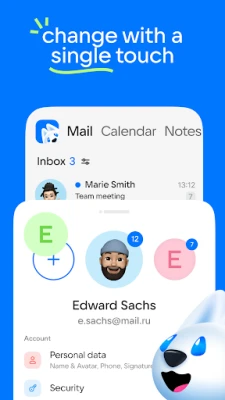
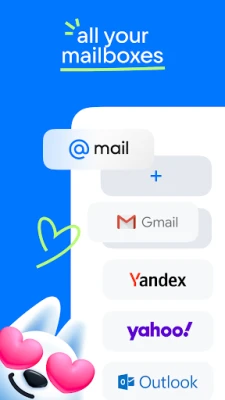
Mail.ru Mail is an email client for Android that supports Mail.ru accounts and other services compatible with protocols such as IMAP, POP, and SMTP. It can bring messages from providers including Gmail, Yahoo, Microsoft Outlook, Hotmail, Yandex Mail, Rambler, and Zimbra into one application. Its organizational tools group emails into threads and sort certain types of messages, such as newsletters and notifications, into folders.
An APK is the Android application package format. It contains the files needed to install an app on an Android device, and installing one manually is an alternative to downloading the app through an app store. Always verify that an APK is authentic and comes from a trustworthy source.
Pros
Cons
Feedback for email clients commonly reflects how well they balance convenience, reliability, and account compatibility. Users tend to value having multiple inboxes in one app, clear message organization, flexible notifications, and quick access to email on the go. Mail.ru Mail’s extra tools may also appeal to people who prefer keeping email and planning features together.
Possible frustrations with a multi-service email app include account setup issues, notification behavior, changes after updates, or features that do not work identically across every provider. Review scores and individual experiences can change, so check recent Google Play feedback for current reports about compatibility and performance on your device.
Mail.ru Mail is a versatile option for Android users who want to manage several compatible inboxes without constantly switching applications. Its combination of email organization, translation, offline access, calendar tools, and cloud storage gives it more range than a basic mail client.
The best fit is someone who will actually use those additional tools and is comfortable connecting their email accounts to one application. Before adding work or personal inboxes, review the permissions and privacy information, and confirm that the latest version supports your providers. If you want a single hub for messages and everyday planning, Mail.ru Mail is worth considering.
Email apps can access sensitive messages and account information, so use a strong password and enable two-factor authentication with your email provider whenever possible. Review the app’s permissions and privacy settings, and avoid connecting accounts you do not want managed through a third-party client.
For manual installation, download the APK only from a source you trust and verify that the file is genuine. Android may require you to allow installation from that particular source in its settings; this permission can increase risk if used carelessly, so disable it again when you are finished. Unofficial or modified APKs may contain malware, expose personal data, or fail to receive security updates.
Q1: Is Mail.ru Mail free to use?
A1: The app is generally offered as a free download. Some services or features may have separate terms, limits, or availability depending on your account and region.
Q2: Can I add Gmail, Outlook, Yahoo, and other accounts?
A2: The app description lists support for services including Gmail, Microsoft Outlook, Yahoo, Yandex Mail, Hotmail, Rambler, and Zimbra. Account setup can vary, and some providers may require additional authentication steps.
Q3: Does Mail.ru Mail work offline?
A3: You can read messages that have already been synchronized and saved on your device. Sending or receiving new email and accessing online services requires an internet connection.
Q4: What Android version does the app require?
A4: The supplied description states that the app is compatible with Android 7.0 and higher. Check the current store listing for requirements that apply to the latest release.
Q5: Is it safe to install the Mail.ru Mail APK?
A5: Safety depends on where the APK comes from and whether it is authentic. Prefer the official app store or a reputable source, avoid modified packages, and review permissions before signing in to your email accounts.
Mail.ru Mail APK
📱 Mail.ru Mail APK Summary
Mail.ru Mail is an email and productivity app that brings messages from multiple providers into one inbox. It also includes tools such as email summaries, translation, a calendar, notes, weather, news, and cloud storage.
- App Name: Mail.ru Mail
- Current Version: Version varies by release; check the latest listing or app package before downloading
- Last Updated: Changes by release; verify the current date in the official app listing
- Category: Communication
- Developer: VK LLC (formerly Mail.Ru Group)
- Google Play Rating: Ratings and review totals change over time; check Google Play for the current figures
💡 Introduction
Managing email accounts from different providers can mean switching between apps, missing messages, and losing track of important tasks. Mail.ru Mail aims to simplify that routine by bringing supported inboxes together with everyday planning tools in one Android app.
Beyond email, the app offers features such as message translation, configurable notifications, a calendar, and cloud storage. It is designed for people who want a single place to keep up with personal and work correspondence.
❓ What is Mail.ru Mail APK?
Mail.ru Mail is an email client for Android that supports Mail.ru accounts and other services compatible with protocols such as IMAP, POP, and SMTP. It can bring messages from providers including Gmail, Yahoo, Microsoft Outlook, Hotmail, Yandex Mail, Rambler, and Zimbra into one application. Its organizational tools group emails into threads and sort certain types of messages, such as newsletters and notifications, into folders.
An APK is the Android application package format. It contains the files needed to install an app on an Android device, and installing one manually is an alternative to downloading the app through an app store. Always verify that an APK is authentic and comes from a trustworthy source.
🧑💻 How to Use
- Install and open the app: Download Mail.ru Mail from a trusted app store or APK provider, then launch it.
- Add an email account: Sign in with a supported provider. If your service is not listed, check whether it supports IMAP, POP, or SMTP setup.
- Review your inbox: Read, reply to, or compose messages. Use the available folders and conversation threads to find related mail.
- Set notifications: Choose which folders should send push notifications and adjust notification timing to suit your routine.
- Organize messages: Mark important emails, move them to folders, delete them, or leave them unread using the message actions.
- Use the extra tools: Explore the calendar, notes, translation, weather, news, and cloud features where available.
- Enable offline reading: Let the app store messages locally so previously synchronized mail can be read when you do not have a connection.
⚙️ Features
- Multiple email accounts: Connect several supported email services and switch between accounts without repeatedly opening separate apps.
- Email threads and sorting: Related messages can be grouped into conversations, while newsletters and certain notifications are organized into categories or folders.
- AI-assisted email summaries: The app can provide a short overview of long messages, helping you scan their main points more quickly. Availability may depend on the current app version and service.
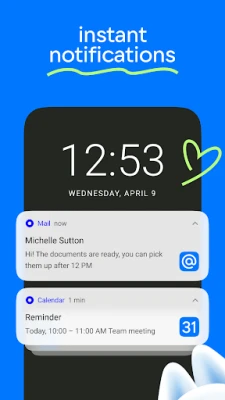
- Custom notifications: Choose which folders trigger alerts and set notification preferences to reduce unnecessary interruptions.
- Translation tools: Translate email text or a message you are writing into another language, which can be useful for international correspondence.
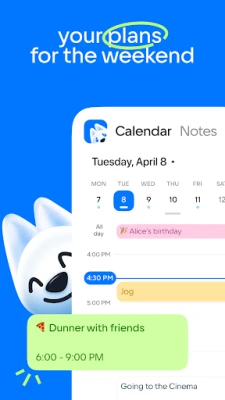
- Calendar and planning tools: Keep track of meetings, plans, reminders, and important dates. The app description also highlights vacation-planning guidance based on salary and calendar dates.
- Cloud storage: Store photos, videos, documents, and scans in the cloud, and use it to help free up space on your phone.
- Offline email access: Previously synchronized messages can be saved locally for reading when a network connection is unavailable.
- Light and dark themes: Choose a brighter interface during the day or a darker appearance when it is more comfortable for your eyes.
- Address book suggestions: When composing an email, the app can suggest contacts from your address book and connected accounts.
✅ Pros and ❌ Cons
Pros
- Combines several supported email accounts in one interface.
- Includes practical tools for sorting, searching, and managing messages.
- Offers configurable notifications and offline reading for synchronized mail.
- Includes useful extras such as a calendar, translation, notes, and cloud storage.
- Supports both light and dark interface options.
Cons
- Some features may be available only in particular regions, accounts, or app versions.
- Connecting third-party accounts may require extra permissions or provider-specific setup.
- The range of built-in services may feel crowded if you only need a basic email client.
- Offline access applies to messages already synchronized; it does not provide full email service without internet.
- Users should review account permissions and privacy settings before connecting sensitive inboxes.
📋 App Details
- App Name: Mail.ru Mail
- Current Version: Varies by release; confirm the version on the official listing or the app’s package details
- Last Updated: Varies; check the current listing for the latest update date
- File Size: Varies by version and device; check the download details before installing
- Requires Android: Android 7.0 or higher, according to the supplied app description
- Developer: VK LLC (formerly Mail.Ru Group)
- Content Rating: Check the current store listing for the applicable rating in your region
- Category: Communication
💬 User Reviews
Feedback for email clients commonly reflects how well they balance convenience, reliability, and account compatibility. Users tend to value having multiple inboxes in one app, clear message organization, flexible notifications, and quick access to email on the go. Mail.ru Mail’s extra tools may also appeal to people who prefer keeping email and planning features together.
Possible frustrations with a multi-service email app include account setup issues, notification behavior, changes after updates, or features that do not work identically across every provider. Review scores and individual experiences can change, so check recent Google Play feedback for current reports about compatibility and performance on your device.
🔍 5 Best Alternative Apps
- Microsoft Outlook: A popular email and calendar app that supports Outlook accounts and many other providers. It is a strong option for users who want a polished inbox alongside scheduling tools.
- Gmail: Google’s email app supports Gmail and can connect to other email accounts. It suits users who rely on Google services and want familiar inbox organization.
- Yahoo Mail: Yahoo’s app provides access to Yahoo Mail and offers inbox-management features. It may be a convenient choice for people who primarily use a Yahoo account.
- BlueMail: A multi-account email client designed to bring messages from various providers into one interface. It is worth considering if broad account support is a priority.
- Proton Mail: An email service focused on privacy, with its own secure mailbox and encrypted messaging features. It is a different fit from a general-purpose aggregator but may appeal to users prioritizing privacy.
🧠 My Opinion
Mail.ru Mail is a versatile option for Android users who want to manage several compatible inboxes without constantly switching applications. Its combination of email organization, translation, offline access, calendar tools, and cloud storage gives it more range than a basic mail client.
The best fit is someone who will actually use those additional tools and is comfortable connecting their email accounts to one application. Before adding work or personal inboxes, review the permissions and privacy information, and confirm that the latest version supports your providers. If you want a single hub for messages and everyday planning, Mail.ru Mail is worth considering.
🛡️ Privacy and Security
Email apps can access sensitive messages and account information, so use a strong password and enable two-factor authentication with your email provider whenever possible. Review the app’s permissions and privacy settings, and avoid connecting accounts you do not want managed through a third-party client.
For manual installation, download the APK only from a source you trust and verify that the file is genuine. Android may require you to allow installation from that particular source in its settings; this permission can increase risk if used carelessly, so disable it again when you are finished. Unofficial or modified APKs may contain malware, expose personal data, or fail to receive security updates.
❓ Frequently Asked Questions (FAQs)
Q1: Is Mail.ru Mail free to use?
A1: The app is generally offered as a free download. Some services or features may have separate terms, limits, or availability depending on your account and region.
Q2: Can I add Gmail, Outlook, Yahoo, and other accounts?
A2: The app description lists support for services including Gmail, Microsoft Outlook, Yahoo, Yandex Mail, Hotmail, Rambler, and Zimbra. Account setup can vary, and some providers may require additional authentication steps.
Q3: Does Mail.ru Mail work offline?
A3: You can read messages that have already been synchronized and saved on your device. Sending or receiving new email and accessing online services requires an internet connection.
Q4: What Android version does the app require?
A4: The supplied description states that the app is compatible with Android 7.0 and higher. Check the current store listing for requirements that apply to the latest release.
Q5: Is it safe to install the Mail.ru Mail APK?
A5: Safety depends on where the APK comes from and whether it is authentic. Prefer the official app store or a reputable source, avoid modified packages, and review permissions before signing in to your email accounts.
Rate the App
Add Comment & Review
User Reviews
Based on 0 reviews
No reviews added yet.
Comments will not be approved to be posted if they are SPAM, abusive, off-topic, use profanity, contain a personal attack, or promote hate of any kind.






More »

Popular Apps

TradingView: Track All MarketsTradingView Inc.

Bus Fever Party!Lumi Games

Claude by AnthropicAnthropic PBC

Block Craft 3D:Building GameWildlife Studios

Malwarebytes - Mobile SecurityMalwarebytes

Block Blast!HungryStudio

Canva: AI Photo & Video EditorCanva

Candy Crush SagaKing

Carrom Pool: Disc GameMiniclip.com

EA SPORTS FC Soccer Mobile 27ELECTRONIC ARTS
More »
Editor's Choice

Kahoot! Play & Create QuizzesKahoot!

United AirlinesUnited Airlines

Tripwoa: Travel Plan & Trailtripwoa

trivago: Compare hotel pricestrivago N.V.

Planner 5D: AI Home DesignPlanner 5D

ibis Paint Xibis inc.

Agoda: Cheap Flights & Hotelsagoda.com

Hopper: Hotels, Flights & CarsHopper Inc.

Brilliant: Learn Math & CodingBrilliant.org

Google ClassroomGoogle LLC