


Latest Version
Version
6.2.13.1
6.2.13.1
Update
October 17, 2026
October 17, 2026
Developer
Samsung Electronics Co., Ltd.
Samsung Electronics Co., Ltd.
Categories
E-mail
Platforms
Android
Android
Downloads
0
0
License
Free
Free
Package Name
com.samsung.android.email.provider
com.samsung.android.email.provider
Report
Report a Problem
Report a Problem
More About Samsung Email
This update is available for Samsung Mobile with Android OS.
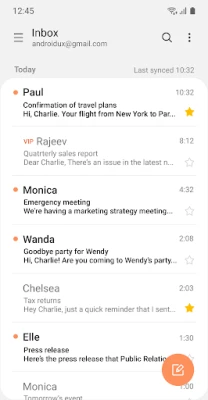
Samsung Email is an Android email client for managing personal and work inboxes in one place. It supports common email protocols, Exchange synchronization, and security and organization tools for handling messages.
Keeping up with messages across personal and business accounts can quickly become inconvenient. Samsung Email brings supported inboxes together in a single app, with familiar email tools alongside features for Exchange users, including synchronization for calendars, contacts, and tasks.
Its practical appeal lies in the balance between everyday convenience and business-focused controls. Customizable notifications, conversation views, spam management, and S/MIME email encryption help users organize correspondence and, where supported, protect sensitive communications.
Samsung Email is an email application designed for Android devices. It can connect to personal accounts using POP3 or IMAP and to compatible business accounts through Exchange ActiveSync (EAS). Depending on the account and organization’s configuration, users can manage messages and synchronize associated information such as calendars, contacts, and tasks.
An APK is the Android application package format used to distribute and install apps. Installing Samsung Email from an APK is a manual installation method; it may require allowing installs from the source app in Android settings. For the safest and simplest update experience, use an official app store when the app is available for your device.
Pros
Cons
User feedback can vary across devices and app releases, so it is best to check the latest reviews in your region before installing. Common reasons people choose Samsung Email include having multiple accounts in one place, useful message organization, and support for work accounts. As with email clients generally, users may also report account-setup difficulties, synchronization or notification issues, or changes in behavior after an update. Experiences can depend on the email provider, device settings, and workplace policies.
Samsung Email is a practical choice for Android users who want a single app for personal correspondence and, where supported, workplace email. Its combination of POP3 and IMAP support, Exchange synchronization, conversation views, and configurable alerts covers the needs of many everyday users, while S/MIME and policy support add value for compatible business environments.
It is especially worth considering if you use a Samsung device or need to connect to an Exchange account. Before installing an APK manually, verify that it is compatible with your device and comes from a trustworthy source. For most users, the official store is the best place to get the current version.
Email apps may handle sensitive messages and account information, so download Samsung Email from an official store or another source you trust. Unofficial or modified APKs can contain malware or expose personal data. If you install an APK manually, Android may ask you to allow installation from the specific source app; enable this only when necessary and turn it off afterward if you do not need it.
Review optional permissions carefully and grant access only when you want the related feature. For example, contacts and calendar access may be used for Exchange synchronization, while camera, location, and file access may support attachments. S/MIME protection depends on compatible certificates, accounts, and configuration; it does not automatically encrypt every message.
Q1: Is Samsung Email free to use?
A1: Samsung Email is generally available as a free app through supported official stores. Your email provider or mobile plan may have separate fees or conditions.
Q2: Can I use Samsung Email with a non-Samsung Android phone?
A2: Availability and compatibility can vary by device, Android version, and region. Check the official store listing on your phone to see whether it can be installed.
Q3: Does Samsung Email work without an internet connection?
A3: You may be able to read messages that are already stored on your device, but sending and receiving email and syncing account data generally require an internet connection.
Q4: Does the app require access to my contacts or calendar?
A4: The supplied app information lists no required permissions. Contacts and calendar access are optional and may be used for features such as Exchange synchronization; you can decline them if you do not need those features.
Q5: Is it safe to install the Samsung Email APK?
A5: Safety depends on the APK’s source and integrity. Prefer an official app store; unofficial files may be outdated, altered, or harmful. If you install manually, use a trusted source and review permissions carefully.
Samsung Email APK
📱 Samsung Email APK Summary
Samsung Email is an Android email client for managing personal and work inboxes in one place. It supports common email protocols, Exchange synchronization, and security and organization tools for handling messages.
- App Name: Samsung Email
- Current Version: Version varies by device and release; check the Google Play Store or Galaxy Store for the latest version available to you.
- Last Updated: The latest update date varies by store and region.
- Category: Productivity
- Developer: Samsung Electronics Co., Ltd.
- Google Play Rating: Rating and review count change over time and may vary by region; check the current Google Play listing.
💡 Introduction
Keeping up with messages across personal and business accounts can quickly become inconvenient. Samsung Email brings supported inboxes together in a single app, with familiar email tools alongside features for Exchange users, including synchronization for calendars, contacts, and tasks.
Its practical appeal lies in the balance between everyday convenience and business-focused controls. Customizable notifications, conversation views, spam management, and S/MIME email encryption help users organize correspondence and, where supported, protect sensitive communications.
❓ What Is Samsung Email APK?
Samsung Email is an email application designed for Android devices. It can connect to personal accounts using POP3 or IMAP and to compatible business accounts through Exchange ActiveSync (EAS). Depending on the account and organization’s configuration, users can manage messages and synchronize associated information such as calendars, contacts, and tasks.
An APK is the Android application package format used to distribute and install apps. Installing Samsung Email from an APK is a manual installation method; it may require allowing installs from the source app in Android settings. For the safest and simplest update experience, use an official app store when the app is available for your device.
🧑💻 How to Use
- Install and open the app: Get Samsung Email from an official store or a trusted distribution source, then launch it.
- Add an account: Choose your email provider or enter the account details provided by your email service or workplace.
- Complete sign-in: Follow the provider’s sign-in steps. For work accounts, your organization may require additional authentication or security settings.
- Review permissions: Grant optional access only when you want the related feature, such as attaching a photo or synchronizing contacts and calendars.
- Read and organize messages: Use the inbox, folders, conversation view, and available spam controls to manage mail.
- Adjust synchronization and alerts: Set notification preferences and sync schedules to suit your routine and data usage.
- Compose and send: Start a new message, add recipients and attachments, then send it through the selected account.
⚙️ Features
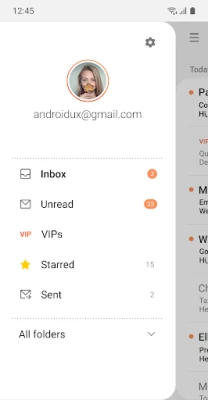
- Multiple account support: Manage compatible personal and work email accounts from one application, reducing the need to switch between separate inbox apps.
- POP3 and IMAP support: Connect many personal email accounts using widely supported mail protocols, subject to the provider’s settings.
- Exchange ActiveSync integration: EAS can synchronize business email and, when enabled by the organization, calendars, contacts, and tasks with an Exchange Server account.
- S/MIME encryption: For compatible accounts and configurations, S/MIME supports encrypted email communication to help safeguard sensitive messages.
- Customizable notifications and synchronization: Adjust alerts and sync schedules to better match your work habits and reduce unnecessary interruptions.
- Spam management and combined inboxes: Use available spam controls and combined mailbox views to keep messages easier to review.
- Conversation and thread view: Related messages can be grouped together, making it easier to follow an ongoing discussion.
- Business policy support: Built-in EAS capabilities allow supported organizations to apply administrative policies to managed accounts.
- Optional attachment and sync permissions: Depending on your Android version and chosen features, permissions may support attaching files, photos, or location information and synchronizing contacts or calendars.
✅ Pros and ❌ Cons
Pros
- Supports both personal email protocols and business Exchange accounts.
- Can bring multiple supported inboxes together in one app.
- Offers useful organization features, including threads, notifications, and spam management.
- Supports S/MIME and business policy controls where configured and supported.
- Optional permissions let users decide whether to enable features such as contact or calendar synchronization.
Cons
- Some features depend on the email provider, Android version, device, or workplace administrator.
- Business setup and S/MIME configuration may require help from an organization’s IT team.
- The interface and available options can differ between devices and app versions.
- Users who prefer a particular provider’s specialized tools may find a dedicated email app more suitable.
- App version, update date, rating, and file size can vary by region, device, and distribution source.
📋 App Details
- App Name: Samsung Email
- Current Version: Varies by release and device; verify in the official store or the app’s device listing.
- Last Updated: Varies by store and region.
- File Size: Varies by version and device; check the listing or installer details before downloading.
- Requires Android: Minimum Android requirement varies by release and device. Confirm compatibility in the store listing for your device.
- Developer: Samsung Electronics Co., Ltd.
- Category: Productivity
- Content Rating: Check the current store listing for the rating shown in your region.
- Required Permissions: The supplied app information lists no required permissions.
- Optional Permissions: May include camera, location, contacts, calendar, notifications, and access to files or media, depending on Android version and the features you use.
💬 User Reviews
User feedback can vary across devices and app releases, so it is best to check the latest reviews in your region before installing. Common reasons people choose Samsung Email include having multiple accounts in one place, useful message organization, and support for work accounts. As with email clients generally, users may also report account-setup difficulties, synchronization or notification issues, or changes in behavior after an update. Experiences can depend on the email provider, device settings, and workplace policies.
🔍 5 Best Alternative Apps
- Gmail: Google’s email app works with Google accounts and can also add many other email providers. It is a familiar option for users who want Google services and inbox tools in one place.
- Microsoft Outlook: Outlook combines email and calendar features and is a strong alternative for people who use Microsoft 365 or Exchange accounts.
- FairEmail: FairEmail is an email client focused on privacy and user control. Its feature set and setup may appeal to users who want a more configurable mail experience.
- Thunderbird for Android: Thunderbird offers an open-source option for managing supported email accounts on Android, with a familiar focus on email essentials.
- Proton Mail: Proton Mail is a privacy-oriented email service and app. It is most suitable for users who want to use Proton’s own encrypted email ecosystem.
🧠 My Opinion
Samsung Email is a practical choice for Android users who want a single app for personal correspondence and, where supported, workplace email. Its combination of POP3 and IMAP support, Exchange synchronization, conversation views, and configurable alerts covers the needs of many everyday users, while S/MIME and policy support add value for compatible business environments.
It is especially worth considering if you use a Samsung device or need to connect to an Exchange account. Before installing an APK manually, verify that it is compatible with your device and comes from a trustworthy source. For most users, the official store is the best place to get the current version.
🛡️ Privacy and Security
Email apps may handle sensitive messages and account information, so download Samsung Email from an official store or another source you trust. Unofficial or modified APKs can contain malware or expose personal data. If you install an APK manually, Android may ask you to allow installation from the specific source app; enable this only when necessary and turn it off afterward if you do not need it.
Review optional permissions carefully and grant access only when you want the related feature. For example, contacts and calendar access may be used for Exchange synchronization, while camera, location, and file access may support attachments. S/MIME protection depends on compatible certificates, accounts, and configuration; it does not automatically encrypt every message.
❓ Frequently Asked Questions (FAQs)
Q1: Is Samsung Email free to use?
A1: Samsung Email is generally available as a free app through supported official stores. Your email provider or mobile plan may have separate fees or conditions.
Q2: Can I use Samsung Email with a non-Samsung Android phone?
A2: Availability and compatibility can vary by device, Android version, and region. Check the official store listing on your phone to see whether it can be installed.
Q3: Does Samsung Email work without an internet connection?
A3: You may be able to read messages that are already stored on your device, but sending and receiving email and syncing account data generally require an internet connection.
Q4: Does the app require access to my contacts or calendar?
A4: The supplied app information lists no required permissions. Contacts and calendar access are optional and may be used for features such as Exchange synchronization; you can decline them if you do not need those features.
Q5: Is it safe to install the Samsung Email APK?
A5: Safety depends on the APK’s source and integrity. Prefer an official app store; unofficial files may be outdated, altered, or harmful. If you install manually, use a trusted source and review permissions carefully.
Rate the App
Add Comment & Review
User Reviews
Based on 0 reviews
No reviews added yet.
Comments will not be approved to be posted if they are SPAM, abusive, off-topic, use profanity, contain a personal attack, or promote hate of any kind.






More »

Popular Apps

TradingView: Track All MarketsTradingView Inc.

Bus Fever Party!Lumi Games

Claude by AnthropicAnthropic PBC

Block Craft 3D:Building GameWildlife Studios

Malwarebytes - Mobile SecurityMalwarebytes

Block Blast!HungryStudio

Canva: AI Photo & Video EditorCanva

Candy Crush SagaKing

Carrom Pool: Disc GameMiniclip.com

EA SPORTS FC Soccer Mobile 27ELECTRONIC ARTS
More »
Editor's Choice

Kahoot! Play & Create QuizzesKahoot!

United AirlinesUnited Airlines

Tripwoa: Travel Plan & Trailtripwoa

trivago: Compare hotel pricestrivago N.V.

Planner 5D: AI Home DesignPlanner 5D

ibis Paint Xibis inc.

Agoda: Cheap Flights & Hotelsagoda.com

Hopper: Hotels, Flights & CarsHopper Inc.

Brilliant: Learn Math & CodingBrilliant.org

Google ClassroomGoogle LLC