




Latest Version
Version
26.10.0
26.10.0
Update
October 17, 2026
October 17, 2026
Developer
Edison Software
Edison Software
Categories
E-mail
Platforms
Android
Android
Downloads
0
0
License
Free
Free
Package Name
com.easilydo.mail
com.easilydo.mail
Report
Report a Problem
Report a Problem
More About Email - Fast & Secure Mail
Have you ever looked at your overflowing inbox and groaned? Struggled to manage multiple email accounts overloaded with spam? Wished for an easy way to clean your inbox?
Edison Mail is an Android email app designed to bring multiple accounts into one inbox and make everyday email tasks easier to manage. Its tools include inbox organization, customizable controls, sender blocking, and an optional paid subscription with additional features.
Keeping up with several email accounts can turn a simple inbox check into a time-consuming chore. Edison Mail aims to make that routine more manageable by combining supported accounts in a unified inbox and helping users find, sort, and deal with messages faster.
Its appeal comes from a straightforward interface and practical email tools rather than a complicated setup. Whether you want to tidy up promotional mail, locate a travel confirmation, or keep work and personal accounts in one place, Edison Mail offers a convenient way to handle everyday correspondence.
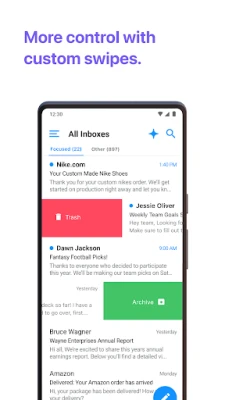
Edison Mail is an email client for Android that lets users connect multiple email accounts and manage them from one app. It supports popular providers and compatible IMAP accounts, while features such as message search, customizable swipe actions, templates, and sender blocking help users organize their inboxes. Some assistant functions, including certain bill, travel, receipt, and package alerts, may have regional limitations.
An APK is the package file format Android uses to distribute and install apps. Installing Edison Mail from an APK is a manual alternative to installing it through an app store; the file should come from a source you trust and match your device and Android version.
Pros
Cons
User feedback commonly highlights the convenience of managing multiple accounts together and the app’s approachable interface. People who value a consolidated inbox, quick searches, and tools for reducing promotional clutter may find it especially useful.
As with other email clients, some users may report account-connection problems, inconsistent behavior after updates, or preferences for different privacy and inbox-management options. Features can also work differently depending on the email provider, Android device, region, and app version. Review recent feedback for your device before installing.
Edison Mail is a useful option for Android users who manage several email accounts and want a single place to review messages. Its unified inbox, customization options, and tools for managing unwanted mail address common email frustrations without requiring a complicated workflow.
It is most worth considering if you want to consolidate supported accounts and make routine inbox tasks more convenient. Before connecting your email, check the current feature availability, subscription terms, and privacy information. For users who value a simpler, centralized email experience, Edison Mail can be a practical addition to an Android device.
Email apps handle sensitive information, so review Edison Mail’s current privacy policy and permissions before signing in. The app’s description has stated that email is fetched to the device and that certain commercial-message data may be processed for assistant features; data practices can change, so check the latest disclosures and settings. Use a strong account password and enable two-factor authentication with your email provider when available.
If you install an APK manually, download it only from a reputable source and check that it is the genuine, unmodified app. Android may ask you to allow installation from that particular source; enable this permission only when needed, then disable it afterward if appropriate. Unofficial or altered APKs can contain malware, compromise account credentials, or expose personal data.
Q1: Is Edison Mail free to use?
A1: Edison Mail has been offered as a free app with an optional Edison Mail+ subscription. Features and prices can change, so review the current in-app subscription details before purchasing.
Q2: Can I use Edison Mail with more than one email account?
A2: Yes. The app is designed to connect multiple supported accounts and show messages in a unified inbox. Compatibility depends on the email provider and account configuration.
Q3: Do I need an internet connection to use Edison Mail?
A3: An internet connection is generally needed to sign in, sync new messages, and send or receive email. Some previously loaded messages may remain accessible on your device, depending on the app and account settings.
Q4: Is it safe to download the Edison Mail APK?
A4: APKs can be safe when obtained from a trustworthy source and left unmodified, but files from unknown sites may be altered or malicious. Check the source and file carefully, and consider installing through an official app store.
Q5: Why can’t I see some Edison Mail assistant features?
A5: Certain features may be limited by region, account type, Android version, or app release. Check the app’s current settings and product information to see what is available to you.
Edison Mail APK
📱 Edison Mail APK Summary
Edison Mail is an Android email app designed to bring multiple accounts into one inbox and make everyday email tasks easier to manage. Its tools include inbox organization, customizable controls, sender blocking, and an optional paid subscription with additional features.
- App Name: Edison Mail
- Current Version: Version varies by release and device; check the listing or app store for the latest build.
- Last Updated: The current update date could not be independently verified.
- Category: Communication
- Developer: Edison Software
- Google Play Rating: Ratings and review counts change over time; check Google Play for the current figures.
💡 Introduction
Keeping up with several email accounts can turn a simple inbox check into a time-consuming chore. Edison Mail aims to make that routine more manageable by combining supported accounts in a unified inbox and helping users find, sort, and deal with messages faster.
Its appeal comes from a straightforward interface and practical email tools rather than a complicated setup. Whether you want to tidy up promotional mail, locate a travel confirmation, or keep work and personal accounts in one place, Edison Mail offers a convenient way to handle everyday correspondence.
❓ What is Edison Mail APK?
Edison Mail is an email client for Android that lets users connect multiple email accounts and manage them from one app. It supports popular providers and compatible IMAP accounts, while features such as message search, customizable swipe actions, templates, and sender blocking help users organize their inboxes. Some assistant functions, including certain bill, travel, receipt, and package alerts, may have regional limitations.
An APK is the package file format Android uses to distribute and install apps. Installing Edison Mail from an APK is a manual alternative to installing it through an app store; the file should come from a source you trust and match your device and Android version.
🧑💻 How to Use
- Install Edison Mail from a trusted app store or, if you choose a manual installation, use a verified APK that is compatible with your device.
- Open the app and follow the setup prompts to add an email account. Sign in through the provider’s authentication flow and grant only the permissions needed for the features you want.
- Add any other supported accounts, such as Gmail, Outlook, Yahoo, iCloud, AOL, or compatible IMAP accounts.
- Use the unified inbox to review messages from connected accounts together, or switch to a specific account when needed.
- Search for emails and relevant information, and use available categories or assistant features to find items such as receipts, travel details, and delivery notifications.
- Adjust settings to personalize swipe actions, appearance, templates, and inbox preferences.
- Block unwanted senders or unsubscribe from mailing lists where the relevant options are available. Review privacy and subscription settings to ensure they match your preferences.
⚙️ Features
- Unified inbox: View messages from multiple connected accounts in one place, reducing the need to jump between email apps.
- Support for major providers: Connect popular services such as Gmail, Outlook, Yahoo, Hotmail, iCloud, Office 365, Exchange, AOL, and compatible IMAP accounts. Exchange compatibility may depend on the server version.
- Email search and organization: Search for important messages and details, including travel plans, bills, subscriptions, and package updates, where supported.
- Customizable swipe actions: Set up message gestures to suit your routine and handle common inbox tasks with fewer taps.
- Templates and appearance options: Customize email templates and visual settings for a more personal experience.
- Inbox preference controls: Adjust options such as Focused Inbox, depending on the features available in your version.
- Unsubscribe and sender blocking: Tools for managing unwanted senders and mailing lists can help reduce inbox clutter.
- Optional Edison Mail+ subscription: The paid plan has been described as offering additional contact-management and security features. Subscription pricing and included benefits can change, so check the current in-app terms before subscribing.
✅ Pros and ❌ Cons
Pros
- Combines multiple supported email accounts in a unified inbox.
- Offers useful inbox-management tools, including search, sender blocking, and unsubscribe options.
- Customizable controls make it easier to adapt the app to personal email habits.
- Supports many widely used email services and compatible IMAP accounts.
- Some versions provide helpful organization features for commercial messages and delivery updates.
Cons
- Availability of certain assistant features can vary by country and account type.
- Some advanced features require a paid Edison Mail+ subscription.
- Connecting several accounts may involve provider-specific sign-in steps or compatibility limits.
- App features, pricing, device requirements, and performance can change between releases.
- Users concerned about email-data handling should read the current privacy policy and review the app’s settings before connecting accounts.
📋 App Details
- App Name: Edison Mail
- Current Version: Varies by release; check the official store listing or the app’s update information.
- Last Updated: Not independently verified; consult the current store listing.
- File Size: Varies by version, device, and distribution format. Check the installer details before downloading.
- Requires Android: The minimum Android version depends on the current release; confirm compatibility on the official listing or with the APK provider.
- Developer: Edison Software
- Content Rating: Check the current store listing for the applicable rating in your region.
- Category: Communication
- Monetization: The app has offered optional Edison Mail+ subscriptions; confirm current pricing and terms in the app.
💬 User Reviews
User feedback commonly highlights the convenience of managing multiple accounts together and the app’s approachable interface. People who value a consolidated inbox, quick searches, and tools for reducing promotional clutter may find it especially useful.
As with other email clients, some users may report account-connection problems, inconsistent behavior after updates, or preferences for different privacy and inbox-management options. Features can also work differently depending on the email provider, Android device, region, and app version. Review recent feedback for your device before installing.
🔍 5 Best Alternative Apps
- Microsoft Outlook: A popular email and calendar app with support for Microsoft accounts and many other providers. It is a strong choice for users who want email alongside scheduling tools.
- Gmail: Google’s email app offers familiar Gmail features and can also manage other supported accounts. It suits users who prefer Google’s services and interface.
- BlueMail: A multi-account email client with a unified inbox and customization options. It may appeal to people looking for another all-in-one email app.
- Spark Mail: An email client focused on inbox organization and productivity features. Its tools and supported services may vary by platform and plan.
- FairEmail: An email client for users seeking detailed control over accounts and privacy-related settings. Its setup and extensive options may take more time to learn.
🧠 My Opinion
Edison Mail is a useful option for Android users who manage several email accounts and want a single place to review messages. Its unified inbox, customization options, and tools for managing unwanted mail address common email frustrations without requiring a complicated workflow.
It is most worth considering if you want to consolidate supported accounts and make routine inbox tasks more convenient. Before connecting your email, check the current feature availability, subscription terms, and privacy information. For users who value a simpler, centralized email experience, Edison Mail can be a practical addition to an Android device.
🛡️ Privacy and Security
Email apps handle sensitive information, so review Edison Mail’s current privacy policy and permissions before signing in. The app’s description has stated that email is fetched to the device and that certain commercial-message data may be processed for assistant features; data practices can change, so check the latest disclosures and settings. Use a strong account password and enable two-factor authentication with your email provider when available.
If you install an APK manually, download it only from a reputable source and check that it is the genuine, unmodified app. Android may ask you to allow installation from that particular source; enable this permission only when needed, then disable it afterward if appropriate. Unofficial or altered APKs can contain malware, compromise account credentials, or expose personal data.
❓ Frequently Asked Questions (FAQs)
Q1: Is Edison Mail free to use?
A1: Edison Mail has been offered as a free app with an optional Edison Mail+ subscription. Features and prices can change, so review the current in-app subscription details before purchasing.
Q2: Can I use Edison Mail with more than one email account?
A2: Yes. The app is designed to connect multiple supported accounts and show messages in a unified inbox. Compatibility depends on the email provider and account configuration.
Q3: Do I need an internet connection to use Edison Mail?
A3: An internet connection is generally needed to sign in, sync new messages, and send or receive email. Some previously loaded messages may remain accessible on your device, depending on the app and account settings.
Q4: Is it safe to download the Edison Mail APK?
A4: APKs can be safe when obtained from a trustworthy source and left unmodified, but files from unknown sites may be altered or malicious. Check the source and file carefully, and consider installing through an official app store.
Q5: Why can’t I see some Edison Mail assistant features?
A5: Certain features may be limited by region, account type, Android version, or app release. Check the app’s current settings and product information to see what is available to you.
Rate the App
Add Comment & Review
User Reviews
Based on 0 reviews
No reviews added yet.
Comments will not be approved to be posted if they are SPAM, abusive, off-topic, use profanity, contain a personal attack, or promote hate of any kind.






More »

Popular Apps

TradingView: Track All MarketsTradingView Inc.

Bus Fever Party!Lumi Games

Claude by AnthropicAnthropic PBC

Block Craft 3D:Building GameWildlife Studios

Malwarebytes - Mobile SecurityMalwarebytes

Block Blast!HungryStudio

Canva: AI Photo & Video EditorCanva

Candy Crush SagaKing

Carrom Pool: Disc GameMiniclip.com

EA SPORTS FC Soccer Mobile 27ELECTRONIC ARTS
More »
Editor's Choice

Kahoot! Play & Create QuizzesKahoot!

United AirlinesUnited Airlines

Tripwoa: Travel Plan & Trailtripwoa

trivago: Compare hotel pricestrivago N.V.

Planner 5D: AI Home DesignPlanner 5D

ibis Paint Xibis inc.

Agoda: Cheap Flights & Hotelsagoda.com

Hopper: Hotels, Flights & CarsHopper Inc.

Brilliant: Learn Math & CodingBrilliant.org

Google ClassroomGoogle LLC