



Latest Version
Version
1.2604204.7002
1.2604204.7002
Update
October 18, 2026
October 18, 2026
Developer
Microsoft Corporation
Microsoft Corporation
Categories
Design
Design
Platforms
Android
Android
Downloads
0
0
License
Free
Free
Package Name
com.microsoft.designer
com.microsoft.designer
Report
Report a Problem
Report a Problem
More About Microsoft Designer
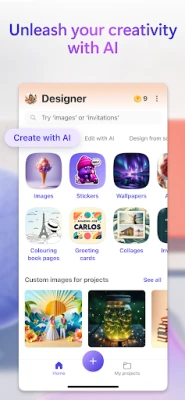
Microsoft Designer is an AI-powered design tool that helps you create designs and edit photos in seconds.
Microsoft Designer is an AI-powered design app for creating and editing images, invitations, social posts, and other visual content. It combines ready-made layouts with generative AI tools to help users produce polished designs without advanced graphic-design skills.
Creating attractive digital content can take time, especially when you are starting with a blank canvas. Microsoft Designer aims to make that process easier by pairing approachable design tools with AI features that can help generate, customize, and refine visuals.
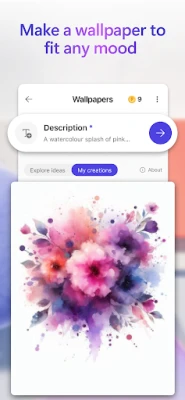
Whether you need a social media graphic, a greeting card, a wallpaper, or a quick image edit, Designer offers a convenient starting point on your Android device. Its appeal comes from making creative work feel more accessible, while still giving users options to personalize the final result.
Microsoft Designer is a visual design and image-creation application from Microsoft. It helps users make graphics for personal projects, social media, invitations, and other everyday uses. Depending on availability, account status, and the feature being used, the app may offer AI-assisted image generation, design suggestions, templates, and editing tools. The intended audience ranges from casual users who want a quick, attractive design to creators who need a simple mobile companion for visual content.
An APK is the package file format Android uses to install apps. Installing Microsoft Designer through an APK can be useful when the app is not available through your usual store, but manual installation requires care: the file should come from a source you trust and match your device’s requirements.
Pros
Cons
User feedback commonly reflects interest in Designer’s convenient interface and the ability to make attractive visuals without specialized design experience. AI-assisted ideas and quick creation tools can be especially useful for casual projects and social content.
Some users may encounter limitations with generated results, feature availability, account requirements, or the experience on particular devices. As with other evolving creative apps, feedback can also change after updates. Check recent reviews for reports that match your Android model and intended use.
Microsoft Designer is a worthwhile option for Android users who want to create appealing graphics without learning a complex design program. Its combination of templates, editing tools, and AI-assisted features can make everyday creative tasks faster and more approachable.
It is best suited to casual creators, students, small businesses, and social media users who value convenience over advanced desktop-level control. Feature availability and requirements can vary, so check the current listing before installing. If you want an accessible way to turn an idea into a shareable visual, Microsoft Designer is worth considering.
For the safest experience, install Microsoft Designer through Google Play or another official distribution channel whenever possible. If you choose to install an APK manually, use only a reputable source, verify that the file is genuine, and scan it with a trusted security tool. Unofficial or modified APKs can contain malware, expose personal information, or compromise your device.
Android may require you to allow installation from an unknown source for the browser or file manager you are using. Enable this permission only when necessary, install the file, and disable the permission afterward. Review the app’s permissions and privacy settings, and avoid sharing sensitive information in prompts or uploaded images unless you understand how that content may be handled.
Q1: Is Microsoft Designer APK free to use?
A1: The app may be available to download at no cost, but some features, limits, or account requirements can vary. Check the current official listing and in-app information for the terms that apply to you.
Q2: Does Microsoft Designer need an internet connection?
A2: Many AI-powered and online features need an internet connection. Offline access may be limited, so connect to the internet for the most complete experience.
Q3: Is it safe to download the Microsoft Designer APK?
A3: The safest option is to install the app from an official store. APK files from unofficial sites may be altered or bundled with harmful software, so download only from a source you trust and scan the file before installation.
Q4: Do I need a Microsoft account?
A4: Some features may require signing in with a Microsoft account. Requirements can change, so check the prompts shown in the app.
Q5: Can Microsoft Designer create images from text?
A5: AI image-generation tools may be available, depending on the app version, region, account, and current feature access. Check the app for the tools offered to your account.
Microsoft Designer APK
📱 Microsoft Designer APK Summary
Microsoft Designer is an AI-powered design app for creating and editing images, invitations, social posts, and other visual content. It combines ready-made layouts with generative AI tools to help users produce polished designs without advanced graphic-design skills.
- App Name: Microsoft Designer
- Current Version: Version number varies by release and region; check the app listing or installed app for the latest version.
- Last Updated: The latest update date may vary by region and store listing.
- Category: Art & Design
- Developer: Microsoft Corporation
- Google Play Rating: Ratings and review counts change over time and by region; check Google Play for the current figures.
💡 Introduction
Creating attractive digital content can take time, especially when you are starting with a blank canvas. Microsoft Designer aims to make that process easier by pairing approachable design tools with AI features that can help generate, customize, and refine visuals.
Whether you need a social media graphic, a greeting card, a wallpaper, or a quick image edit, Designer offers a convenient starting point on your Android device. Its appeal comes from making creative work feel more accessible, while still giving users options to personalize the final result.
❓ What Is Microsoft Designer APK?
Microsoft Designer is a visual design and image-creation application from Microsoft. It helps users make graphics for personal projects, social media, invitations, and other everyday uses. Depending on availability, account status, and the feature being used, the app may offer AI-assisted image generation, design suggestions, templates, and editing tools. The intended audience ranges from casual users who want a quick, attractive design to creators who need a simple mobile companion for visual content.
An APK is the package file format Android uses to install apps. Installing Microsoft Designer through an APK can be useful when the app is not available through your usual store, but manual installation requires care: the file should come from a source you trust and match your device’s requirements.
🧑💻 How to Use
- Install and open the app: Get Microsoft Designer from an official app store where available, then launch it on your Android device.
- Sign in if prompted: Some features may require a Microsoft account. Review any sign-in and permission requests before continuing.
- Choose a starting point: Select a suggested design, template, or creation tool that matches what you want to make.
- Describe or customize your idea: Where AI creation is available, enter a prompt. You can also adjust the design manually using the editing options provided.
- Refine the result: Change text, colors, layout, and other available elements until the design suits your needs.
- Save or share: Export the finished image or use the app’s sharing options. Check the selected format and destination before saving.
⚙️ Features
- AI-assisted design creation: Available tools can help turn a written idea into a visual starting point, reducing the effort needed to begin a project.
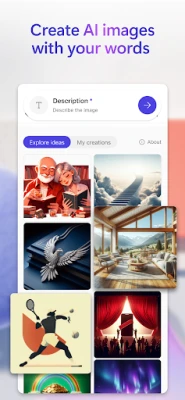
- Image generation tools: Create original images from text prompts where the feature is available, with results that can be used as part of a design.
- Templates and design ideas: Ready-made layouts give users a quicker route to social posts, invitations, and other common graphics.
- Image editing: Edit and personalize visuals using the tools offered in the app, making it easier to adapt a design to a particular purpose.
- Text and layout customization: Adjust wording and visual arrangement to give a design a more personal, finished appearance.
- Mobile-friendly workflow: Create or make changes directly on a compatible Android device without needing a desktop design program.
- Microsoft account integration: Signing in may enable account-related features and a more connected experience across Microsoft services, subject to the app’s current options.
✅ Pros and ❌ Cons
Pros
- Approachable tools make visual design more manageable for beginners.
- AI-assisted creation can provide ideas and help users get past a blank canvas.
- Useful for a range of everyday graphics, including social content and invitations.
- Lets users create and edit designs on a mobile device.
- Backed by Microsoft, with features and availability that may evolve over time.
Cons
- Some AI features may require an internet connection, an account, or availability in the user’s region.
- Results from generative tools may need editing and may not match a prompt exactly.
- Feature access, usage limits, and account requirements can change.
- Users seeking detailed professional design controls may find a mobile app limiting.
- Performance and compatibility can vary across Android devices and app versions.
📋 App Details
- App Name: Microsoft Designer
- Current Version: Varies by release; confirm the version shown in the official store or on your device.
- Last Updated: Varies by region and listing.
- File Size: Varies by version and device; check the installer details before downloading.
- Requires Android: Minimum Android requirement can change between releases; check the current store listing for your device.
- Developer: Microsoft Corporation
- Content Rating: Check the current Google Play listing for the rating applicable in your region.
💬 User Reviews
User feedback commonly reflects interest in Designer’s convenient interface and the ability to make attractive visuals without specialized design experience. AI-assisted ideas and quick creation tools can be especially useful for casual projects and social content.
Some users may encounter limitations with generated results, feature availability, account requirements, or the experience on particular devices. As with other evolving creative apps, feedback can also change after updates. Check recent reviews for reports that match your Android model and intended use.
🔍 5 Best Alternative Apps
- Canva: A popular graphic-design app with templates for social posts, presentations, invitations, and more. It is a strong alternative for users who want a broad library of layouts and editing tools.
- Adobe Express: Offers quick design and content-creation tools for social media and promotional graphics. It suits users looking for templates and a workflow connected to Adobe’s creative ecosystem.
- Picsart: Combines photo editing, creative effects, collage tools, and design features. It is a good option for people who want to experiment with images as well as make graphics.
- VistaCreate: Provides templates and editing tools for digital designs and marketing content. It can help users quickly produce polished visuals for different platforms.
- PhotoRoom: Focuses on image editing and background removal, making it especially useful for product photos and clean promotional images.
🧠 My Opinion
Microsoft Designer is a worthwhile option for Android users who want to create appealing graphics without learning a complex design program. Its combination of templates, editing tools, and AI-assisted features can make everyday creative tasks faster and more approachable.
It is best suited to casual creators, students, small businesses, and social media users who value convenience over advanced desktop-level control. Feature availability and requirements can vary, so check the current listing before installing. If you want an accessible way to turn an idea into a shareable visual, Microsoft Designer is worth considering.
🛡️ Privacy and Security
For the safest experience, install Microsoft Designer through Google Play or another official distribution channel whenever possible. If you choose to install an APK manually, use only a reputable source, verify that the file is genuine, and scan it with a trusted security tool. Unofficial or modified APKs can contain malware, expose personal information, or compromise your device.
Android may require you to allow installation from an unknown source for the browser or file manager you are using. Enable this permission only when necessary, install the file, and disable the permission afterward. Review the app’s permissions and privacy settings, and avoid sharing sensitive information in prompts or uploaded images unless you understand how that content may be handled.
❓ Frequently Asked Questions (FAQs)
Q1: Is Microsoft Designer APK free to use?
A1: The app may be available to download at no cost, but some features, limits, or account requirements can vary. Check the current official listing and in-app information for the terms that apply to you.
Q2: Does Microsoft Designer need an internet connection?
A2: Many AI-powered and online features need an internet connection. Offline access may be limited, so connect to the internet for the most complete experience.
Q3: Is it safe to download the Microsoft Designer APK?
A3: The safest option is to install the app from an official store. APK files from unofficial sites may be altered or bundled with harmful software, so download only from a source you trust and scan the file before installation.
Q4: Do I need a Microsoft account?
A4: Some features may require signing in with a Microsoft account. Requirements can change, so check the prompts shown in the app.
Q5: Can Microsoft Designer create images from text?
A5: AI image-generation tools may be available, depending on the app version, region, account, and current feature access. Check the app for the tools offered to your account.
Rate the App
Add Comment & Review
User Reviews
Based on 0 reviews
No reviews added yet.
Comments will not be approved to be posted if they are SPAM, abusive, off-topic, use profanity, contain a personal attack, or promote hate of any kind.






More »

Popular Apps

TradingView: Track All MarketsTradingView Inc.

Bus Fever Party!Lumi Games

Claude by AnthropicAnthropic PBC

Block Craft 3D:Building GameWildlife Studios

Malwarebytes - Mobile SecurityMalwarebytes

Block Blast!HungryStudio

Canva: AI Photo & Video EditorCanva

Candy Crush SagaKing

Carrom Pool: Disc GameMiniclip.com

EA SPORTS FC Soccer Mobile 27ELECTRONIC ARTS
More »
Editor's Choice

Kahoot! Play & Create QuizzesKahoot!

United AirlinesUnited Airlines

Tripwoa: Travel Plan & Trailtripwoa

trivago: Compare hotel pricestrivago N.V.

Planner 5D: AI Home DesignPlanner 5D

ibis Paint Xibis inc.

Agoda: Cheap Flights & Hotelsagoda.com

Hopper: Hotels, Flights & CarsHopper Inc.

Brilliant: Learn Math & CodingBrilliant.org

Google ClassroomGoogle LLC