



Latest Version
Version
1.2604204.7002
1.2604204.7002
Update
October 18, 2026
October 18, 2026
Developer
Microsoft Corporation
Microsoft Corporation
Categories
Design
Design
Platforms
Android
Android
Downloads
0
0
License
Free
Free
Package Name
com.microsoft.designer
com.microsoft.designer
Report
Report a Problem
Report a Problem
More About Microsoft Designer
Microsoft Designer is an AI-powered design tool that helps you create designs and edit photos in seconds.
Microsoft Designer is an AI-powered design and image-editing app for creating original visuals, personalized cards, social posts, wallpapers, and more. It combines text-to-image generation with practical editing tools, making it useful for quick creative projects as well as polished designs.
Need a custom birthday card, an eye-catching social graphic, or a fresh wallpaper but don’t have design software or experience? Microsoft Designer helps turn ideas into visuals with AI-powered creation and straightforward editing tools. Describe what you want, personalize the result, and make designs for everyday sharing, special occasions, or personal projects.
Its appeal comes from bringing several creative tasks into one mobile app. You can generate images, remove distracting objects, create stickers, and build designs in formats suited to different uses—all with a Microsoft account.
Microsoft Designer is a creative design app from Microsoft. Its tools help users generate images from written descriptions, edit existing photos, and make practical visual content such as invitations, greeting cards, banners, monograms, collages, icons, and social posts. It is aimed at casual creators, students, small businesses, and anyone who wants to make personalized graphics without learning a complex design program.
An APK is the package format Android uses to install apps. An APK file can be used for a manual installation, but users should choose a trusted source and make sure the file is genuine and compatible with their device. Installing the app through Google Play is generally the simplest way to receive verified updates.
Pros
Cons
Feedback on creative apps like Microsoft Designer commonly highlights the convenience of making attractive visuals on a phone and the range of available design tools. AI image generation, quick photo cleanups, and templates for cards or social content can be especially appealing to users who want results without starting from a blank canvas.
Potential frustrations include generated images that do not exactly match a prompt, features that work differently across devices or regions, and reliance on an account or internet connection for some functions. Ratings and review themes can change as the app is updated, so check the current Google Play reviews for the latest user experiences.
Microsoft Designer is a versatile choice for anyone who wants to turn an idea into a shareable visual without relying on desktop design software. Its combination of AI image creation, object removal, background tools, and ready-to-make designs covers a wide range of creative needs, from personal wallpapers to event invitations.
It is most worthwhile for casual creators, social media users, and people preparing personalized cards or graphics. If you need precise professional design controls, or prefer working offline, check whether the app’s available tools meet your needs before making it your main editor. For quick, accessible creativity, Microsoft Designer is a strong app to try.
Download Microsoft Designer from Google Play or another reputable source, and avoid modified or unofficial APKs. Unverified packages can contain malware, request unnecessary permissions, or put personal information at risk. If you install an APK manually, Android may ask you to allow installation from that specific source; enable this only when necessary, verify the file, and turn the permission off again afterward.
Review the app’s permissions and Microsoft account privacy settings before using it. As with any cloud-connected creative service, consider what images or personal information you upload and how you want your files stored.
Q1: Is Microsoft Designer free to use?
A: Microsoft says Designer is available for free with a Microsoft account. Feature availability or limits may vary, so check the app for current details.
Q2: Do I need an internet connection?
A: Some features, particularly AI-powered creation and cloud storage, may require an internet connection. Offline availability can depend on the tool and app version.
Q3: Is it safe to download the Microsoft Designer APK?
A: Use Google Play or a trusted source and verify that the package is genuine. Unofficial or altered APKs may expose your device or data to malware and privacy risks.
Q4: What can I create with Microsoft Designer?
A: You can create AI-generated images, stickers, wallpapers, greeting cards, invitations, social posts, banners, collages, icons, and other visual projects.
Q5: Does Microsoft Designer include cloud storage?
A: A Microsoft account includes 5 GB of free cloud storage that can be used to save designs, files, and photos across devices.
Microsoft Designer APK
📱 Microsoft Designer APK Summary
Microsoft Designer is an AI-powered design and image-editing app for creating original visuals, personalized cards, social posts, wallpapers, and more. It combines text-to-image generation with practical editing tools, making it useful for quick creative projects as well as polished designs.
- App Name: Microsoft Designer
- Current Version: Version varies by device and rollout; check Google Play for the latest release
- Last Updated: Check the Google Play listing for the latest update date
- Category: Art & Design
- Developer: Microsoft Corporation
- Google Play Rating: Rating and review count change over time; see Google Play for current figures
💡 Introduction
Need a custom birthday card, an eye-catching social graphic, or a fresh wallpaper but don’t have design software or experience? Microsoft Designer helps turn ideas into visuals with AI-powered creation and straightforward editing tools. Describe what you want, personalize the result, and make designs for everyday sharing, special occasions, or personal projects.
Its appeal comes from bringing several creative tasks into one mobile app. You can generate images, remove distracting objects, create stickers, and build designs in formats suited to different uses—all with a Microsoft account.
❓ What Is Microsoft Designer APK?
Microsoft Designer is a creative design app from Microsoft. Its tools help users generate images from written descriptions, edit existing photos, and make practical visual content such as invitations, greeting cards, banners, monograms, collages, icons, and social posts. It is aimed at casual creators, students, small businesses, and anyone who wants to make personalized graphics without learning a complex design program.
An APK is the package format Android uses to install apps. An APK file can be used for a manual installation, but users should choose a trusted source and make sure the file is genuine and compatible with their device. Installing the app through Google Play is generally the simplest way to receive verified updates.
🧑💻 How to Use
- Install and open the app: Get Microsoft Designer from Google Play or another trusted distribution source, then launch it.
- Sign in: Use a Microsoft account to access the app. Microsoft accounts include 5 GB of cloud storage for saving designs and files across devices.
- Choose a project: Select the type of creation you want, such as an image, wallpaper, greeting card, invitation, collage, or social post.
- Describe your idea: For AI image creation, enter a prompt explaining the subject, style, colors, or mood you have in mind.
- Edit the result: Refine your design with available options such as filters, brightness adjustments, resizing, background removal, blur, or generative erase.
- Personalize and save: Add your own text or other design elements, then save your finished work or share it where supported.
⚙️ Features
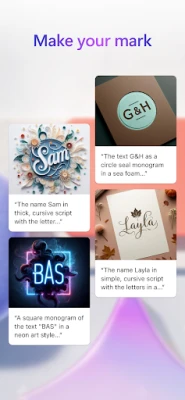
- AI image generation: Turn written ideas into original visuals, from surreal scenes and sci-fi art to playful illustrations.
- Custom stickers: Create personalized stickers for messaging, social content, and other creative projects.
- AI photo editing: Improve images with editing tools designed to help make photos and graphics look more polished.
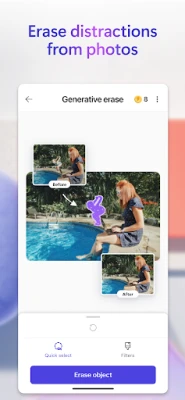
- Generative erase: Remove unwanted objects or distractions from an image to keep attention on the subject.
- Background removal and blur: Remove a background or soften it to make the main subject stand out more clearly.
- Image adjustments and resizing: Apply filters, change brightness, and resize artwork into square or custom dimensions.
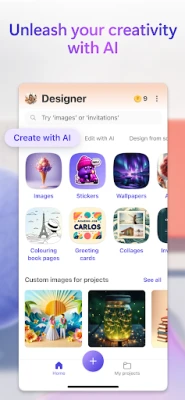
- Ready-to-personalize designs: Make greeting cards, invitations, wallpapers, banners, monograms, social posts, and other occasion-specific graphics.
- Creative extras: Design emojis, icons, coloring pages, framed photos, and collages for personal or sharing purposes.
- Microsoft account storage: Save designs and files using the 5 GB of cloud storage provided with a Microsoft account.
✅ Pros and ❌ Cons
Pros
- Offers image generation and photo-editing tools in one app.
- Supports a wide range of personal, social, and event-based design projects.
- Useful for creating visuals without advanced graphic-design skills.
- Includes convenient tools such as background removal, blur, resizing, and object erasing.
- Microsoft account storage can help keep files available across devices.
Cons
- Some AI features may require an internet connection and can depend on Microsoft account access or feature availability.
- Generated images may need several prompt adjustments before they match your idea.
- Availability, limits, and feature behavior can vary by region, account, device, and app version.
- Cloud storage is shared with other files saved to the Microsoft account, so the free allowance is not exclusive to Designer.
- Exact version, device requirements, file size, rating, and update details can change; check the current app listing before installing.
📋 App Details
- App Name: Microsoft Designer
- Current Version: Varies by device and release; check Google Play for the current version
- Last Updated: Check the Google Play listing for the latest date
- File Size: Varies by version and device; check the installer or store listing
- Requires Android: Minimum Android version may change; confirm compatibility on Google Play before downloading
- Developer: Microsoft Corporation
- Content Rating: Check Google Play for the current rating in your region
- Account and storage: Available free with a Microsoft account; the account includes 5 GB of cloud storage
💬 User Reviews
Feedback on creative apps like Microsoft Designer commonly highlights the convenience of making attractive visuals on a phone and the range of available design tools. AI image generation, quick photo cleanups, and templates for cards or social content can be especially appealing to users who want results without starting from a blank canvas.
Potential frustrations include generated images that do not exactly match a prompt, features that work differently across devices or regions, and reliance on an account or internet connection for some functions. Ratings and review themes can change as the app is updated, so check the current Google Play reviews for the latest user experiences.
🔍 5 Best Alternative Apps
- Canva: A popular design platform for social graphics, presentations, invitations, and other visual content. Its templates and editing tools make it a flexible alternative for everyday design work.
- Adobe Express: Provides templates and creative tools for making social posts, flyers, and other branded graphics. It may suit users looking for a broad design and content-creation toolkit.
- Picsart: Combines photo editing, effects, collage creation, and creative design features. It is a good option for users who want to experiment with image edits and visual styles.
- Adobe Photoshop Express: Focuses on accessible photo editing, with tools for improving and adjusting pictures. It is a practical alternative when photo enhancement is the main priority.
- ibis Paint X: A drawing and illustration app with a range of tools for creating artwork by hand. It may be a better fit for users who prefer sketching and detailed digital drawing over AI-led design.
🧠 My Opinion
Microsoft Designer is a versatile choice for anyone who wants to turn an idea into a shareable visual without relying on desktop design software. Its combination of AI image creation, object removal, background tools, and ready-to-make designs covers a wide range of creative needs, from personal wallpapers to event invitations.
It is most worthwhile for casual creators, social media users, and people preparing personalized cards or graphics. If you need precise professional design controls, or prefer working offline, check whether the app’s available tools meet your needs before making it your main editor. For quick, accessible creativity, Microsoft Designer is a strong app to try.
🛡️ Privacy and Security
Download Microsoft Designer from Google Play or another reputable source, and avoid modified or unofficial APKs. Unverified packages can contain malware, request unnecessary permissions, or put personal information at risk. If you install an APK manually, Android may ask you to allow installation from that specific source; enable this only when necessary, verify the file, and turn the permission off again afterward.
Review the app’s permissions and Microsoft account privacy settings before using it. As with any cloud-connected creative service, consider what images or personal information you upload and how you want your files stored.
❓ Frequently Asked Questions (FAQs)
Q1: Is Microsoft Designer free to use?
A: Microsoft says Designer is available for free with a Microsoft account. Feature availability or limits may vary, so check the app for current details.
Q2: Do I need an internet connection?
A: Some features, particularly AI-powered creation and cloud storage, may require an internet connection. Offline availability can depend on the tool and app version.
Q3: Is it safe to download the Microsoft Designer APK?
A: Use Google Play or a trusted source and verify that the package is genuine. Unofficial or altered APKs may expose your device or data to malware and privacy risks.
Q4: What can I create with Microsoft Designer?
A: You can create AI-generated images, stickers, wallpapers, greeting cards, invitations, social posts, banners, collages, icons, and other visual projects.
Q5: Does Microsoft Designer include cloud storage?
A: A Microsoft account includes 5 GB of free cloud storage that can be used to save designs, files, and photos across devices.
Rate the App
Add Comment & Review
User Reviews
Based on 0 reviews
No reviews added yet.
Comments will not be approved to be posted if they are SPAM, abusive, off-topic, use profanity, contain a personal attack, or promote hate of any kind.








More »

Popular Apps

TradingView: Track All MarketsTradingView Inc.

Bus Fever Party!Lumi Games

Claude by AnthropicAnthropic PBC

Block Craft 3D:Building GameWildlife Studios

Malwarebytes - Mobile SecurityMalwarebytes

Block Blast!HungryStudio

Canva: AI Photo & Video EditorCanva

Candy Crush SagaKing

Carrom Pool: Disc GameMiniclip.com

EA SPORTS FC Soccer Mobile 27ELECTRONIC ARTS
More »
Editor's Choice

Kahoot! Play & Create QuizzesKahoot!

United AirlinesUnited Airlines

Tripwoa: Travel Plan & Trailtripwoa

trivago: Compare hotel pricestrivago N.V.

Planner 5D: AI Home DesignPlanner 5D

ibis Paint Xibis inc.

Agoda: Cheap Flights & Hotelsagoda.com

Hopper: Hotels, Flights & CarsHopper Inc.

Brilliant: Learn Math & CodingBrilliant.org

Google ClassroomGoogle LLC