
Latest Version
Version
31.0.2
31.0.2
Update
October 18, 2026
October 18, 2026
Developer
Adobe
Adobe
Categories
Design
Design
Platforms
Android
Android
Downloads
0
0
License
Free
Free
Package Name
com.adobe.spark.post
com.adobe.spark.post
Report
Report a Problem
Report a Problem
More About Adobe Express: AI Photo, Video
Adobe Express is the quick and easy app to create on-brand content that helps your business stand out and make an impact. Whether you're a beginner or a seasoned creator, Adobe Express empowers you and your team to make high-quality marketing and business materials while maintaining brand consistency.
Adobe Express is an all-in-one design and editing app for creating polished videos, photos, social posts, PDFs, and branded content. Its beginner-friendly tools, ready-made templates, and AI-powered features make it useful for quick creative projects on a phone.
Creating attractive content can take time, especially when you need to switch between separate apps for video editing, photo touch-ups, and graphic design. Adobe Express brings many of those everyday creative tools together, helping users make social media graphics, short videos, branded designs, and more from one mobile workspace.
Its templates and straightforward editing controls make it approachable for beginners, while features such as background removal, automatic captions, PDF editing, and generative AI offer extra flexibility. Whether you are preparing a post for a small business or polishing a personal photo, Adobe Express aims to make the process faster and easier.
Adobe Express is a mobile design and content-creation application from Adobe. It lets users start with customizable templates or their own media, then edit videos, enhance photos, create graphics and QR codes, work with PDFs, and prepare content for different platforms. Some tools and premium assets require a paid membership, and feature availability may depend on the device, account, and region.
An APK is the package file format Android uses to distribute and install apps. Installing an APK manually can be useful when an app is not available through a particular store, but users should obtain it only from a trustworthy source and verify that the file is genuine and current.
Pros
Cons
User feedback commonly highlights Adobe Express’s broad range of creative tools, convenient templates, and ability to make professional-looking designs without specialist software. Many users appreciate having photo, video, and graphic features together, along with quick options for social content and branded materials.
Common frustrations include premium restrictions, occasional performance or loading problems, and differences in which features work on particular devices. Some users may also find the number of tools overwhelming at first or prefer a larger screen for detailed editing. Reviews and app performance can change with updates, so check recent feedback for your device before installing.
Adobe Express is a versatile choice for people who want to create and edit different kinds of content without learning several separate apps. Its templates and Quick Actions make everyday tasks approachable, while video editing, PDF support, brand tools, and AI features give it room to grow with more ambitious projects.
The main drawbacks are that some of the most advanced tools sit behind a subscription and that device support is not identical for every feature. Still, for students, social media creators, small businesses, and anyone who needs quick, polished visuals, Adobe Express is well worth considering. If you want a flexible creative toolkit on Android, it offers a compelling place to start.
For the safest installation, download Adobe Express from Google Play or another official Adobe-authorized source. If you install an APK manually, use a reputable provider, check that the file is authentic and unmodified, and scan it before installation. Unofficial or altered APKs can contain malware or create privacy and account-security risks.
Android may require you to allow installation from the specific source app, sometimes described as enabling “Install unknown apps” or “Install from unknown sources.” Grant this permission only when necessary, avoid unknown download sites, and turn it off again afterward. Review the app’s permissions and Adobe’s privacy information to understand how your data is handled.
Q1: Is Adobe Express APK free to use?
A1: Adobe Express offers free tools, but certain premium assets and features require an Adobe Express Premium membership. Available features and plan terms may change.
Q2: Do I need an internet connection to use Adobe Express?
A2: Some basic editing may be possible with local files, but signing in, syncing projects, accessing online assets, and using many AI or cloud features generally require an internet connection.
Q3: Is it safe to download the Adobe Express APK?
A3: It is safest to install the app through Google Play or an official Adobe source. An APK from an untrusted site could be modified or carry malware, so check the source and file carefully before installing.
Q4: Does Adobe Express work on every Android device?
A4: No. Android requirements and feature support vary by app version and device. Check the current store listing and device compatibility details before downloading.
Q5: Can I use Adobe Express to edit videos and PDFs?
A5: Yes. The app includes video editing tools and PDF import and editing options, though some capabilities may be limited to certain devices or Premium plans.
Adobe Express APK
📱 Adobe Express APK Summary
Adobe Express is an all-in-one design and editing app for creating polished videos, photos, social posts, PDFs, and branded content. Its beginner-friendly tools, ready-made templates, and AI-powered features make it useful for quick creative projects on a phone.
- App Name: Adobe Express
- Current Version: Version varies by device and rollout; check Google Play for the latest release
- Last Updated: Varies by region and Play Store listing
- Category: Art & Design
- Developer: Adobe
- Google Play Rating: Rating and review count change over time; see the current Google Play listing for live figures
💡 Introduction
Creating attractive content can take time, especially when you need to switch between separate apps for video editing, photo touch-ups, and graphic design. Adobe Express brings many of those everyday creative tools together, helping users make social media graphics, short videos, branded designs, and more from one mobile workspace.
Its templates and straightforward editing controls make it approachable for beginners, while features such as background removal, automatic captions, PDF editing, and generative AI offer extra flexibility. Whether you are preparing a post for a small business or polishing a personal photo, Adobe Express aims to make the process faster and easier.
❓ What Is Adobe Express APK?
Adobe Express is a mobile design and content-creation application from Adobe. It lets users start with customizable templates or their own media, then edit videos, enhance photos, create graphics and QR codes, work with PDFs, and prepare content for different platforms. Some tools and premium assets require a paid membership, and feature availability may depend on the device, account, and region.
An APK is the package file format Android uses to distribute and install apps. Installing an APK manually can be useful when an app is not available through a particular store, but users should obtain it only from a trustworthy source and verify that the file is genuine and current.
🧑💻 How to Use
- Install and open the app: Get Adobe Express from Google Play or another reputable source, then launch it on your Android device.
- Sign in: Use an Adobe account to access your projects and available features. Some editing options may be accessible without a paid plan, while premium tools require a subscription.
- Choose a starting point: Select a template, create a new design, or import a photo, video, or PDF from your device.
- Edit your content: Add text, graphics, colors, music, transitions, or other elements. For video, you can trim and combine clips; for photos, you can apply edits and supported AI effects.
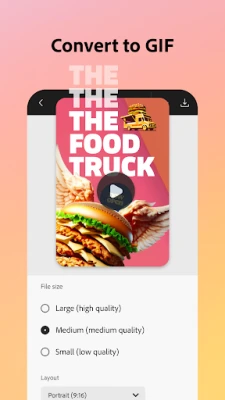
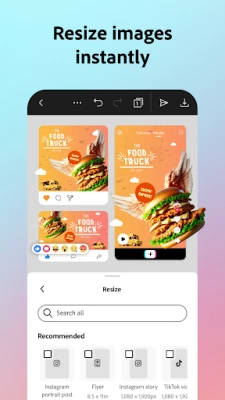
- Use Quick Actions: Choose an available action such as resizing, cropping, removing a background, converting images to a GIF, or importing a PDF.
- Review and export: Check your design, choose an appropriate format or size, and save or share the finished result.
⚙️ Features
- Template-based design: Start with customizable layouts for common creative projects, which can save time and provide a useful starting point for beginners.
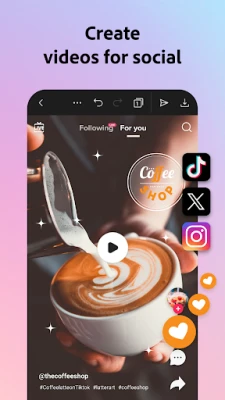
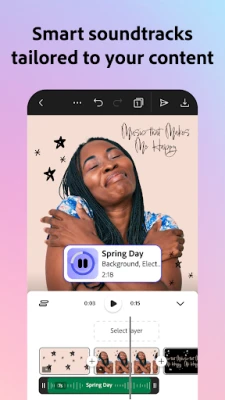
- Video editing tools: Upload clips, trim and combine footage, and add text, music, transitions, or sound effects to create short videos.
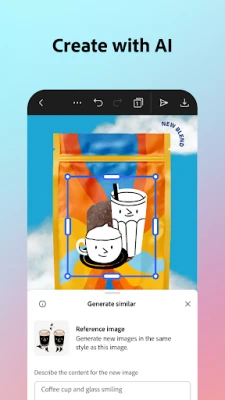
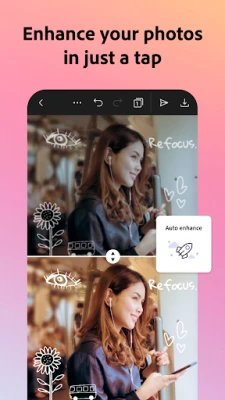
- Photo editing and AI tools: Enhance images with accessible editing options, Photoshop-powered filters, and supported AI tools for adding or removing objects or generating photo art.
- Background removal: Quick Actions can remove backgrounds from photos, and eligible premium tools include video background removal, helping users prepare cleaner visuals.
- Social-ready resizing and captions: Reframe content for different channels and use automatic captions where available, making it easier to adapt videos and graphics for sharing.
- QR code creation: Make QR codes with customizable colors and styles so they can better fit a campaign, business identity, or personal project.
- Brand kits: Keep logos, fonts, and colors together for consistent designs. Premium membership includes brand-related tools and features such as one-click resizing across multiple channels.
- PDF editing and conversion: Import PDFs to adjust supported content and layouts, apply visual branding, or export files for sharing.
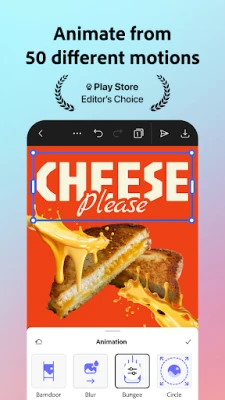
- GIF and animation tools: Convert supported images or videos into GIFs and explore creative animation options, including animating a character with your voice on supported devices.
- Premium creative library: A Premium membership provides access to additional Adobe Stock assets and fonts, generative credits, and other paid features. Included assets and limits can change, so check Adobe’s current plan details.
✅ Pros and ❌ Cons
Pros
- Combines several useful design, photo, video, and PDF tools in one app.
- Templates and simple controls make it accessible to users without design experience.
- Offers practical quick-editing tools for resizing, cropping, background removal, and GIF creation.
- Brand kits can help businesses and creators maintain a consistent visual style.
- Projects can be useful for social media, marketing, school, and personal creative work.
Cons
- Some advanced features, stock assets, and generative tools require a Premium membership.
- AI and cloud-based features may require an internet connection and an Adobe account.
- Tool availability can vary by device, and some features are not supported on every Android model.
- Editing large or complex projects may be less comfortable on a small phone screen.
- App version, performance, and feature access can differ across devices and regions.
📋 App Details
- App Name: Adobe Express
- Current Version: Version varies by device and rollout; check the official store listing for the latest version
- Last Updated: Check Google Play for the latest update date in your region
- File Size: Varies by version and Android device; confirm the download size on the store or trusted download page
- Requires Android: Minimum Android requirement varies by release and device; check the current Google Play compatibility information
- Developer: Adobe
- Content Rating: Check the current Google Play listing for the rating shown in your region
💬 User Reviews
User feedback commonly highlights Adobe Express’s broad range of creative tools, convenient templates, and ability to make professional-looking designs without specialist software. Many users appreciate having photo, video, and graphic features together, along with quick options for social content and branded materials.
Common frustrations include premium restrictions, occasional performance or loading problems, and differences in which features work on particular devices. Some users may also find the number of tools overwhelming at first or prefer a larger screen for detailed editing. Reviews and app performance can change with updates, so check recent feedback for your device before installing.
🔍 5 Best Alternative Apps
- Canva: A popular template-based design app for social posts, presentations, posters, and other graphics. It is a strong choice for users who want an extensive library of layouts and simple editing controls.
- CapCut: A video-focused editor with tools for trimming clips, adding effects, captions, and music. It may suit creators who mainly want to make short-form videos.
- Picsart: A photo and creative editing app with filters, collage tools, effects, and AI-assisted features. It is a useful option for users who prioritize image editing and visual experimentation.
- InShot: A straightforward mobile editor for videos and photos, with practical tools for cropping, resizing, adding music, and preparing content for social platforms.
- VistaCreate: A template-led design platform for social graphics, marketing materials, and other visual content. It can be a good alternative for small businesses and creators seeking ready-made designs.
🧠 My Opinion
Adobe Express is a versatile choice for people who want to create and edit different kinds of content without learning several separate apps. Its templates and Quick Actions make everyday tasks approachable, while video editing, PDF support, brand tools, and AI features give it room to grow with more ambitious projects.
The main drawbacks are that some of the most advanced tools sit behind a subscription and that device support is not identical for every feature. Still, for students, social media creators, small businesses, and anyone who needs quick, polished visuals, Adobe Express is well worth considering. If you want a flexible creative toolkit on Android, it offers a compelling place to start.
🛡️ Privacy and Security
For the safest installation, download Adobe Express from Google Play or another official Adobe-authorized source. If you install an APK manually, use a reputable provider, check that the file is authentic and unmodified, and scan it before installation. Unofficial or altered APKs can contain malware or create privacy and account-security risks.
Android may require you to allow installation from the specific source app, sometimes described as enabling “Install unknown apps” or “Install from unknown sources.” Grant this permission only when necessary, avoid unknown download sites, and turn it off again afterward. Review the app’s permissions and Adobe’s privacy information to understand how your data is handled.
❓ Frequently Asked Questions (FAQs)
Q1: Is Adobe Express APK free to use?
A1: Adobe Express offers free tools, but certain premium assets and features require an Adobe Express Premium membership. Available features and plan terms may change.
Q2: Do I need an internet connection to use Adobe Express?
A2: Some basic editing may be possible with local files, but signing in, syncing projects, accessing online assets, and using many AI or cloud features generally require an internet connection.
Q3: Is it safe to download the Adobe Express APK?
A3: It is safest to install the app through Google Play or an official Adobe source. An APK from an untrusted site could be modified or carry malware, so check the source and file carefully before installing.
Q4: Does Adobe Express work on every Android device?
A4: No. Android requirements and feature support vary by app version and device. Check the current store listing and device compatibility details before downloading.
Q5: Can I use Adobe Express to edit videos and PDFs?
A5: Yes. The app includes video editing tools and PDF import and editing options, though some capabilities may be limited to certain devices or Premium plans.
Rate the App
Add Comment & Review
User Reviews
Based on 0 reviews
No reviews added yet.
Comments will not be approved to be posted if they are SPAM, abusive, off-topic, use profanity, contain a personal attack, or promote hate of any kind.










More »

Popular Apps

TradingView: Track All MarketsTradingView Inc.

Bus Fever Party!Lumi Games

Claude by AnthropicAnthropic PBC

Block Craft 3D:Building GameWildlife Studios

Malwarebytes - Mobile SecurityMalwarebytes

Block Blast!HungryStudio

Canva: AI Photo & Video EditorCanva

Candy Crush SagaKing

Carrom Pool: Disc GameMiniclip.com

EA SPORTS FC Soccer Mobile 27ELECTRONIC ARTS
More »
Editor's Choice

Kahoot! Play & Create QuizzesKahoot!

United AirlinesUnited Airlines

Tripwoa: Travel Plan & Trailtripwoa

trivago: Compare hotel pricestrivago N.V.

Planner 5D: AI Home DesignPlanner 5D

ibis Paint Xibis inc.

Agoda: Cheap Flights & Hotelsagoda.com

Hopper: Hotels, Flights & CarsHopper Inc.

Brilliant: Learn Math & CodingBrilliant.org

Google ClassroomGoogle LLC