



Latest Version
Version
2026.09.3
2026.09.3
Update
October 18, 2026
October 18, 2026
Developer
TopHatch, Inc.
TopHatch, Inc.
Categories
Design
Design
Platforms
Android
Android
Downloads
0
0
License
Free
Free
Package Name
com.tophatch.concepts
com.tophatch.concepts
Report
Report a Problem
Report a Problem
More About Concepts: Sketch, Note, Draw
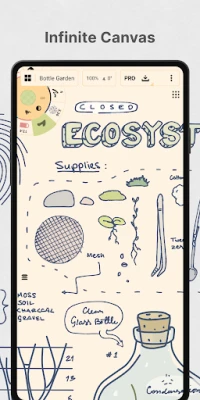
Think, plan & create – Concepts is a flexible vector-based creative workspace/sketchpad where you can take your ideas from concept to reality.
Concepts is a flexible sketching and design app built around an infinite canvas and editable vector strokes. It gives artists, designers, students, and planners a space to capture ideas, refine drawings, and share their work.
Ideas rarely arrive as finished designs. Concepts gives you room to explore them, whether you are sketching a product, mapping out a project, making a mind map, or simply doodling. Its spacious canvas and editable vector drawing tools make it easier to revise a rough idea instead of starting over.
The app is designed for both casual creativity and more structured design work. With pressure-sensitive drawing support, flexible layers, color tools, and export options, Concepts can fit into a workflow that ranges from a quick note to a polished presentation sketch.
Concepts is a digital drawing and ideation app for creating sketches, diagrams, storyboards, notes, product concepts, and other visual work. Its infinite canvas lets you keep expanding a project, while vector-based strokes remain editable and scalable. Tools such as Select, Nudge, and Slice help you adjust parts of a drawing without having to redraw the whole thing.
The app is intended for illustrators, designers, architects, students, creative teams, and anyone who prefers to think visually. It supports stylus-focused workflows on compatible devices, while its customizable tools, grids, layers, and color systems also make it useful for planning and note-making.
An APK is the package file format used to install Android apps. Downloading an APK can allow manual installation, but it should only be done through a trusted source, and the file should match your device and app version.
Pros
Cons
People drawn to Concepts commonly appreciate its roomy canvas, smooth sketching experience, and the ability to move or refine vector-based marks after drawing. Its selection of pens, colors, layers, and precision tools also makes it appealing to users who want more than a basic doodling app.
Some users may find the interface and extensive settings less straightforward at first, while others may wish more tools and export options were included without an upgrade. As with any drawing app, performance and comfort can depend on the device, operating system, and stylus being used. Check recent store reviews for feedback about the version currently available on your device.
Concepts is a compelling option for anyone who wants a flexible space to think visually. Its infinite canvas and editable vector strokes are especially useful for brainstorming, design exploration, diagrams, and sketches that are likely to change along the way.
The free version offers a practical starting point, but users seeking advanced editing, extra layers, or expanded export formats should review the available purchases before committing. If you enjoy drawing, planning, or refining ideas on a tablet or stylus-enabled device, Concepts is well worth trying.
Download Concepts from Google Play or another source you trust. If you install an APK manually, verify that it comes from a reputable provider and scan the file where possible. Unofficial or modified APKs can contain malware, request unnecessary permissions, or put personal information at risk.
Android may require you to allow installation from the specific app handling the download, such as your browser or file manager. Enable this permission only when necessary, install the file you intended to download, and turn the permission off again afterward. Avoid APKs that claim to unlock paid features, as they may be unsafe or altered.
Q1: Is Concepts APK free to use?
A1: Concepts offers free sketching features, with optional subscriptions and one-time purchases for additional tools, exports, and other capabilities. Check the current app listing for available plans and pricing.
Q2: Can I use Concepts without an internet connection?
A2: You can generally draw and work on local projects offline, but downloading the app, syncing or using online services, and completing purchases may require an internet connection.
Q3: Is Concepts available for stylus users?
A3: Yes. The app is designed to work well with compatible pen-enabled devices, and supported pens can provide pressure, tilt, or speed responses.
Q4: Can I export my drawings?
A4: Yes. Export options depend on the features you have unlocked. JPG export is included in the described free features, while additional formats such as PNG, PSD, SVG, or DXF may require a purchase.
Q5: Is it safe to download the Concepts APK?
A5: An APK can be safe if it comes from a trustworthy source and has not been modified, but unofficial files carry risks including malware and privacy issues. For the safest option, install the app through Google Play.
Concepts APK
📱 Concepts APK Summary
Concepts is a flexible sketching and design app built around an infinite canvas and editable vector strokes. It gives artists, designers, students, and planners a space to capture ideas, refine drawings, and share their work.
- App Name: Concepts
- Current Version: Version details may vary by device and release; check Google Play for the latest listing.
- Last Updated: The latest update date can vary by region; check Google Play for current information.
- Category: Art & Design
- Developer: TopHatch, Inc.
- Google Play Rating: Rating and review count change over time; consult Google Play for the current figures.
💡 Introduction
Ideas rarely arrive as finished designs. Concepts gives you room to explore them, whether you are sketching a product, mapping out a project, making a mind map, or simply doodling. Its spacious canvas and editable vector drawing tools make it easier to revise a rough idea instead of starting over.
The app is designed for both casual creativity and more structured design work. With pressure-sensitive drawing support, flexible layers, color tools, and export options, Concepts can fit into a workflow that ranges from a quick note to a polished presentation sketch.
❓ What is Concepts APK?
Concepts is a digital drawing and ideation app for creating sketches, diagrams, storyboards, notes, product concepts, and other visual work. Its infinite canvas lets you keep expanding a project, while vector-based strokes remain editable and scalable. Tools such as Select, Nudge, and Slice help you adjust parts of a drawing without having to redraw the whole thing.
The app is intended for illustrators, designers, architects, students, creative teams, and anyone who prefers to think visually. It supports stylus-focused workflows on compatible devices, while its customizable tools, grids, layers, and color systems also make it useful for planning and note-making.
An APK is the package file format used to install Android apps. Downloading an APK can allow manual installation, but it should only be done through a trusted source, and the file should match your device and app version.
🧑💻 How to Use
- Install and open the app: Get Concepts from Google Play or a trusted APK provider, then launch it and review the available introductory prompts.
- Create a drawing: Start a new project from the gallery. Choose a paper style or grid if you want a guide for your sketch.
- Select a tool: Pick a pencil, pen, brush, or other available tool from the customizable tool wheel or toolbar. Adjust its color, size, and smoothing to suit your work.
- Sketch on the canvas: Draw with your finger or a compatible stylus. On supported devices, pressure, tilt, and drawing speed can affect the marks you make.
- Organize and refine: Use layers to separate parts of your design. Depending on the tools and plan available, select, move, resize, or reshape strokes without recreating them.
- Add references and guides: Bring images onto the canvas for reference or tracing, and use grids, shape guides, snapping, or measurements when you need greater precision.
- Save and share: Keep your work in the gallery or export it in a supported format. Available export types depend on the features you have unlocked.
⚙️ Features
- Infinite canvas: Keep sketching, planning, and expanding a project without being restricted to a fixed page size.
- Editable vector strokes: Resize and adjust your marks while preserving their clarity, making revisions more flexible than in a purely pixel-based workflow.
- Natural-feeling drawing tools: Pencils, pens, and brushes can respond to pressure, tilt, and speed on compatible devices, with adjustable stroke smoothing.
- Selection and editing tools: Tools such as Nudge, Slice, and Select make it easier to reposition or modify parts of a sketch instead of starting again.
- Layers and organization: Layer-based drawing helps separate elements and control their opacity. The free offering includes a limited number of layers, while additional options may require an upgrade.
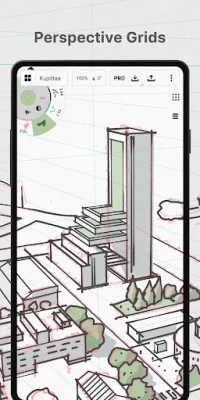
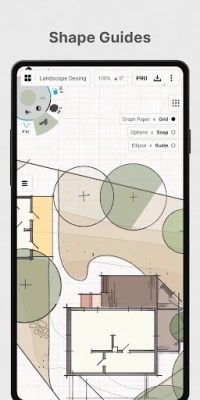
- Custom grids and precision aids: Paper styles, grids, shape guides, snapping, and measurement tools can help make diagrams and design sketches more orderly and accurate.
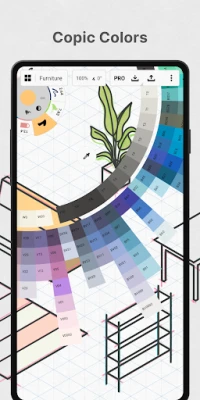
- Flexible color selection: COPIC, RGB, and HSL color controls give users several ways to choose and coordinate colors.
- Customizable workspace: Arrange favorite tools and presets on the tool wheel or toolbar, and personalize canvas and gesture settings to suit your habits.
- Image references and exports: Add images to the canvas for reference or tracing, then export work in supported formats. Some formats and export options may be paid features.
- Free and paid options: Users can sketch with core free tools, while subscriptions and one-time purchases unlock additional features and professional tools. Availability and pricing can vary by platform.
✅ Pros and ❌ Cons
Pros
- The infinite canvas works well for open-ended brainstorming and large projects.
- Vector strokes can be edited and scaled, making experimentation less risky.
- A broad selection of drawing, color, layer, and precision tools supports different creative workflows.
- Stylus support can make drawing feel responsive on compatible devices.
- Free features provide a way to try the core sketching experience before purchasing extras.
Cons
- Some useful tools, export formats, and customization options are locked behind purchases or a subscription.
- The wide range of settings may take time for first-time users to learn.
- Advanced drawing features are most comfortable on a capable device, especially with a compatible stylus.
- Purchase options and feature availability can differ between Android and other platforms.
- Version, rating, pricing, and device compatibility can change, so users should confirm current details in the store listing.
📋 App Details
- App Name: Concepts
- Current Version: Check Google Play for the latest version available for your device.
- Last Updated: Check the current Google Play listing; release dates may differ by region.
- File Size: Varies by version and device; review the download listing before installing.
- Requires Android: Minimum Android version can change with updates and device compatibility; check Google Play for the requirement shown for your device.
- Developer: TopHatch, Inc.
- Category: Art & Design
- Content Rating: Check Google Play for the current rating in your region.
- Pricing: Core features are available for free, with optional subscriptions and one-time purchases for additional tools and capabilities.
💬 User Reviews
People drawn to Concepts commonly appreciate its roomy canvas, smooth sketching experience, and the ability to move or refine vector-based marks after drawing. Its selection of pens, colors, layers, and precision tools also makes it appealing to users who want more than a basic doodling app.
Some users may find the interface and extensive settings less straightforward at first, while others may wish more tools and export options were included without an upgrade. As with any drawing app, performance and comfort can depend on the device, operating system, and stylus being used. Check recent store reviews for feedback about the version currently available on your device.
🔍 5 Best Alternative Games/Apps
- Sketchbook: A drawing-focused app with a familiar set of brushes and tools. It is a good choice for users who want a straightforward digital sketching experience.
- Infinite Painter: A feature-rich painting and illustration app with a variety of brushes and creative controls. It suits users who want to develop more polished artwork.
- Autodesk SketchBook: A popular option for freehand drawing and quick concept sketches, with a workspace aimed at artists and illustrators.
- ibis Paint X: A versatile illustration app with many brushes and drawing features. It can be a strong alternative for users focused on character art and detailed digital illustrations.
- Adobe Fresco: A drawing and painting app with expressive brush options and a workflow that may appeal to users already working with Adobe creative tools.
🧠 My Opinion
Concepts is a compelling option for anyone who wants a flexible space to think visually. Its infinite canvas and editable vector strokes are especially useful for brainstorming, design exploration, diagrams, and sketches that are likely to change along the way.
The free version offers a practical starting point, but users seeking advanced editing, extra layers, or expanded export formats should review the available purchases before committing. If you enjoy drawing, planning, or refining ideas on a tablet or stylus-enabled device, Concepts is well worth trying.
🛡️ Privacy and Security
Download Concepts from Google Play or another source you trust. If you install an APK manually, verify that it comes from a reputable provider and scan the file where possible. Unofficial or modified APKs can contain malware, request unnecessary permissions, or put personal information at risk.
Android may require you to allow installation from the specific app handling the download, such as your browser or file manager. Enable this permission only when necessary, install the file you intended to download, and turn the permission off again afterward. Avoid APKs that claim to unlock paid features, as they may be unsafe or altered.
❓ Frequently Asked Questions (FAQs)
Q1: Is Concepts APK free to use?
A1: Concepts offers free sketching features, with optional subscriptions and one-time purchases for additional tools, exports, and other capabilities. Check the current app listing for available plans and pricing.
Q2: Can I use Concepts without an internet connection?
A2: You can generally draw and work on local projects offline, but downloading the app, syncing or using online services, and completing purchases may require an internet connection.
Q3: Is Concepts available for stylus users?
A3: Yes. The app is designed to work well with compatible pen-enabled devices, and supported pens can provide pressure, tilt, or speed responses.
Q4: Can I export my drawings?
A4: Yes. Export options depend on the features you have unlocked. JPG export is included in the described free features, while additional formats such as PNG, PSD, SVG, or DXF may require a purchase.
Q5: Is it safe to download the Concepts APK?
A5: An APK can be safe if it comes from a trustworthy source and has not been modified, but unofficial files carry risks including malware and privacy issues. For the safest option, install the app through Google Play.
Rate the App
Add Comment & Review
User Reviews
Based on 0 reviews
No reviews added yet.
Comments will not be approved to be posted if they are SPAM, abusive, off-topic, use profanity, contain a personal attack, or promote hate of any kind.






More »

Popular Apps

TradingView: Track All MarketsTradingView Inc.

Bus Fever Party!Lumi Games

Claude by AnthropicAnthropic PBC

Block Craft 3D:Building GameWildlife Studios

Malwarebytes - Mobile SecurityMalwarebytes

Block Blast!HungryStudio

Canva: AI Photo & Video EditorCanva

Candy Crush SagaKing

Carrom Pool: Disc GameMiniclip.com

EA SPORTS FC Soccer Mobile 27ELECTRONIC ARTS
More »
Editor's Choice

Kahoot! Play & Create QuizzesKahoot!

United AirlinesUnited Airlines

Tripwoa: Travel Plan & Trailtripwoa

trivago: Compare hotel pricestrivago N.V.

Planner 5D: AI Home DesignPlanner 5D

ibis Paint Xibis inc.

Agoda: Cheap Flights & Hotelsagoda.com

Hopper: Hotels, Flights & CarsHopper Inc.

Brilliant: Learn Math & CodingBrilliant.org

Google ClassroomGoogle LLC